The On-Page Playbook: An On-Page SEO Checklist (Step-by-Step) for Perfect Page Optimization
Introduction: the on-page playbook I use to ship pages that rank (and get clicks)
It’s a scenario I’ve seen play out dozens of times: a marketing team hits publish on a piece of content they are genuinely proud of. They wait a week, then a month. Nothing happens. The page stalls on page two, or worse, it gets impressions but zero clicks.
Usually, the content itself isn’t the problem. The issue is almost always a disconnect between the content and how search engines—and now AI answer engines—understand it. I’ve watched perfectly good pages fail simply because they lacked a clear structure or targeted the wrong user intent.
This article isn’t about theoretical algorithms or “gaming the system.” It is a practical, newsroom-grade on-page SEO checklist designed for the current search reality. In 2025 and 2026, we aren’t just optimizing for Google’s traditional ten blue links; we are optimizing for a landscape where AI Overviews and zero-click searches are increasingly common. By the end of this guide, you will have a runnable workflow to audit and optimize any single URL with confidence.
What an on-page SEO checklist is (and why it’s changing in 2025–2026)

When I’m teaching beginners or onboarding new writers, I define an on-page SEO checklist as a quality assurance gate. It is the systematic process of ensuring a page is relevant to the user’s query, readable by humans, and easily understood by search engine crawlers.
However, the definition of “understood” has shifted. Traditional fundamentals—Title tags, H1s, and internal links—remain the bedrock of ranking. If you skip these, you don’t rank. But with the rise of Answer Engine Optimization (AEO) and Generative Engine Optimization (GEO), the stakes have changed. We now have to ask: “Can an AI model easily extract a direct answer from this content?”
Research indicates that AI Overviews now appear in over 50% of Google search results as of August 2025. This means your content needs to be dual-optimized: structured enough for machines to parse, but engaging enough for humans to click.
Quick definition (beginner-friendly)
At its core, on-page SEO is a structured list of page-level tasks. It covers visible elements like titles, headings, and content depth, as well as technical elements like schema markup, URL structure, and Core Web Vitals. It is the bridge between great writing and technical visibility.
What’s new: optimizing for humans + answer engines (AEO/GEO)

The biggest shift I’ve made in my own process recently isn’t about keywords; it’s about formatting. AI systems prioritize structured answers. This raises the value of FAQs, scannable bullet points, and clean schema markup. While we optimize for these “zero-click” summaries, meta descriptions remain critical for the 8–15% of users who ignore the AI summary and look for a trustworthy human source in the organic results.
My step-by-step on-page SEO checklist workflow (from keyword to publish)
Here is the exact order I use when a page is stuck or when I’m launching a new URL. It’s designed to be efficient—you shouldn’t spend hours guessing. Most of these steps take 10–15 minutes once you know what you are looking for.
Step 1: Confirm search intent and pick the page format

Before you touch a single tag, look at the SERP (Search Engine Results Page). A common mistake I see is writing a blog post when Google is ranking product pages. If the top results are all “Best X Tools” lists, a “What is X” guide will likely fail.
- Informational: Guides, how-tos, definitions.
- Commercial: Reviews, comparisons, “best of” lists.
- Transactional: Product pages, pricing pages, demos.
If the SERP is mixed, I usually lean toward the format that offers the most value—often a comprehensive guide that includes a comparison element.
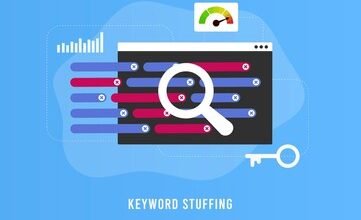
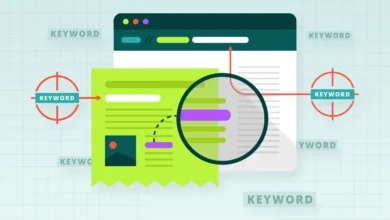
Step 2: Set the primary topic + supporting subtopics (avoid keyword stuffing)
Gone are the days of repeating a keyword every 100 words. Instead, identify your primary keyword and 3–5 supporting subtopics (entities). For example, if I’m writing about “payroll software,” my subtopics shouldn’t just be synonyms; they should be “tax compliance,” “direct deposit,” and “employee self-service.” This builds a topic cluster on a single page.
Step 3: Write (or rewrite) the title tag for relevance + clicks
I choose clarity over cleverness every time. Your title tag is the single most important on-page ranking factor. Keep it readable and punchy.
- Front-load the keyword: “On-Page SEO Checklist: The 2025 Guide” performs better than “The Ultimate Guide to an On-Page SEO Checklist.”
- Add a benefit: Why should they click? (e.g., “…with Templates” or “…Step-by-Step”).
- Watch the length: Keep it under 60 characters (or 580 pixels) to avoid truncation.
Step 4: Craft a meta description that earns the click (even with AI answers)

Think of the meta description as a mini-ad. It doesn’t directly impact rankings, but it impacts Click-Through Rate (CTR). Even with AI Overviews dominating the top of the page, users scrolling down are looking for specific signals of trust.
Example (Informational):
“Follow this step-by-step on-page SEO checklist to audit your content. Learn how to optimize titles, headers, and schema for better rankings. Updated for 2025.”
Keep it under 155 characters and always include a verb (Learn, Discover, Read).
Step 5: Build clean header structure (one H1, then H2/H3)
If you look at the code of a messy page, the headers usually look like a grocery list written by a toddler. A clean hierarchy helps AI and humans scan your content.
- H1: Only one per page. This is your headline.
- H2: The main chapters of your story. Include secondary keywords here naturally.
- H3: The sub-points under each chapter.
Step 6: Optimize the URL slug (short, descriptive, keyword included)
I frequently see URLs like /blog/2025/10/12/how-to-do-seo-checklist-guide-final-v2. This is messy and hard to read. Clean URLs are trust signals.
Bad: /p=123 or /checklist-for-seo-optimization-and-ranking
Better: /on-page-seo-checklist
Keep it hyphen-separated, lowercase, and devoid of dates unless it’s a news article.
Step 7: Align the main content with the promise (depth, clarity, structure)

If your title promises a checklist, the first thing the user sees should not be a 500-word history lesson on search engines. Get to the point. Use short paragraphs (2–3 lines max) and bullet points to break up walls of text. I often use an “In Short” summary box at the top for skimmers.
Mini-template: The “40–60 word direct answer” block
To capture “position zero” or AI citations, I often place a direct answer definition near the top of the content.
Template: “[Keyword] is a [definition] that helps [audience] achieve [outcome]. It involves [Key component 1], [Key component 2], and [Key component 3].”
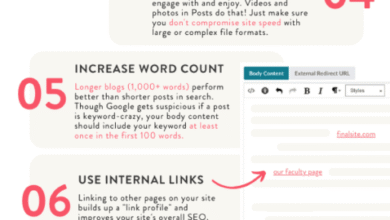
Step 8: Add internal links, outbound citations, and a next-step CTA
A dead-end page is a wasted opportunity. Every page needs a next step. I aim for 3–5 internal links to relevant content using descriptive anchor text (e.g., link to “technical SEO guide” rather than “click here”).
Also, don’t fear outbound links. Citing credible sources (like Google Search Central or industry studies) builds E-E-A-T (Experience, Expertise, Authoritativeness, and Trustworthiness). AI systems tend to trust content that references other authoritative data.
Checklist table: On-page SEO checklist you can reuse for every page
This is the same checklist I keep open in a separate tab while publishing. You can copy this into your project management tool.
| Item | What I Check | Why it Matters | Done |
|---|---|---|---|
| Title Tag | Contains primary keyword, under 60 chars. | High ranking factor & CTR. | [ ] |
| Meta Description | Under 155 chars, includes CTA. | Drives clicks from SERP. | [ ] |
| URL Slug | Short, hyphenated, keyword-rich. | User trust & crawlability. | [ ] |
| H1 Tag | Matches title intent, unique on page. | Clarifies topic to Google. | [ ] |
| Direct Answer | 40-60 word definition near top. | Optimizes for AI extraction. | [ ] |
| Internal Links | 3+ links to related pages. | Passes authority & guides users. | [ ] |
| Images | Compressed (WebP), descriptive alt text. | Speed & accessibility. | [ ] |
| Schema | Valid structured data (Article/FAQ). | Enhances machine understanding. | [ ] |
Content optimization that works for Google *and* AEO/GEO (how I format pages for AI visibility)
The rise of AI-driven search doesn’t mean we stop writing for humans. It means we have to be more disciplined with our structure. If your content is a wall of unstructured text, AI models (like Gemini or GPT-based search tools) struggle to extract facts from it. If you want to be the source of an AI answer, you need to hand-feed the facts to the bot.
I focus on what I call “scannable formatting.” This involves breaking complex ideas into distinct components. If I am struggling to maintain this structure across dozens of drafts, I might use an AI article generator to help scaffold the headers and definition blocks, ensuring the formatting is consistent before I add the expert nuances.
Formatting patterns AI systems tend to extract cleanly
AI models love certainty. They look for patterns like:
- Definition-first structure: State the “what” immediately under the heading.
- Q&A Headers: Phrase headings as questions (e.g., “Why is on-page SEO important?”) and answer them in the first sentence of the paragraph.
- Summary Boxes: A bulleted list of “Key Takeaways” at the start or end of a section helps models summarize your viewpoint.
FAQ blocks: when to add them (and when not to)
I used to slap an FAQ section on every footer. I’ve stopped doing that. Now, I only add FAQ blocks when there are genuine questions that didn’t fit into the main narrative. If the questions are redundant (i.e., you already answered them in H2s), it just bloats the page. However, a well-placed FAQ with unique questions is prime real estate for “People Also Ask” boxes.
Technical on-page essentials: speed, mobile, and images (with Core Web Vitals benchmarks)

You can write the best content in the world, but if your page takes 5 seconds to load on a mobile phone, the user—and Google—will bounce. If I’m only allowed one technical fix, I always start with image compression, because it’s usually the biggest drag on speed.
Core Web Vitals (CWV) are the metrics Google uses to measure user experience. It’s not just about “speed”; it’s about stability and responsiveness.
Table: Core Web Vitals targets + practical fixes
If these terms feel alien, here is what you need to ask your developer (or check in PageSpeed Insights):
| Metric | What it feels like | Target | Fastest Fix |
|---|---|---|---|
| LCP (Largest Contentful Paint) | How fast the main content loads. | < 2.5 sec | Compress the hero image; ask dev to “preload” it. |
| CLS (Cumulative Layout Shift) | Does the page jump around? | < 0.1 | Add width/height dimensions to all images/videos. |
| INP (Interaction to Next Paint) | Does the menu open when clicked? | < 200 ms | Minimize heavy JavaScript execution. |
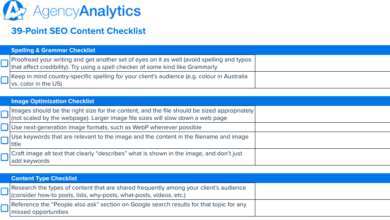
Image optimization checklist (fast + accessible)
Images are essential for engagement but dangerous for performance if ignored. Here is my quick protocol:
- Format: Use WebP or AVIF formats instead of heavy PNGs or JPEGs.
- Compression: Tools like TinyPNG are great. Aim for file sizes under 100KB where possible.
- Alt Text: Write for accessibility, not SEO. Bad: “SEO checklist keyword ranking.” Good: “Screenshot of the Google Search Console performance report showing increased clicks.”
- Lazy Loading: Ensure images below the fold don’t load until the user scrolls.
Schema, linking, and trust signals: the on-page SEO checklist items most guides under-explain

This is where you separate the pros from the amateurs. Structured data (Schema) is code that tells search engines exactly what your content is. It eliminates the guesswork for the crawler.
Only add schema you can defend. I’ve seen sites get penalized for marking up content that isn’t actually visible on the page (like hiding FAQ schema content that users can’t see). Always validate your code using the Rich Results Test.
Which schema to use (simple decision guide)
Think of this as a decision tree:
- Is it a blog post? Use
ArticleorBlogPostingschema. - Does it have questions and answers? Use
FAQPageschema. - Is it a product? Use
Productschema (critical for merchant listings). - Is it a local service page? Use
LocalBusinessschema.
Internal links + external citations: how I build pages AI can trust
Internal linking is about architecture; external linking is about credibility. I have a personal rule: if I make a specific claim involving numbers, money, or health, I link to the source. AI systems and Google’s E-E-A-T algorithms tend to favor content that cites authoritative third-party sources. It shows you aren’t just making things up.
Common on-page SEO checklist mistakes I see (and how to fix them fast)
I’ve made most of these mistakes myself early in my career. Catching them early saves you months of poor performance.
Mistake-to-fix list (5–8 items)
- Duplicate H1 Tags: Why it hurts: Confuses Google about the main topic. Fix: Ensure only the page title is wrapped in H1.
- Keyword Stuffing: Why it hurts: Reads unnaturally and triggers spam filters. Fix: Read your content aloud. If it sounds robotic, cut the keywords.
- Thin Content: Why it hurts: Fails to satisfy user intent. Fix: Add examples, data, or a unique perspective to flesh out the topic.
- Broken Internal Links: Why it hurts: Stops the crawler and frustrates users. Fix: Run a crawler (like Screaming Frog) to find 404 errors.
- Ignoring Search Intent: Why it hurts: High bounce rate. Fix: Check the SERP before writing. Don’t write a guide if people want a tool.
- Missing Meta Descriptions: Why it hurts: Lower click-through rate. Fix: Write a compelling summary for every page.
FAQs + recap: my on-page SEO checklist for consistent wins
We have covered a lot of ground. If you want to make this actionable, bookmark this page and run just one underperforming URL through the checklist this week. You will likely see improvements in crawlability and clicks surprisingly fast.
Recap: 3 things to do today
- Audit your title tags and H1s for clarity and keyword alignment.
- Add a structured data layer (schema) relevant to your content type.
- Check your Core Web Vitals and compress those heavy images.
If you need to scale this process across hundreds of pages, finding a reliable AI SEO tool can help you maintain this level of structure and consistency without burning out your editorial team.
FAQ: What is an on-page SEO checklist?
An on-page SEO checklist is a standard operating procedure for optimizing individual web pages. It ensures that content is relevant to user queries (keywords, intent), readable by humans (structure, clarity), and technically sound for search engines (schema, speed, tags).
FAQ: How have AEO and GEO changed on-page optimization?
AEO (Answer Engine Optimization) and GEO (Generative Engine Optimization) have shifted the focus toward machine readability. While keywords still matter, the format matters more than before. Strategies now include using direct answer blocks, clear Q&A headings, and structured data to help AI models extract and synthesize information for users.
FAQ: Do meta descriptions still matter if AI answers appear first?
Yes, absolutely. While AI Overviews are growing, they don’t trigger for every query, and many users scroll past them. In those cases, your meta description is your pitch to earn the click. A persuasive, benefit-driven description can differentiate you from competitors who ignore this tag.
FAQ: What role does structured data play now?
Structured data (schema) is critical for disambiguation. It explicitly tells the search engine, “This is a review,” or “This is a recipe.” This clarity improves the chances of your content being used in rich snippets and AI-generated summaries because the machine doesn’t have to guess the context.
FAQ: How critical is page speed and Core Web Vitals now?
They remain essential. A slow page kills user experience and is a negative ranking factor. Core Web Vitals (LCP, CLS, INP) are the specific metrics Google uses to judge this. If you are overwhelmed, start by optimizing your images—it is often the highest-impact fix for speed.