Automating the Creative: Best DCO Solutions for CMS (Beginner’s Guide for 2025–2026)

I’ve seen teams drown in versioning. It usually happens on a Thursday afternoon. The marketing lead approves a new promo, the creative team scrambles to resize the hero image for five different social channels, and then—just as files are being exported—the product team updates the pricing feed. Suddenly, dozens of “final” assets are obsolete.
If you are managing content through a headless or hybrid CMS, this manual chaos feels particularly outdated. You have the structured data; you just need a way to assemble it into compelling visuals automatically.
This is where Dynamic Creative Optimization (DCO) meets your Content Management System. It’s not just about “personalization” buzzwords; it’s about survival for lean teams handling display, social, and CTV campaigns.
In this guide, I’ll walk you through the best DCO solutions for CMS environments, how to connect your data feeds without breaking your brand, and the specific integration steps I use to move from “manual hell” to automated scale.
Quick answer: What I mean by “DCO for a CMS”
Let’s be precise. When I talk about DCO in a CMS context, I’m referring to a system where:
- Inputs: Your creative templates, data feeds (products, prices, copy), and real-time signals (weather, location).
- Outputs: Thousands of unique creative variants generated instantly per impression or user segment.
This article is: A guide on connecting that assembly engine to your content stack (CMS/PIM/DAM).
This article is not: A design tutorial or a deep dive into programmatic bidding strategies.
What is DCO and how does it relate to a CMS?

Think of your CMS as the pantry and the DCO platform as the chef. The pantry (CMS) holds the ingredients—your approved images, copy blocks, legal disclaimers, and metadata. The chef (DCO) grabs those ingredients and assembles a specific dish for each guest based on what they like, right at the moment they sit down.
Technically, DCO platforms leverage real-time contextual triggers—like local weather, inventory levels, or geolocation—to dynamically assemble creatives per impression. This isn’t just about efficiency; it’s about relevance. Industry reports have noted that well-executed DCO can drive a directional lift in CTR, with some studies citing up to a 10% increase compared to static campaigns .
However, the real magic happens when you pair this with a hybrid headless CMS. In the past, headless systems were great for developers but terrible for marketers who couldn’t “see” what they were building. Modern hybrid systems allow marketers to visually preview creative outputs while preserving the API flexibility developers need to feed the DCO engine.
DCO in one minute: templates + feeds + rules (and sometimes AI)
If you strip away the marketing jargon, DCO relies on four components working in sync:
- The Template: A master design file (often HTML5 or video) with “dynamic fields” where content will be swapped.
- The Feed: The spreadsheet or API (often JSON/XML) that contains the variable data—like Product Name, Price, and Image URL.
- The Rules: Logic that tells the system “If the user is in London and it’s raining, show the trench coat image.”
- The Activation: The delivery mechanism (usually a DSP or Ad Server) that pushes the final asset to the screen.
Imagine a sneaker retailer. Instead of a designer manually creating a banner for every shoe, the DCO system looks at the feed, sees the “Red Runner” is in stock at the local store, and swaps the image, price, and “Visit [City] Store” text instantly.
Where a CMS fits: governance, preview, localization, and approvals
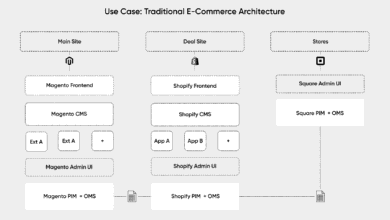
If DCO is the engine, the CMS is the steering wheel. You don’t want your DCO platform pulling data from a rogue spreadsheet on someone’s desktop. That’s a recipe for legal disasters.
A CMS-centered workflow ensures:
- Governance: Only approved assets and copy enter the feed.
- Localization: Translated text strings are managed centrally, not hard-coded in banners.
- Visual Preview: Marketers can see how a long German headline breaks the layout before the campaign goes live.
In practice, I see teams skip the CMS integration and go direct-to-feed, only to regret it when they realize they can’t version-control their legal disclaimers.
What your CMS needs before you pick a DCO tool (headless vs. hybrid, APIs, and data readiness)

Before you even look at a vendor list, you need to check your own house. I often advise clients to pause on buying a DCO tool until they can answer “yes” to a few data hygiene questions. If your product feed is messy, DCO will just amplify that mess across thousands of ads.
The Readiness Checklist:
- Clean Data Feeds: Do your products have consistent attributes (Name, Price, ID) and high-res images with uniform aspect ratios?
- Asset Management (DAM): are your creative assets tagged and accessible via a public URL or CDN?
- Structured Content: Does your CMS separate content from presentation? (e.g., “Headline” is a field, not part of a rich text blob).
- API Access: Can a third-party tool fetch this data via JSON or XML in real-time?
Red Flag #1: No approval workflow in your CMS. If anyone can publish a price change without review, DCO will broadcast that error instantly.
Red Flag #2: Inconsistent image sizes. If your feed mixes portrait and landscape product shots, your automated banners will look broken.
Headless vs. hybrid CMS: which is easier for DCO?
Headless CMS architectures are fantastic for delivering raw data to a DCO engine via APIs. However, pure headless systems can be a black box for creative teams. You might send data out, but you can’t easily visualize the result.
This is why hybrid headless CMS options are gaining traction. They offer the API-first structure developers need for integration but provide a visual “head” or preview layer. This allows a marketer to simulate the “London + Rain” scenario inside the CMS interface to ensure the creative looks right before it hits the ad server.
Data signals you can realistically start with (and add later)
Don’t try to boil the ocean. Start with signals you actually own or can easily access.
| Signal Type | Example | Data Owner | Risk Level |
|---|---|---|---|
| Geolocation | “Store near [City]” | DSP / Ad Server | Low (Standard) |
| Inventory | Hide ad if stock < 5 | PIM / ERP | Medium (Latency issues) |
| Contextual | Show umbrella if raining | Weather API | Low (Accuracy is high) |
| Behavioral | Retargeting viewed items | CDP / Pixel | High (Privacy/Cookie loss) |
How I choose the best DCO solutions for CMS: a beginner-friendly evaluation checklist

Evaluating DCO platforms can be overwhelming because every vendor claims to do everything. In my experience, the “best” tool is the one that fits your team’s technical maturity, not the one with the flashiest demo.
I use a simple scoring framework (0–2 points per category). For a beginner team, “good enough” usually means a score of 10/14, provided you nail the workflow and support categories.
The non-negotiables (what I won’t compromise on)
- Feed Reliability: The tool must handle feed ingestion robustly. If the feed breaks, does the ad stop serving, or does it show a fallback?
- Brand-Safe Templates: Can I lock down fonts, colors, and logo positions so the automation doesn’t break brand guidelines?
- Preview & QA: There must be a way to preview variants in bulk. I need to see the “worst-case scenario” (longest headline, smallest image).
- Version Control: If we screw up, can we roll back to yesterday’s creative instantly?
- Role-Based Access: Interns shouldn’t have “Push to Live” permissions.
Nice-to-haves that save time at scale
These features aren’t strictly necessary for a pilot, but they save sanity later. Auto-resizing is a big one—automatically generating 10 sizes from one master assets. Localization automation is critical if you operate in multiple markets; I didn’t think we needed this until we had to manually copy-paste French translations into 50 different banners. PIM/DAM integrations can also smooth out the workflow significantly.
Mini checklist table: requirements → questions to ask vendors
| Requirement | Ask the Vendor This | Ask for This Proof |
|---|---|---|
| CMS Connection | “Do you have a native connector for [My CMS], or do we need to build a custom API feeder?” | API Documentation |
| Template Flexibility | “Can we build custom HTML5 templates, or are we stuck with your pre-set layouts?” | Sandbox Access |
| Feed Hygiene | “What happens if a field in my feed is empty? Can I set a default value in your platform?” | Demo of error handling |
| Analytics | “Do you report creative performance back to the asset level, or just the campaign level?” | Sample Report |
Comparison table: best-in-class DCO platforms (2025–2026) and what each is best at

Based on current market capabilities, several platforms stand out. Note that performance claims like “2x conversions” are vendor-reported and should be validated with your own pilot. .
In the real world, I’d shortlist these based on your business model: Smartly for social-heavy retail, Celtra for high-end brand design, and ADventori or Adzymic for complex display logic.
At-a-glance table (recommended format)
| Platform | Best For | Key Capabilities | Typical Complexity |
|---|---|---|---|
| Smartly.io | Social & Commerce | Automated video/image ads from feeds. Strong creative rules. | Medium |
| Celtra | Enterprise Brand | High-end creative production, scaling, and workflow. | Medium/High |
| ADventori | Data-Driven Display | Real-time data injection, dynamic video. Claims 50% ROI increase . | Advanced |
| Hunch | Performance Agencies | Automated creative production + media buying on Meta/Snap. | Medium |
| Zuuvi | Speed to Market | Fast template building, easy tailored ads. Reports 70% faster go-live . | Easy/Medium |
| Segwise | Mobile Apps/Games | Creative Intelligence: AI tagging + performance loops. | Advanced |
Quick profiles (what I’d know before booking a demo)
Smartly.io: A powerhouse for social advertising. It’s a strong fit when you have a massive product catalog and need to generate distinct ads for Facebook/Instagram/Pinterest automatically.
Segwise: Represents the new wave of “Creative Intelligence.” It doesn’t just build ads; it uses AI to tag video elements and tell you why an ad is working. Great for app marketers.
Celtra: The gold standard for “Creative Automation” workflow. If your design team refuses to use tools that limit their creativity, Celtra offers the control they want with the scaling you need.
How to integrate DCO into your existing CMS (a step-by-step workflow I use)

The biggest mistake is trying to do everything at once. Integration is a crawl-walk-run process. If you also need to generate supporting blog posts or landing page copy to match your dynamic ads, tools like Kalema’s AI content writer can help maintain consistency across your textual content, but for the DCO engine itself, follow this workflow.
Step 1: Pick one use case (don’t start with ‘personalize everything’)
Don’t try to personalize every pixel for every user on Day 1. Start with a single, high-value use case:
- Cart Abandonment: Show the exact product left behind.
- Geo-Localization: “Available now in [City].”
- Weather Trigger: “It’s hot in [City], grab a cold brew.”
I usually recommend the Geo-Localization use case for brick-and-mortar clients because the data is reliable and the value is obvious.
Step 2: Map your data sources and decide what lives in the CMS
You need a “Source of Truth” map. Usually, it looks like this:
- PIM: Product specs, live pricing, stock status.
- CMS: Marketing copy (headlines, CTAs), legal text, lifestyle imagery.
- DAM: The actual image/video files.
The Gotcha: Inconsistent naming conventions. Ensure your PIM “SKU ID” matches the ID in your retargeting pixel. If they don’t match, the DCO breaks.
Step 3: Build templates and brand rules (with preview/QA built in)
Design your master template with “safe zones.” If a headline can vary from 10 to 50 characters, your design must accommodate both without breaking. This is where your QA checklist comes in:
- Check for text truncation (Does “Washington D.C.” cut off?).
- Check contrast on background images (White text on a snow image?).
- Check legal lines (Are they legible on mobile?).
Step 4: Connect activation and close the feedback loop
Once the ad is live via your DSP or Ad Server, the data must flow back. You aren’t just looking for clicks; you are looking for fatigue. If the CTR on the “Blue Background” variant drops after 3 days, your system should know that. In the beginning, I look for directional lift—is this performing better than our static baseline?
Creative Intelligence + generative AI: what’s changing in the best DCO solutions for CMS

The industry is moving beyond simple rules-based variation toward AI-driven strategy. While you might use an AI article generator to speed up your content marketing, DCO platforms are applying similar Generative AI to visual ad components.
Creative Intelligence (CI): optimization that’s driven by insights, not just variants
Traditional DCO tests A vs. B. Creative Intelligence asks why B won. CI tools use computer vision to tag every element in your ad—”smiling woman,” “blue background,” “discount in top-right.” It then correlates those tags with performance data. Instead of just knowing “Ad #45 worked,” you learn that “ads with smiling women work best on weekends.” This informs your next round of CMS content production.
Generative AI + DCO: where it helps (and where it can hurt)
Generative AI is starting to enter the DCO space, allowing for real-time background generation or copy variations.
- Do: Use GenAI to brainstorm headline variants or extend background images for different aspect ratios.
- Don’t: Let GenAI invent product benefits or hallucinate legal disclaimers.
I always advise keeping a human in the loop. Use GenAI to accelerate the drafting of variants, but keep your strict approval workflow in the CMS before they go live.
Common DCO-in-CMS mistakes (and fixes I recommend)

I see the same issues derail pilots time and time again. Here is how to troubleshoot them before they happen.
Mistake #1: Treating the product/content feed as ‘good enough’
Why it happens: Marketing assumes the data team’s export is ready for public viewing. It rarely is. I’ve seen internal codes like “PROD_DESC_FINAL_V2” show up in live ads.
The Fix: Implement a “middleware” or cleaning step. Validate that all required fields (Name, Price, Image) are present and formatted for humans, not databases.
Mistake #2: No fallback rules (so variants fail in the real world)
Why it happens: You assume you’ll always know the user’s location. You won’t.
The Fix: Always have a generic default. If the “City” data is missing, the headline should default from “Hello [City]” to just “Hello there.” Never serve a blank space.
Mistake #3: Skipping preview + QA because ‘the platform is automated’
Why it happens: Automation creates a false sense of security.
The Fix: Force a manual review of a “sample batch”—generate 50 random variants and eyeball them. You will almost always find a contrast issue or a typo.
Mistake #4: Measuring only CTR (and missing the business outcome)
Why it happens: CTR is easy to report.
The Fix: Connect your creative data to conversion events. I once saw a “Free IPod” banner get massive clicks but zero qualified leads. High CTR with low conversion is a sign of clickbait, not success.
Mistake #5: Over-personalizing too early (complexity before value)
Why it happens: It’s tempting to use every signal available.
The Fix: Start with a “Crawl” phase using 1–2 signals. Prove the value there before you add complex weather-dependent rules. Complexity kills momentum.
FAQs + summary: what to do next if you’re evaluating DCO for your CMS
If you are ready to move forward, keep it simple. You don’t need a perfect stack on day one.
FAQ: What is DCO and how does it relate to CMS?
DCO (Dynamic Creative Optimization) is the engine that assembles ad variants using data. Your CMS (Content Management System) is the library that holds the approved assets and copy. Integrating them ensures that your automated ads remain on-brand and easy to manage.
FAQ: Which platforms are considered best-in-class DCO solutions as of 2025–2026?
Top contenders include Smartly.io (social), Celtra (enterprise creative), ADventori (display data), and Zuuvi (speed). The “best” one depends entirely on your primary channels and technical resources.
FAQ: How can I integrate DCO into my existing CMS?
Focus on your data layer. Ensure your CMS can export structured content via API or JSON feeds. Use a hybrid headless approach if you need visual previews for your marketing team.
FAQ: What trends should marketers watch in DCO development?
Watch for Creative Intelligence (analytics that tell you why) and GenAI for asset production. The teams that win will be the ones who use these tools to speed up iteration, not just to cut costs.
3-bullet recap + next actions checklist
- DCO + CMS = Scale: Don’t treat them as separate silos; your CMS should govern the assets that DCO assembles.
- Data Hygiene is King: Your automated creative is only as good as the feed that powers it.
- Start Small: Pick one use case (like geo-location) and master it before trying to personalize everything.
Your Next Steps:
- Audit your feeds: Are they clean enough for public display?
- Shortlist 2–3 vendors: Use the checklist above to ask tough questions.
- Run a Pilot: Launch one campaign with a clear control group.
- Scale your content: As you ramp up, consider using tools like Kalema’s automated blog generator or bulk article generator to efficiently create the supporting content and landing pages your new campaigns will drive traffic to.
If I were starting this from scratch, I’d focus on getting the data right first. Once the pipes are clean, the automation feels like magic.