Introduction: why I’m writing this guide to internal vs external links in SEO

When I first audited a small business site—a local HVAC company with great service but zero traffic—I found their blog was essentially a collection of dead ends. They had decent articles, but once a reader finished a post, there was nowhere to go. No links to their services, no links to related guides, and certainly no references to outside sources to back up their claims. They were treating every page like an island.
I hear this constantly from in-house marketers and business owners: “I know I need links, but should I link internally or build backlinks? What’s the difference, and what actually moves rankings?”
Here is the reality: You need both, but for entirely different reasons. Search engines use links to understand the relationship between pages and to measure authority. Users use them to find answers. In this guide, I’m cutting through the noise. I’ll share the exact framework I use to structure internal vs external links in SEO, complete with the workflow I use to audit sites and practical rules for anchor text that work in 2025.
What you’ll learn (and who it’s for)
- Definitions that stick: The clear difference between internal, outbound, and backlinks.
- Strategic structure: How to place links so readers actually click (and stay on your site).
- Anchor text rules: Why “click here” is dead and what to use instead.
- The “safe” numbers: How many links are too many, and when to stop.
- A 6-step workflow: A repeatable process to audit and implement links on any site.
- Mistake-proofing: How to avoid common errors like orphan pages and broken redirects.
Internal vs external links in SEO: quick definitions, differences, and what each one signals
Before we dive into strategy, let’s get our terminology straight. In the SEO world, people often throw around the word “link building” when they really just mean “adding a link in WordPress.” To build a site that ranks, you need to understand the distinct roles these links play.
Think of your website like a physical store (let’s stick with that HVAC example). Internal links are the signs in the aisles pointing customers to the “Thermostats” section. Outbound external links are you recommending a specific brand of filter sold elsewhere because you trust it. Backlinks (inbound external links) are the local newspaper writing an article about your business and telling people to visit you.
Quick answer (30–50 words)
Internal links connect pages on your own domain, distributing authority and helping Google crawl your site. External links (outbound) point to other domains to provide context and cite sources. Backlinks are links from other sites pointing to you, acting as votes of confidence for your authority.
Comparison table: internal links vs outbound links vs backlinks
| Link Type | Where it Points | Primary SEO Benefit | Control Level | Key Risk if Misused |
|---|---|---|---|---|
| Internal Link | Another page on your domain | Site structure, indexing, & user retention | High (100%) | Over-optimization (spammy) or broken paths |
| Outbound External | A different domain | Credibility, context, & trust signals | High (100%) | Leaking authority to low-quality/spam sites |
| Backlink (Inbound) | Your domain (from elsewhere) | Domain Authority & ranking power | Low (Influenced via outreach) | Toxic links triggering Google penalties |
Rule of thumb: I treat internal links as infrastructure (make them solid) and backlinks as reputation (earn them slowly).
Internal link strategy (beginner-friendly): structure, anchor text, and how many links to use

If you take one thing away from this guide, let it be this: Internal linking is the highest-ROI activity you can do on your site today. It costs nothing but time, and getting it right can drastically improve how Google indexes your content. I’ve seen improvements to internal linking yield significant ranking gains—sometimes moving pages from page 2 to page 1 simply because Google finally understood the site structure.
Internal linking isn’t just about splashing URLs onto a page. It’s about creating a system. When I audit a site, I look for three things: Are the pages connected logically? Is the anchor text descriptive? And are we overwhelming the user?
How internal links help Google (crawl + index) and help people (navigation)
Google’s bots are explorers. They follow links to discover new pages. If a page on your site has zero internal links pointing to it, it is an orphan page. It’s like building a room in your house but forgetting to install a door—nobody can get in, and Google assumes it’s not important. Improvements to internal linking can yield up to 40–80% more organic sessions because you are essentially opening those doors .
For users, internal links are navigational shortcuts. If I’m reading about “AC repair costs,” a link to “financing options” isn’t just SEO; it’s helpful. It keeps me on the site longer.
Anchor text in 2026: descriptive beats generic (with examples)
Gone are the days when “click here” was acceptable. Modern SEO demands descriptive anchor text because it tells both the user and the search engine what to expect on the other side. This is crucial for accessibility and for keyword signals.
Common Anchor Text Patterns:
- Descriptive: “Check out our guide to heat pump maintenance.” (Best practice)
- Branded: “Contact Smith HVAC for support.” (Good for home/contact pages)
- Naked URL: “Visit https://example.com” (Avoid usually, looks messy)
- Generic: “Click here to learn more.” (Avoid)
Real-world rewrite:
Bad: “To see our pricing, click here.”
Good: “Review our 2025 AC repair pricing guide to estimate your costs.”
How many internal links per page (without overdoing it)
I often get asked, “Is there a magic number?” The honest answer is no, but there are safe ranges. For a standard 1,000–1,500 word blog post, I typically aim for 3–10 internal links. If the post is a massive 3,000-word pillar page, that number might go up to 20 or 30.
However, be careful. Beyond approximately 100 links on a page (including your header, footer, and sidebar), you hit diminishing returns. Excessive linking dilutes the value (link equity) passed to each page and can look spammy to Google. Plus, data suggests users only follow about 3–4 internal links per session , so flooding them with 50 options usually leads to decision paralysis.
My self-check: Before I add a link, I ask, “Does this help the reader take the next logical step or understand a complex term?” If the answer is no, I skip it.
Topic clusters and entity-based internal linking (simple version)
The most effective way to structure internal links is the hub-and-spoke model (or topic clusters). Imagine a bicycle wheel.
- The Hub (Pillar Page): A broad guide, e.g., “The Ultimate Guide to HVAC Systems.”
- The Spokes (Cluster Pages): Specific articles, e.g., “How to change a filter,” “Central Air vs Window Units,” “Smart Thermostats.”
The Hub links to all the Spokes, and every Spoke links back to the Hub. This creates a tight semantic network. In 2025, we also focus on entity-based linking—linking concepts that are related even if they don’t share keywords (e.g., linking “mold prevention” to “humidity control”).
Nofollow on internal links: when (almost never) to use it
Should you “nofollow” internal links? Generally, no. Nofollow tells Google, “Don’t trust this link.” Why would you say that about your own content? I only use nofollow internally for pages I don’t want Google to waste time on, like a login page, a huge terms-of-service PDF, or a specific admin filter. For 99% of your blog posts and service pages, keep them “dofollow” (which is the default).
External links in SEO: how to use outbound links—and how backlinks are earned in 2025

External links are where many business owners get nervous. They worry that linking out will “leak” their hard-earned ranking power (PageRank). But the web is built on connections. If you refuse to link out, you look like a cul-de-sac on the information superhighway—isolated and suspicious.
Outbound links: when they help (and when they distract)
Linking out to high-quality, relevant sources builds credibility. It shows you’ve done your homework. I think of it as citing sources in a research paper.
Best placements for outbound links:
- Definitions: Linking to a manufacturer’s spec sheet or a government energy site.
- Statistics: Citing a study to back up a claim (e.g., “Energy costs rose 10% last year”).
- Tools: Sending users to a calculator or resource you don’t own but is helpful.
Heuristic: I ask myself, “Would I still link to this if Google didn’t exist, just to help the reader?” If yes, it stays.
How many external links should I include?
There is no quota, but for a standard article, I aim for 1–2 high-quality external references as a baseline. If I’m writing a deeply technical piece, I might have 5 or 6. The key is quality. Linking to Wikipedia, a major news outlet, or an edu/gov site is infinitely better than linking to a low-quality affiliate blog.
Backlinks (inbound external links): what still works in 2025
Getting other sites to link to you (backlinks) is still one of the top ranking factors. But the game has changed. Spamming forums or buying links on “link farms” is a fast track to a penalty. In 2025, safe link building is about relationships and value.
- Digital PR: Sharing company news or data studies that journalists actually want to cover.
- Broken Link Building: Finding a broken link on a relevant blog and emailing the owner: “Hey, I saw this link is dead. I have a similar guide here if you want to swap it.”
- Unlinked Brand Mentions: If someone mentions “Smith HVAC” but doesn’t link, ask them nicely to add the link.
- Guest Contributions: Writing a high-value article for a non-competitor in your industry.
Internal vs external links in SEO working together: a practical framework (plus G-SEO realities)

This is where the magic happens. You don’t choose between internal and external links; you orchestrate them. When I look at a site strategy, I view it as an ecosystem. Internal links define your structure, outbound links prove your research, and backlinks confirm your authority.
Consider the impact of Generative SEO (G-SEO). AI-driven search engines are looking for intent and context. If your internal links clearly map out the relationship between “Air Conditioning” and “Energy Efficiency,” AI models can better serve your content as a complete answer. Furthermore, efficient workflows matter here. For example, when I am efficiently creating cluster content using an AI article generator, I ensure the output is immediately structured with these semantic connections in mind, linking pillars to clusters automatically where possible.
The 6-step linking framework I use for business sites
- Map the Intent: Decide if the page is “Informational” (Blog) or “Transactional” (Service Page).
- Build the Cluster: If writing a pillar page, list out the 5-6 sub-topics you will link to immediately.
- Place Navigation Links: In the intro, link to the parent category.
- Add Conversion Links: Place internal links to service pages where the user has high intent (e.g., “schedule a repair”).
- Cite Credibility (External): Add 1-2 external citations to reputable data sources to bolster trust.
- Earn Authority (Backlinks): Once published, promote the content to earn inbound links.
If I were launching a new service page today, I wouldn’t just publish it and hope. I would immediately go to my 3 highest-traffic blog posts and add an internal link pointing to this new service page. That’s the fastest way to get it indexed.
Conversion-driven internal linking (CRO-friendly linking)
We often forget that links are for clicking. Strategic internal linking can drive revenue.
- The Intro Hook: “If you need immediate help, check our [Emergency Repair Service].”
- The “Next Step”: At the bottom of a “How to troubleshoot” guide, link to “When to call a pro.”
- The Comparison: In a product review, link to the product page with anchor text like “View current price.”
How G-SEO changes linking: intent roles + credible references
In the age of AI search (SGE/G-SEO), your content needs clear “roles.” Is this a definition? A how-to? A comparison? Internal links help define these roles. I’m seeing that pages with tight topical clustering perform better in AI snapshots because the engine understands the semantic context. Additionally, citing authoritative external sources may help your content surface as a trusted answer source .
Implementation workflow: how I add internal and external links as I write (with tools + QA)

Theory is great, but how do you actually do this without spending hours per post? I have a specific workflow. I don’t wait until the end to add links; I weave them in.
I often use an SEO content generator to speed up the drafting process, which frees up my brain space to focus on strategy—like where the links go—rather than just typing words. This hybrid approach of automation plus editorial oversight is how modern teams scale.
Step-by-step: add links during drafting (not after)
- Outline & Targets: Before writing, I list the 3 URLs I must link to internally.
- Drafting: As I write, when I hit a keyword related to those URLs, I highlight it.
- External Cites: If I make a claim (e.g., “SEO is growing”), I immediately find a source and link it.
- The Pivot: I look for a natural spot to pivot from information to conversion (linking to a product/service).
- Review: I read the anchors aloud. Do they sound natural?
- Publish: I hit publish.
Even if you use an Automated blog generator to scale your publishing, you need a QA step to ensure your internal linking web remains intact and logical.
Quality assurance checklist before I hit publish
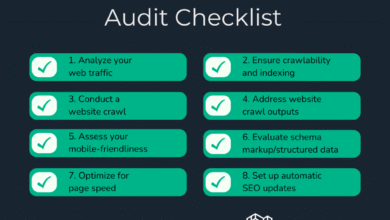
Here is the exact checklist I use before a post goes live:
- No Broken Links: Click every link. Do they load? (No 404s).
- New Tab behavior: Do external links open in a new tab? (Optional, but often preferred for UX).
- Anchor Text: Is it descriptive? (No “click heres”).
- Orphan Check: Did I link to this new post from at least one older post?
- Link Count: Are there fewer than 100 links on the page?
- Relevance: Are the external sources actually authoritative?
Common linking mistakes (and fixes) I see on beginner sites

I’ve audited enough sites to see the same patterns repeat. It’s usually not malicious; it’s just neglect. Here are the most common issues and how to fix them quickly.
- Mistake: Over-linking.
Why it’s a problem: It looks spammy and dilutes value.
Fix: Audit pages with >100 links and remove non-essential ones. Stick to the 3-10 rule for body content. - Mistake: Generic “Click Here” anchors.
Why it’s a problem: Missed keyword opportunity and bad for accessibility.
Fix: Rewrite anchors to include the destination topic (e.g., “read our sizing guide”). - Mistake: Orphan Pages.
Why it’s a problem: Google can’t find the page easily.
Fix: Run a crawl (using Screaming Frog or similar), identify orphans, and add 2 internal links to them from relevant high-traffic posts. - Mistake: Nofollow on Internal Links.
Why it’s a problem: You block authority flow.
Fix: Check your plugin settings. Ensure internal links are set to “dofollow.” - Mistake: Broken Redirect Chains.
Why it’s a problem: It slows down the site and wastes crawl budget.
Fix: Update old links to point directly to the current URL, not a redirect.
This is common: A site redesign happens, URLs change, and suddenly internal links point to 404s. An afternoon spent fixing these with a redirection plugin is often the easiest SEO win you can get.
FAQs + wrap-up: my starter plan for internal vs external links in SEO

To wrap this up, let’s hit the questions I see most frequently in search data.
What is the ideal number of internal links per page?
There is no hard cap, but for user experience and crawl efficiency, aim for 3–10 internal links in the body of a standard post. I’d rather have 5 great links that people actually click than 20 random ones that look like clutter.
How many external links should I include?
Start with 1–2 high-quality external references per article. Add more only if it genuinely supports the content (like a medical or technical article). If you are linking out just to hit a number, don’t.
Should I use nofollow on internal links?
Unless you have a specific technical reason (like a login page or print-version page), no. Let authority flow naturally through your site.
How do internal and external links work together?
Internal links build your house’s structure; external links inspect the foundation; backlinks are the neighbors vouching for you. Together, they create a site that Google trusts and users can navigate.
How does G-SEO (Generative SEO) affect linking?
I’m seeing that G-SEO favors content that is semantically connected. Using clear, intent-based internal linking helps AI models understand the “role” of your page, while reputable external citations can signal that your content is factually grounded .
Final recap + next actions
If you feel overwhelmed, just focus on the basics. You don’t need to fix everything overnight.
- Internal links are for navigation and structure.
- External links are for credibility.
- Anchor text should be descriptive and natural.
Your Next 3 Steps (Do this week):
- The “Top 5” Audit: Go to your 5 most important pages. Do they link to other relevant content? Do other pages link to them?
- The Anchor Fix: Scan your latest blog post. Change any “click here” or naked URL to a descriptive phrase.
- The Cluster Plan: Pick one main topic (e.g., “HVAC Maintenance”) and write down 3 sub-topics you can link to it. Create those links.
Start there. Consistency beats perfection every time.