Introduction: Revenue Through Content (and why my ecommerce content marketing strategy starts here)

When I audit ecommerce sites, I usually find a familiar pattern: organic traffic is climbing, but revenue remains flat. The marketing team is churning out three blog posts a week, but the category pages—the ones that actually make money—are gathering dust with generic manufacturer descriptions. It’s the classic quantity over quality trap.
Real ecommerce growth doesn’t come from just “publishing content.” It comes from building a system where every word has a job—whether that’s getting a click from Google, answering a hesitation on a product page, or reducing returns through better sizing guides. That is what I call a revenue-focused ecommerce content marketing strategy.
In this guide, I’m going to share the exact framework I use to turn content into a measurable revenue driver. We’ll cover how to prioritize your efforts, the high-leverage formats that actually convert (like video and AR), and how to measure it all without getting lost in vanity metrics. While tools like a SEO content generator can help you scale production, the strategy must come first to ensure you aren’t just creating noise.
What “revenue through content” means for ecommerce (traffic, conversion, AOV, retention)

For a long time, I used to think my job was just to get people to the site. If sessions went up, I was winning. But in ecommerce, traffic that doesn’t convert is just server cost. Revenue through content means looking at the entire P&L impact of what we publish.
It’s about four specific levers:
- CTR (Click-Through Rate): Winning the click on the SERP so you don’t pay for ads.
- CVR (Conversion Rate): Using on-page content (videos, specs, guides) to convince the shopper to buy.
- AOV (Average Order Value): Using educational content to upsell bundles or explain why the premium version is worth it.
- Retention: Post-purchase guides that ensure the customer actually enjoys the product and comes back.
Research suggests that improving content performance from average to above-average can yield about $12.50 additional revenue per visitor . That’s the difference between a description that says “100% cotton” and one that explains why that cotton feels softer after ten washes. It’s not just words; it’s revenue capability.
The content-to-revenue map (simple model I use)

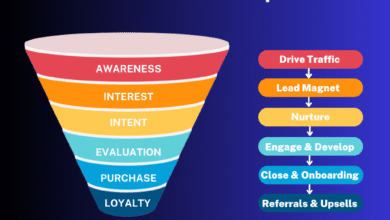
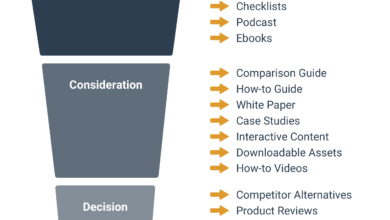
To keep things organized, I map every piece of content to a stage in the buyer’s journey. This reduces the guesswork of “what should we write today?”
- Awareness: Educational blog posts, social shorts (e.g., “Why does my back hurt while sleeping?”).
- Consideration: Comparison guides, “Best X for Y” lists, Category pages (e.g., “Firm vs. Soft Mattress Guide”).
- Purchase: Product Detail Pages (PDPs), sizing calculators, shipping FAQs.
- Post-Purchase: Setup videos, care guides, user-generated content galleries.
A quick table: which content improves which revenue lever
Here is a breakdown of how I assign specific jobs to content assets so we know exactly what to measure.
| Content Asset | Primary KPI | Revenue Impact Example | Common Pitfall |
|---|---|---|---|
| Category Page Intro | Organic Traffic / CTR | Capture high-volume “broad” search intent. | Too much text pushes products below the fold. |
| Buying Guide | Assisted Conversions | Educates users to buy higher-margin items (AOV). | Not linking directly to the products mentioned. |
| PDP Description | Conversion Rate (CVR) | Answers “Is this for me?” to trigger Add-to-Cart. | Copy-pasting manufacturer text (duplicate content). |
| Sizing Guide / AR | Return Rate | Ensures fit confidence, saving logistics costs. | Burying it in a footer link nobody sees. |
| Short-Form Video | Engagement / Shares | Viral discovery leads to new customer acquisition. | Making it look like a TV commercial (too polished). |
| Post-Purchase Email | Retention / LTV | Drives second purchase or subscription renewal. | Sending generic “buy more” instead of “how to use.” |
My ecommerce content marketing strategy framework (7 steps you can implement this quarter)

If you are feeling overwhelmed, you aren’t alone. Most teams struggle because they try to do everything at once. Here is the operational framework I use to focus efforts on what matters. It’s designed to be repeatable, whether you are a team of one or ten.
Step 1: Pick one revenue goal and one customer segment (so content has a job)
Don’t try to “improve SEO” generally. Pick a target. For example, are you trying to move excess inventory of winter coats, or are you trying to increase the AOV of your skincare bundles?
- Goal: Reduce returns on denim by 10%.
- Segment: First-time buyers who are unsure of their size.
- Focus: Fit guides, video try-ons, and detailed fabric specs.
Step 2: Run a content audit that includes product, category, and support content
I see this all the time: marketers audit their blog but ignore their category pages. Your category pages are often your highest-traffic assets. Audit them first.
Create a simple spreadsheet:
- URL: (e.g., /collections/running-shoes)
- Target Intent: Commercial investigation (“buy running shoes”)
- Current Status: Ranking #8, CVR 1.2%
- Gap: No unique intro text; filters are not indexable.
- Action: Write 200 words of unique helpful copy; optimize meta title.
Step 3: Build an intent-based topic plan (not a random blog calendar)
Stop brainstorming “fun ideas” and start mapping intent. If you sell coffee, a random history of beans is okay, but a “Manual vs. Electric Grinder Comparison” drives sales.
Example Topic Cluster:
- Pillar: Ultimate Guide to Home Brewing (Links to all sub-articles)
- Support 1: Best Grinders for Espresso (Links to Grinder Category Page)
- Support 2: How to Store Beans (Links to Canister PDPs)
- Support 3: Light vs. Dark Roast (Links to Subscription Page)
Step 4: Create a repeatable content brief + on-page checklist (quality control at scale)
This is the exact checklist I hand to writers to ensure we don’t get fluff. I divide it into “Non-Negotiables” and “Nice-to-Haves.”
The Brief Checklist:
- Primary Keyword & Intent: Is this transactional or informational?
- Structure: H1, H2, H3 hierarchy defined.
- Internal Links: Must link to at least 2 PDPs and 1 Category page.
- Media: Must include at least one product image or video embed.
- Differentiation: What specific insight do we offer that competitors don’t?
- Schema: FAQ schema or Product schema requirements.
Step 5: Publish with clean information architecture and internal links that reflect intent
Site structure is your skeleton. A common mistake is burying great content in a blog folder that isn’t linked to the store. Your “Running Shoes Guide” should link to the “Running Shoes” category, and the Category page should link back to the guide.
If you are using tools to scale, keep in mind that while an Automated blog generator helps with distribution and consistency, you still need that final human review to ensure the internal links make sense for the user’s journey, not just for bots.
Step 6: Distribution system (email, social, partners) so content actually gets seen
If you only have two hours a week for distribution, do this:
- Email: Send the article/guide to your segment (e.g., “Unsure which grinder to buy? Read this.”).
- Social: Turn the H2s of the article into a carousel for Instagram/LinkedIn.
- Internal: Link the new guide on relevant product pages (e.g., “Read our size guide” link on the PDP).
Step 7: Measurement + refresh cycles (how content compounds)
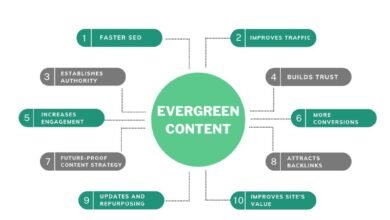
Content decays. I have a monthly routine: I look at my top 20 traffic pages. If traffic or CTR has dropped, I refresh the content. I check if the products mentioned are still in stock and if the year in the title is current. This 30-minute task often drives more revenue than writing a brand new post.
The high-leverage content plays (AI, AR, short-form video, and UGC) that drive revenue

Now that we have the framework, let’s talk about the tactics that are actually moving the needle right now. These aren’t just trends; they are efficiency and conversion levers.
AI for scale: where it helps (and where I keep humans in the loop)
AI is projected to power over 50% of ecommerce marketing content by late 2025 . The opportunity for personalization is massive—imagine showing a different headline to a returning customer versus a new one.
I use tools like the AI article generator to draft product descriptions, generate meta tag variations, and outline blog posts. It clears the “blank page” syndrome. However, I always keep a human editor in the loop, especially for compliance. If you are selling supplements or skincare, AI can hallucinate health claims that will get you in trouble with the FTC or FDA. Use AI for drafts; use humans for strategy and safety.
AR/immersive content: reducing uncertainty and returns
Augmented Reality isn’t just a gimmick; it’s a return-rate killer. AR try-ons can reduce return rates by up to 40% in fashion and cosmetics .
If you can’t afford a full AR app, start with 360-degree product images or “See it in your room” functionality. If a customer can visualize how that couch fits in their apartment, they are far less likely to return it. I measure this by tracking the return rate on PDPs with AR vs. those without.
Short-form & shoppable video: the discovery-to-purchase shortcut
Short-form videos drive 82% of viewers to purchase and get significantly more shares than static images . Platforms like TikTok Shop have exploded because they collapse the funnel—discovery and purchase happen in the same tap.
My advice: Don’t overproduce these. Filming a 15-second clip on a phone showing the texture of a fabric or how to buckle a strap often converts better than a studio shoot. It feels real. Focus on the “hook” (the problem) and the “payoff” (the solution).
UGC, micro-influencers, and affiliates: trust that converts
Authenticity sells. On Cyber Monday 2024, influencers and affiliates drove nearly 20% of ecommerce revenue .
I recommend aggressively collecting User Generated Content (UGC). Send a post-purchase email offering a discount on the next order in exchange for a photo review. Place these photos directly on your PDPs. Seeing a real person wearing the shirt (wrinkles and all) builds more trust than a photoshopped model.
Search is changing: how I adapt ecommerce content for zero-click, voice, and visual discovery

Search isn’t just 10 blue links anymore. With zero-click searches constituting around 58.5% of Google searches , users are getting their answers right on the results page. Voice commerce is also growing rapidly, expected to reach $19.4 billion by 2023 .
Here is how I adapt my on-page strategy to win in this environment without losing traffic:
On-page essentials in the right places: title tags, meta descriptions, headings, and FAQs
You need to structure your content for scanners—both human and bot.
- Title Tags: Format as “Primary Keyword + Differentiator + USP”.
Bad: “Men’s Boots”
Good: “Men’s Waterproof Hiking Boots | Leather & Lightweight” - Headings: Use H2s and H3s to break up text. If a user asks a question via voice search, your H2 should likely be that question.
- FAQs: I always add an FAQ section at the bottom of category pages. It captures long-tail voice search queries like “How do I clean these boots?” or “Are these true to size?”
Category and product page text that ranks without feeling spammy
Category pages with 200–300 words of unique text rank significantly higher . But don’t just dump a wall of text at the top of the page pushing products down.
What I do: Write a helpful 50-word intro at the top helping the user choose (e.g., “Browse our collection of high-impact sports bras designed for running…”). Then, put the detailed SEO content (fabric specs, history, detailed guides) at the bottom of the page. This serves the bot without annoying the shopper.
Image and video SEO basics for ecommerce teams
Visual search is huge. Products with 5–7 images convert at 3.2x the rate of those with a single image .
But be careful: heavy media kills page speed, which kills revenue. I learned this the hard way when we uploaded uncompressed 4K videos to a PDP and our conversion rate tanked because the page took 5 seconds to load. Use WebP formats, lazy load images, and always fill out your Alt Text—not just for SEO, but for accessibility.
Measuring content ROI: the KPIs, dashboards, and attribution basics I rely on

Measurement is where most content strategies fall apart. Leaders want to know the ROI, and “brand awareness” isn’t a satisfying answer. I treat attribution as directional—it’s never 100% perfect, but it tells you where to steer the ship.
Here is a simple dashboard approach I use:
| Metric | Source | What ‘Good’ Looks Like | Next Action |
|---|---|---|---|
| Organic Impressions | GSC | Steady month-over-month growth | If flat, publish more or refresh old content. |
| CTR (Click-Through Rate) | GSC | Above 2-3% for non-brand | If dropping, rewrite Title Tags & Metas. |
| Conversion Rate (CVR) | GA4 | Context dependent (e.g. 1-3%) | If low, check page speed, intent match, or offer. |
| Assisted Conversions | GA4 | High number for blog posts | Add better internal links to push to purchase. |
A simple content ROI formula (with a realistic example)
Here is a conservative way to calculate the value of your content efforts:
(Incremental Organic Traffic x CVR x AOV x Gross Margin) – Content Production Cost = ROI
Example:
You optimize a category page. Traffic grows by 2,000 visitors/month.
CVR is 2%. That’s 40 extra orders.
AOV is $100. That’s $4,000 in revenue.
Gross Margin is 50%. That’s $2,000 in profit.
Cost to rewrite content: $300.
First Month Profit: $1,700. (And this compounds monthly).
Common mistakes that kill content-driven ecommerce revenue (and how I fix them)

I have made plenty of mistakes. Here are the most common ones I see so you can avoid them:
- The “Blog-First” Fallacy:
Symptom: Thousands of blog readers, zero sales.
Why: You are writing about topics that have no purchase intent.
Fix: Shift focus to bottom-of-funnel content (comparisons, reviews, PDPs) before broad educational pieces. - Duplicate PDP Content:
Symptom: Product pages aren’t ranking.
Why: You used the default manufacturer description that 50 other retailers are using.
Fix: Rewrite descriptions for your top 20% best-sellers using your unique brand voice. - Ignoring Internal Links:
Symptom: High bounce rate on blog posts.
Why: Readers enjoy the article but have nowhere to go.
Fix: Add explicit “Shop this look” or “See the collection” CTAs within the first 3 paragraphs. - Slow Page Speed from Media:
Symptom: High bounce rate on mobile.
Why: Uncompressed images or heavy video files.
Fix: Compress all images before uploading and use video hosting platforms (like YouTube/Vimeo embeds) rather than self-hosting heavy files. - No Refresh Cadence:
Symptom: Traffic slowly bleeds out over a year.
Why: Content decay; competitors published newer stuff.
Fix: Schedule a quarterly “Content Refresh Week” to update stats, dates, and links.
FAQs: ecommerce content strategy questions beginners ask
How does AI improve ecommerce content marketing?
What I’ve found is that AI is best for scale and efficiency. I use it to generate twenty variations of a product description for A/B testing or to translate content for international markets. However, I never automate the final publish—human QA is essential to maintain brand voice.
Why is AR important for online stores?
AR is a confidence builder. In categories like furniture or eyewear, the biggest barrier to purchase is “will this fit/look good?” AR answers that question instantly, which typically leads to higher conversion rates and fewer returns.
What makes short-form video so effective in ecommerce?
It’s about speed and proof. A 10-second video can demonstrate a product’s features faster than a user can read a paragraph. I start with three types: a problem/solution demo, a user testimonial, and a simple unboxing to show what arrives.
Why prioritize user-generated content and micro-influencers?
Shoppers trust other shoppers more than they trust brands. I place UGC galleries directly on product pages to act as social proof. It’s effective because it feels authentic, but remember to always vet creators to ensure they align with your brand values.
How should ecommerce content adapt to evolving search trends?
I focus on answering questions directly. Since zero-click and voice search are rising, I ensure every page has clear, structured answers (like definitions or lists) that can be pulled into a featured snippet, while providing a compelling reason to click through for more detail.
What is the ROI of optimizing content performance?
The ROI comes from efficiency. Better content improves Quality Score (lowering ad costs) and organic conversion rates. If you improve your content performance to above-average, data suggests a significant lift in revenue per visitor , which you can validate by running a controlled A/B test on a category page.
Conclusion: the 3-part recap + the next actions I recommend
We’ve covered a lot, but don’t let the details paralyze you. Here is the recap of the strategy:
- Map content to revenue: Every piece must drive CTR, CVR, AOV, or Retention.
- Build the system: Use the 7-step framework (Audit, Plan, Brief, Create, Publish, Distribute, Measure).
- Leverage tech & trust: Use AI for scale, AR/Video for experience, and UGC for trust.
Your Next Actions (in priority order):
- Audit your top 10 category pages: Do they have unique text? Are they helpful?
- Fix your internal linking: Ensure your blog posts actually point to products.
- Launch one test: Add a user-generated photo gallery or short video to your best-selling product page and watch the conversion rate.
If you only do one thing this week, rewrite the descriptions of your top five best-sellers to be truly helpful. That’s the quickest path to revenue.