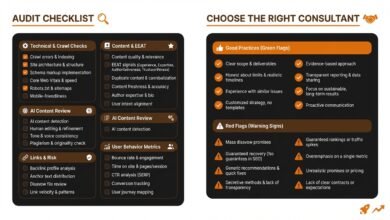
How to write a technical SEO audit report: an actionable, business-ready framework (Beginner Guide)

I have seen the same story play out in dozens of organizations: a passionate SEO sends over a 50-page PDF filled with red warnings and “critical” errors, only for it to languish in a Google Drive folder, untouched by engineering.
The problem usually isn’t the technical accuracy of the findings. The problem is the format. When we treat audits as a laundry list of problems rather than a prioritized roadmap for solutions, we lose our stakeholders before the first ticket is even written.
In this guide, I will walk you through the framework I use to write technical SEO audit reports that actually get implemented. This isn’t about chasing a perfect 100/100 score on a tool. It is about identifying the specific technical blockers—like INP issues, crawl budget waste, or missing AI-readiness signals—that are hurting your bottom line, and presenting them in a way that makes developers say, “I know exactly how to fix this.”
Whether you are an in-house specialist or an agency consultant, this guide covers how to scope, audit, and prioritize your findings so you can ship fixes that drive revenue.
What “actionable” means in a technical SEO audit report (and what to include)

To a business, “actionable” means that a finding has a clear owner, a defined solution, and a measurable impact. If a report is just a screenshot of a tool dashboard, it’s not a report—it’s raw data. An actionable report bridges the gap between “something is broken” and “here is how fixing it helps us grow.”
Think of your report less like a medical diagnosis sheet and more like an emergency room triage board. We aren’t trying to fix everything; we are trying to save the patient. In a US business context, where developer sprints are expensive and crowded, you might only get three major fixes approved this quarter. They need to be the right ones.
Here is how I structure reports to ensure they remain useful for every stakeholder:
| Section of Report | Purpose | Who uses it |
|---|---|---|
| Executive Summary | Highlights risks, opportunities, and ROI. | CMO / VP of Marketing |
| Prioritized Backlog | The list of tickets to be created, ranked by impact. | Product Owners / PMs |
| Technical Findings | Detailed evidence, reproduction steps, and documentation. | Engineering / Developers |
| Monitoring Plan | How we will verify the fixes post-release. | SEO / QA Team |
The one-sentence goal of my report
I often put this right at the top of my working document to keep me focused:
“This report identifies technical blockers and prioritizes fixes by business impact and engineering effort to improve crawl efficiency, performance, and organic visibility.”
Report anatomy: executive summary → evidence → recommendation → priority
Consistency builds trust. If every finding looks different, developers have to relearn how to read your report on every page. I use a standard “Finding Card” structure for every single issue I report:
- The Issue: A plain-English summary of what is broken.
- The Evidence: Screenshots, URLs, or log data proving the issue exists.
- The Recommendation: Specific technical instruction (e.g., “Change the canonical tag logic to…”).
- Validation: How we will know it is fixed.
A scoring note: when I use tool scores (and when I don’t)
Tools like Lighthouse or SEMrush are fantastic for gathering data, but their automated scores are often “smoke alarms,” not the fire itself. I have seen sites with a “Health Score” of 92% that were completely de-indexed due to a robots.txt error. Conversely, a site might have a low score due to large images on low-traffic blog posts, while their revenue pages are pristine.
I use scores to spot trends, but I never present a score as a KPI in itself. Google’s guidance emphasizes context-aware auditing; a slow load time on a checkout page is a critical emergency, while the same load time on an archived press release is a low priority.
Before I start: scope, access, and benchmarks (so the audit doesn’t fall apart)

The quickest way to fail is to try to audit “the whole internet.” If you don’t define your boundaries, you will drown in data. Before I run a single crawl, I secure access and define what I am actually looking at.
Essential Access Checklist:
- Google Search Console (GSC): Non-negotiable. It shows how Google actually sees the site.
- Google Analytics (GA4): To correlate technical issues with traffic drops.
- Server Logs: Ideally. If I can’t get them (which is common in enterprise setups), I note that my crawl budget analysis will be an estimate based on GSC stats.
- Staging Environment: If possible, to test fixes before they go live.
If I cannot get full access—for example, if I’m auditing a prospective client—I clearly state in the intro: “This audit is based on external crawl data and may miss server-side nuances visible only in logs.”
Define success: the business goal that shapes my recommendations
A SaaS company needs its lead-generation landing pages to rank. An ecommerce brand needs its product category filters to be indexable but not wasteful. A local business needs accurate schema for maps. I align my audit priorities to these goals. If a section of the site doesn’t drive revenue or brand value, I de-prioritize it immediately.
Pick the right crawl sample (and avoid auditing the whole internet)
For large sites (100k+ pages), I never crawl everything initially. I sample by template. I look at 100 product pages, 50 category pages, and 50 blog posts. If a technical error exists in the template, finding it 100 times is enough to write the ticket; I don’t need to find it 100,000 times.
Benchmark the right metrics (so improvements are provable)
You need to prove your work worked. Before any changes are made, I screenshot or export:
- Core Web Vitals Pass Rate (Mobile): Specifically INP and LCP.
- Index Coverage Errors: The count of valid vs. excluded pages in GSC.
- Organic Traffic to Key Directories: To establish a baseline.
Industry data suggests that technical audits can deliver 25–40% traffic uplift after issue resolution, but only if you can prove the correlation.
My step-by-step workflow to audit crawlability, indexability, rendering, and performance

This is the core execution phase. I follow this sequence because it mimics how a search engine interacts with a site: first it crawls, then it renders, then it indexes, and finally it ranks based on content and signals.
Step 1: Crawlability (robots.txt, sitemaps, status codes)
I start here because if Google can’t access the page, nothing else matters. I look for the basics that often trip up even senior teams.
| Issue | How to Detect | The Fix |
|---|---|---|
| Robots.txt Blocks | GSC “Blocked by robots.txt” report | Update robots.txt to allow necessary bots. |
| Sitemap Dirty Data | Crawl the sitemap URLs | Remove non-200 status codes (404s, 301s) from XML maps. |
| Broken Links (4xx) | Site Crawler (Screaming Frog/Lumar) | Update internal links to point to the live 200 URL. |
Common gotcha: I often see staging directives left in production robots.txt files, blocking the entire site. It sounds silly, but it happens more than you’d think.
Step 2: Indexability (canonicalization, noindex, duplicates, parameter handling)
Once crawled, is the page allowed in the index? I check for conflicting signals—like a page having a self-referencing canonical tag but also a `noindex` meta tag. I pay special attention to “duplicate without user-selected canonical” in GSC.
Waste is a huge issue here. Average websites often waste 30–40% of their crawl budget on duplicate parameters (like `?session_id=` or `?sort=price`). I identify these patterns and recommend parameter handling in GSC or rigorous canonical tags.
Step 3: Site architecture & internal linking (orphan pages, depth, broken links)
I visualize the site structure. Are key revenue pages buried 6 clicks deep? I look for “Orphan Pages”—URLs that exist in the sitemap or receive organic traffic but have no internal links pointing to them. These are dead ends for bots and users. Fixing broken internal links is often the highest-ROI activity in this step; statistics show up to 67% of websites suffer from broken internal architecture that bleeds link equity.
Step 4: On-page technical hygiene (titles, meta descriptions, headings, canonicals)
I don’t rewrite copy here; I look for systemic failures. Are H1 tags missing across the entire blog template? Are title tags duplicated on paginated series (Page 2, Page 3)? With 52% of sites facing title tag issues, fixing the logic in the CMS (e.g., auto-appending ” – Page X” to titles) is a scalable win.
Step 5: Rendering & JavaScript (what I check for modern sites)
If the site uses a framework like React or Vue, I ask: “Is the content visible in the raw HTML source?” If not, I check if Google can render it. I use the “Test Live URL” feature in GSC to see the rendered HTML. If critical links or content only appear after client-side JavaScript execution, I flag this as a high-severity risk. Server-Side Rendering (SSR) is usually the recommendation here.
Step 6: Performance & Core Web Vitals (INP, LCP, CLS)
Performance is now a core part of technical SEO. The metric to watch is Interaction to Next Paint (INP), which replaced FID. It measures responsiveness—how quickly the page reacts when a user clicks.
| Metric | Good Threshold | Typical Fix |
|---|---|---|
| INP | < 200ms | Minimize main-thread JS work; break up long tasks. |
| LCP | < 2.5s | Preload hero images; optimize server response time. |
| CLS | < 0.1 | Reserve space for images/ads with CSS aspect ratios. |
Step 7: Mobile-first checks (parity, UX, and technical pitfalls)
I always spot-check the site on my actual phone, not just a browser resizing tool. Does the mobile menu actually work? Is the primary content (and headings) the same on mobile as on desktop? Google indexes the mobile version; if your content is “desktop only,” it effectively doesn’t exist.
AI-first additions: schema, AI Overviews readiness, and llms.txt / bot permissions

The landscape of search is changing. Audits in 2025 and beyond must account for AI agents and Generative Engine Optimization (GEO). I treat this section as “future-proofing.” It’s about ensuring your content is machine-readable and eligible for citation.
Schema validation: completeness, correctness, and coverage by template
It is not enough to just “have” schema. I check for validation errors using the Rich Results Test, but I also check for coverage. If you are an ecommerce site, do 100% of your product pages have `Product` schema? Missing schema is a missed opportunity for rich snippets and AI comprehension. I report on “Schema Coverage %” per template.
AI Overviews / AEO checks: citation readiness and answer formatting
With AI Overviews appearing in over 50% of searches, structure matters. I look for pages that answer questions but lack clear structure. My recommendation is often technical-adjacent: “Implement a `
- ` (definition list) or a clear `
- Impact (5 = High): Will this fix directly affect revenue or critical indexing?
- Confidence (5 = High): Do I have hard evidence (logs/GSC) that this is the problem?
- Effort (5 = Easy): Can a dev fix this in one sprint, or is it a re-platforming project?
- Current State: “The site is technically sound but suffers from crawl inefficiency in the product catalog.”
- Top 3 Priorities: “1. Fix canonical logic on filters. 2. Resolve INP issues on mobile. 3. Implement Article schema.”
- Expected Outcome: “Improvement in index coverage and a projected uplift in organic traffic.”
- Ask: “Approval for 3 Jira tickets in the upcoming sprint.”
- The “Data Dump”: Sending raw exports without filtering. Fix: Only report what you want fixed.
- Vague Recommendations: Saying “Optimize site speed.” Fix: Say “Defer third-party JS on the homepage.”
- Ignoring Context: Flagging low word count on a contact page. Fix: Whitelist templates that don’t need SEO content.
- No Owner Assigned: Leaving findings open-ended. Fix: Suggest a specific team (Frontend, Backend, Content) for each ticket.
- Forgetting to Re-Audit: Assuming it’s fixed. Fix: Schedule a validation crawl 2 weeks post-deployment.
- Context is King: Don’t just report errors; report business risks.
- Prioritize Ruthlessly: Use the Impact vs. Effort matrix to focus on the top 10% of issues that matter.
- Prepare for AI: Start including schema validation and bot permission checks now.
- Define your scope and get access to GSC and logs.
- Run a crawl on a sample of your key templates.
- Identify your top 3 “high impact, low effort” wins.
- Draft your finding cards with clear evidence and acceptance criteria.
- Set up a monitoring cadence to catch regressions early.
` + `
` structure for direct answers.” This makes it easier for LLMs to parse and cite your content as the source of truth.
llms.txt and AI bot access: what I include in the audit now
We are seeing the emergence of `llms.txt`—a standard proposed to help AI web crawlers understand which content they can use for training or citation. While not universally adopted yet, creating this file (and ensuring your `robots.txt` explicitly handles bots like `GPTBot` or `CCBot`) is a sign of a mature technical strategy. I include a check: “Does the site explicitly declare permissions for AI agents?” If not, I recommend discussing a policy with legal/marketing stakeholders.
Log file analysis and crawl budget: the fastest way I find hidden technical waste

If you can get access to server logs, you unlock a new level of insight. While crawlers like Screaming Frog show you what can be found, logs show you what Googlebot is actually doing.
What logs show that crawling tools don’t
I once audited a large publisher and found that Googlebot was spending 60% of its daily crawl budget on an archive calendar from 2012 that had zero traffic. A standard crawl didn’t show this because the links were buried. Logs reveal the frequency of crawls and the “wasted hits” on low-value URLs.
Common crawl budget wins: duplicates, redirects, pagination, and thin pages
I look for high-frequency crawls on non-200 pages (301s or 404s). Consolidating these redirects or fixing the broken links recovers budget immediately. I also look for spider traps—infinite calendar pages or filtered combinations—that keep bots busy. The fix is usually a tighter `robots.txt` disallow rule or `noindex` directives.
How to write a technical SEO audit report that stakeholders will actually implement (prioritization + format)

This is where the audit succeeds or fails. You have a list of findings; now you need a roadmap. I use the ICE method (Impact, Confidence, Effort) to sort my findings, but I simplify it for stakeholders into a clear “Impact vs. Effort” matrix.
If you are struggling to articulate the description of every ticket consistently, tools like the AI article generator can help draft standardized ticket descriptions or executive summaries based on your bullets, ensuring clarity while you focus on the strategy.
My prioritization rubric (Impact × Confidence ÷ Effort)
I assign a 1–5 score for each:
Items with High Impact and Low Effort (High score) go to the top of the backlog.
Executive summary that gets approved
I stick to this template for the opening page:
Engineering-ready tickets: acceptance criteria and validation steps
When I write a ticket (or a card in the report), I include a Definition of Done. For example:
Ticket: Fix Canonical Tag on Filtered Pages
Acceptance Criteria: When a user visits `/category?color=red`, the canonical tag should point to `/category` (or self-reference if that is the strategy).
Validation: Inspect source on 5 test URLs; verify GSC ‘Duplicate’ report decreases over 4 weeks.
Common mistakes + FAQs + next steps (so your audit becomes a continuous system)

Auditing is not a one-time event; it’s a hygiene habit. To wrap up, here are the pitfalls to avoid and the answers to questions I hear most often.
Common mistakes I see in technical SEO audit reports (and the fix)
FAQs
What is INP and why has it replaced FID in audits?
Interaction to Next Paint (INP) replaced FID in March 2024 as a Core Web Vital. While FID measured the first input delay, INP measures the responsiveness of all interactions on a page. If a user taps a menu and the screen freezes for 500ms, that’s a poor INP. In my audits, I target an INP under 200ms to ensure a “Good” user experience.
How should I handle AI visibility in a technical audit?
I treat AI visibility as a layer of “machine readability.” It involves ensuring your structured data is error-free and your content is formatted in a way that AI agents can easily parse (using clear headings and lists). I also check for the presence of `llms.txt` or proper robots directives to control which AI bots are allowed to access your data.
What’s the value of log file analysis in SEO audits?
Log files offer the only source of truth for how search bots actually crawl your site. They reveal wasted budget on low-value pages and highlight orphan pages that crawling tools miss. In my experience, log analysis is where you find the efficiency wins that significantly improve indexation rates.
How frequent should technical SEO audits be?
I recommend moving away from quarterly “big bang” audits to continuous monitoring. At a minimum, run a full technical check after any major deployment or migration. For day-to-day health, set up automated alerts for critical failures like `noindex` spikes or `5xx` errors.
How do I interpret audit tool scores effectively?
Treat tool scores as directional signals, not absolute grades. A drop in score helps you spot a regression, but a “100%” score doesn’t guarantee rankings. Always interpret the score in the context of your specific business goals and the actual impact on user experience.
Conclusion: my 3-point recap + next actions checklist
If you only take three things away from this guide, make them these:
Your Next Actions:
For ongoing support in generating high-quality content briefs and technical documentation that keeps your strategy sharp, consider exploring the AI SEO tool capabilities at Kalema, where content intelligence meets execution.