How to optimize for user intent: real-world examples and a practical workflow
Introduction: why “good content” still fails when it misses intent

Here is a scenario I see constantly: A marketing team spends weeks producing the “Ultimate Guide to CRM Pricing.” It’s 3,000 words long, beautifully written, and technically optimized. But it sits on page three. Why? because the people searching for “CRM pricing” didn’t want a history lesson or a definition of what a CRM is. They wanted a comparison table, a calculator, or a list of numbers. They clicked the result that gave them that immediately, and they bounced from the ultimate guide.
I’ve been burned by this myself. You can write the “best” article on the internet, but if the format doesn’t match the job the searcher is trying to do, Google won’t rank it—and users won’t convert. In this article, I’m going to walk you through the exact workflow I use to diagnose intent, map it to the right format, and optimize for the new reality of AI Overviews. Whether you’re running SEO for a SaaS brand, a local business, or an ecommerce store, this system works.
User intent optimization: what it is, why it matters, and what’s changed with AI Overviews

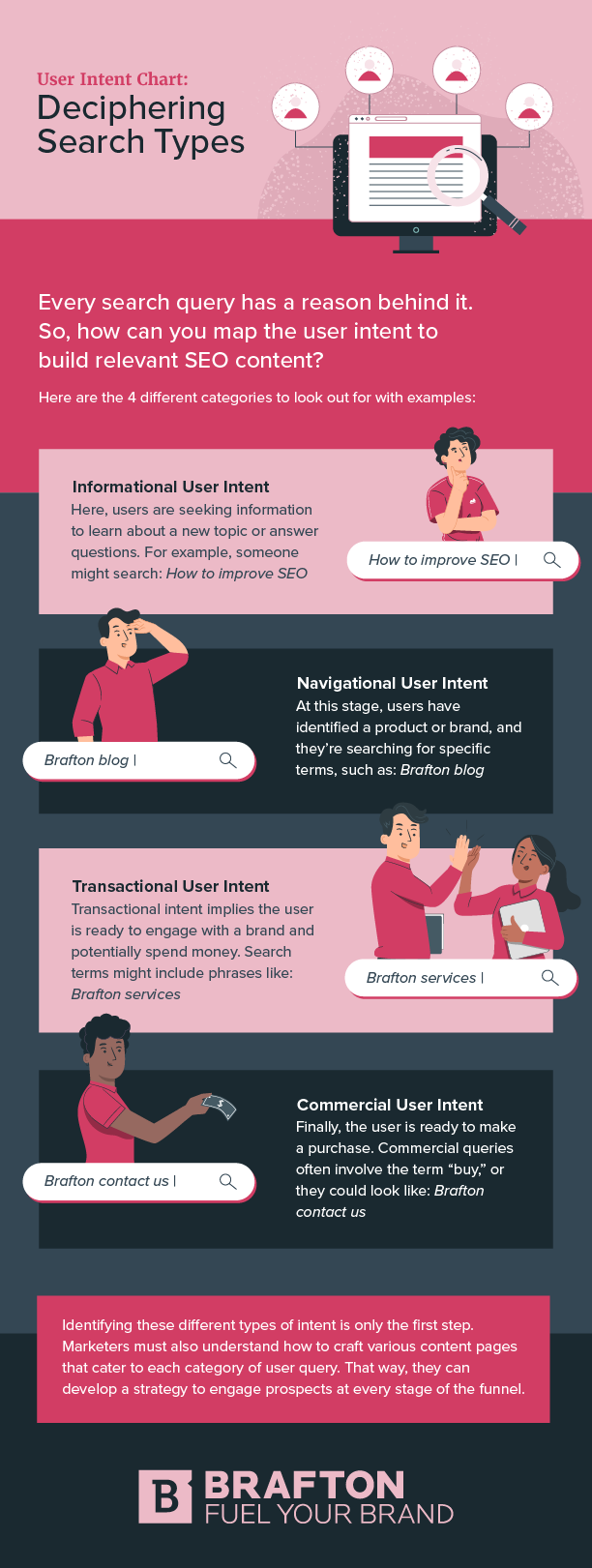
User intent optimization is simply the practice of aligning your content—not just the keywords, but the format, angle, and structure—with the goal a user has in mind when they type a query. Traditionally, we categorized these into four buckets, but modern SEO requires us to connect these directly to business outcomes.
- Informational Intent: The user wants to learn. (Business goal: Brand awareness, newsletter signups).
- Navigational Intent: The user is looking for a specific site. (Business goal: Direct traffic retention).
- Commercial Investigation: The user is comparing options before buying. (Business goal: Demos, trials, consultations).
- Transactional Intent: The user is ready to buy now. (Business goal: Sales, immediate bookings).
However, the game has changed. With the rise of Google’s AI Overviews and answer engines like Perplexity, “intent” isn’t just about getting a click; it’s about being the source of the answer. Research suggests that AI Overviews are appearing in approximately 13% of U.S. desktop searches , often pushing organic results down the page. If your content isn’t structured to be summarized (AEO), you risk losing visibility entirely. I watch the SERPs daily, and the shift is undeniable: generic content gets buried, while specific, intent-matched answers get cited.
Step-by-step: how to optimize for user intent (from query to conversion)
Optimizing for intent isn’t a guessing game; it’s a diagnostic process. I follow a specific workflow every time I create a brief. It prevents me from wasting resources on content that won’t perform. If production speed is your bottleneck, using an AI article generator can help you ship drafts faster, but remember: the machine needs your strategic intent map to be effective.
Step 1 — Start with the query: what job is the searcher hiring me to do?

Before I look at a keyword tool, I look at the language. Users tell us exactly what they want through modifiers. If I see “how to,” I know I need a process. If I see “price,” I know I need numbers. Here is how I decode common modifiers:
- “Best” or “Top” → Commercial Investigation. They want a curated list or ranking.
- “Vs” or “Alternative” → Comparison. They want a side-by-side feature breakdown.
- “Template” or “Tool” → Utility. They want a resource they can use immediately, not a blog post.
- “Near me” or “Service” → Transactional. They want a phone number, map, or booking form.
- “What is” → Informational. They want a definition and context.
Step 2 — Do a quick SERP ‘sniff test’ to confirm the dominant intent
I never skip this step. I spend about 3 minutes manually searching the target keyword to see what Google is already rewarding. The algorithm is a massive feedback loop; if 8 out of 10 results are listicles, Google is telling you that users prefer listicles. If the results are all product pages, a blog post will struggle to rank.
What I look for:
- Dominant Format: Are the top results guides, tools, videos, or product pages?
- SERP Features: Is there a “People Also Ask” box? (Signals informational intent). Is there a Local Pack? (Signals location intent). Is there an AI Overview? (Signals the need for concise definitions).
- Freshness: Are the results from the last month? If so, news/recency is part of the intent.
Format mismatch is the silent killer of SEO campaigns. I’ve been burned by writing a comprehensive “ultimate guide” for a query where the SERP just wanted a simple free calculator. Don’t fight the SERP; match it.
Step 3 — Map micro-intents (the questions they need answered next)

A single query is rarely just one question. It’s a Russian nesting doll of needs. “Micro-intent mapping” ensures your content is comprehensive enough to keep the user from bouncing back to Google. I use a simple sticky-note style approach for this.
Example Query: “Project management software for small business”
Primary Intent: Compare options.
Micro-Intents (The Sticky Notes):
- Is it free? (Cost micro-intent)
- Is it hard to learn? (Ease of use micro-intent)
- Does it integrate with Slack? (Feature micro-intent)
- Can I see examples? (Visual micro-intent)
If you miss these, you leave a gap in the user journey.
Step 4 — Choose the right content format (guide vs checklist vs comparison vs tool)

Once you know the intent, pick the vehicle. This table guides my decisions:
| Intent Type | What SERP Usually Rewards | Best Page Format | Primary CTA |
|---|---|---|---|
| Informational | Direct answers, definitions, steps | How-to Guide or Blog Post | Newsletter / Read Next |
| Commercial | Lists, “Best of,” Reviews | Listicle or Comparison Page | Free Trial / Demo |
| Transactional | Product details, pricing, stock | Product/Landing Page | Buy Now / Contact Us |
| Navigational | Site links, login pages | Home Page or Login Portal | Log In |
Step 5 — Draft the page so it satisfies intent fast (above-the-fold answers + scannability)
When I draft, my obsession is the “time to value.” Beginners often write long, winding introductions. In the age of AI answers, that’s fatal. I structure my openings to satisfy the user immediately. If they ask a question, I answer it in the first paragraph.
My standard block order for high-intent pages:
- Direct Answer/Definition: Satisfy the immediate curiosity.
- Proof/Validation: Why should they trust me?
- The “Meat”: The steps, list, or data they came for.
- Examples/Nuance: Deeper context for those who stay.
- FAQs: Catch-all for micro-intents.
I skim pages, and so do you. Use bullet points and H2s/H3s liberally to break up walls of text.
Step 6 — On-page SEO that supports intent (titles, metas, internal links, and schema)
Your on-page elements aren’t just for bots; they are for user psychology. Your title tag is your first promise of intent fulfillment.
Before/After Title Rewrite:
Weak: “Understanding CRM Software for Business” (Vague, sounds academic).
Strong: “7 Best CRM Software for Small Business (2025 Pricing Comparison)” (Specific, promises a format).
Intent Alignment Checklist:
- Does the H1 match the user’s core problem?
- Do H2s map directly to the micro-intents we identified?
- Are internal links guiding them to the next logical step (e.g., from a guide to a product page)?
- Am I using Schema (like FAQ or Product schema) to help Google understand the specific entity?
Step 7 — Build engagement signals that align with intent (not gimmicks)

Google uses engagement metrics (like dwell time and scroll depth) as proxies for content quality. But don’t just add fluff to keep people on the page. Add “helpfulness.”
If the intent is calculation (e.g., “mortgage cost”), a 2,000-word essay has low utility. A simple JavaScript calculator has high utility. If the intent is visual (e.g., “how to tie a tie”), a video retains users 3x longer than text alone .
Interactive ideas by intent:
- Price queries: Add a calculator or estimator tool.
- Comparison queries: Add a responsive table.
- Process queries: Add a downloadable checklist PDF.
Step 8 — Measure if you matched intent (queries, CTR, conversions) and iterate
You won’t always get it right on the first try. I review performance 2–4 weeks after publishing. Here is my troubleshooting matrix:
- High Impressions, Low CTR: Your title/meta doesn’t match the intent users see in the SERP. Fix: Rewrite the title to be more specific.
- High Clicks, Low Dwell Time (High Bounce): The content didn’t deliver on the promise fast enough. Fix: Move the answer above the fold or change the format.
- Good Traffic, No Conversions: You satisfied the information need but didn’t offer a next step. Fix: optimize CTAs or internal links.
Intent in action: real-world examples of intent-matched content (with what I’d change)

Let’s look at how this applies across different business models. If I were coaching these businesses, here is how I would optimize their pages.
Example 1 — Local service: “near me / cost / same-day” queries
Scenario: A user searches “emergency plumber cost near me.”
Dominant Intent: Transactional + Urgency.
The Mistake: A long blog post about “The History of Plumbing.”
The Fix: A service page that puts the service area, a pricing range, and a “Call Now” button at the very top. Trust signals (licenses, “arrives in 1 hour”) are critical here. I’d include a short FAQ block answering “Do you charge for estimates?” because that’s a key micro-intent.
Example 2 — Ecommerce: category vs product vs ‘best’ list pages
Scenario: “Best running shoes for flat feet.”
Dominant Intent: Commercial Investigation.
The Mistake: Sending traffic to a generic “Men’s Shoes” category page with no filters.
The Fix: A curated “Best Of” blog post or a specific collection page. It must include a comparison table showing arch support levels and prices. When I shop, I skim for specs and return policies—make those visible instantly.
Example 3 — SaaS: “alternatives” and “vs” pages that convert without being spammy
Scenario: “Asana vs Trello.”
Dominant Intent: Comparison.
The Mistake: A biased page that says “We are the best” without showing the competitor.
The Fix: A fair comparison page. Use a table: Feature | Asana | Trello | Us. Be honest about where you lose. If I see a balanced review, I trust the recommendation more. Explicitly state “Best for X” vs “Best for Y.”
Example 4 — B2B services: thought leadership that still matches intent
Scenario: “B2B lead generation strategies.”
Dominant Intent: Informational (Advanced).
The Mistake: Shallow, generic tips like “use social media.”
The Fix: An expert guide with a visual process diagram. The intent here is to find a solution to a pain point. The CTA shouldn’t be “Buy Now,” it should be “Book a Strategy Call” or “Download the Blueprint.”
AEO and GEO basics: optimizing for AI Overviews and answer engines without losing the user
You might be wondering, “How does this change with ChatGPT and Google’s AI Overviews?” The good news is that optimizing for user intent and optimizing for Answer Engines (AEO) and Generative Engines (GEO) overlap significantly.
AEO focuses on making your content easy for AI to understand and cite. GEO targets visibility in those AI-generated summaries. My goal is simple: win the click when it happens, and earn the citation when it doesn’t. This relies heavily on E-E-A-T (Experience, Expertise, Authoritativeness, Trustworthiness). AI engines prioritize sources that demonstrate real-world experience.
What AI systems tend to cite: patterns I format for
AI models love structure. They struggle to extract facts from walls of text. To increase your odds of being cited:
- Use “In Short” summaries: Start complex sections with a 1-2 sentence summary.
- Definition Lists: Use bolding for terms followed by concise definitions.
- Structured Headings: Ensure your H2s and H3s are direct questions users ask.
- Data Tables: AI can easily parse rows and columns to generate a comparison answer.
E-E-A-T in practice: how I add real experience signals
To signal Experience (the extra ‘E’), you can’t just state facts. You need to show you’ve lived them.
- Author Bios: Link to a real LinkedIn profile.
- First-Hand Visuals: Don’t use stock photos. Use screenshots of the dashboard you are describing or photos of the product in your hand.
- Specific Anecdotes: “When we tested this in 2024…” is better than “It is recommended that…”
- Date Your Data: Explicitly state when you last reviewed the information.
Common mistakes when you optimize for user intent (and how I fix them)
I’ve audited hundreds of pages, and the same intent issues pop up repeatedly. These aren’t technical glitches; they are strategic misses.
- Mistake: Choosing the wrong format. You wrote a blog post when the SERP wanted a product page.
The Fix: Re-check the SERP. If you see tools/products, build a tool or product page. - Mistake: Burying the answer. You put the definition at the bottom of the page.
The Fix: Move the direct answer to the very top (the “BLUF” method—Bottom Line Up Front). - Mistake: Ignoring micro-intents. You answered the main question but missed the follow-ups (price, integration, safety).
The Fix: Add an FAQ section based on “People Also Ask.” - Mistake: Writing for keywords, not decisions. You stuffed “CRM software” in 50 times but didn’t help them choose one.
The Fix: Focus on decision-enabling content (comparisons, pros/cons). - Mistake: Weak internal linking. You have a dead end.
The Fix: Always guide the user to the next logical stage of the funnel.
Mistake-to-fix quick list (scan this before you publish)
Before I hit publish, I run this 2-minute checklist. If I can’t check these off, the post isn’t ready.
- [ ] Does the H1 clearly promise a solution to the user’s problem?
- [ ] Is the direct answer visible without scrolling?
- [ ] Have I included at least one unique image or data point (E-E-A-T)?
- [ ] Is the format (list, guide, tool) aligned with the top 3 SERP results?
- [ ] Is there a clear next step (CTA) that matches their readiness to buy?
FAQs + next steps: my intent-matching checklist for this week
Optimizing for user intent is the single most effective way to future-proof your SEO strategy against AI changes. It’s about being the most useful result, regardless of the platform. Here is the recap:
- Diagnose first: Use modifiers and SERP analysis to define intent before writing.
- Format matters: Don’t force a blog post where a tool belongs.
- Structure for AI: Use clear headings, lists, and direct answers to win AEO visibility.
Your Next Steps:
- Run a “sniff test” on your top 3 decline pages. Is the format right?
- Map the micro-intents for your next planned article using the sticky note method.
- Rewrite the intro of your most important page to answer the user’s question in the first 100 words.
- If you need to scale this process, consider using an SEO content generator to build your first drafts.
- Use an AI SEO tool to analyze SERP gaps you might have missed.
- Leverage an AI content writer to help format your FAQs and data tables for better extractability.
FAQ: What is user intent optimization and why is it important?
User intent optimization is the process of aligning your content with the specific goal a searcher has—whether that is to learn, buy, or find a website. It is critical because Google and users punish mismatches; if a user wants to buy a shoe and you give them the history of shoelaces, they will bounce, signaling to Google that your page is irrelevant.
FAQ: How do AEO and GEO differ from traditional SEO?
Traditional SEO is about ranking a document in a list of links. AEO (Answer Engine Optimization) and GEO (Generative Engine Optimization) are about getting your content selected as the single, direct answer or cited source in an AI summary. Think of it like this: SEO is getting your book in the library; AEO is getting your paragraph quoted in the research paper.
FAQ: How can content be optimized for AI Overviews or answer boxes?
To increase your odds of appearing in AI Overviews, focus on structure and conciseness:
- Provide direct, jargon-free answers immediately after headings.
- Use HTML lists and tables for data.
- Cite credible sources to boost E-E-A-T.
- Cover the topic comprehensively (micro-intents) so the AI views you as a complete source.
FAQ: What role does content format play in meeting user intent?
Content format is the vehicle for the answer. If the SERP is dominated by videos, a text guide is the wrong format. If everyone on page one is doing a “Top 10 List,” I usually don’t try to force a different format unless I have a compelling reason. Matching the expected format reduces friction and improves dwell time.
FAQ: How can engagement metrics improve content visibility?
While metrics like dwell time aren’t direct ranking factors in the traditional sense, they are strong signals of utility. If users stay on your page to use a calculator or watch a video, it tells search engines your result satisfied the query. To boost this, add interactive elements like comparison tables, simple estimators, or short explainer videos that genuinely help the user.