SEO Ranking Report Template: Next‑Gen Update Format
Reporting Excellence with an SEO ranking report template (what I’m building, who it’s for, and what you’ll get)

I still remember the first time I sent a “report” to a VP of Marketing. It was essentially a screenshot of a rank tracker showing green arrows next to fifty keywords. I felt great about it until they replied with a single line: “Okay, but so what?”
That moment changed how I approach SEO reporting. Stakeholders don’t pay bills with ranking positions; they need to understand how visibility translates into revenue. If you are an in-house marketer or an agency specialist, you need a system that connects the dots between a keyword moving up, a user clicking, and a conversion happening.
This article provides a next-gen SEO ranking report template designed for the reality of modern search. It moves beyond simple position tracking to cover AI Overviews, pixel depth, and business impact. You will get the exact structure, tables, and workflow I use to deliver reports that executives actually read—and trust.
Quick definition: what an SEO ranking report is (and what it isn’t)
An SEO ranking report is a strategic document that evaluates organic search performance over a specific period. It is not just a data dump of keyword positions. A true report contextualizes organic visibility (where you appear), traffic quality (who clicks), and business outcomes (what they do). It answers the question “Is our SEO strategy working?” with evidence, not just vanity metrics.
Why ranking position isn’t enough anymore (and what to track instead)

For years, we operated on the assumption that ranking #1 meant capturing about 30% of the traffic. That math is broken. In today’s landscape, you can hold Position 1 organically and still be invisible on a mobile screen.
Between ads, Featured Snippets, Local Packs, and now AI Overviews (formerly SGE), the “organic #1” spot is often pushed far down the page. Research suggests that AI Overviews can reduce top-3 organic CTR by 20–40% on mobile , fundamentally changing how we calculate success. If your report only tracks position, you might report stability while traffic plummets. We need a more honest way to measure exposure.
Modern SERP reality: AI Overviews, modules, and “below-the-fold” rankings
Open your phone and search for a commercial term like “best crm for small business.” You will likely see Sponsored results, then perhaps a Google AI summary block, then a “People also ask” section. By the time you reach the first traditional organic blue link, you have scrolled two full screens. This is why I track pixel depth—measuring the visual distance a user must scroll to see a result—rather than just ordinal ranking.
The metrics I use to replace “rank-only” thinking
Instead of reporting on 500 isolated keywords, I focus on metrics that tell a story of visibility and value. If you are new to this, start with these three:
- Share of Voice (SoV): The percentage of visibility you own across a specific keyword cluster compared to competitors.
- Traffic & Engagement: Specifically, Google Search Console (GSC) clicks paired with GA4 engaged sessions.
- Business Outcomes: Conversions or revenue attributed to organic search.
SEO ranking report template: the exact sections I include (executive-ready, beginner-friendly)

A great report follows a narrative flow: Summary → Performance → Diagnostics → Actions. Here is the order I use because it prevents confusion; we start with the bottom line before getting into the weeds. This structure works whether you are building a deck in Slides, a Google Doc, or a Looker Studio dashboard.
1) Executive summary (the 60-second version)
This is the only slide most executives will read. It needs to be punchy and devoid of fluff. I typically include:
- Headline performance: “Organic revenue is up 12% MoM despite a dip in rankings for [Category A].”
- The ‘Why’: Briefly explain the primary driver (e.g., “Seasonal demand” or “Technical fix on product pages”).
- One major win: A specific success story.
- One risk/blocker: Something holding you back (e.g., “Dev resources needed for Core Web Vitals“).
2) KPI snapshot: rankings + visibility + traffic + conversions
Here, we merge data sources. A common pitfall is mixing data without labeling it—don’t do that. Clearly mark GSC data (clicks/CTR) versus GA4 data (sessions/conversions).
Pro tip: When I present this, I use a simple script to manage expectations: “Rankings are our leading indicator; revenue is the outcome. While rankings fluctuated this month, our qualified leads held steady, meaning we kept visibility on the high-intent terms that matter.”
3) Rankings and keyword clusters (what moved, and why it matters)
I never report on a raw list of 1,000 keywords. It’s noise. Instead, I group keywords into clusters (e.g., “CRM features,” “Pricing queries,” “Integration support”). Report on the movement of the cluster. If the “Pricing” cluster dropped 3 positions on average, that is a specific business problem we can fix. If a few random long-tail terms dropped, it might just be noise.
4) SERP features and pixel-depth visibility (the missing context)

This section explains the “invisible” losses. If traffic dropped but rankings stayed flat, the culprit is often a new SERP feature. I note ownership of Featured Snippets, inclusion in Local Packs, or presence in video carousels. I also note pixel depth: “Our average rank is #2, but due to a new AI Overview block, our visual position is now 800 pixels down the page, impacting CTR.”
5) Content performance (pages, queries, and intent match)

Here we look at landing pages. Which pages are driving the most value? I look at impressions vs. clicks to judge title tag effectiveness. Before I recommend rewriting content, I check the intent match—are we answering the user’s question, or just stuffing keywords? This is where you report on content decay and pages that need a refresh.
6) Technical & indexing health (only what affects rankings and revenue)

Keep this section focused on “red/yellow/green” status. Executives don’t need to know about every 404 error. They need to know if the site is healthy. I report on:
- Indexing coverage: Are our key pages actually in Google?
- Critical Crawl Errors: 5xx errors that block bots.
- Core Web Vitals: Only if we are failing (Red) and it’s hurting us.
7) Authority & backlinks (quality, not vanity)

It is easy to game authority scores, so I focus on quality. I report on new referring domains from reputable industry sites. If we lost a high-value link, I note it here. I explain it simply: “We earned a link from [Major Industry Publication], which signals trust to Google.” Avoid reporting on spammy links unless they are part of a negative SEO attack.
8) AI/LLM visibility (optional, but increasingly important)
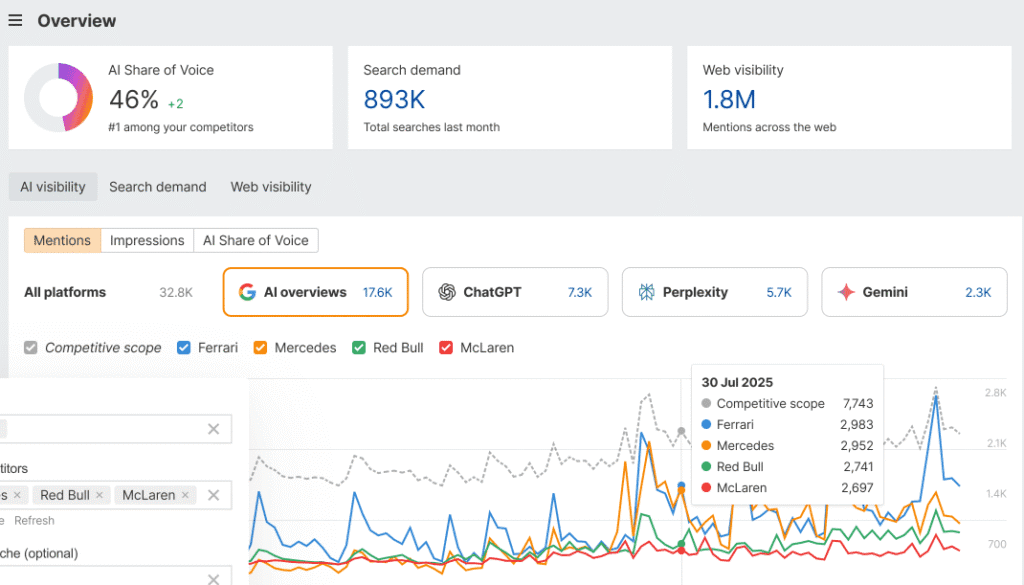
This is the new frontier. With AI platforms influencing a projected ~6.5% of organic traffic in 2025 , we need to track it. I treat this as directional data. I note if our brand is being cited in AI summaries (like ChatGPT or Gemini) for our core topics. It’s early days, so I frame this as “Brand Visibility” rather than direct traffic attribution.
How I build and deliver the SEO ranking report template each month (step-by-step workflow)
Creating a report shouldn’t take three days. If you have a solid process, you can knock this out in a few hours. Here is the workflow I use to ensure accuracy and repeatability.
Step 1: Set the reporting scope (goals, pages, keyword clusters)
Before opening a tool, I define what I am looking for. This month, am I tracking the “Winter Sale” cluster or the “Enterprise Features” cluster? I write down the business goal: “Identify why leads from the blog dropped 10%.” This keeps me from getting distracted by vanity metrics.
Step 2: Pull data from the right sources (and label everything)
I pull my ranking data from my tracker, my click data from GSC, and my conversion data from GA4. Warning: GSC clicks will rarely match GA4 sessions perfectly. GSC tracks clicks from search results; GA4 tracks sessions on your site. If there is a 10-20% discrepancy, that is normal. Just be consistent with your date ranges—mixing up “Last 30 Days” with “Last Month” is a mistake I’ve made that ruined an entire MoM comparison.
Step 3: Create the story: what changed, why it changed, what we do next
Data without a narrative is just noise. I use a simple framework: Observation → Hypothesis → Recommendation. For example: “We saw a drop in the ‘Integration’ cluster (Observation). This coincides with a new competitor page that loads faster (Hypothesis). We will optimize our page speed and add a comparison table (Recommendation).”
Step 4: Turn insights into an execution plan (content + technical + internal links)
Reporting must lead to action. If we identify that ten priority pages are losing relevance, the next step is a content refresh. I outline the specific tasks: update title tags, add internal links, or expand the FAQ section. To speed up the drafting process for these updates, I often use an AI article generator to create the initial structure and content briefs, which I then refine for brand voice and accuracy.
Step 5: QA the report before sending (trust builders)
Nothing kills credibility like a broken formula or a typo in the date range. I have a personal rule: I do one final skim of the report on my mobile phone. If I can’t understand the main takeaways while scrolling on my phone, the report is too dense. I also double-check that all “Hypotheses” are labeled as such, so I don’t present guesses as facts.
Copy/paste layouts: tables and visuals that make ranking updates instantly clear
You don’t need complex visualization tools to be effective. Simple, clean tables work best. Here are the exact layouts I drop into my reports. If you need tools to help generate the underlying content strategies efficiently, a dedicated SEO content generator can save hours of manual analysis.
Table 1: Executive KPI summary (MoM)
Use this table to show the high-level health of the account. Note the “Driver/Notes” column—this is crucial for answering “Why?” before they even ask.
| Metric | This Month | Last Month | % Change | Driver / Notes |
|---|---|---|---|---|
| Organic Revenue (GA4) | $45,000 | $41,200 | +9.2% | Seasonal demand + improved checkout flow |
| Organic Clicks (GSC) | 12,500 | 11,000 | +13.6% | New blog content indexing well |
| Weighted Avg Position | 14.2 | 12.5 | -13% | Drop in non-branded informational terms |
| Top 3 Visibility | 150 keywords | 145 keywords | +3.4% | Stable on high-intent terms |
Table 2: Keyword cluster movement (focus on what changed)
This table prevents the “cherry-picking” problem by focusing on topic groups.
| Cluster Name | Avg Rank Change | Visibility Note | Click Trend | Priority Action |
|---|---|---|---|---|
| “CRM Pricing” | Down 2 spots | AI Overview pushing results down | -5% | Optimize schema for rich snippets |
| “Best CRM for SMB” | No Change | Featured Snippet Won | +12% | Monitor competitor updates |
Table 3: Action plan tracker (who does what by when)
This makes the report operational. Without this, your report is just news; with it, it’s a project plan.
| Recommendation | Effort | Expected Impact | Owner | Status |
|---|---|---|---|---|
| Update title tags for “Pricing” cluster | Low | Med | Content Team | Pending |
| Fix canonicals on product category | Med | High | Dev Team | In Progress |
Suggested visual: report flow diagram (data → insight → decision → result)
I recommend adding a simple slide that visually connects the dots: Inputs (Rankings/GSC) → Analysis (Visibility/Clusters) → Outputs (Content Updates) → Outcomes (Revenue). It reminds stakeholders that SEO is a system, not a switch.
Cadence, SERP volatility, and governance: how I keep reports trustworthy over time
One question I hear constantly is, “Why did our rankings bounce around yesterday?” If you try to explain every daily movement, you will go insane. Volatility is a feature of the system, not a bug.
How often should SEO reports be run? (a practical cadence for beginners)
While I track data daily, I only report formally on a monthly basis. Weekly reporting often captures too much noise and not enough signal. However, if you are in a hyper-competitive niche:
- Daily: Monitor critical infrastructure and “money keywords” for drastic drops.
- Weekly: Internal check-ins on implementation progress.
- Monthly: The official stakeholder report focusing on trends and revenue.
My volatility playbook: annotations, change logs, and methodology notes
The secret to peaceful reporting is annotations. I keep a simple changelog in my reporting deck. Did we launch a new site section on the 12th? Did Google announce a Core Update on the 5th? Write it down. Without annotations, every dip looks like a failure. With annotations, a dip is just context. “Jan 15: Migration to new server—expected temporary volatility.” This builds massive trust.
Common SEO ranking report template mistakes (and the fixes I use)
I have made plenty of mistakes in reporting. Here are the most common ones so you can avoid them Monday morning.
Mistake #1: Sending a rank dump with no narrative
Problem: Sending a raw Excel file forces the boss to do the analysis.
Fix: Always include the “Executive Summary” slide first. Tell them what the data means before showing them the data.
Mistake #2: Treating all keywords as equal
Problem: Treating a vanity keyword with zero search volume the same as a high-intent conversion term.
Fix: Use keyword clusters and weight your reporting toward the clusters that drive revenue.
Mistake #3: Ignoring SERP features and pixel depth
Problem: Reporting “Position 1” when the result is buried under ads and maps.
Fix: Add a “Visual Rank” or “Pixel Depth” note for your top 10 priority keywords.
Mistake #4: Not tying rankings to clicks, sessions, and conversions
Problem: Stakeholders ask “So what?”
Fix: Use the KPI Snapshot table to show the funnel: Rankings → Clicks → Conversions.
Mistake #5: No annotations or version control
Problem: You can’t explain why traffic dropped three months ago.
Fix: Maintain a “Changelog” slide. Document every major site change and algorithm update.
Mistake #6: Overreacting to weekly noise
Problem: Panic-changing titles because rankings dipped for two days.
Fix: Look at 30-day trends. Never make strategic changes based on 48 hours of data.
FAQs + wrap-up: my next steps checklist for using this SEO ranking report template
FAQ: Why isn’t ranking position enough anymore?
Modern SERPs are crowded with AI Overviews, ads, and local packs. A ranking of #3 might now be visually invisible “below the fold.” Visibility metrics and pixel depth give a truer picture of exposure.
FAQ: How should rankings be tied to business value?
I report it like this: Rankings are the leading indicator of Visibility. GSC Clicks are the indicator of Traffic. GA4 Conversions are the indicator of Value. If rankings go up but conversions don’t, we have a traffic quality or CRO problem, not an SEO problem.
FAQ: How often should SEO reports be run?
For most small teams, a monthly deep-dive is perfect. It filters out weekly volatility and allows enough time for strategies to show impact.
FAQ: How do I handle SERP volatility in reports?
Be transparent. Use annotations to mark algorithm updates. Say, “We are seeing sector-wide volatility due to the March Core Update; we are monitoring but holding course.” This shows confidence.
FAQ: Should I include AI/LLM visibility in SEO reports?
Yes, but keep it as an optional, experimental module. It is important to show stakeholders you are watching the future, but don’t base your entire ROI model on it yet.
Your Next Steps:
If you do only one thing this week, stop sending raw keyword lists. Start building a narrative. Here is your checklist:
- Set your baseline: Record where you stand today on your top 3 keyword clusters.
- Build your KPI table: Create the simple 4-column view (Metric, This Month, Last Month, Notes).
- Add Annotations: Go back and tag the last 3 major site changes in your analytics.
- Schedule it: Block out 2 hours on the first Tuesday of next month to run your first “Next-Gen” report.