Introduction: Why I’m building a DIY tool (and what you’ll be able to build by the end)

I still remember the sinking feeling I had last year when a cluster of product pages started slipping in rankings. I logged into my expensive enterprise SEO dashboard, and it showed me a sea of red arrows, but it didn’t tell me why or, more importantly, what to do next. I spent hours exporting CSVs, cross-referencing Analytics with Search Console, and realized that my $99/month tool was just giving me data, not decisions.
That was the breaking point. I realized I didn’t need another dashboard; I needed a specific workflow that matched how my business actually operates. I needed to know which pages had high impressions but terrible click-through rates, and which ones were cannibalizing each other—without clicking through fifty different tabs.
In this guide, I’m going to walk you through exactly how to build your own SEO tool. I’m not talking about a complex SaaS product. I’m talking about a functional, “shippable” internal tool—built in a weekend for about $20 using API data and AI-assisted coding—that runs a specific logic to output a prioritized task list. We will cover the data you need, the logic to code (even if you aren’t a developer), and how to future-proof it for the era of AI Overviews and Generative Engine Optimization (GEO).
Before I code: how to build your own seo tool (and when you shouldn’t)
Before we open a code editor or a spreadsheet, we need to be honest about what we are building. A DIY SEO tool isn’t going to replace Ahrefs or Semrush for analyzing the entire internet’s backlink database—that costs millions in infrastructure. If you need global competitive intelligence, keep your subscriptions.
However, building your own tool is superior when you need to automate your specific internal logic. Here is the reality of the trade-off I made: I’d rather have 3 metrics I trust and act on than 30 generic metrics I ignore. By building it yourself, you gain total control over the inputs and the scoring.
Here is the breakdown of what this article covers:
- The Goal: A system that inputs raw data and outputs a prioritized “to-do” list.
- The Audience: Site owners, content leads, and SEO specialists who are tired of manual reporting.
- The Cost: Roughly $20. This covers a subscription to an AI coding assistant (like ChatGPT Plus or Claude) to write the script, plus a few dollars for API credits if you choose to automate data collection.
- The Time: A couple of afternoons. One to plan and script, one to debug and refine.
The simplest definition: a DIY SEO tool = data in → rules/logic → prioritized actions out
When people ask me how to build your own SEO tool, they usually imagine a complex web app with a login screen. Forget that. The tool we are building is simply an automation engine.
It works like this: You feed it raw data (like a Google Search Console export). It runs a set of rules you define (e.g., “If position is 8-20 and impressions are > 1000, flag for title optimization”). Finally, it spits out a clean table telling you exactly which URL to fix and why. It’s like a spreadsheet that actually tells you what to do next, rather than just staring back at you.
What a beginner can realistically build in week 1 (MVP scope)
If you try to build everything at once, you will fail. I learned this the hard way by trying to code a rank tracker from scratch—it was a disaster of proxy errors and CAPTCHAs. Keep your Minimum Viable Product (MVP) small and shippable.
Here is a realistic weekend build list:
- Page Opportunity Finder (30-60 mins): Identifying high-impression, low-CTR pages using GSC data.
- Content Refresh Queue (45 mins): Flagging articles that haven’t been updated in 6 months and are losing traffic.
- Basic Cannibalization Check (60 mins): finding queries where two or more of your URLs are fighting for the same ranking.
The data layer: essential sources and APIs for DIY SEO tools (what I use first)

Your tool is only as good as the data you feed it. In the US market, we are fortunate to have access to robust, free data directly from Google, but it comes with caveats—mainly sampling and data retention limits.
When I started, I tried to pull data from everywhere. Now, I stick to a “source of truth” hierarchy. I trust Google Search Console for performance data, and I use third-party APIs only when I need to see what the SERP actually looks like (ads, snippets, AI overviews). Below is the stack I recommend for a DIY build.
| Data Source | What it tells me | Best for | Cost | Common Limitations |
|---|---|---|---|---|
| Google Search Console (GSC) | Impressions, Clicks, CTR, Position | Performance tracking & opportunity finding | Free | Data is sampled; 16-month retention limit. |
| Google Analytics 4 (GA4) | Engagement time, Conversions | Business value validation | Free | Hard to join with GSC due to URL variances. |
| SERP API (e.g., ValueSERP, SerpApi) | Live search results, AI Overviews, PAA | Competitor analysis & rank checking | ~$0.50 – $5 / month | Requires technical integration; costs scale with volume. |
| Screaming Frog (Free Mode) | Technical status, Word counts, Titles | Site auditing | Free (up to 500 URLs) | Desktop-based; requires manual export for the tool. |
Minimum viable data stack for beginners (mostly free)
If you are just starting, don’t overcomplicate it. You can build a powerful engine just using Google Search Console and Screaming Frog.
- GSC gives you the “Demand” (what people are searching for and how you rank).
- Screaming Frog gives you the “Supply” (what you currently have on your site).
- Why this matters: By combining these two, you can see if your 300-word blog post is trying to rank for a keyword that deserves a 2,000-word guide. That’s a huge insight for $0.
What I skipped at first: I ignored backlink data in my V1 tool. API costs for backlinks are high, and honestly, for a content operations tool, I needed to fix my own pages before worrying about who was linking to them.
Choosing a SERP data method: manual sampling vs API vs lightweight browser tooling
A word on compliance: It is tempting to write a Python script to “scrape” Google directly. Don’t do it. It violates Google’s Terms of Service, your IP will get banned, and your tool will break constantly.
I started with manual spot-checking. I would look at my top 10 “problem keywords” manually in an Incognito window. Once I tired of that, I moved to a legitimate SERP API. For $5 a month, you can get thousands of clean, JSON-formatted search results without risking your IP address. It’s the best money you’ll spend on this project.
Plan the MVP: features, scoring rules, and a simple architecture (no overengineering)

The biggest mistake I see beginners make is analysis paralysis. They want to build a tool that does everything. Instead, we are going to build a tool that does one thing really well: The Opportunity Scorer.
The Architecture:
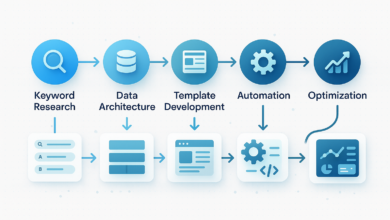
Data Connectors (GSC Export) → Normalization (Cleaning URLs) → Scoring Logic (Your Rules) → Output Table (Prioritized Actions).
My first version was just a messy spreadsheet with conditional formatting. It was ugly, but it worked. It proved that if I fixed the pages highlighted in red, traffic went up. Only then did I move to a script.
Picking the one metric that drives action (example: ‘update priority score’)
We need a single number to sort our list by. I call this the “Update Priority Score.” Here is the logic I use:
Score = (Impressions * 0.5) + (Inverse Position Weight * 0.3) + (Declining Trend Flag * 0.2)
In plain English: I want to find pages that lots of people see (High Impressions), that are almost ranking well (Position 8-20), but are starting to slip (Declining Trend). If a page hits all three, it gets a score of 90/100 and goes to the top of my list.
Sheet vs script vs mini-app: what I recommend for a first build
- Google Sheets: Best if you have under 1,000 pages. You can use formulas for the logic. It’s free and visual.
- Python Script (Recommended): Best for 1,000+ pages. You can process huge CSVs instantly. With AI coding assistants, you don’t need to be a pro developer to write this.
- Web App (Streamlit/Flask): Overkill for V1. Only build a UI if you need to share the tool with a team who is scared of code.
How to build your own seo tool: a step-by-step MVP you can ship this weekend

This is the hands-on part. We are going to build a Python script that processes a GSC export. Don’t worry if you don’t know Python—I will describe exactly what to ask your AI coding assistant to generate for you.
Step 1 — Define the output first (the ‘action table’ I want at the end)
Start with the end in mind. If I can’t assign a task from a row in my data, that row is useless. Here are the columns I require in my final output:
- Target URL: The page that needs fixing.
- Primary Query: The main keyword driving impressions.
- Opportunity Score: My custom 0-100 metric.
- Problem Detected: e.g., “Low CTR,” “Striking Distance,” “Cannibalization.”
- Recommended Action: e.g., “Rewrite Meta,” “Add FAQ Schema,” “Merge Pages.”
Step 2 — Get the data (fast path: export; scalable path: API)
For your first run, log into Google Search Console. Go to Performance > Search Results. Select the last 90 days (I use 90 days to smooth out weekly noise). Click Export > CSV. You will get a zip file; we care about `Pages.csv` and `Queries.csv`.
Warning: Avoid using data ranges shorter than 28 days. One weird holiday weekend can skew your entire analysis if your sample is too small.
Step 3 — Normalize and join (URLs, queries, pages, conversions)
This is where my first version broke. GSC might list a URL as `https://mysite.com/blog/seo-tool`, while Screaming Frog lists it as `https://mysite.com/blog/seo-tool/` (with a trailing slash). To a computer, those are different pages.
The Fix: When you prompt your AI coder, explicitly say: “Normalize all URLs by stripping protocol (https), removing query parameters, and removing trailing slashes before joining datasets.” This simple instruction saves hours of debugging.
Step 4 — Add simple rules (CTR gaps, position buckets, cannibalization hints)
Now we apply business logic. Here are the three rules I script immediately:
- The “Striking Distance” Rule: Filter for queries where Average Position is between 4 and 20. These are your easiest wins.
- The “Click Magnet” Check: Filter for pages with High Impressions (top 20% of site) but Low CTR (below site average). These usually just need a better Title tag or Meta Description.
- The “Cannibalization” Flag: Group data by Query. If a single Query brings in significant traffic to more than 2 URLs, flag it. You might need to merge those pages.
Step 5 — Create a scoring model you can explain to a teammate
I keep my scoring weighted but simple. If I can’t explain why a page scored a 92 to my content writer, I don’t ship the model.
| Signal | Weight | Rationale |
|---|---|---|
| High Impressions | 40% | Traffic potential is the most important factor. |
| Position 4-20 | 30% | It is easier to move up from page 2 than to rank a new page. |
| Trend (vs previous period) | 30% | Losing momentum is a risk signal we must address. |
Step 6 — QA the output with spot checks (don’t skip this)
Before you act on the data, you must QA it. I always pick the top 5 and bottom 5 URLs from my tool’s output and manually check them in GSC. Does the tool say the page is failing, but GSC shows it just had a viral spike yesterday? Adjust your logic.
Stop-Ship Check: Did you accidentally mix up HTTP and HTTPS versions? Are you flagging your Privacy Policy page as an SEO opportunity? (I’ve done that—add an exclusion list!).
Step 7 — Turn the MVP into a monthly habit (light automation)
I’d rather run a simple script consistently once a month than have a complex tool I never use. I set a recurring calendar invite for the first Monday of the month: “Run SEO Script.” I export the data, run the Python script, and paste the results into a shared Google Sheet for the team. It takes 15 minutes.
Put the tool to work: from scores to SEO wins (content briefs, internal links, and publishing)

Congratulations, you have a spreadsheet full of opportunity scores. Now comes the hard part: actually doing the work. This is where the workflow shifts from “Data Intelligence” to “Content Intelligence.”
You need to bridge the gap between a row in a CSV and a published article. My workflow is simple: I take a high-priority row from my DIY tool, and I turn it into a content brief.
| Tool Output | Human Task | Done Definition |
|---|---|---|
| Low CTR | Rewrite Title/Meta | Updated in CMS |
| Striking Distance | Refresh Content & Add Sections | Republished with current date |
| Cannibalization | 301 Redirect or Canonicalize | Verified in Header Check |
This is exactly where a platform like Kalema fits into the stack. While your DIY tool identifies what to work on, Kalema acts as the content intelligence layer that operationalizes the execution. You can feed your prioritized topics into the AI article generator to create structured first drafts or comprehensive briefs. Instead of staring at a blank page, you start with an automated blog generator workflow that respects the SEO data you just uncovered, allowing you to move from “analysis” to “published” faster, while keeping the final quality control in human hands.
A simple content brief template (generated from your DIY tool output)
When I hand off a task, I use a standard format so my writers don’t have to guess. Keep it short—if it is longer than a page, my team won’t read it.
- Target Keyword: [From Tool]
- Current Rank: [From Tool]
- Goal: [e.g., Increase CTR by testing emotional hooks in title]
- Missing Topics/Entities: [List 3-5 keywords the competitors have that we lack]
- Internal Link Opportunity: [Link to our new Case Study page]
Future-proofing your DIY SEO tool: GEO, conversational SEO (C‑SEO), and AI visibility tracking

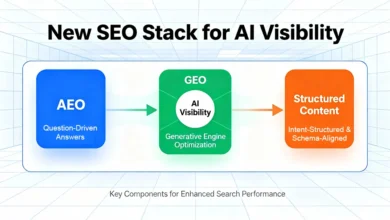
If we were building this tool in 2020, we’d be done. But in the era of Generative Engine Optimization (GEO), ranking #1 isn’t the only goal. As of late 2025, AI Overviews appear in over 50% of Google searches . Your tool needs to evolve to track visibility in these new surfaces.
Traditional rank trackers often fail here because they only count blue links. I treat this as an additional layer of data—I don’t replace my standard metrics, I augment them.
What to measure (starter set): generative appearance, citations, and ‘answerability’ signals
You can’t easily automate this for free yet, but you can start tracking it manually or via advanced SERP APIs. Here is what I am starting to log in my tool:
| Metric | How to collect | Why it matters |
|---|---|---|
| Generative Appearance | Manual check / SERP API | Does an AI overview trigger for this query? |
| Citation Frequency | Check sources in AI snippet | Are we being cited as a source of truth? |
| Informational Intent | Keyword modifiers (how, why) | These queries are most likely to be eaten by AI. |
Limitation Note: AI Overviews are highly personalized and location-dependent. What you see in New York might differ from what I see in London. I treat this data as directional, not absolute.
FAQs (quick, practical answers)
How much does it really cost to build a DIY SEO tool?
In my experience, the hard cost is around $20. This covers a one-month subscription to an advanced AI coding assistant to help you write the Python scripts. The data from Google Search Console and Analytics is free. If you want automated SERP checks, add $5-10/month for an API.
Do I need to be a developer to build this?
No, but you need to be “technical-ish.” You need to be comfortable running a script on your computer or pasting code into Google Colab. You don’t need to know how to write the code from scratch—that’s what the AI is for—but you need to know how to read an error message.
Can I just use free tools instead?
Yes, you can do this manually in spreadsheets. The downside is time. Automating the logic ensures you actually do the analysis every month. When I did this manually, I often skipped months because it was too tedious.
How does GEO change how I build this?
GEO means you need to value “citations” as much as “clicks.” In your tool, you might want to create a separate flag for queries that trigger AI Overviews, prioritizing content updates that structure data clearly (tables, lists) to increase the chance of being cited.
Common mistakes, validation, and next steps (so your tool stays trustworthy)

Building the tool is the easy part. Trusting it is the hard part. I’ve seen many DIY projects abandoned because the data “felt wrong.” Here are the most common pitfalls I encountered:
- Relying on one week of data: SEO is noisy. Always use at least 28 days, preferably 90, for decision-making.
- Ignoring Seasonality: If your tool flags a drop in “Christmas Gift Ideas” in January, that’s not an SEO problem; that’s the calendar.
- Chasing AI Metrics while basics are broken: Don’t optimize for Generative Search if your title tags are duplicated. Basics first.
- Automating without Review: Never let a script automatically delete or redirect pages without a human checking the list first.
Your Next Actions This Week:
- Export your GSC data for the last 90 days.
- Define your logic: Write down your 3 “if this, then that” rules on a notepad.
- Build v0.1 in a Spreadsheet: Prove the logic works manually before you try to script it.
Building your own tool isn’t about saving a subscription fee; it’s about building a workflow that forces you to take action. Consistency beats complexity every time. Good luck with the build.