Introduction: Meaningful naming for image SEO (and what I’ll help you do)

I remember vividly the first time I audited a client’s media library during a major site migration. It was a disaster. Thousands of high-quality product photos and hero images were sitting in the database, all named variations of IMG_8923.jpg or Screen Shot 2023-01-12 at 10.45.22.png. Not only were these files impossible for the content team to search internally, but they were also invisible to search engines.
We were effectively telling Google nothing about the visual content on the page.
While filenames are just one signal among many, they are the foundation of SEO content generator strategies that actually scale. Google explicitly recommends descriptive, keyword-rich filenames over generic ones. But here is the reality: filenames alone won’t magically rank your images. They work in concert with alt text, surrounding context, and page performance.
In this guide, I’m going to show you exactly how to name image files for SEO using the workflow I use for business clients. We will cover the specific formatting rules, a step-by-step process you can hand to your team, scalable automation for large libraries, and the common pitfalls that usually trip up intermediate SEOs.
Why image filenames affect rankings: how Google understands images (beginner explanation)

To understand why we bother renaming files, you have to think like a crawler. When a search engine bot lands on your page, it cannot “see” the image in the way a human does. It relies on a cluster of data points to determine what the image depicts and, crucially, which search queries it is relevant for.
Think of a filename as the label on a manila folder. If the label is blank or reads “Folder 12,” no one knows what is inside without opening it. If it reads “annual-financial-report-2025,” everyone knows exactly where to file it and when to retrieve it.
Search engines use the following signals to rank images:
- The filename: A primary relevance signal.
- Alt text: The accessibility layer that describes the image to screen readers and bots.
- Surrounding text: The captions, headers, and paragraph copy immediately near the image.
- Structured data: Schema markup (like Product or Recipe) that explicitly defines the image entity.
Industry data suggests that Google Image Search accounts for approximately 22.6% of all internet searches. That is nearly a quarter of search traffic that many businesses ignore by leaving their filenames as default camera exports. By optimizing these names, you aren’t just ticking an SEO box; you are driving more qualified traffic, improving accessibility, and making your own asset management significantly less chaotic.
How to name image files for SEO: the formatting rules that work

If you are looking for the “cheat sheet” to send to your designers or writers, this is it. Through trial and error across dozens of sites, I’ve found that adhering to a strict naming convention prevents technical debt later. The goal is consistency.
Here is the convention I stick to for every single asset:
| Rule | Why it matters | Example |
|---|---|---|
| Lowercase only | Prevents case-sensitivity issues on different servers (Linux/Unix). | austin-skyline.jpg |
| Hyphens as separators | Google treats hyphens as word separators; underscores often merge words. | red-leather-couch.jpg |
| 2–5 descriptive words | Short enough to manage, long enough to be specific. | saas-dashboard-analytics.png |
| No special characters | Prevents broken URLs and encoding errors (e.g., %20). | Avoid logo(final).png |
Rule 1: Describe what’s actually in the image (not the page topic)
A common mistake I see is naming an image based on the keyword of the article, rather than the image itself. If your article is about “Best SEO Tools,” but the image is a screenshot of a specific pricing table, name the file seo-tool-pricing-table.png, not best-seo-tools-header.png.
The filename should describe the visual content. If the image was separated from the article and shared on social media, would the filename still make sense? If yes, you’ve named it correctly.
Rule 2: Use hyphens, lowercase, and keep it readable
This sounds picky, but it saves hours of technical headaches later. Servers handle uppercase and lowercase letters differently. A file named Image.jpg and image.jpg might be treated as duplicate or distinct files depending on the environment, leading to broken images.
Furthermore, Google explicitly prefers hyphens. If you name a file email_marketing_tips.jpg, search engines may read that as emailmarketingtips. If you use email-marketing-tips.jpg, they read it as “email marketing tips.” Stick to hyphens.
Rule 3: Keep it short (2–5 words) but specific
I try to keep filenames under 50–60 characters. Anything longer becomes a nightmare to read in your CMS and can get truncated in search results or analytics reports. However, do not be so brief that you lose meaning.
Too short: office.jpg (Could be anywhere, anything)
Just right: modern-open-plan-office.jpg
Too long: modern-open-plan-office-view-from-top-floor-sunny-day-marketing-team.jpg
Rule 4: Use keywords naturally (once, only when relevant)
Here is my personal rule of thumb: If I wouldn’t say the keyword out loud to describe the photo to a blindfolded friend, I don’t put it in the filename.
It is acceptable—and encouraged—to include a keyword if it accurately describes the image. If you are selling a “leather tote bag,” naming the file black-leather-tote-bag.jpg is perfect. But do not name a picture of your CEO leather-tote-bag-ceo.jpg just to rank. That is keyword stuffing, and it confuses the search algorithms.
Rule 5: Make filenames unique to avoid internal competition
In many content management systems (like WordPress), uploading a file with the same name as an existing one usually results in the system appending a number, like -1. This creates clutter.
If you have variants of an image, establish a pattern. For ecommerce, I often use a structure like {product}-{color}-{view}. For example: running-shoe-red-side.jpg and running-shoe-red-sole.jpg. This keeps them unique without resorting to spammy tactics.
How to name image files for SEO: my step-by-step workflow (from draft to publish)

When I’m training a junior marketer or setting up an SOP for a content team, I don’t just give them the rules; I give them a workflow. Without a process, filenames are the first thing to be ignored when a deadline looms.
Here is the decision tree and workflow I use for every post:
Step 1: Start from what the image shows (not your target keyword list)
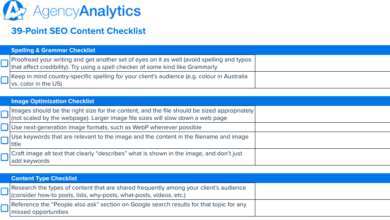
Before you even look at your keyword research, look at the image. What is it? If it’s a photo of a modern office workspace in Austin, start there. Your base phrase is modern-office-workspace.
Only then do you look at the page context. If the article is specifically about “startup culture,” you might refine it to startup-office-workspace-austin.jpg. But never force a keyword that contradicts the visual reality.
Step 2: Choose a consistent naming pattern for your site
Pick one pattern and stick to it for at least a quarter. Consistency is better than intermittent perfection. For a standard business blog, I recommend: {topic-or-object}-{detail-or-context}.filetype.
If you are in ecommerce, your pattern might be stricter: {sku}-{product-name}-{angle}.jpg. This helps your team know exactly what to type without inventing new formats every time.
Step 3: QA before upload (filename + alt text + URL)
Once I have the file named, I do a quick sanity check before dragging it into the CMS upload window. I ask myself three questions:
- Are there any capital letters or spaces I missed?
- Does this filename clash with an image I uploaded last week?
- Does the filename align with the Alt Text I plan to write?
This takes about ten seconds, but it saves the frustration of having to delete, rename, and re-upload an image after realizing you left a space in the name.
Examples and templates (with a table you can copy)

Theory is fine, but examples are better. Below are realistic examples of how I would name files for different business scenarios. Note that these aren’t “perfect” in an academic sense; they are practical, optimized names that work in a real CMS.
Table: bad vs better SEO-friendly image filenames
| Context | Bad Filename | Better Filename | Why it’s better |
|---|---|---|---|
| E-commerce Product | DSC_0091.jpg |
mens-leather-jacket-black.jpg |
Describes the item, material, and color clearly. |
| SaaS Interface | Screenshot 2024-03-01.png |
marketing-dashboard-analytics-view.png |
Identifies the specific feature shown in the screenshot. |
| Local Service | roof repair final.jpg |
slate-roof-repair-boston-ma.jpg |
Includes relevant service detail and local modifier naturally. |
| Team Headshot | Dave profile.jpg |
dave-smith-marketing-director.jpg |
Full name and role helps with entity search and branding. |
| Infographic | IG_v3_final_print.jpg |
seo-ranking-factors-infographic-2025.jpg |
Tells search engines exactly what the graphic explains. |
Templates: naming patterns for common business images
If you were starting your media library today, these are the patterns I would recommend adopting:
- For Blog Headers:
{article-topic}-{visual-description}.jpg
Example:content-strategy-planning-whiteboard.jpg - For Products:
{brand}-{product}-{attribute}.jpg
Example:nike-running-shoe-blue-side.jpg - For Events:
{event-name}-{city}-{year}.jpg
Example:marketing-conference-chicago-2025.jpg
Scaling image naming across hundreds or thousands of files (automation + governance)

Renaming files one by one works when you post once a week. But what if you have to migrate 5,000 product SKUs? Or what if you manage a newsroom producing ten articles a day?
Manual renaming breaks down at scale. This is where we need tools and governance. Research suggests that implementing automation across large sites (1,000+ pages) can yield ROI traffic increases of 15–25% over time, simply by fixing the descriptive data layers of your assets.
For those looking to leverage advanced AI article generator capabilities, modern tools can now handle this heavy lifting as part of the content creation workflow.
Option 1: Batch renaming tools (fast wins)
If you have a folder of images on your desktop, do not rename them individually. On Mac, you can highlight all files, right-click, and select “Rename” to apply a format (e.g., `event-name-sequence`). For more control, tools like Adobe Bridge or specialized renaming software can strip metadata and standardize names in seconds.
A critical caution I learned the hard way: Never batch rename images that are already live on your website unless you have a strict redirection plan. Changing a filename changes the URL. If you rename `img1.jpg` to `seo-guide.jpg` on a live page, the image will break until you update the HTML source.
Option 2: CMS and DAM workflows (repeatability)
For larger teams, relying on individuals to remember the rules is risky. I recommend configuring your CMS or Digital Asset Management (DAM) system to enforce hygiene. Some WordPress plugins can automatically sanitize filenames on upload—converting uppercase to lowercase and swapping spaces for hyphens automatically. This acts as a safety net for when your editors are rushing.
Option 3: AI-assisted naming at scale (filenames + alt + schema alignment)
This is where the industry is heading. AI tools can now analyze an image, read the surrounding content context, and propose a filename, alt text, and caption that all align semantically. This isn’t about “magic rankings”; it’s about efficiency. You move from writing filenames to approving them.
However, AI still needs a human editor. It might suggest `woman-using-laptop.jpg` for a tech article, which is accurate but generic. A human eye ensures it fits your brand voice, perhaps correcting it to `remote-developer-coding-python.jpg`.
Don’t sabotage your results: common image filename mistakes (and fixes)

I see the same issues pop up in site audits repeatedly. Here is a quick troubleshooting list to ensure you aren’t accidentally sabotaging your SEO efforts.
- Mistake: Leaving default names (IMG_1234).
- Why it hurts: Zero descriptive value for search engines.
- Fix: Rename the file locally before you upload it.
- Mistake: Keyword stuffing.
- Why it hurts: Looks like spam to Google and creates messy, long URLs.
- Fix: Ask yourself, “Does this name describe the image or just my wish list of rankings?”
- Mistake: Using underscores.
- Why it hurts: Google often joins words with underscores (e.g., `seo_guide` becomes `seoguide`).
- Fix: Always use hyphens (`-`).
- Mistake: Renaming files without checking references.
- Why it hurts: You break the image on every page that links to it.
- Fix: Only rename new files, or use a “Enable Media Replace” type plugin that updates links automatically.
- Mistake: Inconsistent patterns.
- Why it hurts: Makes your library impossible to search (e.g., searching “logo” vs “brand”).
- Fix: Create a one-page style guide for your creative team.
FAQ + recap: my checklist for naming images the right way
To wrap this up, let’s address the specific questions that usually linger after reading a guide like this, and then I’ll give you a final checklist.
How long should my image filenames be?
Keep them between 2–5 words. This is usually enough to be descriptive without becoming unwieldy. If your filename is longer than the title of your blog post, it’s probably too long.
Should I include keywords in image filenames?
Yes, but only if they describe the image. Think of the keyword as a helpful modifier, not the main event. If the keyword is “digital marketing” and the image is a chart showing growth, `digital-marketing-growth-chart.jpg` is excellent. If the image is a picture of a cat, `digital-marketing-cat.jpg` is spam.
Is it necessary to use hyphens instead of underscores or spaces?
Yes. In the world of URLs, spaces are errors (encoded as `%20`), and underscores are connectors. Hyphens are the only universally recognized word separator for SEO. Stick to them.
What role do alt text and structured data play alongside filenames?
Filenames are just one piece of the system. Think of the filename as the ID card, the alt text as the description for the blind, and structured data as the official filing categorization. When all three align—for example, a recipe photo named `chocolate-cake.jpg`, with alt text “Slice of moist chocolate cake,” and Recipe schema markup—you send a powerful, unified signal to search engines.
How can I scale this process across hundreds or thousands of images?
Start small. Do not try to rename your entire back catalog overnight. Begin by enforcing the new rules for all new content. Then, use batch tools or AI-assisted workflows to clean up your most important pages (your top 20 traffic drivers) first. Systematize the process, then automate the execution.
Your Next Steps (The “Do This Week” Plan):
- Update your internal style guide to mandate lowercase, hyphenated filenames.
- Audit your top 10 landing pages and check if the images have descriptive names.
- Ensure your next 5 published articles follow the naming workflow exactly.
Image SEO isn’t about gaming the system; it’s about organizing your information so clearly that Google can’t help but rank it.