Introduction: Why I rely on a content gap analysis template (and how you can, too)

There is a specific kind of frustration that comes from hitting “publish” on a dozen well-researched articles, only to watch your competitors continue to dominate the search results. I have been there. Early in my career, I once spent an entire quarter shipping content based purely on keyword volume, only to realize months later that we were completely missing the “pricing vs. cost” intent gap that was actually driving conversions for our rivals.
The problem wasn’t that we weren’t working hard; it was that we were working blind. We were guessing at priorities rather than operating from a system.
That is why I stopped treating content gaps as one-off audits and started treating them as a recurring operating system. A robust content gap analysis template doesn’t just show you what keywords you are missing; it tells you why you are losing, whether that is due to missing topics, thin content, or a lack of expert voices.
In this guide, I will share the exact structure I use to build a reusable content gap analysis ecosystem. This is designed for business marketers and in-house operators who need to move from “what should we write?” to a prioritized roadmap. We will cover the fields you need, the workflow to populate them, and how to use tools like a SEO content generator or AI content writer to accelerate execution once your strategy is set.
Quick answer: What a content gap analysis template is (and why a reusable one beats one-off audits)

At its core, a content gap analysis template is a structured framework used to identify the distance between your current content inventory and the market’s needs (or your competitors’ performance). However, the “template” isn’t just the spreadsheet; it is the decision-making logic built into the columns.
A static list of missing keywords is helpful for a day. A reusable template helps you answer three critical questions every single month:
- What are we missing completely? (Topics where we have zero presence).
- Where are we underperforming? (Existing URLs that are thin, outdated, or missing the mark on intent).
- What should we build next? (A prioritized list based on business impact, not just search volume).
What it is in one sentence
A content gap analysis template is a living document that maps your inventory against competitor benchmarks and audience intent to output a prioritized action plan (create, refresh, or consolidate).
Why I treat it as a system, not a spreadsheet
If you treat this process as a one-time “spring cleaning” audit, your strategy will be obsolete within 90 days. Search Engine Results Pages (SERPs) are volatile. Competitors publish daily. By building a system—where you have defined inputs, a review cadence, and clear owners—you reduce the cognitive load of decision-making. You stop asking “what’s next?” and simply look at the roadmap.
The reusable content gap analysis template: the exact fields I include (copy this structure)
I have seen templates that are far too simple (just keywords and volume) and others that are paralyzed by data (50+ columns of API exports). The sweet spot lies in the middle: enough data to make a decision, but simple enough to update manually if needed. I position this as a “Reusable Content Gap Analysis Ecosystem” because it unifies SEO metrics with quality and lifecycle checks.
Here is the column structure I recommend building in Google Sheets, Excel, or Airtable. You can start with fewer columns and expand later, but try not to skip the “Action” or “Status” fields—those are what make the sheet actionable.
| Column Name | What to Capture | Example Value |
|---|---|---|
| Topic Cluster / Category | The broader theme this content belongs to. Keeps you focused on topical authority. | Payroll / Compliance |
| Target Keyword / Query | The primary search term you want to own. | “California payroll tax rates 2024” |
| User Intent | The stage of the journey or goal of the user. | Informational / Comparison |
| Competitor Benchmark URL | The URL currently winning the snippet or top rank. | competitor.com/blog/ca-tax-guide |
| My URL (If Exists) | Your current page targeting this (leave blank if it’s a total gap). | ourbrand.com/blog/payroll-taxes |
| Gap Type | Why are we losing? (Missing, Thin, Outdated, Media, UX). | Thin Content / Outdated Data |
| Content Format Needed | What format is the SERP rewarding? | Guide + Tax Calculator |
| Priority Score (1-5) | A calculated score based on business value and effort. | 4 (High Impact) |
| Action Required | The specific task to close the gap. | Refresh + Add Table |
| Owner | Who is responsible? If this is blank, it won’t happen. | Sarah (Content Lead) |
| Status | Where is it in the pipeline? | In Briefing |
Tab 1 — Content inventory (what I already have)
This is your baseline. Before you look at competitors, you must know what you have. In this tab, I pull a crawl of all indexable blog posts and landing pages. I include the URL, H1 Title, Publish Date, and Last Updated Date. I also add a “Performance Tier” column derived from Google Search Console (High Traffic, Striking Distance, or Zombie Page). If you don’t clean this list first, you risk creating duplicate content for topics you covered three years ago but forgot about.
Tab 2 — Competitor / SERP benchmark (what I’m measured against)
This tab is for external reality checks. I list the top 3-5 competitors for our core topic clusters. I don’t just track their keywords; I track their content types. Are they winning with long-form guides, videos, or tools? I also add a field for “SERP Features,” noting if a Featured Snippet, People Also Ask box, or Video Carousel is present. This context is critical for understanding the “media gap” mentioned later.
Tab 3 — Gap log + actions (what I’ll do next)
This is the working tab where the magic happens. It combines data from Tab 1 and Tab 2. Here, you list the gaps you’ve identified. The most important dropdown here is the Action Taxonomy: Create New, Update/Refresh, Consolidate, Add Media, or Add Expert Quotes. Every row must have an Owner and a Due Date. If I can’t name an owner, I don’t add the row.
Tab 4 — Tracking & review cadence (how I know it worked)
Finally, the accountability tab. This is where I track the outcomes of the work in Tab 3. I include fields for “Baseline Metric” (where we started) and “90-Day Check-in.” It also includes a ‘Decision’ column: Keep, Iterate, Merge, or Retire. This forces the team to acknowledge that not every content update wins immediately, and that is okay—as long as we learn from it.
How I run content gap analysis step by step (repeatable workflow for beginners)

Having the spreadsheet is one thing; filling it out without getting overwhelmed is another. Here is the exact workflow I use. It typically takes about 4-6 hours to run this initially, and then 1-2 hours monthly to update. I recommend a simple flow: Inputs → Analysis → Decisions → Roadmap → Measurement.
- Set scope: audience, offers, and outcomes
Don’t try to boil the ocean. If you are a local HVAC company, your scope isn’t “all plumbing terms.” It might be “commercial HVAC installation in [City].” Define the business goal (e.g., more installation leads) and the target persona before opening a tool. This alignment saves hours of wasted research later. - Build a clean content inventory (don’t skip this)
Export your sitemap or use a crawling tool to get your URLs. Remove the noise: tag pages, legal disclaimers, and pagination. Tag each URL with its primary topic. If you find old posts from 2018 that are still getting traffic, flag them immediately—updating these is often the quickest win. - Choose the right “competitors” (and a SERP reality check)
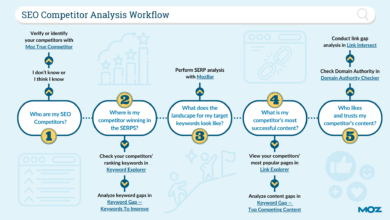
There is a difference between your business competitors and your SERP competitors. Your business competitor might be the shop down the street, but your SERP competitor might be a massive directory like Yelp or a national publisher like Forbes. Pick 3-5 domains that actually rank where you want to rank. A good rule of thumb: search your top 5 target keywords manually. Who appears in the top 3 results consistently? That is your benchmark. - Map topics to intent and the customer journey
For every gap you identify, assign an intent: Informational (learning), Commercial (comparing), or Transactional (buying). A common mistake is finding a keyword gap like “best payroll software” and writing a “what is payroll software” article. That is an intent mismatch. Map the topic to the journey stage (Awareness → Consideration → Decision) to ensure you aren’t just filling the top of the funnel. - Evaluate quality gaps: media, readability, and expert voice
This is where modern analysis beats old-school keyword lists. Look at the winning content. Does it have custom graphics? A video walkthrough? A calculator? Is the readability score simple (Grade 8) or academic (Grade 12)? In the first 30 seconds of looking at a competitor’s page, I ask: “Do they have something I can’t easily copy?” If they have expert quotes and I don’t, that is a quality gap. - Apply on-page SEO fixes while you’re already in the sheet
As you review your existing pages against competitors, check the basics. Are your title tags truncated? Are your H2s capturing secondary keywords? Do you have internal links pointing to your money pages? I recommend adding a simple “Quick Fixes” column to the template. If a page just needs a better title tag, do it immediately. Don’t wait for a roadmap.
How I populate the template with real data (Ahrefs, Search Console, and automated tracking)

You can populate this template manually, but that is a recipe for burnout. I use a combination of free data from Google and paid tools to speed this up. If you are on a budget, Google Search Console (GSC) is non-negotiable.
From Google Search Console: find “striking distance” pages and query themes
GSC is the source of truth for your own performance. I filter for queries where the average position is between 8 and 20. These are your “striking distance” keywords. You are on Page 2 or the bottom of Page 1. The gap here is usually depth or click-through rate (CTR). I export these queries and map them to the relevant URLs in Tab 1 of my template. Often, closing this gap is as simple as adding a missing FAQ section or clarifying the introduction.
From Ahrefs (or similar): export competitor gaps with smart filters
To see what you are missing completely, tools like Ahrefs are invaluable. I use the “Content Gap” feature: plug in your domain and 3 competitors. But be careful—this will often spit out 10,000 rows. I apply a “beginner filter set”: minimum volume of 100, keyword difficulty (KD) max of 40 (depending on my site’s authority), and I exclude brand terms. I export this list and paste it into a temporary tab in my spreadsheet to curate before moving the best ideas to the “Gap Log.”
Automated tracking: turn one-time research into recurring insights
The market moves fast. A manual export today is old news next month. I’m seeing more teams adopt competitive intelligence platforms (like Panoramata) to automate the detection of new competitor content. These tools can send alerts when a rival publishes a new article or changes a headline. If you can’t afford a dedicated tool, set a calendar reminder to check your top competitor’s blog or sitemap once a month.
Once you have identified these high-potential topics, you need to produce the content efficiently. This is where you might leverage a AI article generator to help create first drafts based on the briefs you develop from your template. It allows you to focus your energy on the strategy and the expert polish, rather than the initial blinking cursor.
Prioritization that makes sense for business: scoring gaps and turning them into a content roadmap
You now have a list of 50 gaps. You have bandwidth for 5. How do you choose? This is where many content strategies die. To solve this, I use a scoring model that balances business impact against production effort.
My simple gap scoring model (with a table you can copy)
I add a “Score” column to my template. I rate opportunities on a scale of 1-3 for three factors:
- Business Value (1-3): Does this tie directly to a service we sell? (3 = Direct tie, 1 = Loose relation).
- Search Volume/Potential (1-3): Is the traffic worth the effort?
- Ease to Rank (1-3): Is the competition low? (3 = Low competition, 1 = dominated by giants).
I sum these up. A score of 9 is a “do it now.” A score of 3 is the backlog. It is directionally correct and prevents analysis paralysis.
Decide the action: create, refresh, consolidate, or expand media
Not every gap requires a new post. In fact, my favorite gap to close is the “Consolidation” gap. If you have three weak posts about “employee onboarding,” consolidate them into one authoritative guide. If you have a post ranking #6 but the top 3 results all have videos, the action isn’t “rewrite text,” it is “Add Media.”
Turn priorities into briefs (so production doesn’t drift)
Once the priorities are set, I move them to the roadmap. Each item needs a clear brief: primary query, user intent, required internal links, and the specific “angle” that will differentiate it. If you are operating at scale, tools like a Bulk article generator can be integrated here to handle the heavy lifting of drafting, provided you have a strong QA gate in place to review the output against your brief.
Example walkthrough: using the content gap analysis template for a (fictional) US business

Let’s look at how this works in practice. Imagine I am the marketing manager for “FrontRange Payroll,” a fictional B2B SaaS company based in Denver.
Snapshot: the starting inventory and what the SERP is rewarding
My inventory shows we have a lot of generic content like “Why Payroll Matters.” However, when I look at the SERPs for “payroll compliance Denver,” I see competitors winning with specific checklists and tax calculators. My generic blog posts are nowhere to be found.
Three gaps → three actions (and why)
Using the template, I identify three specific gaps:
- The Intent Gap: We have a post on “Colorado Tax Laws,” but the intent is transactional—users want a calculator, not a history lesson. Action: Refresh the post to include a simple tax rate table and a link to our demo. Priority: High.
- The Topic Gap: Competitors are ranking for “Denver small business payroll grants.” We have zero content on this. Action: Create a new guide interviewing a local expert. Priority: Medium.
- The Media Gap: Our “How to switch payroll providers” guide is text-only. The #1 result is a video walkthrough. Action: Add a Loom video to our existing page. Priority: Low (but quick).
Common mistakes (and fixes): why content gap analysis templates fail in the real world

I have messed this up plenty of times. The biggest mistake I see (and have made) is treating the spreadsheet as the goal, rather than the content. Here are the most common traps and how to fix them.
Mistake-to-fix checklist (5-8 items)
- Mistake: Skipping the inventory cleanup.
Fix: Spend the first hour deleting or archiving 404s and duplicates. If you build on a messy foundation, your roadmap will send you to the wrong place. - Mistake: Obsessing over high-volume keywords.
Fix: Prioritize by “Business Value” first. A keyword with 50 searches that converts is worth more than a vanity keyword with 5,000 views. - Mistake: Ignoring content decay.
Fix: Add a ‘Last Updated’ column. If a page hasn’t been touched in 12 months, it is a gap by default. - Mistake: Not assigning specific owners.
Fix: If the ‘Owner’ cell is blank, the task doesn’t exist. Assign names, not just departments. - Mistake: Forgetting to review the outcome.
Fix: Schedule a 90-day review. Did the gap close? If not, why? The learning is more valuable than the ranking.
FAQs: what beginners ask about a reusable content gap analysis template

What is a content gap analysis template?
A content gap analysis template is a structured document (usually a spreadsheet) that organizes your current content, compares it against competitors and search intent, and helps you prioritize missing topics or improvements to existing pages. It serves as a roadmap for your content strategy.
What components should a reusable content gap analysis template include?
At a minimum, it should include tabs or sections for your Content Inventory (what you have), Competitor Benchmarks (what they have), Gap Analysis (the difference), Priority Scores, Action Plans (Create/Refresh), and a Review Schedule. Essential columns include URL, Topic Cluster, Intent, and Owner.
How can tools like Ahrefs or Panoramata be integrated?
You can export data from tools like Ahrefs (keywords you rank for vs. competitors) and import them directly into your ‘Gap Log’ tab. Tools like Panoramata can automate the monitoring of competitor changes, which you can add as a monthly ‘New Insights’ import to keep the template fresh without manual checking.
Why is a process-oriented template still valuable?
Even with advanced AI tools, you need a central nervous system for decision-making. A process-oriented template ensures alignment across stakeholders, enforces discipline (dates and owners), and provides a historical record of what was tried and what worked, which is critical for long-term growth.
Conclusion: my reusable content gap analysis template in 3 takeaways + next steps
Building a content gap analysis ecosystem isn’t about creating more work; it’s about ensuring the work you do actually counts. By moving from intuition to a structured evidence-based system, you stop guessing and start dominating.
Here are the three big takeaways:
- Think system, not audit: Make this a recurring quarterly cycle, not a one-time event.
- Look beyond keywords: Assess gaps in media, expert voice, and user intent, not just topics.
- Prioritize ruthlessly: Use a scoring model to focus on the 20% of gaps that drive 80% of the value.
Your next steps for today:
- Create a blank spreadsheet with the columns listed in the “Exact Fields” section above.
- Export your top 50 pages from Google Search Console and paste them into Tab 1.
- Pick your top 3 SERP competitors and run one manual search for your main keyword to see what you are missing.
- Score your top 5 opportunities and assign them to yourself for next week.