Low Competition Keywords: Find “Golden” SEO Wins Fast
Introduction: The Holy Grail of SEO (and why I start with low competition keywords)

I still remember the sinking feeling of refreshing Google Search Console and seeing a flat line. I had spent weeks crafting what I thought were perfect articles targeting high-volume terms like “best running shoes” or “CRM software,” only to be buried on page six behind giants like Amazon and Salesforce.
That’s when I realized I was playing the wrong game.
If you are an intermediate SEO or a business owner, you likely feel this frustration. You are publishing consistently, your content is good, but the traffic isn’t coming. The solution isn’t to write more; it’s to pick battles you can actually win.
This guide isn’t about tricking Google. It is about a disciplined, newsroom-grade workflow for identifying “golden” low competition keywords—terms that legitimate buyers are searching for, but big brands are ignoring. By the end of this article, you will have a repeatable process to find these opportunities, validate them against real SERP data, and publish content that ranks in weeks, not years.
What I mean by “golden” keywords (fast traction, realistic competition)

When I talk about “golden” keywords, I’m not just talking about low volume. I am talking about specificity. A golden keyword is a search term where the user’s intent is crystal clear, but the current results are weak or misaligned.
For example, instead of targeting “plumber” (impossible for a new site), a golden keyword might be “emergency water heater repair cost Portland.” It’s messy, it’s specific, and it practically begs for a click from someone holding a credit card. These are the wins that build momentum.
Low competition keywords explained: definition, long-tail intent, and how KD scores really work

Low competition keywords are typically long-tail keywords—phrases containing three or more words that address a very specific query. While they often have lower search volume individually, they collectively make up the vast majority of search traffic and boast much higher conversion rates.
To identify them, most of us start with Keyword Difficulty (KD). Tools like Semrush or Ahrefs assign a score from 0 to 100 indicating how hard it is to rank. However, I treat KD as a starting point, not a verdict. A low score doesn’t guarantee a win, and a high score doesn’t always mean “impossible.”
Here is how I generally interpret KD bands when scanning for opportunities:
| KD Band (0–100) | What it usually means | What I do next |
|---|---|---|
| 0–14 (Very Easy) | New sites can rank with quality content alone. | Validate the intent and write immediately. |
| 15–29 (Easy) | Some competition, but mostly weak pages or forums. | Check the SERP manually. If I see Reddit or Quora, I go for it. |
| 30–49 (Possible) | Requires decent domain authority or backlinks. | Only target if I have a unique angle or existing topical authority. |
| 50+ (Hard) | Dominated by big brands and high-DR sites. | Skip for now unless it’s a vital pillar page I don’t expect to rank quickly. |
Why low-competition beats high-traffic (especially for newer sites)
Why chase 50 searches a month? Because 50 visitors looking for exactly what you sell is worth more than 5,000 visitors looking for a definition.
I’ve seen this play out repeatedly: a site targeting “marketing automation” gets zero clicks, while a competitor targeting “best marketing automation for small dental clinics” starts generating demo requests in week three. Long-tail keywords align with bottom-of-funnel intent. When you target them, you get faster rankings, quicker feedback loops from Google, and tangible business results—leads and sales—that justify your content investment to stakeholders.
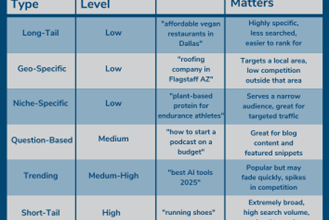
The 3 types of low-competition keywords I look for first
When I scan a list of thousands of keywords, I look for three specific patterns:
- Question-based (Informational): “How to fix a leaking skylight without replacing it.” These often appear in the “People Also Ask” boxes.
- Geo-specific (Local): “Commercial roofers in Austin for warehouses.” Even national brands often neglect these specific local modifiers.
- Problem-Solution (Niche comparison): “Asana vs Trello for video production teams.” General comparisons are competitive; specific use-cases are often wide open.
My “Golden Keyword” workflow for finding low competition keywords (step-by-step)

Finding these keywords shouldn’t be a guessing game. Here is exactly how I’d do it on a Monday morning to build a content calendar that actually performs. This is a system you can hand off to a team member.
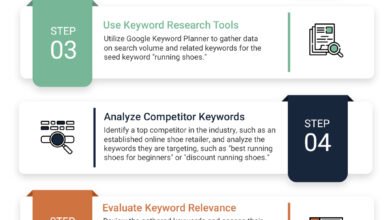
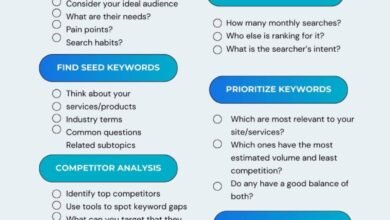
Step 1: Start with a seed topic tied to revenue (not just volume)
I usually start with the pages that would make me money if they ranked. Don’t start with “what’s popular.” Start with what you sell.
Ask yourself these seed prompts:
- What specific service has the highest profit margin? (e.g., “emergency dental surgery”)
- What is the most annoying problem my product solves? (e.g., “convert pdf to excel without losing formatting”)
- Who exactly is my best customer? (e.g., “crm for solo realtors”)
Step 2: Expand into long-tail variations (questions, modifiers, locations)
Take that seed and blow it up. Real user searches are often messy and imperfect—that is a feature, not a bug. I use tools to expand my seed, but you can also use Google’s own data.
Copy/paste these modifiers into your research tool or Google search bar:
- Audience: …for beginners, for small business, for seniors, for students.
- Cost/Price: …price, cost of, is X worth it, cheap, luxury.
- Location: …in [City], near me, [State] laws.
- Comparison: …vs, alternative to, best X for Y.
- Questions: how to, why does, what is the best way to.
Step 3: Filter for “winnable” (KD, intent, and SERP softness)
Now you likely have a messy list of 500+ keywords. It’s time to filter.
My filter recipe is simple: KD < 10 (if you are using Semrush or Ahrefs). If I see a keyword with KD 8, I stop and look. But be careful—don’t let KD talk you into a bad bet. If the KD is 5 but the top three results are government websites (.gov) or massive industry leaders, it’s not actually easy. I call this “SERP softness,” which we will validate manually in a moment.
Step 4: Cluster keywords into a small topical map (so posts support each other)
One of the biggest mistakes beginners make is writing isolated articles. Google ranks topical authority, not just individual pages.
Think of it like organizing files on a computer. If I find a golden keyword like “best running shoes for flat feet,” I shouldn’t just write that one post. I should look for its siblings: “running shoes for flat feet women,” “running shoes for flat feet men,” and “do flat feet need arch support.” I group these into a cluster. When I publish them, I link them all together. This signals to Google that I am an expert on this specific micro-topic.
Step 5: Create a 10-minute content brief (headline, intent, outline, proof points)
Before writing a single word, I create a brief. If I can’t explain the angle in one sentence, I’m not ready to write yet. A brief ensures I don’t drift off-topic.
My 10-minute brief checklist:
- Target Keyword: Primary phrase + 2-3 secondary variations.
- Search Intent: Informational (Blog) or Commercial (Product/Landing Page)?
- Winning Angle: What are competitors missing? (e.g., “They don’t mention 2024 pricing.”)
- Headers (H2/H3): Map out the skeleton.
- Sources/Data: What stats or internal data will prove my point?
How I validate a low-competition keyword before I write: SERP analysis + intent match + business value

I have wasted weeks writing content for keywords that looked easy in a tool, only to realize later that the search results were filled with eCommerce category pages when I wrote a blog post. Tools give you data; SERPs (Search Engine Results Pages) give you reality.
I use a simple rubric to decide if a keyword is truly a “go.”
| Factor | What I look for (The “Green Light”) | Score (0-2) |
|---|---|---|
| Domain Authority | Are there sites with low authority (DA/DR < 30) in the top 10? | 0 (All giants) to 2 (Many small sites) |
| Content Quality | Are the current results thin, outdated, or poorly written? | 0 (Amazing guides) to 2 (Terrible/Short) |
| Intent Match | Can I create the type of page Google wants (e.g., blog vs. product)? | 0 (Mismatch) to 2 (Perfect match) |
| Forum Presence | Are Reddit, Quora, or niche forums ranking in the top 5? | 2 (Yes! This is a huge signal) |
Decision Rule: If the score is 5+, I write it now. If it’s below 3, I skip it.
The 5 SERP signals that tell me a keyword is actually “easy”
If I see two Reddit threads and a generic article from 2018 ranking on page one, my ears perk up. That is a “soft SERP.” Here are the specific signals of softness:
- User Generated Content (UGC): Reddit, Quora, or TripAdvisor ranking high means Google is starving for a structured, expert answer.
- Outdated Content: Titles saying “2021” or “2019.”
- Poor Optimization: Titles that don’t match the keyword, or meta descriptions that are cut off.
- Low Word Count: Thin pages that barely answer the question.
- Mixed Intent: Google is showing a mix of PDFs, videos, and shops because it’s confused. A clear, focused article can win here.
Business-first checks: conversion intent, CTA, and what page should rank
Before committing, I do one final check: If this ranks, will it drive business? If a query includes “free,” “template,” or “definition,” the conversion rate will likely be low. If it includes “best,” “cost,” “reviews,” or “services,” the intent is commercial.
I also map the query to the page type. If the SERP shows 10 product pages, do not write a blog post. You will not outrank Amazon’s product page with a “What is…” article. You need a collection or product page. Match the format to the user’s expectation.
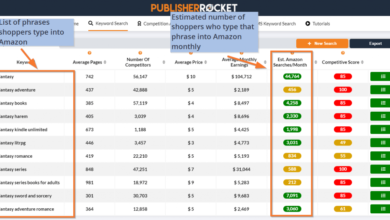
Tools that help me find golden keywords efficiently (and what each is best at)

You can do this manually, but tools save time. I have used almost everything on the market. If I only had one paid tool, I’d probably stick to Ahrefs or Semrush, but there are excellent specialized tools for beginners.
| Tool | Best For | My Beginner Tip |
|---|---|---|
| Semrush / Ahrefs | Deep analysis, KD scores, competitor spying. | Use the “Include” filter to find question words (who, what, cost). |
| LowFruits | Finding weak spots in SERPs automatically. | Use it to bulk-analyze SERPs for UGC (Reddit) presence. |
| AlsoAsked | Visualizing “People Also Ask” relationships. | Great for outlining your sub-headers (H2s and H3s). |
| Google Trends | Spotting rising topics before tools have data. | Compare two terms to see which is growing vs. dying. |
Once you have validated your keyword and know exactly what is required to win, you need to produce the content. This is where workflows often break down. I use an AI article generator like Kalema only after I have done this validation steps. I feed the validated intent and brief into the tool to ensure the output is structured, comprehensive, and not just generic fluff.
My beginner-friendly stack (free-first, then paid)
- The “I have $0” Stack: Google Auto-suggest (typing in the search bar), Google Trends, and the “People Also Ask” box. You can get very far with just these and a spreadsheet.
- The “I have budget” Stack: Ahrefs/Semrush for the heavy data, plus LowFruits to quickly spot easy wins in bulk. This speeds up the process significantly.
How I use Google Trends to catch rising low-competition topics early
Tools like Ahrefs look at historical data (what happened last month). Google Trends shows you what is happening now. I have a tiny habit: I spend 10 minutes every Friday checking my main topics in Trends.
I filter for the past 7 days or 30 days. If I see a “breakout” related query, I know that competition is likely zero because the keyword is too new for most SEO tools to even register a KD score. These are the easiest wins on the internet—if you can move fast.
Where low-competition keyword opportunities hide in the US: industries, ratios, and emerging trend categories
Not all industries are created equal. If you are in Finance or SaaS, you are fighting a war against giants with massive budgets. If you are in Local Services, the field is wide open.
Here is a snapshot of the landscape based on recent industry analysis data (directional):
| Industry | Difficulty Ratio (Easy:Hard) | Opportunity Level |
|---|---|---|
| Local Services | ~93:1 | High. Most local businesses have terrible SEO. |
| E-Commerce | ~48% Low Difficulty | Medium-High. Niche products are very winnable. |
| Health & Wellness | ~44% Low Difficulty | Medium. Requires high trust (E-E-A-T), but long-tail is open. |
| SaaS / Tech | ~29% Low Difficulty | Low. Crowded. Requires ultra-specific comparison angles. |
| Finance | ~18% Low Difficulty | Very Low. Brutal competition. Go hyper-local or niche. |
Industry snapshot: what’s easier vs. what’s brutally competitive
If you are in Local Services (plumbing, landscaping, legal), you have a massive advantage. You aren’t competing with Wikipedia; you’re competing with “Bob’s Plumbing” down the street who hasn’t updated his site since 2015.
In hard niches like Finance, you can’t just write “best credit cards.” You have to go narrower: “best credit cards for dental students with bad credit.” Hard niches aren’t impossible; they just demand much tighter angles.
Emerging trend buckets I watch for new keyword demand
These are the buckets I keep on my radar when I want early-mover advantage. The search volume might look low now, but the trend line is pointing up:
- Eco-Sustainability: Queries like “carbon footprint calculator for small business” or “biodegradable packaging suppliers USA.”
- Privacy Tech: Specific questions about data security, “de-googling” phones, or private cloud storage.
- Hyper-Personalized Health: “AI kitchen planner for diabetics” or “wearable sleep tracker for apnea.”
- AR/VR Implementation: Practical B2B uses, like “VR training for welders.”
Publishing to win fast: on-page SEO, internal links, snippets, and quality control (without cutting corners)

You found the keyword. You validated it. Now you have to execute. The goal is to be the best answer on the internet for that specific question. This doesn’t mean the longest answer—it means the most useful one.
When I am ready to scale this up, I use an SEO content generator to handle the heavy lifting of drafting, ensuring I hit every structural requirement without staring at a blank cursor. But even with tools, quality control is on me.
My on-page SEO checklist for low-competition keywords
Before I hit publish, I run through this list. If I wouldn’t bookmark the article myself, I won’t publish it.
- Title Tag & H1: Does it include the primary keyword naturally?
- First 100 Words: Do I answer the user’s core question immediately? (Don’t bury the lead).
- Headings (H2/H3): Are they descriptive and do they cover the sub-topics found in “People Also Ask”?
- Featured Snippet Block: Do I have a concise 40-60 word definition or list near the top that Google can snatch for position zero?
- Internal Links: Did I link to at least 3 other relevant posts on my site?
- Sources: Did I link to external credible sources for any data claims?
Using a smart AI SEO tool can automate checking these boxes, ensuring you never miss an H2 optimization or a meta description, which is critical when you are trying to move fast.
Fast indexing (the safe way): discovery signals and interlinking
Publishing is only half the battle; indexing is the other. Google can’t rank what it hasn’t indexed. Indexing isn’t always instant, but you can remove friction.
To speed this up safely, I immediately inspect the new URL in Google Search Console. More importantly, I find an older, authoritative post on my site that Google already crawls frequently and add a link from there to my new article. This “piggyback” strategy is the most reliable way to get discovered quickly without using spammy indexing services.
Common mistakes beginners make with low competition keywords (plus FAQs and next steps)

I’ve made plenty of mistakes in this process. The most common one? Getting greedy. I would see a juicy keyword, ignore the fact that the SERP was dominated by Amazon and Best Buy, and write the article anyway. It never ranked.
Mistakes & fixes (the ones I see most often)
- Trusting KD Blindly: Fix: Always look at the SERP manually. If the top 3 are giants, skip it.
- Mismatching Intent: Fix: Don’t write a blog post if the user wants a product page. Check the current results first.
- Ignoring Internal Links: Fix: Never publish an “orphan” page. Always link it to and from other content.
- Targeting Too Broad: Fix: Niche down. Add a location, a persona (e.g., “for students”), or a specific problem.
- Cutting Quality for Speed: Fix: One great article beats ten mediocre ones. Use automation for structure, not to replace insight.
FAQs about finding golden keywords fast
Is it better to target low competition or high traffic?
For new and intermediate sites, low competition is better. It builds authority and brings traffic sooner. High traffic terms are useless if you rank on page 50.
Which tool is best for finding these keywords?
Semrush and Ahrefs are the industry standards. For a budget-friendly option specific to low-competition, LowFruits is excellent. Google Trends is free and essential for new topics.
How long does it take to rank for a low competition keyword?
It varies, but for a truly low-competition term with good content, I often see impressions within days and first-page rankings within 2–4 weeks on an established domain.
My 7-day action plan (beginner-friendly)
If I were starting from zero today, here is exactly what I would do this week:
- Day 1: Pick one seed topic related to a high-margin service. Generate 30 long-tail variations using Google Auto-suggest.
- Day 2: Filter the list. Check SERPs manually. Keep only the 5 keywords with the “softest” competition (forums, old posts).
- Day 3: Group them. Decide which ones can be one article and which need their own page.
- Day 4: Write briefs for the top 2 opportunities. Define the angle and headers.
- Day 5: Draft and edit the first article. Focus on answering the question better than anyone else.
- Day 6: Publish, optimize metadata, and add internal links from existing pages.
- Day 7: Inspect in Search Console and share on social media.
Once you have this process nailed down, you can look into an Automated blog generator to help you execute this weekly workflow at scale, keeping your site fresh without burning out.