Amazon keyword optimization: Strategic keyword placement for higher product visibility

I’ve audited listings where the product was objectively strong—great reviews, competitive pricing, high-quality images—yet impressions were flatlining. The seller usually assumes they have a “traffic problem.” But when I look under the hood, I often find they have an indexing problem. The listing doesn’t clearly signal to Amazon what the product actually is.
Many sellers try to fix this by stuffing every high-volume keyword they can find into the title. The result? A listing that looks like spam to humans and confuses the algorithm. In 2026, Amazon keyword optimization isn’t about how many keywords you can force into a listing; it is about where you place them to balance visibility with conversion.
This guide isn’t about theoretical algorithm hacking. It is a practical, field-tested framework for placing keywords where they belong—from the title to the backend—so you can fix low impressions and build a predictable organic traffic engine.
Who this guide is for (and what success looks like)
If you are a brand owner or marketplace manager comfortably using Seller Central but struggling to make organic traffic consistent, you are in the right place. You aren’t looking for definitions of “ASIN”; you want to know why your competitor ranks for a term you don’t.
Success here isn’t just “ranking #1.” It is measurable indexing coverage (showing up), improved Click-Through Rate (CTR) because your title is readable, and higher conversion rates because your copy handles objections rather than just listing keywords.
Quick answer: What is Amazon keyword optimization?
Amazon keyword optimization is the process of researching, selecting, and strategically placing relevant shopper search terms across specific listing fields (title, bullets, backend) to maximize indexing visibility. Crucially, it involves balancing textual relevance with readability, as Amazon’s algorithm weighs conversion rate and sales performance just as heavily as keyword matches.
How Amazon SEO works in 2026: relevance signals + conversion rate + sales velocity

If you treat Amazon like Google, you will lose. Google tries to answer questions; Amazon tries to sell products. The search engine (often referred to as A9 or the A10 update) is a matching engine designed to maximize revenue per search query.
When I audit a listing, I look for three specific signals that the algorithm prioritizes:
- Textual Relevance: Does the product content contain the keywords the shopper typed? If not, you usually won’t be indexed.
- Conversion Rate: When shoppers see your listing for that keyword, do they buy? Amazon rewards listings that turn traffic into revenue.
- Sales Velocity: How many units have you moved recently compared to competitors on Page 1?
The catch is that textual relevance is just the entry ticket. You can have perfect keywords, but if your title is a mess of jammed phrases that scares off buyers, your conversion rate drops, and Amazon downgrades your rank. Industry data consistently suggests that sales performance remains the dominant ranking factor, but text gets you to the table.
Indexing vs ranking (the distinction beginners miss)
This is the most common confusion I see. Indexing means you are in the database—Amazon knows you sell a “stainless steel water bottle.” Ranking means you appear on Page 1 when someone searches for it.
You can be indexed for a term but rank on Page 50. Keyword placement primarily solves the indexing problem. Conversion and sales velocity solve the ranking problem. You need both to win.
Why strategic keyword placement beats keyword stuffing
Stuffing keywords into a title looks like desperation. Shoppers scroll past confusing, spammy titles because they are hard to read. When shoppers skip your listing, your Click-Through Rate (CTR) tanks. When CTR tanks, Amazon assumes your product isn’t relevant, and your visibility drops. Strategic placement puts the heavy hitters in the title and the long-tail support terms in the bullets and backend, keeping the customer experience clean.
Keyword research for Amazon keyword optimization: from shopper language to a keyword map

Before writing a single word of copy, I build a “keyword map.” This prevents the common issue of analysis paralysis, where you have a list of 500 keywords and no idea which ones actually matter. My approach relies heavily on data-driven selection using Amazon’s own reports.
Start with seed terms: product type, material, size, use case, and buyer intent
I start simple. I write down the non-negotiable attributes of the product. If I’m selling a silicone spatula, my seeds are:
- Product Type: Spatula, turner, scraper.
- Material: Silicone, heat-resistant, rubber.
- Use Case: Baking, mixing, non-stick cookware.
- Audience: Bakers, home cooks.
Use Amazon Search Term Reports to find what shoppers actually typed
Tools are great, but your own data is better. If you are running PPC (Sponsored Products), download your Search Term Report. Look for terms with high conversion rates, not just high impressions.
I often find that a term with huge volume has a terrible conversion rate because the intent is research, not purchase. Conversely, a lower-volume term might generate consistent orders. Those “buyer terms” are the ones I prioritize for the title.
Competitor ASIN mining (ethical, buyer-focused)
I scan the top 5 competitors on Page 1. I’m not looking to copy their marketing claims; I’m looking for patterns in how they structure their titles. Do they all mention “BPA-Free” in the first 50 characters? Do they all call it a “turner” instead of a “spatula”? This tells me what the market expects. I verify these patterns but never copy their IP.
Build a keyword map: primary, secondary, long-tail, and “supporting” terms
If you only do one thing from this section, build this map before you rewrite anything. It stops you from repeating the same word 20 times.
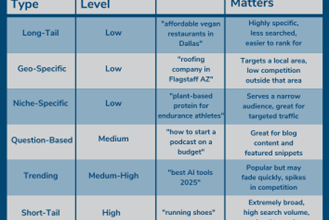
- Primary Keywords: The 1–2 highest volume roots (e.g., “Silicone Spatula”). Destination: Title.
- Secondary Keywords: High relevance, medium volume (e.g., “Heat resistant spatula for cooking”). Destination: Bullets.
- Long-tail / Supporting: Very specific questions or synonyms (e.g., “dishwasher safe baking utensil”). Destination: Description/Backend.
Strategic keyword placement across your listing (title, bullets, description, and voice-friendly phrasing)

Once you have your map, you need to assign the terms. The goal is to maximize indexing coverage without hurting the human reading experience. Here is the framework I use for every listing audit.
Titles: use 1–2 primary terms up front (without killing readability)
I read titles out loud. If I stumble or run out of breath, I know a shopper will skip it. The rule of thumb is simple: Place your 1–2 primary keywords within the first 80 characters. This ensures they are visible on mobile devices.
A strong title formula:
[Brand] + [Core Keyword / Product Type] + [Key Differentiator/Material] + [Size/Count] + [Primary Use Case]
Bullet points: win the click-to-purchase moment while covering long-tail terms
Bullets are for selling, but they are also excellent for secondary keywords. I structure them to handle objections. Instead of just writing “Heat resistant,” I write “Heat resistant up to 600°F so you can mix directly in hot pans without melting.” The phrase “mix directly in hot pans” likely contains long-tail keywords I found in my research.
Description (and A+ content): natural language, questions, and voice-search alignment
The product description (or A+ Content) is where you can be more conversational. This is the perfect place for natural language queries that are rising due to voice search. Phrases like “is this spatula safe for non-stick pans?” can be woven into a FAQ section or a usage narrative.
Table: field-by-field keyword placement checklist (what to put where)
| Field | Primary Keyword? | Long-tail? | What to write for humans | Common Mistake |
|---|---|---|---|---|
| Title | YES (First 80 chars) | No | Clear identification of what the item is. | Stuffing synonyms (“Spatula, Turner, Flipper, Scraper”) |
| Bullet Points | No (unless natural) | YES | Benefits, objection handling, specs. | Repeating the title keywords in every bullet start. |
| Description / A+ | No | YES | Brand story, usage scenarios, FAQs. | Giant blocks of text nobody reads. |
| Backend Terms | No | YES | Synonyms, misspellings, Spanish variants. | Repeating words already in the Title. |
Mini example: before/after keyword placement for one US-friendly product
Let’s look at a Garlic Press. Here is a realistic edit I might make.
Before (Stuffed):
Stainless Steel Garlic Press Rocker Crusher Mincer Chopper, Garlic Presser for Kitchen, Ginger Crusher, Easy Clean, Dishwasher Safe, Garlic Mincing Tool Professional Chef Grade Best Garlic Press
Why it fails: It reads like a robot wrote it. It repeats “Garlic” 4 times and “Crusher” twice. It’s hard to scan.
After (Optimized):
ChefMaster Stainless Steel Garlic Press & Rocker – Professional Grade Ginger Mincer with Ergonomic Handle – Dishwasher Safe & Rust-Proof Kitchen Tool
Why it works: The primary term “Garlic Press” is early. Secondary terms like “Ginger Mincer” are present but natural. It reads like a premium product. I removed “Best” and “Chopper” because they added clutter without adding value—I moved “Chopper” to the backend.
Backend search terms: the most underused lever in Amazon keyword optimization

I treat backend search terms like a “junk drawer”—but a highly organized one. This is a controlled space for synonyms and variations that you couldn’t fit naturally into the customer-facing text.
Data indicates that products ranking on Page 1 typically utilize a significant portion of their backend character limit (often 249 bytes). Optimizing these can lead to a measurable lift in impressions because you are suddenly indexing for 20-30 new variations.
What to include: synonyms, alternate names, misspellings, and relevant variants
- Synonyms: If you sell a “sofa,” put “couch,” “settee,” and “loveseat” here.
- Misspellings: Common typos of your main keyword (e.g., “vacum” for “vacuum”).
- Language Variants: Spanish terms relevant to the US market (e.g., “para cocina”).
- Abbreviations: Common industry shorthand (e.g., “ss” for stainless steel).
Reuse rules: don’t copy-paste the same keyword into every field
Here is the simple rule I follow: If it is in the Title, do not put it in the Backend. Amazon’s algorithm is smart enough to know that if you said “Garlic Press” in the title, you don’t need to say it again in the hidden terms. It’s a waste of precious bytes. Use the backend strictly for unique words that appear nowhere else.
Expected impact and realistic benchmarks (with caveats)
I’ve seen bigger lifts and smaller lifts—product-market fit still matters. However, simply filling out empty backend terms with relevant synonyms often yields a 6–10% lift in search impressions within 30 days. Why? Because you are casting a wider net. You aren’t necessarily ranking higher for the main term yet, but you are showing up for 50 other terms you were previously invisible for.
My Amazon keyword optimization workflow (step-by-step checklist you can reuse)

If you are handing this off to a teammate, this is the checklist I would want them to follow. It ensures discipline and prevents random changes that break listings.
Step 1: Pick one primary keyword per ASIN (the “root term”)
Don’t try to be everything. Pick the single phrase that best describes the item. If I can’t say “I’m selling a [Keyword]” and have it be 100% accurate, it’s the wrong primary keyword. This anchors your title.
Step 2: Map secondary and long-tail terms to specific fields
Open a spreadsheet. Column A: Keyword. Column B: Destination (Title, Bullet 1, Bullet 2, Backend). Map them out first. This reduces the urge to stuff everything into the top of the listing.
Step 3: Rewrite for shoppers first (clarity → trust → conversion)
Write your copy for a human. Use the mapped keywords as ingredients, but don’t let them overpower the flavor of the text. Scan it on mobile; if it is a wall of text, cut it down.
Step 4: Add backend search terms last (maximize unique coverage)
Once the visible copy is done, check your map for unused words. Put those unique leftovers into the backend search terms field.
Step 5: QA checklist before publishing (compliance + measurement)
- Read title out loud (smoothness check).
- Check against Amazon Style Guide (no all-caps, no emojis).
- Ensure no trademarked terms from competitors are used.
- Record the current “Sessions” and “Impressions” count so you have a baseline.
Scaling note: when I use an AI SEO tool to speed up drafts (without losing quality)
Writing listings for 50 SKUs is exhausting. When I need to move fast, I don’t start from a blank page. I use an AI SEO tool to generate the initial drafts based on my keyword map. A good SEO content generator can instantly provide variations for titles and bullets that integrate specific keywords naturally. However, I always manually review the output for tone and accuracy. Using an AI content writer acts as a force multiplier—getting me 80% of the way there so I can spend my time on the final strategic polish.
Measure results and update cadence (so keyword optimization compounds over time)

Optimization is not a “set it and forget it” task. However, you also shouldn’t tinker daily. I recommend a monthly review cycle. This gives Amazon’s algorithm enough time to re-index your product and collect data.
What to watch: impressions, CTR, conversion rate, and term-level orders
When I update keywords, I look for specific correlations:
- Impressions go up: My new backend/long-tail keywords are working; I’m visible in more places.
- CTR goes up: My new title is more readable and relevant to the search.
- Conversion Rate goes up: My bullets are doing a better job of selling the benefits.
How often should I update my keywords? (a practical routine)
I check reports every 2 weeks, but I only make changes every 4–6 weeks. Realistically, unless you have high volume, you need a month of data to distinguish a trend from a fluke. Seasonality is the exception—if Christmas is coming, update your keywords in October.
Table: simple monitoring plan (metric → source → frequency → what I change)
| Metric | Source | Check Frequency | Action if Low |
|---|---|---|---|
| Impressions | Business Reports | Monthly | Expand backend keywords; check indexing. |
| CTR | Search Term Report | Monthly | Simplify Title; improve Main Image. |
| Conversion % | Business Reports | Monthly | Rewrite Bullets/A+ for better benefits. |
Common Amazon keyword optimization mistakes (and how I fix them)
I see the same errors repeated by sellers of all sizes. Here is how to spot them and fix them quickly.
Mistake #1: Stuffing the title until it’s unreadable
If your title looks like a comma-separated list of synonyms, you are hurting your click-through rate. Fix: Limit yourself to 1–2 primary phrases. If it feels cluttered, cut the least important modifier.
Mistake #2: Reusing the exact same keyword in every field
Repeating “Garlic Press” in the title, bullets, description, and backend is a waste of space. Fix: Use the backend purely for words that do not appear on the front end.
Mistake #3: Ignoring long-tail and voice-style queries
Shoppers are asking specific questions like “garlic press easy to clean.” Fix: weave these phrases naturally into your bullet points or A+ Q&A sections.
Mistake #4: Leaving backend search terms blank (or wasting them)
Empty backend fields are money left on the table. Fix: Run a reverse ASIN search on competitors to find synonyms you missed and fill the field.
Mistake #5: Chasing high volume over high conversion intent
Traffic you can’t convert is expensive—even organically. Ranking for “Kitchen Tool” is useless if you sell a garlic press. Fix: Narrow your focus to keywords where you have a competitive advantage.
Mistake #6: Changing too many variables at once (can’t tell what worked)
If you change your price, main image, and keywords on the same day, you won’t know what caused the sales spike (or drop). Fix: Keep a simple changelog. Change one major element at a time.
Mistake #7: Violating category style guides or policy language
Amazon suppresses listings that use banned words (like “Best Seller” or “Antibacterial” in some categories). Fix: Always check the Style Guide for your specific category in Seller Central.
FAQs + recap: Strategic keyword placement checklist for higher visibility
FAQ: How many keywords should I include in my title?
Stick to 1 or 2 primary keyword phrases. Place the most critical one at the very start. The goal is clarity for the shopper first, algorithm second.
FAQ: Where should I place long-tail keywords?
Place them where they fit contextually—usually in the bullet points (as benefits) or the product description (as use cases). If they are awkward to read, move them to the backend.
FAQ: Can I reuse the same keyword in all fields?
You shouldn’t. Exact duplication wastes space. If “Stainless Steel” is in your title, you don’t need it in your backend. Use that space for “Rust proof” instead.
FAQ: How often should I update my keywords?
Review performance monthly. Only make changes if the data shows a clear opportunity or if market seasonality requires a shift.
3-bullet recap (what to remember)
- Placement over stuffing: Put the right keyword in the right field (Title = Core, Bullets = Benefits, Backend = Synonyms).
- Map before you write: Assign terms to specific fields to ensure coverage without redundancy.
- Measure sales, not just rank: Use the Search Term Report to verify that your keywords are actually driving orders.
Next actions (3–5 steps) to implement this week
If you are ready to fix your traffic, here is your plan for the week:
- Download your Search Term Report and identify your top 3 converting terms.
- Audit your title: Does it contain your #1 term in the first 80 characters?
- Fill your backend search terms with unique synonyms and misspellings (check your competitors).
- Use an AI article generator or similar tool to help brainstorm natural phrasing for your description if you get stuck.
- Set a calendar reminder for 30 days from now to review the results.