ROI of SEO audit: Why a yearly audit saves your SEO budget (and what I’ll cover)
I know the feeling well. You’re looking at your monthly marketing P&L, seeing line items for content creation, link building, or agency retainers, and then looking at your traffic graph. If that line is flat—or worse, declining—you start asking the scary question: “I’m spending thousands on SEO, but where is the return?”
This is usually where budget cuts happen. But often, the problem isn’t that SEO “doesn’t work.” It’s that you’re pouring fuel (content and links) into a leaking engine (technical debt, outdated intent, or poor conversion paths). This is why I treat the annual SEO audit not as a technical chore, but as a budget protection mechanism. It’s the cheapest way to find a $5,000 mistake before it becomes a $50,000 problem.
In this guide, I’m skipping the generic advice. I’m going to walk you through a practical framework to measure the ROI of SEO audit efforts. We’ll look at what a yearly review must cover, how to calculate the return on investment using a simple formula, what realistic costs look like in the US market, and the specific mistakes that kill ROI. If you want to stop guessing and start proving value, this is for you.
Who this is for (and what I mean by “ROI” in SEO)
If you are the person who has to defend marketing spend in a Monday morning pipeline meeting, this article is written for you. You might be a Marketing Director at a B2B SaaS company, a founder of a growing ecommerce brand, or a growth lead managing a tight budget. You understand the basics—you know what a keyword is and you check Google Analytics 4 (GA4)—but you need a defensible way to justify pausing “new output” to fix “old problems.”
When I talk about ROI here, I’m not just talking about ranking #1. I’m talking about three specific financial outcomes: Incremental Revenue (new leads), Conversion Lift (more revenue from existing traffic), and Cost Avoidance (protecting your current revenue stream from technical failures).
What “ROI of SEO audit” actually means (simple definition + what counts as a return)
Let’s define the ROI of SEO audit in plain English. It is the measurable financial gain you get from identifying and fixing issues that limit your site’s organic performance, divided by the cost of the diagnosis and the fix.
Unlike ongoing SEO work (which is about growth), an audit is about efficiency and risk management. Think of it like a diagnostic on a high-performance car. You audit to ensure the fuel you buy (content/links) actually moves the needle. A successful audit delivers ROI in three distinct buckets:
- Growth Upside: Unlocking rankings for pages that are stuck on page 2 due to poor optimization or internal linking.
- Conversion Lift: Fixing UX issues (like slow load times or broken mobile elements) so the traffic you already have converts at a higher rate.
- Cost Avoidance: This is the silent killer. If a technical error de-indexes your top-performing blog post, you lose revenue every hour it’s down. An audit prevents these losses.
Quick Answer: Why Annual?
You might ask, “Why do I need a yearly check if I check my tools weekly?” The reality is that search behavior changes, Google updates its algorithms thousands of times a year, and—most importantly—your site changes. A plugin update in March can silently break canonical tags in November. Annual audits catch the “drift” that daily monitoring misses.
Annual audit vs. one-off check: what changes in a year (and why it hits ROI)
Most sites I review have at least one silent issue introduced by a redesign, a CMS update, or a well-meaning content edit. Over 12 months, your site accumulates “digital dust.” Maybe your engineering team shipped a new feature that bloated your JavaScript, slowing down mobile performance. Maybe the keywords that drove traffic last year have shifted intent, and users now want video answers instead of long-form text.
If you rely on a one-off audit you did three years ago, you are optimizing for a version of Google that no longer exists. The ROI of SEO audit comes from realigning your site with today’s reality—fixing the drift before it starts eating into your margins.
What a yearly SEO audit should cover (the checklist that protects ROI)

To ensure you aren’t just getting a generic PDF of “best practices,” your audit needs to be specific. I use a checklist that correlates directly with revenue impact. If a check doesn’t help you rank better, convert better, or avoid a penalty, I usually skip it.
Here is the framework I use to ensure comprehensive coverage:
| Audit Area | What I Check | ROI Impact (Business Value) |
|---|---|---|
| Technical Health | Crawlability, Indexation, Core Web Vitals, HTTPS | Foundation: If Google can’t crawl it, you can’t sell it. Ensures budget isn’t wasted on invisible pages. |
| Content & Intent | Keyword alignment, Cannibalization, Decay, E-E-A-T | Relevance: Stops you from creating content nobody wants. Focuses spend on high-intent queries. |
| On-Page & UX | Titles, Meta, Schema, Internal Links, Mobile UI | CTR & Engagement: Gets more clicks from existing rankings and keeps users on site longer. |
| Conversion | Call-to-Action placement, Form friction, Page speed | Revenue: Directly improves the conversion rate (CVR) of organic traffic. |
Research suggests that regular audits correlate with substantial gains—some sources cite a 61% average increase in organic traffic and up to a 50% reduction in bounce rates . But remember, these numbers only happen if you actually implement the fixes.
Technical health: crawlability, indexation, Core Web Vitals, mobile, security

This is the plumbing. It’s not sexy, but if it leaks, the house is ruined. I always start here because technical issues are “blockers”—they prevent performance regardless of how good your content is. I look for:
- Crawl Budget Waste: Are we asking Google to crawl thousands of useless parameter URLs (e.g., faceted navigation) instead of our money pages?
- Index Bloat: Are staging pages or low-quality tags indexed?
- Core Web Vitals: Specifically LCP (loading speed) and CLS (visual stability). Poor scores here can kill conversion rates instantly.
Think of crawl budget like a delivery route. If you send the driver down 50 dead-end streets, they’ll run out of gas before delivering your most important packages.
Content & intent: freshness, cannibalization, and aligning with what searchers want now

This is where I see the most wasted budget. You might have five different blog posts all trying to rank for “best CRM software,” which means none of them rank well because they are cannibalizing each other. An audit identifies these conflicts so you can consolidate them into one authoritative asset.
I also look for “content decay”—posts that used to drive traffic but have slowly slipped. Refreshing these is often 5x cheaper than writing something new. If you need to scale this process, you can use an AI article generator to speed up the drafting of updates, but always apply human editorial review to ensure the nuance and intent are perfect.
On-page SEO + internal linking: titles, meta, headings, schema, and navigation

Small tweaks here lead to fast ROI. I recommend reviewing your top 10 traffic pages first. Are the title tags still optimized for the current year? Is the meta description enticing clicks? Are you using Schema markup (like FAQ or Product schema) to take up more real estate in the SERPs?
Internal linking is another massive opportunity. I often find that a site’s most profitable service page is orphaned—meaning almost no other pages link to it. Adding 5–10 relevant internal links from high-authority blog posts can sometimes move that page to Page 1 within weeks.
Backlinks & risk: quality, relevance, and what “toxic” really means
I don’t believe in panic-based link audits. Most sites don’t need a massive disavow file. However, you need to check for risks. Has a negative SEO attack pointed thousands of spam links to your homepage? Have you lost significant links from high-authority sites that need to be reclaimed?
The goal here isn’t to obsess over every low-quality directory link, but to ensure your overall profile looks natural and healthy to Google. It’s risk management, pure and simple.
How I calculate the ROI of SEO audit (a step-by-step framework you can reuse yearly)

This is the part most marketers skip, but it’s the only part your CFO cares about. To prove the ROI of SEO audit, you need a model. It doesn’t have to be perfect; it just needs to be logical and conservative.
The formula I use is:
(Estimated Value of Traffic/Revenue Preserved + Estimated Value of New Traffic) – Cost of Audit = Net Return
Here is my step-by-step workflow to get the numbers to fill that formula.
Step 1: Set a baseline (rankings, traffic, leads, revenue, and engagement)
You cannot measure improvement if you don’t know where you started. Before touching a single line of code, I export a “Baseline Snapshot.” I save these in a simple folder so I’m not hunting for them later. You need:
- Organic Sessions (Last 12 Months): From GA4.
- Organic Conversion Rate: For your primary goals (leads or sales).
- Top 20 Landing Pages: By traffic and revenue.
- Keyword Rankings: Especially keywords in positions 4–10 (striking distance).
Having this data allows you to say, “We improved session duration by 20% post-audit,” which is a solid leading indicator of user satisfaction.
Step 2: Translate findings into a prioritized backlog (Impact × Effort × Risk)
This is where the magic happens. An audit tool might give you 500 warnings. If you send 500 tickets to your developer, they will ignore you. You must prioritize.
I use a simple scoring grid: Impact (1–5) vs. Effort (1–5).
I always start with High Impact / Low Effort tasks. These are your “Quick Wins.”
For example, fixing a broken title tag on a high-traffic page is a 5/5 Impact and 1/5 Effort. Do that today. Rewriting your entire site architecture is High Impact but High Effort—schedule that for Q3.
Human Note: Sometimes tools flag things like “missing alt text” as a high-priority error. If that image is a decorative background element, I deprioritize it immediately. Don’t be a robot; use your judgment.
Step 3: Implement fixes in ROI order (technical blockers → content wins → authority)
Sequence matters. There is no point in building new links to a page that Google can’t crawl. My implementation hierarchy is always:
- Technical Blockers: Fix noindex tags, robots.txt errors, and broken redirects first.
- Content Updates: Refresh decaying content and consolidate cannibalized pages.
- Conversion Elements: Improve CTAs and page speed on money pages.
- Authority/Expansion: Only after the above are done do I focus on new content.
If you are struggling with resources, you can use an AI SEO tool to help identify content gaps or generate structured data, but ensure you have a human verify the implementation to keep quality high.
Step 4: Measure ROI (what to look at after 30/60/90 days)
SEO is not instant, but audit fixes often show results faster than new content. I report in three stages:
- 30 Days (Leading Indicators): Crawl stats improve, errors drop in Search Console, impressions increase.
- 60 Days (Traffic Indicators): Rankings for existing keywords move up; organic sessions stabilize or grow.
- 90 Days (Lagging Indicators): Revenue and conversions increase.
Reporting Template:
“We fixed X (Issue). We expected Y (Result). We saw Z (Outcome).”
Be honest about attribution. If seasonality is a factor (e.g., you’re an e-commerce site in November), acknowledge it. Better to be conservative and trusted than hype-driven and doubted.
What a yearly SEO audit costs in the US (and how it saves budget through smarter spend)

Let’s talk money. In the US market, SEO audit pricing varies wildly based on site size and complexity. Here are the realistic ranges I see for 2024–2025:
| Business Size | Typical Audit Scope | Price Range (One-off) |
|---|---|---|
| Small Business / Local | Technical check, GMB review, basic on-page | $1,000 – $3,500 |
| Mid-Market (B2B/SaaS) | Full tech, content strategy, competitor gap, CRO | $4,000 – $10,000 |
| Enterprise / Large E-comm | Complex JS rendering, log file analysis, multi-language | $15,000 – $40,000+ |
Where is the savings?
If a $5,000 audit stops you from spending $3,000/month on content that doesn’t rank for six months because of a technical glitch, the audit pays for itself in under two months. That is the definition of ROI.
A simple payback-period estimate (so you can defend the spend)
If you need to get sign-off, try this simple math:
“This audit costs $5,000. If we identify fixes that improve our organic conversion rate from 1.0% to 1.1% on our current traffic, we will generate an extra $2,000 per month. The payback period is 2.5 months. After that, it’s pure profit.”
This approach—using conservative estimates (0.1% lift)—makes the decision a no-brainer for executives.
Benchmarks and examples: what ROI can you realistically expect from annual audits?

While every site is unique, seeing benchmarks helps set expectations. Industries like Real Estate and B2B SaaS often see the highest long-term returns because their customer lifetime value (LTV) is high. Some studies suggest ROI figures ranging from 700% to over 1,000% over a 3-year period for these sectors .
A Real-World Example:
I once audited a lifestyle blog that was seeing traffic flatline. We found three main issues: slow mobile load times (Core Web Vitals), missing schema markup, and a few toxic backlinks. The “fix” took about two weeks of dev and editorial time.
The result? Six months later, organic traffic was up 75%, bounce rate dropped by 20%, and ad revenue increased by 50% . The audit cost was a fraction of the revenue gained.
Where ROI shows up first (traffic, engagement, conversions, or rankings?)
Don’t panic if traffic doesn’t spike on day one. Usually, you see engagement metrics improve first. Users stay longer because the site loads faster or the content matches their intent better. Rankings follow the engagement signals, and traffic/conversions follow the rankings.
Common mistakes that kill the ROI of an SEO audit (and how I avoid them)
I’ve seen companies spend $10,000 on an audit and get $0 in value. This usually happens because of execution failure, not analysis failure. Here are the traps to avoid.
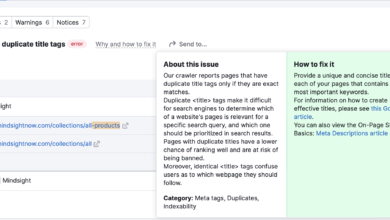
Mistake #1: Treating audit tool scores as the goal (instead of business outcomes)
It is tempting to want that “100/100” score in your SEO tool. But fixing a “low text-to-HTML ratio” warning on a contact page will likely make zero dollars for your business. The mistake I used to make was trying to fix everything. Now, I ignore about 30% of tool warnings because they don’t impact revenue. Don’t chase vanity scores; chase business impact.
Mistake #2: Not connecting fixes to conversion paths (forms, calls, demos, checkout)
You can have all the traffic in the world, but if your “Request a Demo” button is broken on mobile, your ROI is zero. I always include a basic UX review in my audits. Simple fixes—like making a form shorter or adding a trust badge near the checkout button—often provide the quickest cash return of the entire project.
FAQs + recap: turning a yearly audit into a repeatable SEO budget system
FAQ: Why is an annual SEO audit important rather than one-off checks?
The digital landscape is fluid. Competitors launch new content, search intent shifts, and technology evolves. An annual audit is your strategic reset button. It ensures your roadmap is based on the current terrain, not the map from last year.
FAQ: What specific areas should a yearly audit cover?
At a minimum: Technical Health (crawl/index), On-Page SEO, Content Quality/Relevance, User Experience (Core Web Vitals), Backlink Profile, and Competitor Analysis.
FAQ: How does an audit improve ROI?
It improves ROI by stopping waste (cost avoidance) and increasing efficiency (getting more revenue from the same traffic). It allows you to reallocate budget from low-impact activities to high-impact ones.
FAQ: Can I rely solely on automated SEO audit tool scores?
No. Tools are great for data collection but terrible for context. A tool can tell you a page has a short title tag; only a human can tell you if that title tag is perfectly optimized for the brand’s voice. Use tools as inputs, not decision-makers.
FAQ: What ROI can I realistically expect from annual SEO audits?
While variable, many businesses see double-digit percentage growth in organic traffic and conversions within 6–12 months. More importantly, the clarity it provides on where to spend your budget is often invaluable.
Recap (3 bullets) + next actions (3–5 steps)
Let’s wrap this up. If you want to protect your SEO budget and prove its value:
- Stop treating audits as technical chores; view them as financial risk assessments.
- Prioritize based on revenue impact, not tool scores.
- Measure success by the money you save and the new revenue you generate.
Your Next Steps (Start in 10 Minutes):
- Export your baseline: Go to GA4 and Search Console right now and export your last 12 months of data. Save it.
- Run a crawler: Use a tool to get a technical snapshot of your site’s health.
- Triage the list: Cross out the low-impact warnings. Identify the top 5 “money blockers.”
- Schedule the fixes: Put them in your dev sprint or content calendar immediately.
- Operationalize: Use an Automated blog generator to help maintain content freshness consistently once your foundation is fixed.
The best time to audit your site was a year ago. The second best time is today.