The Absolute Beginner’s Guide to Finding Your First 100 Search Terms (keyword research for beginners)

I still remember the anxiety of my first content calendar. I sat there staring at a blinking cursor, paralyzed by the question: “What should I write about next?” I knew I needed traffic, but I didn’t know if I should chase the high-volume terms everyone talks about or write about the specific questions my clients were asking. If you are in that position right now, take a deep breath. You don’t need expensive software or a degree in data science to build a strategy that works.
In this guide, I will walk you through the exact process I use to build a foundational keyword list from scratch. We are going to move beyond the old-school method of obsessing over exact-match phrases and focus on what actually works today: finding keyword research for beginners workflows that prioritize user intent, long-tail opportunities, and realistic ranking goals. By the end of this article, you won’t just have a list of definitions; you will have a spreadsheet with your first 100 actionable search terms.
Search intent + what I’ll help you accomplish in 60 minutes
Let’s be clear about the goal here. We aren’t just looking for random words; we are looking for a plan. If you follow along, within about an hour, you will have:
- A clean, deduplicated spreadsheet of 100 relevant search terms.
- A prioritized shortlist of the first 10 articles you should write.
- A 4-week publishing plan based on actual data, not guesswork.
We are moving from “I think this is a good idea” to “I know people are searching for this, and I know how to answer them.”
What you need before you start (free tools + a spreadsheet)
You don’t need a corporate budget to do this well. Here is the stack I use when I’m bootstrapping a new project:
- A Google Account: Access to Google Sheets, Trends, and Keyword Planner.
- Google Sheets (or Excel): Open a new sheet right now. Name it “Keywords_2024-01” and create a column for “Date Added.”
- Browser Incognito Mode: Essential for unbiased autocomplete research.
- Optional: Access to a social listening tool or just a bookmark folder for Reddit and Quora.
Foundations of keyword research for beginners: seed keywords, long-tail, and intent

Before we start filling cells in a spreadsheet, I need to share how I think about keywords effectively. When I first started, I thought SEO was about repeating a word enough times until Google noticed. Today, that is a guaranteed way to fail. Modern search is semantic—it understands meaning.
The foundation rests on three concepts: seed keywords (your starting point), long-tail keywords (your opportunity), and search intent (your compass). For example, a seed might be “accounting software.” It is too broad to rank for. But a long-tail variation like “best accounting software for freelance designers” is specific, lower competition, and much easier to write for. That is where we will find your first 100 wins.
Quick answer: what counts as your “first 100 search terms” (and what doesn’t)
Beginners often think their first 100 keywords need to be industry-defining head terms. They don’t. Your first 100 terms should be the specific, solvable problems your audience has. Do include comparison queries, “how-to” guides, and specific product questions. Don’t fill your list with single-word terms like “marketing” or “shoes” that you have zero chance of ranking for in your first year.
FAQ: What is a seed keyword, and why is it important?
Think of a seed keyword as the root of a tree. It’s a broad term that defines your niche but isn’t necessarily what you will write an article about. If I run a digital agency, my seeds might be “CRM,” “email marketing,” and “invoicing.” I can’t say “CRM” in a sentence and expect it to mean much, but I use that word to grow branches like “CRM implementation for small business.” Without good seeds, you have nowhere to expand.
FAQ: Why I start with long-tail keywords instead of popular head terms
I focus on long-tail keywords because they are the path of least resistance. A head term like “running shoes” is dominated by giants like Nike and Amazon. A long-tail term like “best cushioned running shoes for bad knees” has less volume, but the person searching for it knows exactly what they want. In my experience, these low competition keywords convert significantly better because the intent is focused.
Intent beats exact match: the modern rule that changes everything
This is the most critical shift in the last decade. Google cares more about why someone is searching than the exact words they use. I always map intent before I write:
- Informational: “How to fix a leaky faucet” (Blog post)
- Commercial Investigation: “Best plumber near me reviews” (Comparison/Listicle)
- Transactional: “Emergency plumber pricing” (Service page)
If you try to rank a service page for an informational query, you will struggle. I learned this the hard way so you don’t have to.
My step-by-step workflow to find your first 100 keywords (mostly free)
Now, let’s get to work. Open your spreadsheet. This is the exact workflow I follow to generate a keyword research workflow that feels comprehensive but manageable. We are going to capture raw ideas first, then refine them.
Step 1: Pull 5–10 seed keywords straight from your business (offers, problems, outcomes)
Don’t overthink this. Look at your homepage or service menu. Ask yourself:
- What product do I sell?
- Who is it for?
- What specific problem does it solve?
- What outcome do my clients want?
If I’m a fitness coach for dads, my seeds aren’t just “fitness.” They are “weight loss for men,” “home workouts,” “dad bod,” and “strength training over 40.” Write these down in a tab called “Seeds.”
Step 2: Expand with Google Autocomplete + People Also Ask (PAA)

This is my favorite step because it relies on real user data. Open an incognito window (so your own history doesn’t skew the results) and start typing your seed keywords.
- Type “weight loss for men ” (with a space) and see what follows.
- Type “weight loss for men vs” to find comparisons.
- Look at the “People Also Ask” box.
I copy these questions verbatim. If Google suggests them, it means people are typing them. These Google autocomplete keywords and People Also Ask questions often become the best H2 headings in your articles.
Step 3: Use Google Keyword Planner + Google Trends to scale ideas (without drowning in data)
Next, I log into Google Keyword Planner. I paste my seed list there to get a sense of volume ranges. I treat volume like a compass, not a ruler—it tells me direction, not exact distance. I filter for terms with “low” or “medium” competition.
Then, I sanity-check interesting terms in Google Trends. Is the term dying out? Is it seasonal? I once planned a huge content cluster around a specific tech tool, only to check Trends and realize interest had plummeted 80% in two years. That 30-second check saved me weeks of writing.
Step 4: Mine Reddit, Quora, and niche forums for authentic user language

Tools are great, but they are sterile. People are messy. I go to Reddit or Quora and search my seed terms. I look for threads with high engagement and read the titles. Users might not search for “ergonomic office chair,” but on Reddit, they ask, “My back hurts from sitting all day, what helps?”
That phrase—”back hurts from sitting all day”—is a goldmine. It’s customer language. I add these natural phrases to my list because they signal high intent. Just remember: use these for inspiration, but don’t copy-paste user stories without permission.
Step 5: Use AI + trend tools to spot terms before they peak (carefully)
Once I have the basics, I look for what’s coming next. I use tools like Exploding Topics or an AI SEO tool to spot rising trends that haven’t saturated the market yet. For example, if I see a new specific diet gaining traction on social media, I can hypothesize that search volume will follow.
However, I have a personal guardrail: if I can’t explain why a trending term matters to my specific audience, I don’t keep it. Chasing a trend just because the line is going up is a distraction. I verify these AI suggestions by searching them manually to see if there is any existing content or if it’s truly a wide-open gap.
Step 6: Dedupe, normalize, and tag your list (so it’s usable later)

By now, your sheet is a mess. That’s good. Now we clean it. I run a quick “Remove Duplicates” in Excel. Then I standardize them—grouping “best CRM for small biz” and “best small business CRM” together because the intent is identical.
This is the unsexy part, but it saves hours later. I add tags for intent (Info/Buy), topic (e.g., “Nutrition”), and format (List/Guide). A clean database is the only way to scale.
Table template: My “First 100 Keywords” capture sheet (columns to use)
Here is the exact layout I use. You can copy these headers into your sheet:
| Keyword Phrase | Source (PAA/Planner/Reddit) | Search Intent | Topic Cluster | Priority Score (1-5) | Target Page Type | Notes (SERP Features) |
|---|---|---|---|---|---|---|
| best accounting software for freelancers | Google Autocomplete | Commercial Investigation | Accounting Tools | 5 | Comparison Blog Post | SERP has snippet + comparison tables |
| how to send an invoice | People Also Ask | Informational | Invoicing | 3 | How-to Guide | Video carousel present |
| freelance tax calculator | Competitor Gap | Transactional | Tools | 4 | Free Tool Landing Page | Calc widget at top of SERP |
Competitor gap analysis (beginner-friendly) to uncover extra opportunities

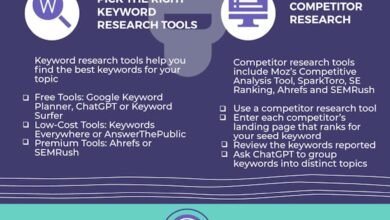
You don’t need to reinvent the wheel. Sometimes the best keyword research is seeing what your neighbors are doing. Competitor keyword research helps you find the “unknown unknowns”—terms you didn’t even know existed.
How I pick the “right” competitors (SERP competitors vs business competitors)
Here is a mistake I see often: a local coffee shop trying to copy Starbucks’ keyword strategy. You need to pick SERP competitors—the sites that are actually ranking where you want to rank. If I’m writing a niche gardening blog, my competitor isn’t Home Depot; it’s the other passionate gardening bloggers on page 1. I pick 3-5 sites that are slightly bigger than mine but still comparable.
Low-cost ways to spot gaps (without fancy tools)
I use a simple Google operator trick. I type site:competitorblog.com "topic". This shows me every article they have written on that topic. I scan their titles. Do they have a “Guide to X” that I missed? Do they have a comparison page I haven’t built? This manual scan usually takes me about 20 minutes and produces 10–30 solid keyword ideas that I know work because they are already working for someone else.
How I prioritize my 100 keywords: volume, difficulty, intent, and SERP reality
You have a list of 100 terms. You can’t write 100 articles this week. We need to prioritize. I don’t just look at search volume; I look at business value.
The 4 signals I use to pick winners (a simple scoring model)
I score each keyword from 1 to 5 based on these four factors:
- Intent Match: How close is this to someone buying or subscribing?
- Competition Ease: Are the current results weak (forums, old posts)?
- Business Value: Does this solve a core problem I address?
- Content Readiness: Can I write this today without needing a subject matter expert?
A keyword with low volume but high business value and easy competition is a priority 1. A high-volume term with vague intent is a priority 5.
Table: Keyword metrics explained (and beginner-friendly thresholds)
| Metric | What it means | Where to find it | Beginner Threshold | Common Trap |
|---|---|---|---|---|
| Search Volume | Avg monthly searches | Keyword Planner | 10 – 1,000 | Ignoring low volume (which converts better) |
| Keyword Difficulty (KD) | Est. competition | SEO Tools | Low / <30 | Assuming low KD means “guaranteed rank” |
| CPC (Cost Per Click) | Advertiser value | Keyword Planner | >$1.00 | Ignoring CPC (high CPC = high value traffic) |
Manual SERP reality check: what I look at before committing to a keyword
Before I commit to writing, I type the keyword into Google. This is my “reality check.” If the top 10 results are all Amazon, Walmart, and Wikipedia, I skip it. I look for featured snippet opportunities, forums on page 1 (a sign of weak content), and local packs. If the SERP is full of video carousels and I don’t do video, I deprioritize it.
Keyword clustering and mapping to a content plan (so your 100 terms turn into pages)

A list of keywords is not a content plan. You need to turn rows in a spreadsheet into actual articles. This process is called content mapping.
What is keyword clustering (and why it saves you from cannibalization)
Keyword clustering is just grouping related terms that can be answered by a single page. If you write one article for “how to bake bread” and another for “baking bread guide,” you are competing with yourself. That is keyword cannibalization. By clustering them, you create one authoritative resource that ranks for both.
Three easy ways I cluster: by intent, by modifier, and by use case
I keep my clustering simple:
- By Intent: All “what is” questions usually go into a glossary or intro guide.
- By Modifier: Terms with “best,” “top,” and “reviews” go into a comparison cluster.
- By Use Case: “For small business,” “for enterprise,” and “for freelancers” might need distinct pages if the answers are totally different.
On-page SEO basics at the mapping stage: title tags, headings, internal links, and FAQ schema
When I map a cluster to a page, I draft the basic on-page elements immediately in the sheet. I decide the primary keyword (the H1) and use the supporting keywords as H2s or H3s. I also note down which other pages I should link to (internal linking). This ensures that when I start writing, the structure is already optimized for SEO.
Optional: drafting faster while keeping quality control (editorial workflow)
Once my clusters are mapped, I need to produce the content. Speed matters, but not at the cost of quality. I often outline the article first, ensuring my headings match the intent I found in the SERP. Then, I might use an AI article generator to help draft the initial sections, which I then heavily edit, fact-check, and humanize. This hybrid approach lets me move faster while still maintaining full editorial control over the strategy and tone.
Table: Cluster → primary keyword → supporting terms → target page → CTA
| Topic Cluster | Primary Keyword | Supporting Keywords (H2s/H3s) | Target Page Title | CTA |
|---|---|---|---|---|
| Email Marketing | email marketing for small business | email marketing tips, best time to send emails, email list building | The Small Business Guide to Email Marketing (2024) | Download Free Email Templates |
Optimize for voice search, featured snippets, and zero-click results (from day one)

The search landscape is changing. With voice search growing and zero-click searches becoming common, we need to format content differently. I want my content to be the answer Google reads out loud.
How I pick question keywords that can win snippets
I look for questions that require a concise, factual answer. Queries starting with “What is,” “How to,” and “Best way to” are prime candidates. I check the SERP to see if a snippet already exists. If the current snippet is vague or outdated, I know I can beat it.
Formatting patterns that work: definitions, steps, comparisons, and FAQs
To win these features, formatting is key:
- Definitions: Provide a clear, 40-60 word answer directly under the heading.
- Steps: Use numbered lists for processes.
- Comparisons: Use HTML tables (like the ones in this article).
- FAQs: Add an FAQ section at the bottom of articles using Schema markup if possible.
Common mistakes I see in keyword research for beginners (and how I fix them)

I have made every mistake in the book. Here are the ones that set me back the most, so you can avoid them.
Mistake: chasing high volume keywords too early
I used to get excited about 10,000 monthly searches. But I never ranked. The fix? Ignore volume initially. Focus on relevance. A keyword with 50 searches that converts 10 people is infinitely better than a keyword with 10,000 searches that gets you zero clicks.
Mistake: writing the wrong page type for the query
I once wrote a 2,000-word guide for a keyword that turned out to be a product page intent. Google wanted to show a shop, not a blog. I didn’t rank. The fix? Always check the SERP. If Google shows products, you need a product page.
Mistake: not tracking what happens after publishing
Keyword research doesn’t end when you hit publish. I treat my rankings as market feedback. I check Google Search Console monthly. If I’m getting impressions for queries I didn’t target, I go back and optimize the article for them.
FAQs + my next steps checklist (so you can apply this today)

You have the strategy. Now you need momentum. Here is a quick recap and your immediate to-do list.
FAQ: How can free tools help me find my first 100 keywords?
Free tools like Google Keyword Planner and Trends are powerful because they come directly from the source. I start with Autocomplete to find natural phrasing, use Planner to check volume ranges, and use Trends to verify seasonality. It is a robust combo that costs nothing.
FAQ: How do social platforms help with keyword discovery?
Social platforms like Reddit give you the “why” behind the search. By reading forum titles, you discover the actual problems people are facing, expressed in their own words. This helps you target high intent keywords that standard tools might classify as “low volume” simply because they are conversational.
FAQ: Should I optimize for voice search and featured snippets from the start?
Yes. Optimizing for snippets forces you to write clearly and structure your content logically, which is good for all readers, not just voice search. It is worth doing early because it positions you to capture visibility even in zero-click scenarios.
3-bullet recap + 3–5 next actions
If you only remember three things:
- Intent matters more than exact wording.
- Long-tail keywords are your best opportunity for quick wins.
- Always manually verify the SERP before writing.
Your Next Steps (do this in the next 60 minutes):
- Open a new spreadsheet and name your columns.
- Brainstorm 5 seed keywords based on your service/product.
- Spend 20 minutes on Google Autocomplete and capture 30 long-tail variations.
- Pick your top 5 keywords based on the “4 Signals” scoring model.
- Start writing the outline for your first article.