Best Open Source SEO Tools: Build a Full Stack on $0
Introduction: A budget-optimized way to pick the best open source SEO tools (for indie devs)

I still remember the first time I decided to “get serious” about SEO for a side project. I immediately bought a $99/month subscription to a popular all-in-one suite. Three months later, I canceled it. I realized I had paid nearly $300 just to stare at a dashboard I didn’t understand, for a site that barely had enough traffic to measure.
That was an expensive lesson in a simple truth: tools don’t fix SEO; workflows do.
If you are an independent developer, a technical founder, or an operating marketer, you don’t need enterprise-grade software to get started. You need a system. In this article, I’m going to show you how to build a modular, budget-optimized SEO stack using the best open source SEO tools available today. We will cover privacy-first audits, self-hosted analytics, and even automation pipelines—all without vendor lock-in. Whether you are bootstrapping a SaaS or optimizing a local service site, this guide is your recipe for a professional SEO setup that scales with you, not against your bank account.
What an “open-source SEO stack” actually includes (and how I evaluate tools)

When I say “stack,” I don’t just mean a list of random GitHub repositories. I mean a cohesive set of utilities that handle the core jobs of search engine optimization: crawling, analyzing, tracking, and reporting. To build this list, I didn’t just look for “free.” I looked for utility and control.
Here is the exact rubric I use to decide if a tool deserves a spot on my server:
- Job-to-be-Done: Does it solve a specific problem (e.g., finding broken links) better than a spreadsheet?
- License & Longevity: Is it truly open source (MIT, GPL) or just “open core” with a paywall? Is the repo active?
- Self-Hosting Effort: Can I deploy it via Docker in 10 minutes, or do I need a DevOps degree to run it? (Self-hosted saves money but costs maintenance time—that’s the tradeoff).
- Data Ownership: Does the data stay on my machine? This is critical for privacy-first projects.
- Integration Surface: Can I get data out via API, Webhooks, or CSV? If data is trapped in the UI, I can’t automate it.
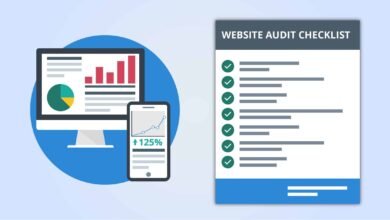
The beginner-friendly tool evaluation checklist (copy/paste)

Before you install anything, run it through this quick filter. I wish I had this five years ago:
- Is it actively maintained? (Last commit < 6 months ago? Score: 1)
- Can I export data easily? (CSV/JSON export available? Score: 1)
- Does it require a third-party API key? (If yes, check the free tier limits. Score: 0 if expensive)
- Is the documentation readable? (If I can’t configure it in 30 mins, it’s a no. Score: 1)
Reality check: what “open source” does (and doesn’t) mean in SEO
I need to be honest here so you don’t get frustrated later. Open source code cannot generate proprietary data out of thin air.
Tools like Google Search Console or Ahrefs have value because they own massive databases of keywords and backlinks. An open-source tool like SERPOSCOPE can track rankings, but it has to fetch them from Google. This means you are still interacting with third-party platforms. You might need a few dollars for proxy services or CAPTCHA solving if you scale up. Open source gives you the engine, but sometimes you still have to buy the gas.
Comparison table: best open source SEO tools by task (audits, analytics, rank tracking, automation)

Here is how the top contenders stack up. I’ve included one non-open-source exception (Screaming Frog) because its free tier is industry-standard for technical auditing.
| Tool | Primary Task | License/Type | Best For | My Honest Limitation |
|---|---|---|---|---|
| SEO Auditor | On-page Audits | Open Source (GPL) | Privacy-first, browser-based checks | It runs client-side, so no historical data logging. |
| Matomo | Analytics | GPL v3 (Self-hosted) | Data ownership & privacy compliance | Setup requires a server/database; steeper learning curve than GA4. |
| SERPOSCOPE | Rank Tracking | MIT | Unlimited keywords, local tracking | UI is dated; scraping Google requires proxies at scale. |
| Screaming Frog | Technical Crawl | Proprietary (Free tier) | Deep technical dives (up to 500 URLs) | Not open source; the 500 URL limit hits faster than you think. |
| RustySEO | Integrated Suite | Open Source | Modular audits + AI insights | Newer tool; documentation is still evolving. |
| n8n | Automation | Fair Code / Source Available | Glueing APIs together | Workflow logic can get complex if you aren’t a developer. |
SEO Auditor (privacy-first audits in your browser)

If I’m just doing a quick sanity check on a page—maybe I’m about to hit publish on a new feature landing page—I use SEO Auditor. It’s a browser extension that runs entirely client-side. This means it doesn’t send your data to some random server, which is a huge plus if you’re working on pre-release content.
What I look for first:
- Missing Meta Descriptions: An easy fix that improves click-through rates.
- Broken Canonical Tags: This kills SEO, and it’s invisible to the naked eye.
- Heading Structure (H1-H6): Is the outline logical, or did I skip from H2 to H5?
I ignore the “keyword density” scores it might give. In modern SEO, natural writing beats math every time.
Matomo (self-hosted analytics for SEO measurement you own)

Analytics is the only way to know if your SEO is actually driving business results. Matomo is the heavyweight champion of self-hosted analytics. It allows you to track campaign attribution and SEO metrics while keeping 100% ownership of the user data.
My default dashboard:
When I set up Matomo, I strip away the noise. I only look at three things: Organic Search Visits, Top Entry Pages, and Goal Conversions (signups or sales). If you stare at too many graphs, you’ll paralyze yourself.
SERPOSCOPE (open-source rank tracking under an MIT license)

SERPOSCOPE is a beast. It’s a standalone java application that you can run on your desktop or a server. Because it’s open source under the MIT license, you can track unlimited keywords without paying a per-keyword fee.
However, be careful. If you try to track 1,000 keywords from your home IP address every hour, Google will block you. My advice: Start small. Track your top 20 “money keywords” and check them once a day. That’s plenty of data for a beginner.
Screaming Frog (popular technical crawler—free tier as a practical exception)

Okay, it’s not open source. But Screaming Frog is so essential that excluding it would be malpractice. The free version allows you to crawl up to 500 URLs, which covers most indie projects, portfolios, and local business sites.
It acts like a search engine bot, crawling your site to find broken links (404s), redirect chains, and oversized images. Experts report that a simple technical clean-up—fixing broken links and redirects—can often lead to a 20-30% traffic increase by helping Google index the site more efficiently.
RustySEO (modular audits + AI-enhanced reporting)

RustySEO is a newer entrant that excites me because it’s modular. It combines site audits with AI-enhanced features like keyword grouping and seasonal trend prediction. It was shown to help a home décor shop predict a 15% uplift in Q4 traffic by identifying holiday keyword spikes.
How I handle the AI part: I treat the predictions as a “weather forecast.” It tells me I might need an umbrella (or a holiday article), but I still look outside (check the actual SERPs) before I commit resources.
n8n (self-hosted automation to connect your SEO pipeline)

n8n is the secret weapon. It’s a workflow automation tool that lets you chain nodes together. Imagine this: Every Monday at 9 AM, fetch my top 5 keywords from Search Console, and if any dropped by 3 positions, send me a Slack alert.
I set up my first n8n workflow on a rainy Sunday afternoon. It took about two hours of fiddling, but now it saves me 30 minutes of manual checking every single week.
A unified “Budget Optimizer” stack: how I combine best open source SEO tools into one workflow
Tools are useless in isolation. You need a “stack”—a combination that matches your available time and technical skills. Here are three recipes I recommend.
| Stack Name | Who It’s For | The Tools | Monthly Cost (Est.) |
|---|---|---|---|
| Solo Starter | Indie devs needing quick wins | SEO Auditor + Screaming Frog + Google Search Console | $0 |
| Privacy-First | Regulated industries / Privacy focus | Matomo + SEO Auditor + RustySEO | $5-10 (Server cost) |
| Automation-First | Scaling SaaS / Marketing Ops | n8n + SERPOSCOPE + Matomo | $10-20 (VPS + Proxies) |
Stack 1: The “Solo Starter” (quick audits + basic measurement)
If I only had two hours this week to improve my site, this is the stack I’d use. It requires zero server maintenance.
- Day 1: Install SEO Auditor and check your homepage and pricing page.
- Day 2: Run Screaming Frog to find and fix all 404 errors.
- Day 7: Check Google Search Console to see which queries are getting impressions.
Stack 2: The “Privacy-First Builder” (self-hosted analytics + controlled data)
This is for the builder who wants to own their data. Maybe you’re building a tool for the healthcare or finance space in the US.
- Core: Self-host Matomo on a cheap VPS (like DigitalOcean or Hetzner).
- Audit: Use RustySEO locally to audit your site structure without sending URLs to a third-party SaaS.
- Philosophy: Data never leaves your infrastructure.
Stack 3: The “Automation-First” stack (rank tracking + scheduled reporting)
This is where things get fun (and slightly dangerous if you over-engineer it). We use n8n to glue SERPOSCOPE reports into a weekly email summary. The goal here is consistency. You don’t need to check rankings daily; you just need to know if the floor falls out.
Architecture & data flow (so your tools don’t become a mess)
When you start combining these tools, you can end up with a folder full of confused CSV files named export_final_final_v2.csv. Don’t do that. It stresses me out just thinking about it.
The Mental Model:
Think of your data flow like a factory line:
Inputs (Your Site/Google) → Processors (Screaming Frog/SERPOSCOPE) → Storage (Spreadsheet/Backlog) → Outputs (Fixes).
Suggested diagram: “Open-source SEO stack data flow”
[Note for visualization: Imagine a flow chart where the Site feeds into the Crawler. The Crawler spits out an Issue List. You prioritize that list into a ‘Weekly Sprint’ (Storage). Once fixes are deployed, Matomo verifies the traffic impact.]
The most important part of this flow is Storage. For beginners, a simple Google Sheet or a Notion database acting as a “changelog” is perfect. If you don’t write down what you changed, you won’t know why your traffic went up (or down) three weeks later.
Step-by-step: how I implement the best open source SEO tools in a weekly routine
Consistency beats intensity. I would rather you do 30 minutes of SEO every Friday than a 10-hour marathon once a year. Here is my personal operating system.
Week 1 setup (90 minutes to a few hours): baseline, crawl, tracking, and a backlog
Before you fix anything, measure where you are. (Trust me, nothing is worse than fixing 50 things and not being able to prove it worked).
- Install Matomo/Analytics: Confirm it’s firing.
- Run a Full Crawl: Use Screaming Frog. Export the “Client Error (4xx)” report.
- Set Baseline Ranks: Put your top 10-20 keywords into SERPOSCOPE.
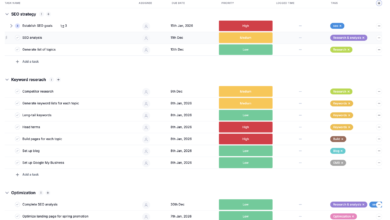
- Create the Backlog: Dump every issue into a spreadsheet with two columns: Impact (High/Low) and Effort (Hard/Easy).
Weekly cadence: audit → fix → measure → document
Time required: 45 minutes.
- Review (10 mins): Check Matomo and SERPOSCOPE. Any red flags?
- Pick 3 Fixes (5 mins): Go to your backlog. Pick three “High Impact, Low Effort” tasks.
- Execute (30 mins): Fix that title tag. Add that internal link. Redirect that broken URL.
- Document (1 min): Write down “Fixed X on [Date]” in your changelog.
On-page essentials I fix first (titles, metas, headings, internal links, schema)
When you are executing your weekly fixes, don’t get fancy. Stick to the basics that move the needle. Here is what I prioritize:
- Title Tags: Ensure the primary keyword is near the front. (Bad: “Home – MySaaS” → Good: “Open Source Kanban Board for Developers – MySaaS”)
- Internal Links: If you write a new blog post, find 3 older posts and link to the new one. This signals importance to Google.
- Heading Structure: Make sure your H2s actually describe the section. It helps users skim and bots understand context.
Automation & scaling: using n8n plus modern content ops (without losing quality)
Once you have the technical foundation solid, the bottleneck becomes content. You can fix all the broken links in the world, but if you aren’t publishing fresh, useful content, traffic won’t grow. This is where automation can help—but also where it can hurt if you aren’t careful.
I use n8n to automate the “boring stuff” (reporting, alerts), and I look to comprehensive content intelligence platforms like Kalema to streamline the creation process. Kalema acts as a content intelligence layer that sits on top of your stack, ensuring that the briefs and outlines you generate are actually aligned with search intent, rather than just being AI fluff.
3 n8n automation playbooks I’d start with
- The “Zero Traffic” Alert: Trigger an email if organic traffic drops to 0 for 24 hours (usually means the site is down or analytics broke).
- The Rank Tracker Digest: Every Monday, email me a list of keywords that moved more than +/- 3 positions.
- New 404 Detector: Once a week, check the crawl logs and ping Slack if new 404s appear on high-traffic pages.
Quality gates for scaling content (so automation doesn’t tank trust)
Automation is great for detection, but dangerous for creation. If you are using tools to accelerate writing, you need a human “Quality Gate” before publishing. Here is my checklist:
- Fact Check: Did the AI hallucinate a statistic? (Verify it).
- Internal Links: Did it link to relevant product pages?
- Intent Match: Does this actually answer the user’s question, or just talk around it?
- Voice Check: Does it sound like us, or like a robot?
This is why tools like Kalema are valuable—they help structure the intelligence phase so the output requires less heavy lifting to meet these standards.
Common mistakes with open-source SEO stacks (and how I fix them)
I’ve broken plenty of workflows in my time. Here are the most common pitfalls I see independent developers fall into.
Mistake #1: Building a tool collection instead of a routine
The Symptom: You have 15 tabs open, 4 tools installed, but your traffic hasn’t changed in 6 months.
The Fix: Stop installing. Pick one goal (e.g., “Fix all critical errors”) and use one tool to solve it. Once that’s done, move to the next. I once spent a week configuring a log analyzer for a site with 10 visitors a day. Don’t be me.
Mistake #2: Treating automated outputs as truth (especially “AI insights”)
The Symptom: You blindly implement every suggestion an audit tool gives you, ruining your user experience.
The Fix: Validation. If a tool says “Remove this JavaScript,” ask yourself: “Does this break my signup form?” If an AI tool predicts a trend, spot-check it on Google Trends. Trust, but verify.
FAQs + my next steps checklist (so you can implement this today)
What open-source tool can I use for privacy-focused SEO audits?
I recommend SEO Auditor. It runs entirely in your browser (client-side), meaning no data is sent to external servers. It’s perfect for pre-launch checks or client work where privacy agreements are strict.
How can I self-host analytics for SEO without giving up data control?
Matomo is the industry standard here. It offers powerful SEO metrics, campaign attribution, and full data ownership. You can install it on a simple VPS. Start by tracking basic sessions and top landing pages before getting complex.
What options exist for open-source rank tracking?
SERPOSCOPE is your best bet. It operates under an MIT license, supports unlimited keywords, and handles multi-user accounts. Just remember to use proxies if you are tracking hundreds of keywords to avoid getting blocked by search engines.
Can I automate custom SEO workflows?
Absolutely. n8n is a fantastic workflow automation tool. You can use it to chain APIs together—for example, pulling data from Search Console and sending alerts to Slack. Start with a simple weekly reporting workflow.
Is there an integrated, AI-enhanced open-source audit tool?
RustySEO is emerging as a strong option. It integrates audits with AI features like keyword grouping and trend prediction. It’s modular, so you can turn features on or off as needed.
Conclusion: my 5-step next actions (checklist)
Building an open-source SEO stack isn’t about saving money—it’s about gaining control. You own the data, you own the workflow, and you aren’t renting your success from a SaaS company.
If I were starting fresh today, here is exactly what I would do in the next hour:
- Choose the “Solo Starter” stack: Download Screaming Frog and install the SEO Auditor extension.
- Run a baseline audit: Crawl your site and find the broken links.
- Set up Matomo: Or at least verify your current analytics are firing correctly.
- Create the Backlog: Open a spreadsheet and list the top 5 errors from your audit.
- Fix one thing: Pick the easiest error and fix it. Right now.
The best tool is the one you actually use. Good luck building.