Performance Data: The Best SEO Monitoring Tools for the Post-Keyword Era
Introduction: Performance data (not just rankings) in the post-keyword era

When I audit a site, rankings are usually the last thing I look at. It sounds counterintuitive, but I’ve seen too many dashboards where the keyword positions are stable—green arrows everywhere—yet organic traffic and qualified leads are in freefall. In the past, rankings were the definitive metric. If you were number one, you won.
That isn’t true anymore. Between AI Overviews pushing organic results down, zero-click searches, and the fragmentation of user attention across platforms like Reddit and TikTok, a number one ranking doesn’t guarantee a click. Today, I measure performance differently. I need to know if my content is visible in AI-generated answers, if technical debt is silently killing my index coverage, and if real humans are talking about the brand.
This guide isn’t just a list of software. It’s a breakdown of the monitoring stack I actually use to track what matters in this post-keyword era. Whether you are running a lean marketing team or managing a site solo, here is how to move beyond vanity metrics and start monitoring for revenue.
Quick answer: What I monitor now (the short checklist)

If you are in a rush, here is the sticky-note version of what needs to be tracked today. It goes well beyond just keyword positions:
- Rankings & SERP Features: Traditional positions plus Featured Snippets and People Also Ask.
- AI & LLM Visibility: Citations in ChatGPT, Gemini, and Google’s AI Overviews.
- Performance Anomalies: Sudden drops in clicks or impressions via Google Search Console (GSC).
- Crawl & Index Coverage: ensuring pages are actually eligible to rank.
- Core Web Vitals (CWV): Speed and stability metrics that impact conversions.
- Backlink Health: New links gained and toxic links lost.
- Brand Mentions: Real-time discussions on social media and forums (off-page signals).
What “post-keyword era” monitoring actually means (and why it matters to my business)

Let’s get the definitions straight because there is a lot of fear-mongering out there. “Post-keyword” doesn’t mean keywords are dead. It means keywords are no longer the only way people find you.
Discovery is now spread across AI interfaces and community platforms. AI visibility refers to how often your brand or content is cited in responses generated by Large Language Models (LLMs) like ChatGPT or Google’s AI Overviews. If a user asks an AI for a recommendation and you aren’t in that synthesized answer, you are invisible, regardless of where your homepage ranks for a generic term.
Think of it this way: Rankings are the scoreboard; monitoring is the replay plus the commentary. The scoreboard tells you the result, but the replay tells you why it happened. Did you lose traffic because you dropped a ranking position? Or did you hold the position, but Google inserted a giant AI summary above you that stole all the clicks? Traditional rank trackers show the former; modern monitoring shows the latter.
The new performance signals I track alongside rankings
I focus on specific signal buckets to make decisions:
- Search Demand (GSC): I watch impression data closely. If impressions drop but rankings hold, the market demand is shifting.
- Content Engagement (GA4): High bounce rates on top pages signal an intent mismatch, even if SEO brought them there.
- Technical Health: I monitor index bloat. If thousands of low-quality pages get indexed, the whole site suffers.
- Authority Signals: It’s not just backlink count, but who is linking.
- AI Visibility: Are we appearing in the sources list for informational queries in LLMs?
- Cross-Channel Discussions: If Reddit is complaining about a product feature, search volume for that product will eventually tank.
How I choose the best SEO monitoring tools (criteria + a simple scoring mindset)
When I trial tools, I always test the alerts first. If a tool can’t proactively tell me something is wrong, it’s just a database I have to remember to log into. For most US-based small businesses or lean marketing teams, you don’t have time to stare at data all day.
I use a simple scoring mindset (1–5) based on utility. Does it integrate with GSC? Is the pricing transparent? Does it track mobile vs. desktop accurately? But the most critical factor is anomaly detection. I want a tool that screams at me when traffic drops by 20%, not one that sends me a generic weekly PDF.
If I had to budget this from scratch: with $0, I stick to Google Search Console and manual checks. With $100/month, I get a solid rank tracker. With $500/month, I build a stack that covers technical crawling, AI tracking, and social listening.
Beginner-friendly checklist: What features are non-negotiable vs. nice-to-have
- Non-negotiables:
- Reliable rank tracking (daily or weekly updates).
- Google Search Console integration (to overlay real traffic data).
- Site audit/crawl capabilities (or connection to a crawler).
- Basic backlink monitoring.
- Exportable reporting.
- Nice-to-haves:
- AI visibility tracking / Share of Voice in LLMs.
- Volatility forecasting.
- Content scoring (TF-IDF or NLP analysis).
- API access (unless you have a data team).
- Multi-location tracking (crucial for local SEO, optional for SaaS).
Tool categories I actually combine (instead of expecting one platform to do everything)
It is rare to find one tool that does it all perfectly. If I were starting today, I’d begin with GSC (the foundation) plus one all-in-one suite (like Semrush or SE Ranking). Once I hit a plateau, I’d add a specialized technical crawler (Screaming Frog) and then look at AI/Social monitoring. This modular “stack” approach prevents you from overpaying for enterprise features you won’t use yet.
Comparison table: the best SEO monitoring tools (traditional + AI visibility + real-time mentions)

Below is how I categorize the top players. Note that pricing and feature sets evolve, but this gives you a snapshot of where they fit in the ecosystem.
| Tool | Best For | Key Monitoring Features | AI Visibility Support | Pricing Signal | Ideal User |
|---|---|---|---|---|---|
| Semrush | Comprehensive All-in-One | Rankings, Site Audit, Backlinks, Content Marketing | Yes (via Copilot/Integrations) | $$$ (Generated ~$376.8M revenue in 2024 ) | Mid-to-large teams needing a full suite. |
| SE Ranking | Value & Scalability | Rank Tracking, Tech Audits, Content Scoring | Yes (AI Visibility Tracker & GPT-4o scoring ) | $$ (Starts ~€59/mo for 500 keywords ) | SMBs and Agencies watching budgets. |
| Screaming Frog | Deep Technical Audits | Crawling, Indexing checks, Broken links | No (Purely technical) | $ (Free version available, License is yearly) | Technical SEOs & Developers. |
| Otterly.ai | AI/LLM Tracking | Brand presence in ChatGPT/Gemini | High Focus (Dedicated tool) | $$ (Partnered with Semrush Jan 2025 ) | Brands worried about AI search discovery. |
| Brand24 (Chatbeat) | Brand Reputation | Mentions across web/social + AI sentiment | Yes (Monitors 100k+ brands in LLMs ) | $$ | PR & Brand Managers. |
| OGTool | Social Listening | Reddit, Twitter, LinkedIn keyword mentions | No (Focus is social conversations) | $$ ($99/month ) | Growth marketers & Community leads. |
Note on pricing: “Starts at” usually covers a basic seat. If you need historical data or API access, expect the price to double.
All-in-one SEO suites (rankings + backlinks + audits)
Tools like Semrush, Ahrefs, and Moz Pro are the table stakes. They are currently racing to add AI-aware metrics. For example, SE Ranking has been aggressive in rolling out their AI Visibility Tracker to show how you appear in generative results. These suites are best for the day-to-day “heartbeat” of your SEO—checking if your keywords are moving and if your backlinks are growing.
Technical SEO monitoring tools (crawling, indexing, and site health)
You can’t rank what can’t be indexed. For deep technical monitoring, I rely on Screaming Frog. It crawls a site exactly like a search engine does. I once caught a developer accidentally leaving a “noindex” tag on a production site 24 hours after a launch using this tool—saved the client a massive revenue dip. For daily monitoring, Google Search Console is the ultimate source of truth for crawl errors and mobile usability issues.
AI visibility tracking tools (monitoring how I show up in LLM/AI answers)
This is the new frontier. Tools like Otterly.ai and Brand24’s Chatbeat focus specifically on LLM outputs. They test prompts to see if ChatGPT or Gemini mentions your brand as a solution.
A word of caution: This data is directional. Unlike a ranking position (which is fairly static), LLM answers vary based on user history and randomness. Use these tools to spot trends—are mentions going up or down?—rather than obsessing over a single query.
Real-time brand and keyword mention monitoring across social + forums
Social monitoring complements SEO because social discussions often precede search volume. OGTool is a strong contender here, specifically for finding keyword mentions on Reddit and Twitter. There is a case study claiming a 4× lower customer acquisition cost using this method compared to paid ads . The value here is turning a complaint found on Reddit into a new FAQ page on your site, which then ranks for the search queries that inevitably follow.
My step-by-step workflow to set up SEO monitoring (from baseline to alerts to reporting)

Buying the tools is the easy part. Setting up a workflow that doesn’t overwhelm you is harder. Here is the process I use to go from “blind” to “informed” in about a week.
Step 1: Establish a baseline snapshot (so I know what “normal” looks like)
Before you turn on any alerts, you need to know where you stand. I create a simple spreadsheet to record day-one metrics:
- Average monthly organic traffic (last 3 months).
- Top 5 converting pages and their primary keywords.
- Total indexed pages count (from GSC).
- Number of critical errors in your site audit.
Step 2: Connect the essentials (GSC, GA4, and a rank/backlink tool)
Connect your chosen suite to Google Search Console and Google Analytics 4 (GA4). If I see zero data flowing in, I immediately check permissions or property types (e.g., Domain property vs. URL prefix). This integration is vital because it lets you overlay actual traffic data on top of ranking positions, showing you which keywords actually drive business.
Step 3: Define what I’m monitoring (topics, pages, and outcomes—not endless keywords)
Don’t track 10,000 keywords just because the tool allows it. I map monitoring to outcomes:
Topic: “CRM Software” → Key Page: /features/crm → Outcome: Demo Request.
I track the “head” terms for the topic and the specific URL’s performance. This keeps the data actionable.
Step 4: Configure alerts and anomaly detection (so I don’t find problems too late)
I set thresholds to avoid noise. A 5% drop is normal fluctuation. A 20% drop is a fire drill. I set alerts for:
• GSC Clicks dropping >20% week-over-week.
• Any new “Noindex” errors.
• Core Web Vitals shifting from “Good” to “Needs Improvement”.
If clicks drop but impressions stay high, I know my title tag or SERP features are the issue. If impressions drop, I check indexing or demand shifts.
Step 5: Add AI visibility and cross-channel monitoring (without losing focus)
Once the basics are safe, I layer in the advanced stuff. I pick 5 brand prompts (e.g., “Best CRM for small business”) and track them in an AI visibility tool. When the data shows a clear topic gap, or if I find a recurring question on Reddit via social listening, I don’t just guess. I use an AI SEO tool to analyze top-ranking structures, or an SEO content generator to draft the initial framework for my writers to ensure we cover the gap comprehensively. Note: I always human-review these outputs to ensure accuracy.
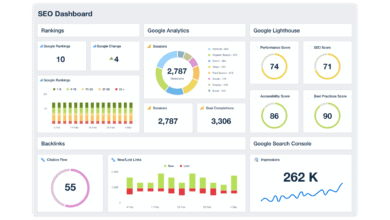
Step 6: Build a simple dashboard + weekly/monthly review rhythm
I don’t look at everything every day. Here is my schedule:
| Frequency | What I Check | Goal |
|---|---|---|
| Weekly (30 min) | GSC Click trends, Critical Errors, Brand Mentions | Catch broken things fast. |
| Monthly (90 min) | Keyword Rankings, Backlink profile, Content Engagement | Strategic adjustments. |
| Quarterly | Full Technical Crawl, AI Visibility Audit | Deep infrastructure health. |
Common mistakes I see with SEO monitoring (and how I fix them)

I’ve made plenty of mistakes in my career. Here are the ones I see most often, so you can avoid them.
Mistake-to-fix checklist (5–8 items)
- Mistake: Obsessing over Average Position.
Why it hurts: One ranking drop for an irrelevant keyword drags the average down, causing panic.
Fix: Segment keywords by “Brand” and “Non-Brand” and only report on specific revenue-driving clusters. - Mistake: Ignoring Indexing.
Why it hurts: You can’t rank if you aren’t in the database.
Fix: Set a weekly alert for “Excluded” pages in GSC. - Mistake: Collecting mentions but never responding.
Why it hurts: Data without action is waste.
Fix: Schedule 15 minutes a week to reply to social mentions or update content based on feedback. - Mistake: Treating AI citations like rankings.
Why it hurts: They fluctuate wildly.
Fix: Look for monthly trends, not daily volatility. - Mistake: Relying on one tool’s data.
Why it hurts: Tools estimate traffic; they don’t measure it.
Fix: Always validate tool data against GSC and GA4.
FAQs about the best SEO monitoring tools in 2026
What is AI visibility in SEO monitoring and why does it matter?
AI visibility measures how often your brand or content appears in answers generated by AI models like ChatGPT or Google’s Gemini. It matters because search behaviors are shifting toward conversational answers. If a user asks, “What is the best CRM?” and the AI doesn’t list you, you miss out on high-intent visibility, effectively becoming invisible to that user segment.
Do traditional rank tracking tools still offer value in the post-keyword era?
Yes, absolutely. While they aren’t the only metric anymore, high rankings still correlate strongly with visibility and traffic. The best approach is a blended one: use traditional trackers for foundational performance, but pair them with GSC performance data and AI monitoring to see the complete picture.
Are there tools that monitor SEO performance across social media and forums?
Yes, tools like OGTool specifically monitor keywords and brand mentions on platforms like Reddit, Twitter/X, and LinkedIn. While these don’t measure Google rankings, they measure “search demand” and reputation. I use these signals to find content gaps—if everyone on Reddit is asking a question I haven’t answered, that’s a new blog post opportunity.
Which tools should businesses use for deep technical SEO monitoring?
For deep dives, Screaming Frog is the industry standard for crawling and identifying structural issues like redirect chains or broken links. For ongoing, automated monitoring, Google Search Console is essential for tracking indexing status and Core Web Vitals. If you only do one thing, check your GSC “Page Indexing” report weekly.
Conclusion: My practical next steps for choosing the best SEO monitoring tools
The post-keyword era isn’t about abandoning the basics; it’s about expanding your vision. To recap:
- Diversify your data: Don’t just watch rankings; watch AI citations and real user discussions.
- Focus on anomalies: Set alerts that tell you when something is wrong so you can sleep at night.
- Connect to action: Monitoring is useless if it doesn’t lead to improvements.
Here is your plan for this week: Connect GSC and GA4 to your primary SEO tool. Set three critical alerts (traffic drops, index errors, and brand mentions). Run one full site crawl to establish your baseline. And remember, when the monitoring identifies a decaying page or a new opportunity, you can use an AI article generator to help refresh that content efficiently, but the strategy must start with clean data.
Monitoring only works if I review it regularly. Start small, trust the data, and iterate as you grow.