Best AI SEO Tools: Optimizing for the AI and Boosting Your Visibility in LLMs
Introduction: Why I’m optimizing for LLM visibility (and what you’ll get from this guide)

If you’ve looked at your analytics lately and seen a spike in “Direct” traffic right after a major ChatGPT update, or noticed your organic clicks plateauing even while impressions hold steady, you aren’t alone. We are in the middle of a massive shift from “10 blue links” to direct AI answers. Users are asking detailed questions to agents like Gemini, Perplexity, and ChatGPT, and often getting the answer without ever visiting a website.
For marketers like us, this is terrifying but also an incredible opportunity. It’s no longer just about ranking; it’s about being the source that the AI cites. In this guide, I’m cutting through the hype to give you a practical Generative Engine Optimization (GEO) framework. I’ll walk you through the workflow I use to audit content for “extractability,” share a vetted list of the best AI SEO tools for every budget, and help you avoid the expensive mistakes I made when I first started trying to track AI mentions.
What is Generative Engine Optimization (GEO)—and why it matters for SEO now

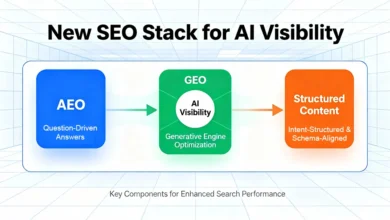
Generative Engine Optimization (GEO) is essentially on-page SEO for how machines “read” and quote you. While traditional SEO focuses on convincing a search engine to rank a URL, GEO focuses on structuring content so that a Large Language Model (LLM) can easily extract, summarize, and cite your information as a credible source.
Why does this matter right now? Because user behavior has changed. Research suggests that up to 86% of high-commercial-intent queries now trigger AI-generated answers . If your brand isn’t visible in those answers—either as a direct citation or a recommended entity—you effectively don’t exist for that user journey.
Quick answer: GEO in one sentence
GEO is the practice of optimizing content structure, entity relationships, and authority signals to maximize the likelihood of being cited in AI-generated responses.
Think of it as making your content “machine-readable” by using clear definitional blocks, logical hierarchy, and semantic connections that help LLMs confidently retrieve your data.
What’s changing: from rankings to citations, mentions, and AI-sourced sessions
We need to update our vocabulary. In the past, I tracked “Position 1-3.” Now, I’m looking for AI citations (is my link in the footnote?), brand mentions (did the AI recommend my product in a list?), and prompt coverage (for which questions does the AI surface my brand?).
For example, if a user asks, “What is the best invoicing software for freelancers?”, I don’t just want to rank for that keyword on Google. I want ChatGPT to list my software in its top 3 recommendations and link to my pricing page. This requires new measurement tactics and, frankly, new tools.
A beginner-friendly GEO workflow I’d follow (step-by-step)

When I first tried to “do AI SEO,” I was overwhelmed. I tried to optimize everything at once. It didn’t work. Here is the streamlined process I use now—it’s practical, repeatable, and you can start it this afternoon.
Field Note: If you only have 2 hours this week, skip to Step 3 and update your highest-traffic blog post with a clear “What is X?” definition block and a comparison table. That’s the highest-ROI move you can make quickly.
Step 1: Pick one business outcome + one topic cluster (don’t boil the ocean)
Don’t try to win every AI answer. Pick a battle that drives revenue. I usually start with a bottom-of-funnel topic where users are comparing solutions. Instead of vanity metrics, focus on a cluster like “HR software onboarding” or “commercial roofing materials.” Deep, interconnected content in one specific area signals authority to LLMs much faster than scattered blog posts.
Step 2: Build a “prompt map” (the new keyword list)
Keywords are for search bars; prompts are for chat interfaces. I look through our sales call transcripts and “People Also Ask” boxes to find the natural language questions people use.
Here is what my Prompt Map looks like:
| Target Prompt (User Query) | User Intent | Ideal Cited Page | Assets Needed |
|---|---|---|---|
| “Compare the best invoicing software for freelancers” | Commercial Investigation | /best-invoicing-software-guide | Comparison table, Feature list, Pricing tier breakdown |
| “How do I automate invoices?” | Informational / How-to | /how-to-automate-invoices | Numbered step-by-step list, Definition of “invoice automation” |
| “Is [Brand Name] good for small business?” | Brand Validation | /reviews or /case-studies | Third-party ratings, Testimonial quotes, Trust badges |
Step 3: Make the page “extractable”: structure, entities, and citations

LLMs love structure. They struggle to pull answers from long, winding paragraphs. To make content extractable, I strictly format my H2s and H3s as questions and answers.
If I’m writing about invoicing, I include a section explicitly titled “What is automated invoicing?” followed immediately by a direct, encyclopedic definition. I use bullet points for features and HTML tables for data comparisons. This isn’t just good for readability; it’s basically spoon-feeding the AI the structured data it needs to generate an answer.
Step 4: Publish with technical basics that help discovery
You can have the best content in the world, but if the crawler can’t access it, you’re invisible. Before I hit publish, I run a quick “discovery check”:
- Indexability: Is the page allowed in robots.txt?
- Canonical tags: Are we pointing to the right version of the page?
- Text availability: Is the text actually text, or is it locked inside an image or PDF? (AI struggles to cite text inside JPEGs).
- Schema Markup: Did I add FAQ or How-To schema to give machines extra context?
Step 5: Measure AI visibility (citations, mentions, traffic) and iterate weekly
Attribution is still messy—I won’t lie to you. But we can track directionally. I look for lifts in “Direct” traffic to specific deep pages (often a sign of an AI referral) and use tools to track actual citations. If I see a jump in AI-sourced sessions , I know the optimization is working.
How I evaluate the best AI SEO tools (categories + selection criteria)

The market is flooded with “AI” tools right now. To avoid buying shelfware, I categorize them strictly by “Job to be Done.” Are you trying to monitor where you appear, or are you trying to create content that appears there?
For most beginners, an AI SEO tool should bridge the gap between traditional data (keywords) and the new reality (prompts). Here is the scorecard I use when evaluating new tech for my stack:
- LLM Coverage: Does it track ChatGPT, Gemini, Perplexity, and Google AI Overviews?
- Prompt Granularity: Can I track my own custom prompts, or just generic keywords?
- Reporting: Can I export a dashboard that my boss will actually understand?
- Time-to-Value: Does it require a developer to set up, or is it plug-and-play?
Tool categories that matter for GEO (what each one actually does)
- AI Visibility Monitoring: Tracks how often your brand is cited for specific prompts (e.g., “monitor brand citations for 50 prompts”).
- Content Optimization & Briefs: Helps structure content with the right entities and headings for extraction.
- Enterprise GEO Platforms: Advanced analytics for large brands needing share-of-voice data across thousands of queries.
My selection criteria for beginners (a simple scorecard)
| Criteria | What “Good” Looks Like |
|---|---|
| Setup Time | Under 15 minutes; no engineering code required. |
| Data Freshness | Updates at least weekly (AI results change fast). |
| Actionability | Doesn’t just say “you aren’t ranking”; tells you why (e.g., missing entity). |
| Price | Flexible tiers. Start simple; upgrade when you can prove value. |
Best AI SEO tools for AI visibility monitoring (citations, mentions, prompt-level tracking)

This category is the “Google Search Console” for the AI era. These tools tell you if you are winning or losing the conversation inside the chat interface. Some enterprise clients using platforms like AthenaHQ have reported seeing massive ROI, such as an 11x increase in AI overview impressions , proving that this data is worth watching.
Here are the top players I’ve analyzed, from SMB-friendly to enterprise-grade.
Otterly.ai: entry-level monitoring across LLM platforms
Best for: SMBs and agencies needing a quick start.
Otterly.ai launched in late 2024 and quickly gained traction because it’s simple. It monitors your brand presence across multiple LLMs like ChatGPT and Perplexity. You feed it a list of prompts—say, 20 sales-critical questions—and it reports back on whether you were cited.
When I would NOT use this: If you need deep enterprise-level sentiment analysis or have thousands of SKUs to track, you might outgrow it quickly.
Peec AI: budget-friendly prompt tracking and sentiment signals
Best for: Teams with limited budgets who need sentiment data.
Peec AI offers an affordable entry point for tracking not just if you are mentioned, but how. It analyzes the sentiment of the AI’s response. This is critical because sometimes an AI mentions you but says your product is “expensive” or “hard to use.” Knowing this lets you update your content to address those objections.
When I would NOT use this: If you need complex API integrations with your own data warehouse.
Limy: connecting AI-agent prompts to conversions (advanced analytics)
Best for: Growth teams who need to prove revenue impact.
Limy is interesting because it tries to close the loop. By integrating with CDNs like Cloudflare, it attempts to track which AI-agent prompts actually lead to site visits and conversions. It raised seed funding in early 2026 to expand this capability. If your boss asks, “But does ChatGPT actually send us leads?”, Limy helps answer that.
When I would NOT use this: If you don’t have a mature analytics setup or high enough traffic volume to make the data statistically significant.
Azoma: ‘digital twin’ simulation for brand positioning in AI answers
Best for: Enterprise brands protecting market share.
Azoma uses a “digital twin” simulation to test thousands of prompts at scale. Imagine running 5,000 mock interviews with ChatGPT to see how it talks about your brand versus your competitors. It’s a powerful way to understand your Share of Voice in the LLM space.
When I would NOT use this: If you are a small business just trying to rank for 10 local keywords. This is overkill.
Wix AI Visibility Overview: CMS-native tracking for site owners
Best for: Non-technical site owners already on Wix.
If your site is built on Wix, you might already have this. They introduced an AI Visibility Overview that lets you track citations and monitor queries directly from your dashboard. It’s fantastic for convenience.
When I would NOT use this: If you are on WordPress, Shopify, or a custom stack, obviously.
Best AI SEO tools for content optimization (briefs, on-page guidance, and scalable publishing)

Monitoring is half the battle; the other half is fixing the content. These tools help you write and structure pages that machines love to read. Some data suggests using these optimization workflows can nearly triple AI visibility within a month .
Semrush (AI Toolkit / Semrush One): best if you’re already in the Semrush ecosystem
Best for: Current Semrush users who want an all-in-one solution.
Semrush has aggressively integrated AI metrics into its platform. With Semrush One, you can see traditional rankings alongside AI Overview presence. They offer “LLM readiness” scoring which helps you see if your content is structured well enough for extraction. If you already pay for Semrush, start here before buying a standalone tool.
When I would NOT use this: If you find their interface too cluttered or expensive just for a single feature.
MarketMuse / Clearscope / Surfer / Frase: content briefs and optimization (how to pick)
Best for: Content teams needing detailed editorial briefs.
These tools are the gold standard for semantic SEO. They analyze top-ranking content to tell you which entities and topics you must cover.
- MarketMuse is excellent for high-level content strategy and finding gaps in your authority.
- Clearscope is the most editor-friendly; it doesn’t distract writers with too many bells and whistles.
- Surfer SEO and Frase are great for detailed, score-based optimization, though they can sometimes encourage “stuffing” keywords if you aren’t careful.
When I would NOT use this: If you are just looking for a quick AI article generator without the strategic analysis layer, these might be too robust (and pricey).
Kalema in the workflow: content intelligence for articles that earn citations (not just words)
I view Kalema not just as a writer, but as a content intelligence system. The mistake most people make with AI content is generating generic text. Kalema fits into the workflow by enforcing editorial structure—turning a strategic brief into a structured outline that covers the necessary entities and definitions automatically.
In my workflow, I use it to generate the “first draft” that is already 80% optimized for GEO—formatted with the right headers and lists—so I can spend my time adding the unique expert examples and verifying the sources.
Common GEO mistakes I see (and how I fix them fast)

I’ve made plenty of mistakes navigating this new landscape. Here are the most common ones so you can avoid them:
Mistake 1–3: Strategy and intent misalignment (what to do instead)
- The “Keywords Only” Trap: I used to just track keywords. Now, I track prompts. Fix: Build a prompt map that reflects full questions.
- Ignoring User Intent: Writing a sales page for an informational query. Fix: Check the SERP/AI answer first. If the AI gives a definition, write a definition.
- Boiling the Ocean: Trying to optimize the whole site at once. Fix: Focus on one cluster (e.g., “Invoicing”) and dominate it.
Mistake 4–6: Content not extractable (formatting, entities, evidence)
- Wall of Text: Writing 300-word paragraphs. Fix: Break it down. Use bold micro-headings and bullet lists.
- Missing Definitions: Assuming the AI knows what your proprietary term means. Fix: Add a clear “What is [Term]?” block.
- Lack of Evidence: Making claims without data. Fix: Cite credible sources and include data tables.
Mistake 7–8: Measurement and iteration mistakes (what to track weekly)
- Obsessing over Attribution: You will never track 100% of AI traffic. Fix: Accept directional data. If direct traffic rises with citations, you’re winning.
- Set and Forget: Doing GEO once. Fix: Review your top 10 prompts weekly. AI answers change frequently.
FAQs + next steps: what I’d do this week to start showing up in AI answers
FAQ: What is Generative Engine Optimization (GEO)?
GEO is the process of optimizing your content to be found, summarized, and cited by AI models (LLMs) like ChatGPT and Gemini. It focuses on high-quality structure, authoritative entities, and clear formatting rather than just keywords.
FAQ: Why is GEO important for SEO today?
Because search behavior is moving to chat. If you aren’t visible in the AI’s answer, you lose the opportunity to influence the user early in their journey. It’s about protecting your brand’s future visibility.
FAQ: How do AI SEO tools differ from traditional SEO tools?
Traditional tools track rankings on a search results page (SERP). AI SEO tools track citations within a generated text response. They measure sentiment, prompt coverage, and how often your brand appears as a recommendation, which requires a completely different technology stack.
FAQ: Which tool is best if I already use Semrush?
Stick with Semrush One / AI Toolkit initially. It integrates seamlessly with the data you already have, so you don’t have to learn a new interface just to start tracking AI Overviews.
FAQ: Are there budget-friendly options for AI visibility monitoring?
Yes. Tools like Otterly.ai and Peec AI offer lower-cost entry points suitable for SMBs. If your budget is zero, you can manually test your top 10 prompts in ChatGPT once a month and record the results in a spreadsheet.
Conclusion: 3 takeaways + 3–5 actions I recommend
To wrap this up, remember that the goal isn’t to game the AI, but to be the most reliable source for it.
- GEO is real: It’s measurable, and it’s driving traffic today.
- Workflow beats tools: Don’t buy a tool until you have a prompt map and a content plan.
- Format for machines: Use tables, lists, and clear headings to make your content extractable.
Here is your Week 1 Action Plan:
- Identify your top 5 revenue-driving topics.
- Create a list of 20 conversational prompts users ask about those topics.
- Update one key page to include clear definitions and a data comparison table.
- Sign up for a trial of a monitoring tool (like Otterly or Semrush) to benchmark where you stand today.
- Check back in 7 days to see if the AI has picked up your changes.