Introduction: I run a backlink audit to keep my site’s link profile clean (and rankings stable)

I don’t chase higher link counts just for the sake of a metric; I chase trust and relevance. When I first started in SEO, I treated backlinks like trophies—once I got them, I put them on the shelf and forgot about them. That was a mistake.
Links rot. They turn toxic. Competitors run negative SEO campaigns, or well-meaning webmasters sell their domains to spam networks. Suddenly, that high-authority link you earned two years ago is coming from a site now promoting gambling or pharmaceuticals. I’ve seen client rankings dip not because they stopped publishing great content, but because their off-page profile quietly became a liability.
That is why I treat backlink audits as basic hygiene, not a panic button I only hit when traffic crashes. I block 20 minutes on my calendar the first Monday of each month to run a quick check. It’s not about obsessing over every single referring domain; it’s about having a repeatable system that answers one question: Is my backlink profile safe?
In this guide, I’m going to walk you through the exact routine I use. Whether you are a business owner, a marketer managing multiple channels, or an SEO specialist, this workflow will help you spot risks, reclaim lost equity, and sleep better at night.
Quick answer: what a backlink audit actually is (in one paragraph)
Think of a backlink audit like balancing your checkbook or running a security scan on your laptop. It is the process of collecting all the links pointing to your website, evaluating their quality against current search engine guidelines, identifying risks (like spam or toxic anchors), and deciding on an action plan—whether that’s to nurture the relationship, monitor it, or disavow the link entirely to protect your organic visibility.
Why backlink hygiene matters (and why I treat a backlink audit like routine maintenance)

It is tempting to think that if you aren’t buying links or doing anything “black hat,” you don’t need to audit. But the web is messy. I once worked with a local service business in the US that saw a 15% drop in leads over two months. Their content hadn’t changed, and their technical SEO was solid. When we looked at the link profile, we found a spike of 500+ inbound links from a network of low-quality directory sites using exact-match commercial anchors. It looked like manipulation, even though the client hadn’t done it.
Backlinks remain one of the strongest ranking signals. In fact, research suggests that over 67% of SEO professionals believe backlinks significantly impact rankings. However, the game has shifted from volume to context and trust. Search engines—and the emerging class of AI answer engines—are getting better at ignoring noise, but they still penalize clear attempts at manipulation.
Regular hygiene protects your business in three specific ways:
- Risk Mitigation: You catch toxic spikes or negative SEO attacks before they trigger a manual action or algorithmic suppression.
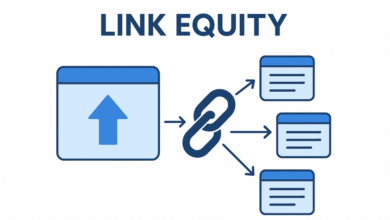
- Equity Recovery: You find broken links (404s) that are wasting authority and reclaim them, which is often the quickest “win” in SEO.
- Citation Readiness: As we move toward 2025 and beyond, AI search tools look for authoritative sources. A clean, high-quality link profile signals to these systems that your content is trustworthy enough to be cited.
How often I audit: monthly + after major changes
People ask me this constantly. Here is the schedule I actually follow:
- Monthly (The “Pulse Check”): I spend 15–20 minutes looking for major anomalies—sudden spikes in referring domains, a drop in lost links, or new toxic anchors.
- Quarterly (The “Deep Dive”): I export the full data, manually review the “monitor” list, and execute outreach for reclamation.
- Event-Based: I run an immediate audit after a site migration, a rebrand, or a viral PR campaign.
If I’m slammed with other work, I stick to the monthly pulse check. Consistency beats perfection.
Backlink audit metrics I actually use to judge link quality (with beginner-friendly benchmarks)

Tools will throw dozens of metrics at you—Authority Score, Domain Rating, Toxicity Score, Trust Flow. It’s easy to get overwhelmed. When I’m reviewing a link profile, I filter out the noise and focus on what actually impacts performance.
Here is the framework I use to judge if a link is an asset or a liability:
| Metric | What Good Looks Like | Red Flags | What I Do Next |
|---|---|---|---|
| Topical Relevance | The linking site is in a related industry or niche. | Unrelated content (e.g., a casino site linking to a bakery). | If irrelevant, mark for removal/disavow. |
| Traffic & Indexing | The linking page is indexed by Google and gets real organic traffic. | Page is de-indexed or has zero traffic (ghost town). | Ignore or monitor. No traffic usually equals no value. |
| Anchor Text | Natural mix: Branded, naked URLs, or generic (“click here”). | Aggressive exact-match keywords (e.g., “best cheap plumber NY”). | If it looks manipulative, investigate immediately. |
| Link Placement | In-content, editorial context. | Sitewide footers, sidebars, or hidden text. | Sitewide links can be dangerous; review carefully. |
| Follow vs. Nofollow | A natural mix (often ~60–80% dofollow is healthy). | 100% dofollow (looks paid) or 100% nofollow (unnatural). | Don’t panic over nofollow; they bring traffic and trust. |
A quick gut check I use: Would I be comfortable showing this link to a client or my boss? If I have to explain why a weird-looking site is actually “good for SEO,” it’s probably not.
The fast “keep / monitor / fix” triage framework

I don’t agonize over every link. I toss them into three buckets to speed up the process:
- Keep (Green): Relevant sites, good traffic, natural anchors. Action: Do nothing. These are wins.
- Monitor (Yellow): New sites with low authority but decent content, or slightly irrelevant sites that aren’t spammy. Action: Re-check in 3 months. Don’t disavow yet.
- Fix (Red): De-indexed sites, obvious spam networks, adult/pharma content, or malicious sites. Action: Add to the removal/disavow list immediately.
My monthly backlink audit workflow: a step-by-step checklist I can finish in under an hour

You don’t need to spend all day on this. Here is the exact workflow I use to get in, get the data, and get out with a plan. This approach balances depth with efficiency.
- Gather Data: I never rely on just one tool. I start by exporting the “Links” report from Google Search Console (GSC) because that is the only data that comes straight from the source. Then, I pull data from a third-party tool (like Semrush or Ahrefs) to fill in the gaps.
- Consolidate & Deduplicate: I merge these lists into a spreadsheet. I deduplicate based on the Referring Domain. I don’t need to see 1,000 links from the same blog; I just need to know the domain is linking.
- Check “Lost” Links: Before looking at new links, I look at what fell off. Did we lose a high-value link? If so, I check the URL. Is it a 404? Did they update the content? This is my first action item for the “Reclaim” list.
- Review New Referring Domains: I filter specifically for new domains found in the last 30 days. This is where I spot the spikes. I scan the TLDs (Top Level Domains). A sudden influx of .xyz or .ru links for a US local business is a red flag.
- Analyze Anchors: I look at the anchor text cloud. Is “brand name” still the dominant anchor? If I see a commercial keyword climbing the charts rapidly, I investigate those specific links.
- Validate with Traffic/Index Checks: For the “suspect” links, I check if the linking page is actually indexed. If Google hasn’t indexed the page, the link is effectively invisible, and I worry about it less.
- Tag & Triage: I run down the list and tag them: Keep, Monitor, or Fix.
- Document Actions: I write down exactly what needs to happen: “Disavow these 5 domains,” “Email editor at Domain X regarding broken link,” or “Nothing to do this month.”
If you are managing this across multiple sites or trying to scale your SEO strategy, using a robust AI SEO tool can help you stay organized. While tools don’t replace human judgment, they drastically reduce the busywork of data collection so you can focus on making the right calls.
Tools I use (and what each is best for)
You generally need GSC plus one paid tool. Here is how I see the landscape:
- Google Search Console (Free): The baseline. It’s what Google sees. Essential.
- Ahrefs: Generally has the largest live index. Great for finding lost links that other tools miss.
- Semrush: Excellent for its “Backlink Audit” tool which automatically scores toxicity and integrates an email workflow for removal.
- Moz: Good for beginner-friendly “Spam Score” metrics, though their index is sometimes smaller.
How I set up a simple backlink audit spreadsheet (columns that matter)
I keep my spreadsheet simple. These are the columns I won’t skip because they save me time later:
- Referring Domain: The root site.
- Target URL: Which page on my site they are linking to.
- Anchor Text: The clickable words.
- First Seen: Helps me track velocity (how fast links are coming).
- Traffic/Authority Proxy: (e.g., DR, DA, or estimated traffic).
- Status Code: Is my page a 200 (OK) or a 404 (Broken)?
- Action Tag: Keep / Monitor / Fix.
- Notes: e.g., “Emailed webmaster on 3/12.”
What I do after the backlink audit: remove, disavow, and reclaim link equity (without panic)

Data without action is just trivia. Once I have my list of “Fix” and “Reclaim” links, I move to execution. I always treat this phase with caution—especially disavowing.
Action Path 1: Manual Removal (The “Polite Ask”)
For links that are spammy but come from real humans (e.g., a low-quality directory you accidentally signed up for years ago), I try to reach out. Here is the template I use. It’s short because nobody reads long emails.
Subject: Request to remove link to [MyDomain.com]
Hi [Name/Webmaster],
I’m auditing the link profile for [My Company] and found a link pointing to us on this page: [URL of their page].
We are cleaning up our off-page SEO and would appreciate it if you could remove this link or set it to “nofollow.”
Here is the link details:
Anchor: [Anchor Text]
Target: [My URL]Thank you for your help,
[My Name]
Action Path 2: Reclaiming Lost Links (The “Quick Win”)
This is where the ROI lives. If a high-quality site linked to you but the link broke (because you moved the page or they made a typo), you are leaving money on the table.
| Issue | Symptoms | The Fix | Confirmation |
|---|---|---|---|
| 404 Target | User clicks link and hits “Page Not Found.” | 301 Redirect the old URL to the most relevant current page. | Check GSC “Coverage” report in 2 weeks. |
| Link Removed | Link existed but is now gone from source code. | Email the editor: “I noticed the link to our resource dropped during your update…” | Reply from editor or re-crawl via tool. |
| Unlinked Mention | They type your brand name but don’t link it. | Email: “Thanks for the mention! Would you mind making that clickable?” | Click the link yourself to verify. |
When I disavow backlinks (and when I don’t)
I treat the Google Disavow Tool like a scalpel, not a broom. If you use it wrong, you can hurt your rankings by disavowing links that Google actually liked. I only upload a disavow file if:
- The links are clearly spam (auto-generated, malware, gibberish).
- I have a Manual Action penalty in GSC.
- There is a massive spike in exact-match commercial anchors from irrelevant sites.
If I’m on the fence about a link, I don’t disavow it. I monitor it.
How I reclaim lost or broken backlinks (quick wins)
My prioritization rule is simple: I start with links pointing to “money pages” (service pages, product pages) and links from domains with real traffic. I send one polite email, and maybe one follow-up a week later. If they don’t reply, I implement a 301 redirect on my end if possible, and then I move on.
How I use a backlink audit to find new opportunities (competitor gaps + link-worthy assets + AEO)

An audit isn’t just about cleaning up trash; it’s about finding treasure. Once the hygiene is done, I look for gaps.
I run a “Link Gap” analysis to see who links to my top 3 competitors but not to me. I don’t just copy them, though. I look at why they got the link. Did they have a better guide? A free tool? A statistic?
For example, if I were running SEO for a US accounting firm, I might notice competitors getting links from small business blogs. Instead of begging for a link, I’d build a “Tax Deadline Checklist & Calculator.” That is a linkable asset. It earns links naturally because it solves a problem.
This is where tools like an AI article generator can assist—not by spamming out generic posts, but by helping you structure comprehensive, data-rich resources that people actually want to reference.
AEO (AI citation readiness): what I check so my pages are easier to cite
In 2025, we aren’t just optimizing for blue links; we are optimizing to be cited by AI. During my audit, I check my most-linked pages against this “Citation Readiness” checklist:
- Structure: Does the page use clear H2s and H3s that define the topic?
- Direct Answers: Is there a direct answer to the core question in the first 100 words?
- Data Sourcing: Do we cite original data or credible sources?
- Skimmability: Are there tables or bullet points that an AI can easily parse?
If I want a page to earn mentions, I make it skimmable and quotable.
Common backlink audit mistakes I see beginners make (and how I avoid them)

I learned some of these the hard way. Here is how you can avoid my early career blunders:
- Trusting DA/DR blindly: I used to think a DR 20 link was “bad.” Now I know a DR 20 link from a highly relevant, local niche site is gold. Fix: Look at relevance and traffic first.
- Disavowing too aggressively: I once disavowed a bunch of directory links that looked “ugly” but were actually passing local relevance. Rankings dipped. Fix: Only disavow if it’s clearly toxic/spam.
- Ignoring “Nofollow” links: Nofollow links still drive traffic and build brand awareness. Fix: Value them as part of a natural profile.
- Not checking indexation: Freaking out over a spam link that Google hasn’t even indexed is a waste of energy. Fix: Check “site:url” before panicking.
- Inconsistent auditing: Doing this once a year ensures a massive, painful cleanup. Fix: Do the 20-minute monthly check.
Backlink audit FAQs + my simple next steps to keep your site clean
To wrap this up, let’s simplify everything. You don’t need to be a technical wizard to maintain a healthy link profile. You just need a routine.
Here is your recap:
- Quality beats quantity. Context beats metrics.
- Audit monthly to catch spikes; audit quarterly to clean up deeply.
- Reclaiming lost links is the highest ROI activity you can do.
Your Next Steps (Do this week):
- Log into Google Search Console and export your “Links” report.
- Pick one tool (even a free trial) to get toxicity data.
- Build your spreadsheet with the columns I listed above.
- Triage the list: Find the worst 5 links to disavow and the best 5 broken links to reclaim.
- Execute those 10 actions.
If you commit to this process, you stop fearing updates and start building an asset. And if you need help scaling the content side of things to attract more of those high-quality links, consider using an automated blog generator to keep your publishing consistency high while you focus on strategy.
FAQ: How often should I conduct a backlink audit?
I recommend a quick “pulse check” once a month to spot any nasty spikes or major drops. Then, do a full deep-dive audit once per quarter. Also, always audit immediately after a site migration or a significant drop in traffic.
FAQ: Which tools are best for backlink audits?
For most small-to-mid-sized businesses, Google Search Console combined with either Semrush or Ahrefs is the standard. If you are on a strict budget, start with GSC, but know that you won’t see toxicity scores or lost link data as easily.
FAQ: What metrics should I use to assess link quality?
My priority order is: 1) Topical Relevance (does it make sense?), 2) Real Traffic (does the site have humans visiting?), 3) Indexing Status (does Google see it?), and 4) Authority Metrics (DA/DR) as a final tie-breaker.
FAQ: When should I disavow backlinks?
Only disavow when you are sure the links are harmful (spam networks, malware, aggressive commercial anchor attacks) and you cannot get them removed manually. Never use the disavow tool just to “tidy up” low-authority links that aren’t hurting you.
FAQ: How can I reclaim lost or broken backlinks?
Identify the broken link (404) or the removed link. If it’s a 404 on your site, 301 redirect it to a relevant live page. If the external site removed your link, send a polite, short email asking if they would consider adding it back to the updated content. I usually get a 5–10% success rate on outreach, but those wins are valuable.