Introduction: Why a content audit is the fastest path to stronger site authority

I’ve been there: staring at a traffic graph that has flatlined despite publishing three high-quality articles a week. It’s frustrating. You feel like you’re feeding a machine that stopped growing. The instinct is to publish more, but usually, the problem isn’t a lack of new content—it’s the weight of the old content.
Over time, websites accumulate “content debt.” Stats in your 2021 guides are now wrong. Screenshots show software interfaces that don’t exist anymore. CTAs point to expired offers. To Google—and increasingly to AI engines—this looks like neglect. It signals that your site authority is decaying.
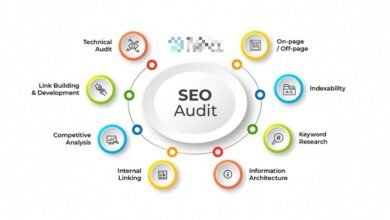
A content audit is the only way to reverse this. It’s not just about deleting bad posts; it’s a disciplined quality assurance (QA) process. In this guide, I’ll walk you through the exact workflow I use to audit sites: from inventory and prioritization to evaluating for E-E-A-T and modern AI visibility. We aren’t just cleaning up; we’re building a stronger foundation.
What a content audit for SEO is (and how it boosts overall site authority)

A content audit for SEO is the process of systematically analyzing the content on your website to decide whether to keep, update, consolidate, or delete it. Think of it like a quarterly financial close, but for your content assets. You wouldn’t let uncollected invoices sit for five years; you shouldn’t let underperforming URLs sit there either.
There are two massive misconceptions I hear constantly:
- “Audits are just for deleting old blog posts.” (False. They are primarily for improving what you have.)
- “Audits are only for rankings.” (Outdated. Today, audits are about trust and extractability.)
The game has changed. With AI Overviews taking up significant real estate in search results, we are no longer just optimizing for a blue link position. We are optimizing for citation readiness. An audit is your chance to ensure your content is structured clearly enough for an AI to understand, verify, and quote. If your content is accurate, fresh, and authoritative, you build the kind of E-E-A-T (Experience, Expertise, Authoritativeness, and Trustworthiness) that protects you from algorithm updates.
Content inventory vs. content QA: the two halves beginners mix up
I used to make this mistake early in my career: I would run a crawl, export a massive spreadsheet of URLs, and call it an “audit.” That’s not an audit; that’s just an inventory. It’s a list of ingredients, not a meal.
A content inventory tells you what you have (URLs, titles, word counts). A content QA checklist tells you how good it is. The inventory provides the data; the QA provides the judgment. If you skip the QA phase—where you actually look at the pages and assess quality—you end up making decisions based solely on traffic numbers, which is dangerous. You might delete a high-converting support page just because it has low traffic. Real auditing requires editorial judgment.
How audits build authority: relevance, trust, and topical completeness

When you audit correctly, you tighten the topical mesh of your site. I recently worked on a site that had four different articles about “email marketing best practices” written over six years. They were cannibalizing each other—fighting for the same keywords and confusing Google about which one was the authority.
We merged all four into one definitive, up-to-date guide and 301 redirected the other three URLs to it. The result? The new “super guide” shot to the top of page one because all the link equity and engagement signals were finally consolidated. That is topical authority in action. By pruning the dead weight and strengthening the winners, you tell search engines exactly what you are an expert in.
Before I audit: goals, scope, and the data I pull (beginner-friendly setup)

If you try to audit everything at once, you will quit. I’ve seen it happen. The spreadsheet becomes a monster, and the task feels impossible. The secret is to define a strict scope before you open a single tool.
Are you auditing the whole domain, or just the /blog/ folder? Are you looking for quick traffic wins, or are you trying to improve conversion rates on product pages? For a standard content audit checklist, I pull data from three main sources: Google Search Console (for true performance), Google Analytics 4 (for engagement), and a crawler like Screaming Frog (for technical data like broken links and word counts).
Here is the simple data framework I use to keep my head straight:
| Data Source | What it tells me | How I use it in the audit |
|---|---|---|
| Google Search Console | Clicks, Impressions, CTR, Position | Identifies decaying content and “striking distance” opportunities (keywords ranking 6–20). |
| Google Analytics 4 | Conversions, Time on Page | Protects low-traffic pages that still make money or help users. |
| Crawler (e.g., Screaming Frog) | Status Codes, Word Count, H1s | Flags technical errors, thin content, and missing headers. |
Set success criteria: what ‘better’ means for this audit
For this audit, I pick one primary KPI and two supporting KPIs. If you don’t define what “better” looks like, you won’t know if the audit worked.
Typically, my primary goal is traffic recovery on decaying pages. My success metrics would be:
- Primary: 15% increase in organic traffic to updated pages within 90 days.
- Secondary: Improved CTR on pages with high impressions.
- Secondary: Reduction of “crawled – currently not indexed” errors (often caused by thin content).
Quick-win targeting (80/20): which URLs I review first
If you are busy—and who isn’t?—you don’t need to review URL #4,000 that gets zero traffic. Start with the 80/20 rule. I prioritize three specific buckets of content for immediate review:
- Decaying Traffic: Pages that have lost >20% traffic year-over-year. These were winners once; they are usually the easiest to revive.
- Striking Distance (Positions 6–20): These pages are knocking on the door. A content refresh often pushes them into the top 5.
- High Impressions / Low CTR: Google is showing this content, but people aren’t clicking. This usually means the title tag or meta description is failing to match intent.
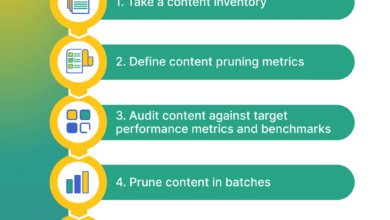
My step-by-step content audit for SEO workflow (repeatable QA framework)
This is the part where theory meets the spreadsheet. I follow this exact workflow for every client, whether they have 100 pages or 10,000. It turns a messy pile of data into a clear action plan.
Sometimes, I use tools to speed up the drafting process once decisions are made. For example, I might use an AI article generator to help create the initial draft of a rewrite or a content brief, but the audit strategy always remains a human-led process. Tools assist; they don’t decide.
Step 1: Export and clean your URL list (inventory)
First, I crawl the site and match it against the sitemap. I export this list into Google Sheets or Excel. Then comes the tedious part that you cannot skip: cleaning the data.
I remove the noise. I filter out pagination URLs (page/2/, page/3/), tag archives, and weird parameterized URLs generated by sloppy internal linking. A common annoyance I face is duplicate URLs caused by trailing slashes vs. non-trailing slashes. I normalize these so I’m looking at unique assets only. Once the sheet is clean, I can triage about 50 URLs in an hour. If the sheet is messy, I spend all day wondering if I’m looking at the right version of a page.
Step 2: Pull performance data (rankings, CTR, conversions, engagement)
I use the VLOOKUP (or XLOOKUP) function to pull GSC and GA4 data next to each URL. Don’t panic if the data looks noisy. I’m looking for trends, not perfection.
I look specifically for content audit metrics like clicks over the last 6 months vs. the previous 6 months. This “Delta” column is my favorite metric—it instantly highlights decay. I also pull conversion data. I once almost deleted a blog post with 10 visits a month, until I saw it was responsible for 2 high-ticket demo requests. Data prevents disaster.
Step 3: Evaluate on-page SEO fundamentals (titles, headings, intent match, internal links)
Now I look at the pages. I open the priority URLs and check the basics:
- Title Tag: Is it truncated? Does it include the core keyword?
- H1 & Headers: Is the structure logical? Can I skim it?
- Search Intent: If the keyword is “how to make coffee,” and the post is a history of coffee beans, I have an intent mismatch.
- Internal Linking: Are there opportunities to link to newer, related content?
I often find titles that are too clever for their own good. I’ll rewrite a vague title like “Thoughts on Growth” to something concrete like “5 Growth Strategies for B2B SaaS in 2025.” It’s a simple title tag optimization that often yields immediate CTR lifts.
Step 4: Make the decision (update, consolidate, prune, or keep)
For every row in my spreadsheet, I must select an action. This is the decision engine of the audit.
- Keep: Performing well, accurate, no changes needed.
- Update: Good potential, but outdated info or declining traffic. Needs a refresh.
- Consolidate: Competing with another page. Merge them.
- Prune: Low value, no traffic, no backlinks, no business purpose. Delete (410) or Redirect (301) if it has some link equity.
Pruning feels scary. Clients worry they will lose “ranking keywords.” But if a page ranks #80 for a keyword you don’t care about, it’s not an asset; it’s distraction.
Quality scoring that improves authority: E-E-A-T, accuracy, and ‘citation readiness’ for AI search

Traffic numbers tell you what happened, but they don’t tell you why. To fix authority issues, we need to grade the quality of the content itself. This is where content governance comes in.
I use a scoring system that evaluates not just SEO, but E-E-A-T and accuracy. With the rise of AI Overviews, I’ve added a new dimension: AEO (Answer Engine Optimization). Is this content written in a way that an AI can easily extract and cite? If your answer is buried in paragraph 4 of a rambling intro, AI will ignore it.
I also look at governance files like llms.txt. This is a newer standard that helps site owners declare which content is suitable for AI usage. It’s not a magic ranking factor, but it’s a layer of control and clarity that sophisticated publishers are starting to use.
A simple content QA scoring rubric (table)
I don’t aim for perfect 5s everywhere—priority is risk reduction and ROI. I use this rubric to score my priority pages rapidly.
| Dimension | What I check | Score (1-5) | Fix Action |
|---|---|---|---|
| Accuracy & Freshness | Are stats < 2 years old? Are screenshots current? | 1 (Obsolete) to 5 (Current) | Update facts, replace images. |
| E-E-A-T | Is there an expert byline? Are claims sourced? | 1 (Anon) to 5 (Expert) | Add author bio, cite primary sources. |
| AI Citation Readiness | Is the answer directly after the heading? Is structure clear? | 1 (Unstructured) to 5 (Clear) | Add definitions, lists, and schema. |
| User Experience (UX) | Is it readable on mobile? Are ads intrusive? | 1 (Broken) to 5 (Seamless) | Fix layout, reduce pop-ups. |
E-E-A-T upgrades that actually move the needle
If a page scores low on E-E-A-T, I deploy these upgrades immediately:
- Author Bylines: I ensure every article has a named author with a bio linking to their LinkedIn or other credentials.
- Sourcing: I use this rule of thumb: Primary sources first (government data, original studies), reputable industry sources second. If I can’t verify a claim in 2 minutes, I either find a source or delete the claim.
- “Reviewed By”: For medical or financial content (YMYL), adding a “Medically Reviewed By” line is critical.
- Date Stamps: I show “Last Updated” dates prominent at the top, not just “Published On.”
- Editorial Policy: I link to our editorial standards in the footer to show we have a process.
Citation readiness (AEO): formatting content so AI can quote it accurately
To win in AEO, you must write for the machine as much as the human. This doesn’t mean keyword stuffing; it means structural clarity.
If I am answering “What is a content audit?”, I don’t bury the definition. I write a clear heading, followed immediately by a direct, 40-word definition. Then, I use a bulleted list for the steps. This structure effectively “hand-feeds” the answer to the AI. I often rewrite long, wall-of-text paragraphs into a 3-step list just to improve extractability.
llms.txt: what it is, when I use it, and what to document
You may have heard of robots.txt, which tells crawlers where they can go. llms.txt is emerging as a similar concept for Large Language Models. It signals to AI crawlers which content is intended for usage, summarization, or citation.
I treat this as a governance layer. If I have high-value, evergreen documentation that I want AI to quote, I list it. It helps reduce hallucinations by pointing models to your most accurate sources. I recommend creating a simple text file that highlights your core knowledge base URLs. However, always check with your legal or policy team before implementation to ensure you aren’t inadvertently opting into data usage you don’t want.
Turn findings into actions: update, consolidate, prune, and strengthen internal links

Now we move from analysis to execution. This is where the work happens. I translate my spreadsheet scores into a “Next Actions” list. This prevents analysis paralysis.
When I have a large batch of updates, I need a workflow that scales. I often use an SEO content generator to spin up the initial briefs or outlines for the updates. This ensures every writer is following the same structure. For completely new sections required during a consolidation, an AI content writer can help draft the connective tissue between merged topics. But remember, the human editor is the pilot. I use Kalema as an AI SEO tool to accelerate the heavy lifting, but I verify every claim and strategic decision personally.
Action matrix (table): what I do with each URL
Here is the logic I use to assign tasks. I share this table with stakeholders so they understand why we are deleting or changing pages.
| Condition | Action | Required Steps | Risk Level |
|---|---|---|---|
| High traffic, current info | Keep | Add internal links to newer posts. | Low |
| Good topic, outdated info/declining traffic | Update | Refresh stats, improve headers, update date. | Medium |
| Competing/Cannibalizing pages | Consolidate | Merge content to best URL, 301 redirect the losers. | High (monitor carefully) |
| No traffic, no links, off-topic | Prune | 410 Delete (or 301 if it has backlinks). Remove internal links pointing to it. | Low |
Note on Edge Cases: Sometimes a page has zero traffic but is needed for legal reasons or seasonal campaigns. Always check with the business owner before pruning.
Internal linking upgrades that raise authority (without spam)
While I am updating a page, I look for orphan pages—pages that have no internal links pointing to them. These are invisible to Google.
I use a “hub and spoke” model. If I update a pillar page about “SEO Basics,” I make sure it links out to my specific guides on “Keywords” and “Backlinks.” Conversely, I make sure those specific guides link back to the pillar. I limit myself to only adding links that genuinely answer the next question a reader would ask. If it feels forced, I don’t add it.
How I scale updates while keeping editorial QA (no “publish and pray”)
I don’t just open WordPress and start typing. That leads to chaos. I create a standardized “Update Brief” for each URL. It lists exactly what needs to change: “Update the 2021 stat in intro,” “Replace the broken video,” “Add a section on AI tools.”
I batch these updates. I’ll do all the “Pricing” pages in one week, then all the “How-to” guides the next. This keeps my brain in the right mode. Once the update is live, I annotate the date in Google Analytics or my tracking sheet. If you don’t track when you made the change, you won’t know if the traffic lift was because of your work or just seasonality.
Common content audit mistakes (and how I fix them)

I’ve made plenty of mistakes in my audits. Here are the most common ones so you can avoid them:
- Auditing without goals: If you don’t know what you want to achieve, you’ll just stare at data. Fix: Set one clear goal (e.g., “Recover lost traffic”).
- Deleting without redirects: I once deleted a campaign landing page that had 50 high-quality backlinks. I lost all that authority overnight. Fix: Always map 301 redirects for any pruned page with backlinks.
- Over-optimizing keywords: Don’t stuff keywords into updates. Fix: Read the draft out loud. If it sounds robotic, rewrite it.
- Forgetting internal links: When you delete a page, you leave broken links on other pages pointing to it. Fix: Run a crawl after pruning to find and fix broken internal links.
- Ignoring Search Intent: Updating a post to be longer doesn’t help if the user just wanted a quick answer. Fix: Check the SERP to see what format Google prefers.
FAQs + audit cadence + next steps (my simple maintenance plan)
A content audit isn’t a one-time event; it’s a hygiene habit. If you wait two years between audits, the pile of debt gets too big to manage effectively.
FAQ: How often should I conduct a content audit?
For most businesses, every 6–12 months is sufficient. However, if you are in a volatile industry like tech or finance, or if you publish daily, I recommend a quarterly content audit frequency to catch decay early. If you are just starting, commit to twice a year.
FAQ: What metrics should I track in a content audit?
Track a mix of quantitative content audit KPIs (Traffic, CTR, Bounce Rate, Conversions) and qualitative scores (Accuracy, E-E-A-T). Do not rely on traffic alone; it lies about quality.
FAQ: How do I prioritize audit efforts for best impact?
Use the 80/20 rule. Focus on quick wins: pages on the bottom of page 1 (positions 6-20) and pages with high impressions but low CTR. Fixing these yields results much faster than writing new content from scratch.
FAQ: Why is E-E-A-T important in audits?
E-E-A-T is your insurance policy. It proves to Google that you aren’t a content farm. Audits are the best time to shore up these signals by adding expert bios, citations, and editorial policy links.
FAQ: What’s llms.txt and should I use it?
The llms.txt file is a text file that guides AI crawlers. Use it if you have valuable evergreen content you want AI models to cite accurately. It’s about AI visibility and control. If you have sensitive data, use it to opt-out or restrict access.
Next Steps
You have the workflow. Here is your plan for this week:
- Export: Get your URL list from the CMS and GSC.
- Prioritize: Identify your top 20 pages with decaying traffic.
- Action: Create your scoring rubric and evaluate those 20 pages.
- Execute: Implement 5 updates this week.
And one final tip: Set a recurring calendar invite for your next audit right now. Future you will thank you.