Best YouTube Channel Optimization Tools: A Beginner’s 2026 Guide to Optimizing Your Entire Channel
Introduction: Growing your base with a channel-wide optimization toolkit (beginner-friendly)

I still remember the sinking feeling I had a few years ago: I had uploaded high-quality videos consistently for 60 days, and my views had completely flatlined. I was doing everything the ‘gurus’ said—posting weekly, using keywords, and sharing on social media—but the graph wouldn’t budge. It felt like shouting into a void.
The problem wasn’t the algorithm; it was my lack of a system. I was guessing at what worked instead of using data to make decisions. That’s the reality for many US-based business creators today. You aren’t looking for viral fame; you’re looking for predictable growth that drives leads and sales. But with random growth comes random results.
This guide isn’t about hype. It’s about building a repeatable workflow using the best YouTube channel optimization tools available in 2026. We will look at how to combine SEO (search intent), packaging (Click-Through Rate or CTR), and audience signals (retention) into a system that actually works. Whether you are a solo consultant or running a small marketing team, this article will walk you through the exact levers to pull, the tools to use, and the common mistakes to avoid.
What I optimize first (and why): the 5 channel levers that actually move views and subscribers

Before we open a single tool, we need to agree on what we are actually trying to fix. When I audit a channel now, I don’t look at the subscriber count first—that’s a vanity metric. I look for the health of the engine. If the engine is broken, adding premium software won’t make the car go faster.
If you only track 5 numbers, track these:
- Topic Demand: Are people actually searching for this?
- Click-Through Rate (CTR): Are people stopping to watch? (Even a 1% lift here can double your views over time).
- Average View Duration (AVD): Are they staying?
- Returning Viewers: Are they coming back?
- Session Time: Does your content keep them on the platform?
Lever #1: Topic + search intent (what people in the US are actually looking for)

I used to pick topics based on what I felt like talking about that morning. That was a mistake. YouTube keyword research isn’t just about finding words; it’s about matching intent. For example, there is a massive difference between someone searching for “freelancer invoicing tips” (informational) versus “best invoicing software for freelancers” (commercial). Tools help us validate if an audience actually exists before we spend 10 hours filming.
Lever #2: Packaging (title + thumbnail) that earns the click without clickbait

Packaging is the promise you make to the viewer. If your packaging is boring, your video doesn’t exist. YouTube thumbnail testing is essential here because our gut instincts are often wrong. I once tested a “clever” abstract thumbnail against a simple face-and-text version. The simple version had a 40% higher CTR. That’s not luck; that’s data.
Lever #3: Retention and session time (why ‘good editing’ is an SEO tactic)

My first videos had 45-second intros with animated logos. The audience retention graph humbled me quickly—50% of people clicked off before I even started speaking. In 2026, editing is optimization. If you can keep a viewer watching, YouTube’s system trusts your video enough to recommend it to others. It’s not about flashy effects; it’s about delivering value immediately.
A simple, repeatable workflow to use the best YouTube channel optimization tools (without getting overwhelmed)

If you are running a business, you likely only have 30 to 90 minutes a week for optimization. You need a checklist, not a research project. Here is a repeatable 7-step workflow that integrates tools naturally.
The Weekly Optimization Workflow:
- Research (Mon): Scan YouTube trends and validate a topic idea.
- Draft (Tue): Use AI to outline the script and hook.
- Produce (Wed): Film and edit (focusing on the first 30 seconds).
- Optimize (Thu): Create 3 title variations and 2 thumbnails.
- Publish (Fri): Upload with optimized metadata (chapters, description).
- Repurpose (Sat): Use an SEO content generator to turn your transcript into a blog post.
- Measure (Sun): Check the first 24-hour signals.
When you encounter issues, don’t guess. Use this troubleshooting matrix:
| Signal | What it usually means | Tool to use | The Fix |
|---|---|---|---|
| High Impressions, Low CTR | Your topic is good, but your packaging (title/thumb) is weak. | TubeBuddy / ViewStats | A/B test a new thumbnail or simplify the title. |
| High CTR, Low Retention | Clickbait alert: You promised something you didn’t deliver. | YouTube Studio / vidIQ | Cut the intro; start the video with the answer immediately. |
| Low Impressions | Low demand topic or poor metadata. | Keywords Everywhere | Target a broader keyword or pivot the angle. |
| Low Subscriber Conversion | Viewers liked it but didn’t feel a connection. | Studio Analytics | Add a stronger verbal Call-to-Action (CTA) or hook them with a series. |
A quick note on that repurposing step: Don’t let your research die in a video file. I use an AI content writer to expand my video’s key points into written guides. This captures Google search traffic that might not watch a video, doubling the ROI on my production time.
Step 1–2: Find a topic + validate it (keyword, trend, competitor reality check)
Before I film, I ask myself one sanity-check question: “If I were a stranger, would I care about this?” Then I verify it. Use tools to check competitor analysis. If five big channels posted “How to fix X” yesterday, you are too late. Look for the gap they missed. Maybe they covered the “what” but not the “cost.” That is your opening.
Step 3–5: Build the video + optimize metadata (title, description, chapters, tags where relevant)
Here is a template I actually use for descriptions. It’s simple but effective for SEO:
- Line 1-2: Restate the title and main keyword naturally (for search snippets).
- Paragraph 2: A 2-sentence summary of the value proposition.
- Timestamps: (e.g., 0:00 Intro, 2:30 The Strategy). This creates chapters in Google Search.
- Links: Lead magnets or related videos.
Don’t overthink tags; YouTube has stated they matter less now. Focus on the description and closed captions.
Step 6–7: Publish, measure, iterate (what to change after 24 hours vs 7 days)
I have a strict rule: I don’t panic-edit until the data settles. YouTube analytics timing matters. In the first 24 hours, I only look at CTR. If it is abysmal (under 2% for me), I might swap the thumbnail. But for retention and search ranking, you need to wait a week. Reacting too fast is just anxiety disguised as optimization.
Comparison: the best YouTube channel optimization tools in 2026 (features, pricing, and who they’re for)

The market is crowded, and every tool promises to blow up your channel. Having tested most of them, I can tell you that no tool replaces a bad video. However, the right tool stack can save you hours of guesswork. Here is how the top players compare in 2026.
| Tool | Best For | Key Features | Watch-Outs |
|---|---|---|---|
| TubeBuddy | SEO & Workflow | A/B Testing, Bulk Editing, Keyword Explorer | Interface can feel dense for total beginners. |
| vidIQ | Analytics & Ideas | Competitor Tracking, Daily AI Ideas, Real-time Stats | Recommendations can be noisy if your niche isn’t defined. |
| ViewStats | Benchmarks | Thumbnail Search, Pro Alerts, Outlier Analysis | Newer platform; feature set is still expanding. |
| Subscribr | AI Automation | GPT-4 Scripts, AI Metadata, Idea Generation | Requires human review to ensure brand voice. |
| Social Champ | Distribution | Calendar, Multi-platform scheduling, Repurposing | Primarily for social management, not deep YouTube SEO. |
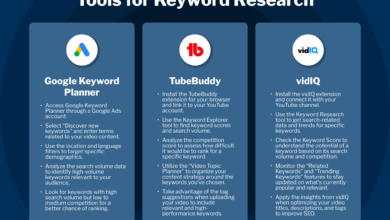
TubeBuddy: certified SEO + bulk updates + A/B testing for packaging
TubeBuddy is the workhorse of YouTube SEO tools. It lives right inside your browser, which I love. Its standout feature is the A/B thumbnail tester. Creators have reported significant uplifts in views after rigorously testing thumbnails (up to 79% in some case studies, though results always vary by niche). If you have a library of old videos, their bulk editing tool is a lifesaver for updating descriptions or cards across 100 videos in minutes.
vidIQ: real-time analytics, competitor tracking, and daily AI video ideas
vidIQ feels more like a coach. The scorecard it adds to every video page is straightforward and helps you size up competitors instantly. The ‘Daily Ideas’ feature uses AI to predict YouTube video ideas based on your channel history. A word of advice: treat these as sparks, not instructions. I use it to find angles I hadn’t considered, but I always filter it through my own business goals.
ViewStats: analytics + thumbnail insights (and what to know about the 2025 backlash)
Launched by MrBeast’s team, ViewStats Pro (priced around US$49.99/month for top tiers) brings heavy-hitting analytics to the masses. It excels at showing you ‘outliers’—videos that are overperforming in your niche so you can study why. It faced some community backlash in 2025 regarding an AI thumbnail generator, with creators concerned about originality and creative control. My take? Use it for the data and the thumbnail insights, but keep your creative process authentic.
Subscribr and YTubeBooster AI: end-to-end AI workflows + multilingual metadata
Tools like Subscribr and YTubeBooster AI are pushing the boundaries of automation. They can draft titles, descriptions, and even scripts. For global channels, YTubeBooster’s bulk translation is incredible for YouTube localization. However, I always do a final human pass. I have a 3-step review habit: Fact-check the stats, adjust the tone to sound like me, and verify originality. AI is an assistant, not the author.
Social Champ: content calendar + cross-promotion + analytics for business teams
Optimization doesn’t stop at upload. Social Champ is excellent for business teams who need to manage a content calendar. It allows you to schedule tweets, LinkedIn posts, and Facebook updates that all point back to your YouTube video. For a business, this cross-promotion is vital. I often turn one long-form video into five social posts scheduled throughout the week to maximize the lifespan of that content.
How I choose the right tool stack (solo creator vs business team vs multilingual channel)
You don’t need all of these. In fact, buying too many tools usually leads to ‘dashboard paralysis.’ Here is how I would build a stack based on your situation.
Scenario 1: The Solo Business Creator (e.g., Realtor, Consultant)
Goal: Efficiency and Leads.
Stack: TubeBuddy (for A/B testing) + YouTube Studio (Free).
Routine: Spend 30 minutes a week validating topics and testing thumbnails. Keep it lean.
Scenario 2: The Content Team / Agency
Goal: Scale and Consistency.
Stack: vidIQ (for research) + Social Champ (for distribution) + ViewStats (for competitive intel).
Routine: Weekly editorial meetings reviewing competitor outliers and scheduling cross-platform pushes.
Scenario 3: The Global Publisher
Goal: Reach.
Stack: YTubeBooster AI (for translation) + Subscribr (for rapid drafting).
Routine: Automate subtitles and metadata translation immediately upon upload.
Regardless of your stack, remember to leverage your video assets fully. After a video goes live, I use an AI article generator to quickly create a companion blog post. This ensures I am ranking on Google for the same keywords I am targeting on YouTube.
Don’t overlook YouTube’s built-in optimization tools (free wins inside YouTube Studio)

Before you pull out your credit card, make sure you are using the tools YouTube gives you for free. The platform wants you to succeed, and their native features have improved drastically.
YouTube Studio now includes an Inspiration tab that uses AI to suggest video concepts, outlines, and even draft titles based on what your specific audience is watching. It’s surprisingly good. For mobile creators, the YouTube Shorts editing tools now include generative backgrounds and seamless integration with Adobe Premiere’s mobile workflows. These are free YouTube optimization wins sitting right in your app.
A beginner walkthrough: Inspiration tab → pick an idea → outline → publish plan
If I were starting from zero today, I would open the Inspiration tab, type in my broad niche (e.g., “marketing”), and look at the “Breakout” queries. I’d click one, let the AI generate an outline, and then take that outline to my filming setup. It removes the “blank page” fear instantly.
Common mistakes I see beginners make with YouTube optimization tools (and how I fix them)
I’ve made plenty of mistakes, and I see clients making them too. Here are the biggest pitfalls to avoid:
- Obsessing over tags: Tags are minimal ranking factors. Don’t waste 20 minutes on them.
- Changing titles daily: If you change a title every 4 hours, the algorithm can’t get a read on the audience. Give it time.
- Copying competitors blindly: Just because a big channel used a terrible thumbnail doesn’t mean you can. They have brand authority; you don’t.
- Ignoring the ‘gray’ metrics: Everyone looks at views. Few look at ‘returning viewers.’ That is your actual fanbase.
- Trusting tool scores over reality: If a tool gives your SEO a “100/100” score but nobody clicks, the score is wrong.
Mistake #1–#3: Over-optimizing metadata, under-optimizing the video
I used to spend an hour writing the perfect description and zero time refining my hook. That is backwards. Metadata vs retention is the battle, and retention always wins. A perfect description cannot save a boring first 30 seconds. Focus on the video quality first.
Mistake #4–#6: Trusting tool scores more than your own audience data
I treat SEO scores as hints, not truth. I once had a video with a “low” keyword score perform exceptionally well because it hit a specific emotional nerve with my audience. YouTube A/B testing strategy should always trump a static score. Test it, read the data, and trust your audience.
FAQs, GEO, and next steps: how I’d keep this system running every week
As we move deeper into 2026, optimization is evolving. It’s no longer just about keywords; it’s about Generative Engine Optimization (GEO). This means structuring your content so that AI engines (like Google’s AI Overviews or ChatGPT) can easily understand and cite your video. Clear chapters, transcripts, and structured descriptions help you rank in this new ecosystem.
FAQ: What is the most effective tool for optimizing YouTube SEO in 2026?
If you want deep data and bulk processing, TubeBuddy is the most effective YouTube SEO tool 2026. If you want idea generation and real-time coaching, vidIQ is likely the better fit. It depends on your workflow.
FAQ: Are AI-powered tools like Subscribr safe to use for content creation?
Yes, but with boundaries. AI tools for YouTube content are safe for drafting and ideation. They are risky if you use them to generate spammy, repetitive content. I treat AI like a junior assistant: great for prep work, but I make the final call.
FAQ: How can I use YouTube’s internal tools to improve my channel without external subscriptions?
Start with the Research tab in Analytics to find content gaps. Use the built-in Editor to trim videos post-publish if retention drops. And use the free YouTube Studio tools for A/B testing thumbnails, which is now a native feature for many creators.
Your Next Steps for This Weekend:
- Audit your last 5 videos: Check the retention graph for the drop-off point.
- Install one tool (TubeBuddy or vidIQ) and run a thumbnail test on an older video.
- Set up a repurposing workflow. Use an Automated blog generator to ensure your video content lives on your website, driving traffic even when you aren’t uploading.