Optimize Image File Names for SEO: Rank in Google Images
Filename SEO, explained (and how to optimize image file names for SEO without overthinking it)

I remember inheriting a client site a few years ago that was an absolute content goldmine—hundreds of high-quality interior design project photos—but their organic traffic was flatlining. When I opened their media library, the problem stared right back at me: thousands of files named IMG_8834.jpg, DSC_0012.png, and Screenshot 2023-01-15 at 9.41.02.png.
Google had no idea what it was looking at. The site was effectively invisible in image search, a channel that should have been their primary driver of qualified leads.
This is where filename SEO comes in. It isn’t about gaming the system or stuffing keywords where they don’t belong. It’s about providing clear, structured context so search engines can understand and index your visual assets accurately. If you manage a site, whether it’s for ecommerce, local services, or a SaaS blog, learning how to optimize image file names for SEO is one of the highest-ROI operational habits you can build. In this guide, I’ll walk you through the exact rules, workflows, and templates I use to clean up media libraries and drive measurable traffic from Google Images.
Quick answer: what an optimized image filename looks like

If you just need the rules to start renaming right now, here is the standard convention:
- Descriptive: Describe what is literally in the image (e.g.,
red-leather-office-chair). - Hyphenated: Always use hyphens (
-) between words, never underscores or spaces. - Lowercase: Keep everything lowercase to avoid server case-sensitivity issues.
- Clean: Remove special characters (like
%,$,&) and stop words (likea,the) if they add length without meaning. - Concise: Aim for 3–5 meaningful words.
Why filename SEO matters for Google Image Search (and business traffic)

It’s easy to dismiss filenames as administrative busywork. Does Google really care if a file is named blue-widget.jpg or 12345.jpg? The short answer is yes, and the documentation backs it up.
Google crawls image file names as textual clues to understand the subject matter of the image. Since search engine bots cannot “see” images in the same way humans do (though AI is changing this rapidly), they rely heavily on metadata—filenames, alt text, captions, and surrounding context—to determine relevance. When you leave a filename as a default camera string, you are stripping away one of the strongest relevance signals available to you.
For businesses in visual niches—think interior design, real estate, recipes, fashion ecommerce, or travel—this is critical. Optimized filenames contribute to:
- Higher visibility in Google Images: A clear filename helps you rank for specific visual queries (e.g., “modern kitchen island lighting”).
- Improved Page Relevance: Consistent keywords in filenames reinforce the topic of the page they are embedded on.
- Better User Experience (UX): While users rarely see the filename directly on the page, they do see it when they download an image or view the image URL directly.
A note on business impact: While I can’t promise that renaming a single image will skyrocket your rankings overnight, the cumulative effect is real. In my experience, properly optimized image libraries for ecommerce clients have contributed to significant upticks in organic sessions—sometimes driving 20–25% of total organic traffic from image search alone . Just remember: filenames are low-hanging fruit, but they won’t fix a page with thin content or poor technical performance.
What Google can learn from a filename (and what it can’t)

Let’s look at a concrete comparison.
- Image A:
IMG_4821.jpg - Image B:
modern-office-workspace-austin.jpg
For Image A, Google knows nothing except that it is a JPEG. For Image B, Google immediately understands the subject (office workspace), the style (modern), and potentially a location relevance (Austin).
However, keep your expectations in check. A filename is a relevance hint, not a magic ranking factor. If modern-office-workspace-austin.jpg is placed on a page about “Dog Grooming Tips,” Google will likely ignore the filename signal because the context doesn’t match. My rule of thumb is simple: The filename should confirm what the surrounding text is already saying.
How to optimize image file names for SEO: a step-by-step workflow I use

Over the years, I’ve refined a workflow that balances SEO impact with operational sanity. You don’t need to spend 20 minutes naming one photo. Here is the process I follow to optimize image file names for SEO efficiently, whether for a single blog post or a massive product catalog.
Step 1: Describe the image in plain language (no keywords yet)
Start by looking at the image and saying out loud what it is. Don’t think about keywords or rankings yet—just accuracy. If you are uploading a photo of a plumber fixing a sink, the description is “plumber fixing sink.” If it’s a product shot of a sneaker, it’s “white running shoe side view.”
This grounding step prevents you from writing filenames that are technically “optimized” but factually incorrect—a common mistake that frustrates users and confuses search engines.
Step 2: Add one context term that matches the page intent
Now, layer in the strategic context. This is where you align the filename with the page’s primary topic or the specific section header.
If that “plumber fixing sink” image is for a page about “Emergency Plumbing in Chicago,” your context term might be “emergency.” If the “white running shoe” is specifically the “Nike Air Zoom,” that’s your context.
My advice: If I had to choose only one word to add, I always pick the one that clarifies the intent. Is it a “diagram,” a “chart,” a “comparison,” or a “tutorial”? Adding that modifier helps capture intent-based image searches (e.g., “SEO process flowchart”).
Step 3: Format the filename correctly (hyphens, lowercase, clean characters)
This is where most people get lazy, and it costs them. Search engines, including Google, treat hyphens as word separators. They do not treat underscores reliably in the same way.
- Bad:
office_space_design.jpg(Google might read this as one long string “officespacedesign”) - Bad:
office space design.jpg(Browsers will convert spaces to%20, creating messy URLs likeoffice%20space%20design.jpg) - Good:
office-space-design.jpg
Also, stick to lowercase letters. Some web servers (like those running Linux) are case-sensitive. Image.jpg and image.jpg could be treated as two different files, leading to broken images if you aren’t careful. Keep it lowercase to be safe.
Step 4: Keep it concise (target length and word count)
Think of your filename as a label, not a sentence. I generally aim for fewer than 50–60 characters and about 3–6 meaningful words.
Why? Extremely long filenames can look like spam (keyword stuffing), get truncated in search results, or cause issues with certain file systems. If you find yourself writing a paragraph, save it for the alt text or the caption.
Step 5: Rename before uploading (and handle existing files carefully)
This is crucial: Rename your files locally on your computer before you upload them to WordPress, Shopify, or your CMS.
Most CMS platforms create the image URL based on the filename you upload. Once it’s uploaded, changing the filename usually requires a plugin or manual re-uploading, which changes the URL.
Warning for existing sites: Be very careful about renaming images that are already live. If you change IMG_1234.jpg to optimized-name.jpg, you have changed the URL. Any page linking to that old image will show a broken image icon unless you set up a redirect. For beginners, I usually recommend leaving old, indexed images alone unless you are doing a full content audit. Focus your energy on getting the new ones right.
Filename templates and real examples (so you can standardize at scale)
Standardization is the secret to scaling SEO. If you work with writers, freelancers, or a content team, you can’t rely on everyone guessing. You need a naming convention. Below are templates and examples you can steal for your own documentation.
| Bad Filename | Better Filename | Why it’s better |
|---|---|---|
IMG_9921.jpg |
leather-sectional-sofa-brown.jpg |
Replaces random digits with descriptive product details. |
Screen Shot 2023-11-01.png |
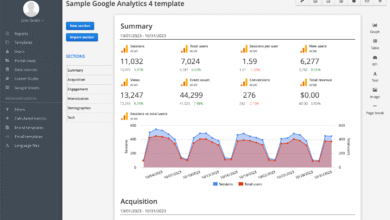
google-analytics-traffic-report-2023.png |
Clarifies the content of the screenshot for users searching for reports. |
DC-plumber-1.jpg |
clogged-drain-repair-washington-dc.jpg |
Includes specific service and relevant location without spamming. |
logo_final_final_v3.jpg |
kalema-seo-agency-logo.jpg |
Removes internal versioning clutter; adds brand context. |
buy-best-cheap-shoes-nike-adidas.jpg |
nike-air-max-running-shoe-red.jpg |
Avoids keyword stuffing; focuses on the specific object in the image. |
A simple naming formula I recommend
If you want a formula to prevent arguments in your team Slack channel, use this:
[Primary Subject] + [Key Attribute/Action] + [Context (Optional)].filetype
It’s simple, scalable, and keeps filenames unique—which is important to prevent overwriting files in your media library.
Business-specific templates (ecommerce, services, content marketing)
- Ecommerce:
product-name-color-variant.jpg
Example:mens-denim-jacket-vintage-wash.jpg - Local Services:
service-type-location-action.jpg
Example:roof-replacement-austin-tx-process.jpg - Blog/Content:
concept-keyword-chart/diagram.png
Example:content-marketing-funnel-diagram.png
Filename SEO is only one signal: pair it with alt text, formats, and performance basics
It’s important to see the bigger picture. A perfect filename won’t save a 5MB image that takes ten seconds to load. To truly win at image SEO, you need to align your filenames with other metadata and performance factors.
This is especially true when you are managing content at scale. Many teams use an AI SEO tool to help generate briefs and outlines, but the human implementation of technical details—like image metadata—remains vital. Even if you use an SEO content generator to draft your articles, you (or your process) must ensure the visual assets accompanying that text are properly optimized.
Filename vs alt text: how they reinforce each other
I often hear beginners ask, “Isn’t alt text the same thing?” Not quite. They work in tandem but serve different masters. The filename is a quick label for the database and URL structure. The alt text is a descriptive sentence for accessibility (screen readers) and semantic context.
| Feature | Filename | Alt Text | Caption |
|---|---|---|---|
| Purpose | Identify file & URL relevance | Accessibility & Context | User engagement |
| Audience | Search Bots / File System | Screen Readers / Search Bots | Human Readers |
| Best Practice | red-convertible-car.jpg |
“A shiny red convertible car driving along a coastal highway at sunset.” | “The 2024 model features a redesigned chassis.” |
Performance and discoverability checklist (beginner-friendly)
Before you hit publish, run through these “quick wins” to ensure your perfectly named images actually load fast enough to rank:
- Use Modern Formats: Google supports JPEG, PNG, GIF, WebP, SVG, BMP, and AVIF. Whenever possible, serve images in WebP or AVIF for superior compression without quality loss.
- Compress Images: An optimized filename on a 3MB image is a waste. Aim for file sizes below 100kb for large visuals where possible.
- Use Lazy Loading: Ensure images below the fold don’t load until the user scrolls to them. This improves your Core Web Vitals.
- Responsive Sizes: Use the
srcsetattribute so mobile users get smaller versions of the image than desktop users. - Image Sitemaps: For image-heavy sites, adding images to an XML sitemap helps Google discover them faster.
Common filename SEO mistakes (and exactly how I fix them)
I see the same mistakes pop up in audits over and over again. The good news is that most are easy to fix if you catch them early.
Mistake-to-fix checklist (5–8 items)
-
Mistake: Keeping Default Camera Names
Problem:IMG_5502.HEICtells Google nothing.
Fix: Rename to describe the subject.
Example:hand-poured-soy-candle-lavender.jpg -
Mistake: Using Underscores
Problem: Google doesn’t always recognize_as a separator.
Fix: Always use hyphens.
Example:marketing-strategy-template.pdf(notmarketing_strategy_template.pdf) -
Mistake: Keyword Stuffing
Problem: It looks spammy and can trigger penalties.
Fix: Stick to 3–5 words that describe the image, not the entire keyword list.
Example:blue-running-shoes.jpg(notbest-cheap-running-shoes-buy-online-sale.jpg) -
Mistake: Brand Stuffing Every File
Problem: Adding your company name to every single image is redundant.
Fix: Only include brand names on logos, products, or proprietary charts.
Example:seo-process-chart.png(better thankalema-seo-process-chart.pngfor generic icons) -
Mistake: Renaming Live Images Carelessly
Problem: Changing a filename changes the URL, breaking the image on the page.
Fix: Only rename during upload, or set up 301 redirects if you must change live assets.
FAQ: filename SEO questions beginners always ask
Let’s wrap up with the specific questions I get asked most often by clients and junior SEOs. I’ll keep these answers direct.
How long should an optimized image filename be?
Aim for under 50–60 characters, or roughly 3–6 meaningful words. This length is readable, unlikely to be truncated, and forces you to be precise. For example, wooden-coffee-table-round.jpg is perfect.
Should I use hyphens or underscores in filenames?
Always use hyphens. Search engines have explicitly stated that they treat hyphens as word separators (reading red-car as “red car”). Underscores are often treated as joiners (reading red_car as “redcar”), which hurts your relevance signals.
Does including the brand or website name in image filenames help SEO?
Generally, no. Unless the image is specifically of your logo, your office, or a branded product, adding your brand name to every generic stock photo or diagram adds noise, not value. Focus on describing the image content first.
What’s the relationship between filename and alt text?
They should align but not duplicate exactly. Think of the filename as the “title” (short, functional) and the alt text as the “description” (accessible, full sentence). If your filename is chocolate-cake-slice.jpg, your alt text might be “A slice of rich chocolate cake on a white plate with a strawberry garnish.”
Can optimizing filenames alone boost SEO?
By itself? Probably not. Filenames are a supporting signal. They work best when paired with excellent alt text, fast loading times (compression, WebP), and high-quality surrounding content. Think of filename optimization as good hygiene—it maximizes your chances, but it doesn’t replace the need for great content.
Conclusion: my 3-part checklist to optimize image file names for SEO (plus next steps)
Optimizing image filenames is one of those unglamorous SEO tasks that separates the pros from the amateurs. It’s operational, it’s precise, and it compounds over time. If you only fix one thing this week, stop uploading IMG_1234.jpg files to your site.
Here is your immediate action plan:
- Pick a convention: Decide on a simple formula (like
subject-attribute.jpg) and document it for your team. - Audit your workflow: Ensure whoever uploads content knows to rename files before they enter the CMS.
- Scale intelligently: If you are managing high-volume content, consider using an AI article generator or content operations tool that helps standardize your briefs and metadata requirements, ensuring every piece of content ships with SEO best practices baked in.
Start with your next upload. It takes five seconds to rename a file, but that file will be working for your SEO for years to come.