Meta Keywords vs Meta Descriptions: What Matters Now
Introduction: what most beginners get wrong about meta tags (and what I’ll clarify)

If you’ve ever stared at an SEO plugin settings page wondering which boxes actually move the needle, you are not alone. When I audit small business sites, I still see meta keywords fields filled with 2009-era comma-separated lists. It’s a common legacy habit, but in the SEO reality of 2026, it’s mostly wasted effort.
Here is the truth: the rules of engagement have changed completely. Meta keywords are dead weight, while meta descriptions have evolved from static summary text into dynamic marketing copy that fights for attention in an increasingly AI-driven search landscape. This isn’t just about ticking a box in WordPress; it’s about controlling how your brand looks when a potential customer finds you.
I’m going to clear up the confusion between these two distinct elements. By the end of this guide, you won’t just know the definitions—you will have a confident, repeatable process for auditing your site, ignoring what doesn’t work, and crafting descriptions that actually earn clicks.
Search intent + who this guide is for
This guide is written for the marketing generalist, the founder, or the junior SEO operator managing a business website. You aren’t looking for academic theory; you need to know what to implement today to see results.
We are going to cover the definitive difference between ranking factors and click-through rate (CTR) influencers, why Google rewrites your carefully crafted text, and how to scale your metadata without losing your mind. If you want a checklist that separates facts from old myths, you are in the right place.
Quick answer: should you use meta keywords or meta descriptions in 2026?

If you are scanning for immediate direction, here is the bottom line:
- Meta Keywords: No. Do not use them. They have been ignored by Google since 2009 and offer zero SEO benefit. In some cases, they can even signal spammy behavior to competitors or search engines.
- Meta Descriptions: Yes. Use them strategically. While they are not a direct ranking factor, they significantly influence your Click-Through Rate (CTR). A good description acts as a billboard that convinces a user to choose your result over a competitor’s.
At-a-glance bullets (what I recommend)
- Stop spending even a second of time on the “meta keywords” tag.
- Write meta descriptions for humans, focusing on the specific benefit or answer they are looking for.
- Align your description with the core intent of the page (informational vs. transactional).
- Measure success by looking at CTR in Google Search Console, not just keyword rankings.
- Accept that Google will rewrite your descriptions roughly 70% of the time to better match user queries—and optimize your on-page content to influence those rewrites.
Meta keywords: what they are, why they died, and why I don’t use them

I still see this in older themes or when taking over legacy client sites: a block of code in the header looking something like this:
<meta name="keywords" content="seo, marketing, business, cheap services">
Seeing this in 2026 is an immediate red flag. It tells me the SEO strategy hasn’t been updated in over a decade. Meta keywords were originally designed to help search engines understand what a page was about. However, because they are hidden from the user, they became the primary target for manipulation. Webmasters would stuff hundreds of irrelevant keywords into this tag to trick engines into ranking them for terms they didn’t deserve.
The result? Search engines stopped trusting them entirely. Today, including them is simply an opportunity cost—time you could have spent optimizing visible content.
Definition (in plain English)
Meta keywords are a specific type of meta tag that appears in the HTML code of a webpage but is invisible to visitors. Historically, they acted as a list of tags you handed to the search engine saying, “This is what my page is about.”
Why search engines ignore meta keywords (and what they use instead)
The system broke because of low trust. Since anyone could type “best insurance” into their meta tags regardless of their content quality, the signal became useless noise. Google officially confirmed they stopped using meta keywords for ranking way back in 2009 .
Instead of relying on a hidden list of tags, modern search engines analyze your actual on-page content, headings, internal links, structured data, and user engagement signals to determine relevance. They look at what users see, not what webmasters hide in the code.
Meta descriptions: what they do today (CTR, snippets, and why Google rewrites them)

Unlike meta keywords, meta descriptions are alive and well—but their role is often misunderstood. They are not part of the ranking algorithm. You can put your main keyword in the description ten times, and it won’t directly make you rank higher. However, they are crucial for conversion on the SERP (Search Engine Results Page).
Think of the meta description as your elevator pitch. It’s the two lines of gray text under your blue link. If your title tag grabs attention, the description closes the deal.
Definition + where it shows up (and where it doesn’t)
A meta description is an HTML attribute that provides a brief summary of a web page. Search engines often display the meta description in search results, where it can influence user click-through rates.
It typically lives in the <head> section of your site’s code. However, just because you write one doesn’t mean Google will use it. It serves as a suggestion, not a command.
Why Google rewrites meta descriptions (query match > author preference)
This is the part that frustrates most beginners. You spend time writing a perfect 155-character pitch, and Google replaces it with a random sentence from your second paragraph. Reports estimate up to 70% of descriptions are overridden by Google .
Why? In my audits, rewrites often happen when the hard-coded description doesn’t perfectly match the user’s specific query. Google’s goal is to show the user that your page contains the answer they just searched for. If your static description is generic, but a sentence halfway down the page answers the query perfectly, Google will pull that sentence instead. This isn’t a penalty; it’s an attempt to make your result look more relevant.
Meta keywords vs meta descriptions: the differences that actually matter for SEO

Let’s break this down into a clear comparison so you can prioritize your workload. The distinction here isn’t just technical; it’s operational.
Comparison table: meta keywords vs. meta descriptions (2026 reality check)
| Feature | Meta Keywords | Meta Descriptions |
|---|---|---|
| Primary Purpose | Obsolete tagging system | Marketing copy for SERP snippets |
| Ranking Factor? | No (Ignored) | No (Indirect via CTR) |
| Influences CTR? | No | Yes, High Impact |
| Risk Level | Medium (Spam signal) | Low (Unless duplicitous) |
| Best Practice 2026 | Delete / Ignore | Optimize for user intent |
| Time Investment | Zero | High (for priority pages) |
A simple priority rule for business sites
If you have limited time—and everyone does—here is your order of operations:
- Title Tag + Page Intent: This is your strongest lever.
- On-Page Content Quality: The actual value you provide.
- Meta Description: The pitch to get them to read the content.
- Structured Data (Schema): To get rich snippets (stars, prices).
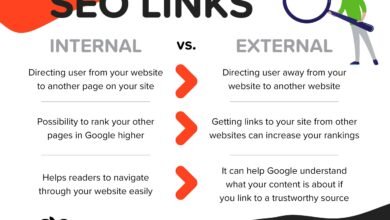
- Internal Linking: To help crawlability.
Notice that meta keywords are not even on the list. If you only do one thing today, audit your top 10 pages and rewrite their descriptions to sound more like a human invitation and less like a robot’s inventory list.
Implementing meta keywords vs meta descriptions: my practical workflow to write, test, and scale

Now that we’ve established what matters, let’s get practical. How do you actually manage this for a site with dozens or hundreds of pages? You need a workflow that is repeatable.
Step 1: map the page’s job (intent) before writing anything
Before you type a single character, ask: “What is the user trying to do?” If it’s a product page, they want specs and price. If it’s a blog post, they want an answer. Your description must promise that specific outcome.
Step 2: audit current snippets (what’s showing now vs what you wrote)
Don’t guess. Go to Google and search for your core keywords. What does the snippet actually look like? Open a simple spreadsheet and log the URL, the description you wrote, and the snippet Google is actually showing. If they are different, analyze why. Is your version too vague?
Step 3: write a description that matches the query and earns the click
When drafting, I follow a few simple rules:
- Lead with the benefit: Put the most important value prop in the first sentence.
- Be specific: “Services from $99” beats “Affordable prices.”
- Reflect the query: Use the language your customers use.
- Watch the length: Aim for ~155 characters, but don’t obsess over it. Clarity wins.
Step 4: use a template (and still make it sound human)
Templates are dangerous if you use them blindly, but helpful as a starting structure. Here is a formula I often use:
[Primary Action/Benefit] for [Target Audience] in [Location/Context]. [Proof Point/Differentiator]. [Call to Action].
Example: Book same-day plumbing repairs in Chicago. Certified experts with 500+ 5-star reviews. Call now for a free estimate.
Step 5: publish + QA (CMS, indexation, and edge cases)
Whether you are on WordPress, Shopify, or a custom stack, find the SEO settings for the page. Paste your new description there. Ensure the page isn’t set to “noindex.” If you have a massive site with faceted navigation (like filters for size/color), you generally want to `noindex` those or canonicalize them so you don’t need unique descriptions for every filter combination.
Step 6: measure impact using Google Search Console (CTR-focused)
You can’t improve what you don’t measure. Go to Google Search Console, filter by the specific page, and look at the CTR data. Note the date you changed the description. After 14–28 days, check if the CTR has improved. Remember, external factors like seasonality matter, but a trend line up is a good sign.
Step 7: scale responsibly (where automation helps and where humans must review)
If you are managing an ecommerce site with 5,000 SKUs, you cannot hand-write every single description. This is where you need a process. You might use a template approach for low-priority pages (e.g., “Buy [Product Name] at [Store]. Features include [Feature 1] and [Feature 2].”).
For high-volume content production, tools can accelerate the drafting phase. Using an AI article generator can help you produce initial drafts of meta descriptions or content summaries that you then refine. The key is editorial QA: never let automation publish directly without a human eye checking for tone, accuracy, and brand alignment.
What to optimize instead of meta keywords: on-page signals that move the needle
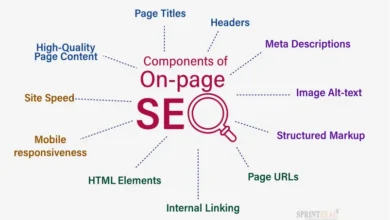
Since we are ignoring meta keywords, where should that energy go? The most effective SEO strategy in 2026 focuses on visible, helpful content.
Checklist table: the on-page elements I prioritize (and why)
| Element | Why it matters | Quick Tip |
|---|---|---|
| Title Tag | Primary relevance signal for ranking & clicks. | Front-load your main keyword. |
| H1 Heading | Tells users (and Google) the page topic. | Make it match the Title Tag closely. |
| Intro Paragraph | Hooks the user immediately. | Answer the main question early. |
| Internal Links | Passes authority between pages. | Link to related, high-value pages. |
| Content Depth | Satisfies user intent fully. | Cover the topic comprehensively. |
If you are looking to build out this kind of comprehensive, intent-matched content efficiently, a robust SEO content generator can provide the structure and topical depth required to compete. The goal is to consistently publish content that answers user questions better than your competitors.
Common meta description mistakes I see (and how to fix them)
Even experienced marketers fall into traps. Here are the mistakes I see most often in my audits, and exactly how to fix them.
Mistake-to-fix list (7 items)
- The “Keyword Stuffing” Trap:
Mistake: Repeating “Best SEO services cheap SEO services SEO agency.”
Fix: Write natural sentences. Google ignores lists and users hate them. - The “Lazy Duplicate”:
Mistake: Using the exact same description for 50 different pages.
Fix: At minimum, inject the specific product name or location into the template. - The “Boring Generic”:
Mistake: “Welcome to our home page. We offer services.”
Fix: State your unique value proposition. “Award-winning landscaping in Austin since 1999.” - The “Too Short” Snippet:
Mistake: Writing only 50 characters.
Fix: Use the space! You have ~160 characters to sell the click. - The “False Promise”:
Mistake: Claiming “Free Shipping” in the description when it’s not on the page.
Fix: Ensure alignment. A high bounce rate from misled users hurts you long-term. - Ignoring Search Intent:
Mistake: Using sales copy on an informational blog post.
Fix: Match the stage of the funnel. If they are learning, promise an answer, not a pitch. - Forgetting the Call-to-Action (CTA):
Mistake: Ending with a period and no direction.
Fix: Add a soft nudge like “Learn more,” “See pricing,” or “Read the guide.”
FAQs + wrap-up: what I’d do next on your site
Let’s wrap up with the specific questions I get asked most often during consultations.
FAQ: Are meta keywords still relevant in 2026?
No. They are completely ignored by Google, Bing, and other major search engines. If your site has them from years ago, don’t panic—they likely won’t hurt you unless they are excessively spammy—but do not waste time adding new ones.
FAQ: Do meta descriptions affect search rankings?
They are not a direct ranking factor. However, because they influence Click-Through Rate (CTR), and CTR is a performance metric that impacts traffic, they are indirectly vital. A better description gets more people to your site, which is the ultimate goal of ranking.
FAQ: Why doesn’t Google always use my meta description?
Google prioritizes the user’s query. If your description doesn’t explicitly answer the specific question the user typed, Google will scan your page content and construct a snippet that does. This happens frequently—estimates suggest up to 70% of the time .
FAQ: Given AI-generated search results, should I still write meta descriptions?
Yes. Even with AI Overviews appearing in over 50% of US desktop searches , traditional organic results still drive massive traffic. Furthermore, clear, structured descriptions help AI models understand your content’s summary, potentially influencing how you are cited in Generative Engine Optimization (GEO) contexts.
Conclusion: 3-bullet recap + next actions
We’ve covered a lot of ground. If you take nothing else away, remember these three points:
- Meta keywords are obsolete. Let them go.
- Meta descriptions are your ad copy. They earn the click.
- Rewrites are normal. Focus on on-page content clarity to influence them.
Your Next Steps for This Week:
- Audit your Top 10 Pages: Check GSC for your highest impression pages.
- Rewrite Weak Descriptions: Ensure they have a clear benefit and CTA.
- Remove Meta Keywords: If you have an easy way to bulk-delete them, do it to clean up your code.
- Set a Reminder: Check back in 28 days to see if your CTR has improved.
SEO isn’t about tricking robots anymore; it’s about serving humans so well that the robots notice. Start with your descriptions, and you’ll see the difference where it counts—in your traffic logs.