Visualizing Success: My On-Page SEO Infographic Guide to On-Page SEO Factors
When I audit a page, I see the same five misses over and over: titles that don’t match user intent, missing alt text, bloated images, nonexistent schema, and weak internal links. It’s rarely a lack of knowledge—it’s a lack of consistency. We know what to do, but in the rush to hit publish, the “basics” get skipped.
That is why I rely on an on-page SEO infographic. It’s not just a pretty visual; it is a memory aid and an implementation checklist for 2025–2026. In an era where AI Overviews are reshaping search, you can’t afford to guess which factors matter.
In this guide, I’ll walk you through exactly what belongs on that infographic today. We will cover the new priorities like E-E-A-T and AI readiness, look at the data driving these changes, and I’ll share a step-by-step workflow to turn this checklist into a standard operating procedure for your team.
Quick definition: What an on-page SEO infographic is (and why I use one)

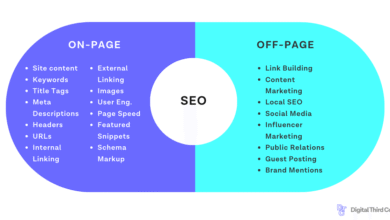
An on-page SEO infographic is essentially a visual compression of a complex checklist. Instead of reading a 3,000-word guide every time you publish, you reference a single, scannable asset that maps out where keywords, links, and technical elements should live on a page.
For me, it serves three specific functions:
- Training: It gives new writers and devs a shared visual language.
- Auditing: It acts as a “spot the difference” tool when reviewing underperforming pages.
- Publishing SOPs: It prevents the “I forgot the meta description” moment.
Note: An infographic isn’t a ranking factor—execution is. The graphic is just the tool that ensures the execution happens.
Why on-page SEO factors changed in 2025–2026 (AI Overviews, trust signals, and shrinking clicks)

If you are still using a checklist from 2022, you are optimizing for a version of Google that no longer exists. The landscape has shifted fundamentally due to the rise of generative search.
Here is what the data tells us about the current environment:
- AI Overviews are dominant: They now appear in approximately 30% of all search results and up to 74% of problem-solving queries . This means your content often needs to be structured to feed these summaries, not just rank as a blue link.
- Clicks are harder to earn: Organic click-through from search in the U.S. dropped to 40.3% in March 2025, down from 44.2% the previous year . Zero-click searches are real; if you don’t grab attention immediately, you don’t get the visitor.
- Trust pays off: Improvements in trust and authority signals (E-E-A-T) have been shown to boost rankings by 89% to 134% in generative search contexts .
For beginners, this means the “basics” now include things that used to be advanced, like schema and clear authorship. You aren’t just writing for a crawler anymore; you’re writing for a synthesis engine.
The on-page SEO infographic: the exact factors I’d highlight (2025 checklist)

If I were designing an infographic today for my team, I wouldn’t include everything. I would focus on the high-impact levers. Below is the specification for what that infographic should contain, mapped to why it matters.
| Factor Category | Why It Matters Now | Infographic Visual Cue | Quick Implementation Tip |
|---|---|---|---|
| Metadata | CTR is lower; snippets must sell the click. | Top bar / Browser tab icon | Front-load the main keyword in the title. |
| Structure & Links | Guides users and bots through topic clusters. | Skeleton/Wireframe view | Use descriptive anchors, not “click here.” |
| Technical Foundation | Core Web Vitals are a baseline requirement. | Speedometer / Mobile Phone | Compress images to WebP before uploading. |
| Schema / Rich Results | Helps machines understand context explicitly. | Code brackets / JSON icon | Add FAQ schema to Q&A sections. |
| E-E-A-T Signals | Differentiation against generic AI content. | Badge / ID Card / Author Photo | Link to the author’s LinkedIn or bio page. |
| AI Readiness | Optimizing for inclusion in AI Overviews. | Summary Box / Robot Icon | Define the topic in 2-3 sentences at the top. |
Despite these clear requirements, gaps are widespread. Data shows that over 80% of websites lack image alt attributes, 72% suffer from slow load times, and more than 23% use no structured data at all . Closing these gaps is your easiest win.
Metadata that earns the click: title tags, meta descriptions, and URL slugs
Your title tag is still arguably the most critical on-page SEO factor. It tells Google what the page is about and tells the user why they should care. While meta descriptions don’t directly impact rankings, they heavily influence whether a user clicks your link or the AI summary above it.
- Title Tag: Keep it under 60 characters. Place the keyword near the front.
- Meta Description: Treat this as ad copy. Include a hook or a solution.
- URL Slug: Keep it short, readable, and keyword-focused.
Example (Bad vs. Better):
- Bad: Home – Services – 12345 (Title) | We do stuff. (Meta)
- Better: Emergency Roof Repair in Austin | 24/7 Local Roofers (Title) | Leaking roof? Our Austin roof repair team arrives in 60 mins. Licensed and insured. Get a free quote now. (Meta)
Content that satisfies intent: originality, topical focus, and readability for humans + AI
I used to over-explain the first 300 words of every article. It made me feel smart, but it didn’t answer the query fast enough. Today, human-first, intent-focused content is the priority. If a user wants a definition, give it to them in the first paragraph.
Search intent generally falls into informational, transactional, or navigational buckets. Your content must match that immediately. Furthermore, readability flows are now evaluated by AI. Giant walls of text are a signal of poor user experience.
My “Definition-First” Rule: start sections with a direct answer or definition. Then expand. This helps humans skim and helps AI extract the snippet.
Page structure that guides readers: H2s, H3s, table of contents, and jump links
Visual hierarchy isn’t just for aesthetics; it’s for comprehension. A clear heading structure (H1 -> H2 -> H3) allows crawlers to understand the relationship between topics.
- One H1: This is your headline.
- Logical H2s: These are your main chapters.
- Table of Contents (TOC): Essential for long-form content. It improves dwell time by letting users jump to what they need.
In my experience, adding a TOC is one of the fastest ways to improve user engagement on long guides. It respects the user’s time.
Internal linking and anchors: building topical pathways (without over-optimizing)
Internal links are the nerves of your website. They pass authority and help users complete their journey. A common mistake is using generic anchors like “read more.” Instead, use descriptive text that tells the user what to expect.
Implementation tip: I try to add links naturally in the body copy where relevant context exists, rather than just dumping a “Related Posts” section at the bottom. Think of them as signposts helping a user solve the next part of their problem.
Technical foundations (easy to visualize): mobile-first, speed, accessibility, and image alt text

Technical SEO can feel abstract, but on an infographic, it’s easy to visualize. Think: speedometers and mobile icons. Since mobile-first indexing is the default, your desktop site is secondary. If your mobile site is slow, your rankings suffer.
Check these three things first:
- Speed: Run a PageSpeed Insights test. Anything under 50 needs immediate attention.
- Alt Text: Every image needs a description. This is for accessibility first, SEO second.
- Responsiveness: Does the text overflow on a phone screen?
Schema markup and rich results: the underrated visibility lever

Despite its effectiveness, schema usage remains surprisingly low . This is an opportunity. Schema (structured data) is code that translates your content into a language Google understands perfectly.
Beginners should start with:
- Article Schema: For blog posts.
- FAQ Schema: If you have a Q&A section.
- Breadcrumb Schema: To show site hierarchy in SERPs.
I always recommend using a validator tool before publishing. Broken schema is worse than no schema.
How I visually emphasize E‑E‑A‑T (Experience, Expertise, Authoritativeness, Trust) in an infographic

E-E-A-T isn’t a single setting; it’s a collection of signals. In your infographic, represent this with badges or icons for credibility. The data suggests that trust and authority enhancements can improve generative search rankings by 89%–134% .
Visual Trust Signals to add:
- Author Bio: Show the face and credentials of the writer.
- Citations: Link to reputable external sources.
- “Last Updated” Date: Show the content is fresh.
- Firsthand Experience: Photos or screenshots that prove you actually used the product or did the task.
AI Overview readiness: concise answers, semantic coverage, and structured summaries
If you want to appear in AI Overviews, you need to structure your content for extraction. AI models look for concise, confident answers to questions.
I recommend including a summary box or a “Key Takeaways” section near the top of your articles. Use consistent terminology and answer the “what is X” question in a simple subject-verb-object sentence structure. It’s not about gaming the system; it’s about clarity.
How I create an on-page SEO infographic from a real page audit (step-by-step workflow)

Theory is great, but execution is what pays the bills. Here is the exact order I follow when applying this framework to a real page, like a B2B software landing page or a local service guide.
| Workflow Step | Output | Common Pitfall |
|---|---|---|
| 1. Define Intent | 1-sentence intent statement | Targeting broad keywords with niche intent. |
| 2. Audit Essentials | List of gaps (e.g., “No H1”) | Getting distracted by minor code issues. |
| 3. Prioritize | Top 3 fixes list | Trying to fix everything at once. |
| 4. Design/Update | Updated page content | Ignoring mobile formatting. |
| 5. Measure | GSC performance note | Expecting instant results (wait 2-4 weeks). |
Step 1: Pick the page + define the search intent in one sentence
Don’t start digging into keywords yet. Look at the page and ask: “What does the user actually want here?” If it’s a “how-to” query, they want steps, not a history lesson.
Template: “The user searching for [Keyword] wants to [Action/Outcome] because [Motivation].”
Step 2: Audit the on-page essentials (metadata, headings, links, media, schema)
Run through the factors we discussed. Check the title tag. Is the H1 unique? Are images over 200KB? I usually take screenshots of the “before” state so I can prove value later. Tools like Google Search Console and PageSpeed Insights are your best friends here.
Step 3: Prioritize fixes with an “Impact × Effort” mini-matrix
You can’t fix everything in an hour. If I only had 60 minutes, I would prioritize using a simple matrix:
- High Impact, Low Effort: Fix title tags, add schema, compress images. (Do this first).
- High Impact, High Effort: Rewrite main content, fix site speed architecture. (Plan this).
Step 4: Turn the checklist into an infographic layout (blocks, icons, and copy length)
When visualizing this, keep it clean. Use distinct blocks for each category. Ensure high contrast for accessibility—if you can’t read the text on a phone without zooming, it’s a bad infographic. I prefer keeping each block to one sentence or a short bullet list.
Step 5: Implement changes on the page and measure outcomes
Once you update the page, verify the changes. Then, watch Google Search Console. Look for changes in Impressions first (Google is testing you) and then CTR. Note that some pages move fast; others take weeks to reflect changes.
Scaling this workflow for teams: keeping quality high with content intelligence tools
When you are managing one page, a manual checklist is fine. When you are managing hundreds, you need a system. This is where standardized briefs and outlines become critical to ensure every writer follows your infographic’s requirements.
To maintain consistency, many teams use an AI article generator to create structured first drafts that already adhere to formatting best practices. This allows editors to focus on refining the message rather than fixing basic structure.
Using a dedicated SEO content generator can help automate the “Definition-First” rules and intent matching we discussed. An effective AI SEO tool doesn’t replace the strategist; it scales the strategist’s insights across every page. Even the best AI content writer requires human oversight, but it provides a robust foundation that ensures no step in your workflow is missed.
Common on-page SEO infographic mistakes I see (and how I fix them)
I’ve made plenty of mistakes trying to simplify SEO into visuals. Here are the most common ones so you can avoid them:
- Cramming too much info: An infographic should be a summary, not a novel. If the font size is 8pt, it’s useless.
- Ignoring Mobile: Most users (and Google) are mobile-first. If your infographic or page layout breaks on mobile, you lose.
- Missing the “Why”: Telling a writer to “add schema” without explaining why leads to bad implementation.
- Forgetting the Update Date: SEO changes fast. An undated infographic is a liability.
- Over-optimizing Anchors: Don’t force keywords into every internal link. It looks spammy and hurts trust.
FAQ: On-page SEO infographic questions beginners ask me
What is the most important element in an on-page SEO infographic?
I recommend prioritizing the Title Tag and User Intent alignment. If these are wrong, the rest of the optimization doesn’t matter because no one will click or stay.
Should I include AI optimization tips in my infographic?
Yes. I suggest adding a specific section for “AI Readiness” that focuses on clear formatting, summary boxes, and direct answers.
How do I visualize technical SEO elements clearly?
Use universal icons: a speedometer for page speed, a smartphone for mobile responsiveness, and a lock icon for HTTPS/security.
Does E-E-A-T really need to be on the checklist?
Absolutely. With the rise of generative search, trust signals like author bios and citations are now critical ranking factors.
Conclusion: My 3-part recap + next steps to publish your on-page SEO infographic
To wrap this up, remember that on-page SEO in 2025 is about balancing technical precision with human trust.
- The Factors: Prioritize Metadata, Intent, Speed, Schema, and E-E-A-T.
- The Workflow: Audit -> Prioritize -> Implement -> Measure.
- The Goal: Create content that is scannable for humans and structured for AI.
Your Next Steps:
- Pick one underperforming page to audit today.
- Rewrite the Title Tag and Meta Description to better match intent.
- Add Article Schema and valid Author metrics.
- Standardize this process for your next batch of content.