Introduction: Winning with Words (and Search) Using SEO content writing tips

I have seen this scenario play out more times than I care to count: A marketing manager spends three days crafting what they believe is a perfect blog post. They hit publish, wait a week, and check their analytics. The result? A handful of impressions, zero clicks, and a ranking stuck somewhere on page two.
It’s frustrating, but it’s rarely a lack of writing talent. It’s usually a lack of process. In 2026, writing for the web isn’t just about peppering keywords into paragraphs; it’s about engineering content that satisfies both human readers and the increasingly complex AI systems that power search engines. We aren’t just optimizing for Google’s ten blue links anymore; we are optimizing for answer engines, chatbots, and generative snapshots.
The good news is that the solution isn’t magic. It is a repeatable workflow. Whether you are running a content engine for a B2B SaaS company or a local service business, this guide covers the hybrid approach I use: combining foundational SEO content writing tips with the new rules of Answer Engine Optimization (AEO). Here is exactly how I run this process.
Optional quick takeaway
Search-optimized content in the AI era means answering the user’s question immediately and structurally. If you can clearly define the search intent and format your answer so a machine can easily quote it, you win both the ranking and the user’s trust.
What “search-optimized content” means now: Traditional SEO + AEO/GEO in one playbook

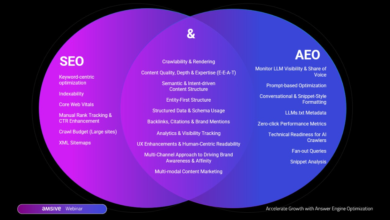
I don’t treat traditional SEO and the new wave of AI discovery as enemies; I treat them as different distribution channels for the same asset. Traditional SEO focuses on getting your page to rank for specific keywords. Answer Engine Optimization (AEO) and Generative Engine Optimization (GEO) focus on making your content the most authoritative, citeable answer for AI models like ChatGPT, Gemini, and Google’s AI Overviews.
The landscape has shifted dramatically. Recent industry data shows that daily AI tool usage among U.S. consumers rose to 29.2% by August 2025. Furthermore, referrals from platforms like ChatGPT to external websites tripled between mid-2024 and late 2024. If your content isn’t structured to be read by these systems, you are invisible to nearly a third of your potential audience.
When I write today, I am not just asking, “Will Google rank this?” I am asking, “Is this structured clearly enough for an AI to understand it’s the best answer?” This hybrid strategy is the only way to future-proof your traffic.
Traditional SEO vs. AEO/GEO: what stays the same vs. what changes
Think of it this way: Traditional SEO is like trying to get your book listed in the library catalog. AEO/GEO is trying to get the librarian to quote a specific paragraph from your book when someone asks a question. The fundamentals—intent, E-E-A-T, and backlinks—remain the price of entry. However, the formatting has changed. We now prioritize direct answers, structured data (tables and lists), and conversational clarity over long-winded introductions.
SEO content writing tips #1: Keyword research and intent mapping (the part beginners skip)

The biggest mistake I see beginners make is chasing search volume instead of search intent. I used to do this too—writing broad guides for high-volume terms, only to realize the people searching for them weren’t looking to buy anything. They were just browsing.
Effective SEO content writing tips always start with intent mapping. Before I write a single word, I use tools like Ahrefs or Google Keyword Planner to find long-tail keywords. These phrases often have lower competition but significantly higher conversion rates because the user is closer to a decision. Once I have my keyword, I map it to a specific content format. If the intent is to compare options, a 2,000-word essay won’t rank—a comparison table will.
Here is the decision matrix I use to match intent to format:
| Search Intent | User Goal | Best Content Format | Must-Include Elements |
|---|---|---|---|
| Informational | “Teach me how to do X” | Step-by-step Guide / How-to | Numbered lists, process videos, “What you need” checklist |
| Commercial | “Which tool is best?” | Listicle / Comparison Review | Comparison tables, pros/cons lists, pricing data |
| Transactional | “Buy X software” | Product Page / Landing Page | Clear CTA, social proof, FAQs on pricing/features |
| Navigational | “Find login page for X” | Hub Page / Portal | Direct links, clear login buttons, minimal text |
A simple intent checklist I use before writing
Before I start drafting, I run through this quick mental checklist to ensure I’m not wasting my time:
- User Goal: Can I state exactly what problem the user is trying to solve in one sentence?
- Time to Value: Can the user get their answer in the first 30 seconds of reading?
- Proof Requirements: Do I need data, screenshots, or expert quotes to back up my claims?
- SERP Analysis: What is currently ranking? (If page 1 is all videos, I shouldn’t write a text-only post).
Mini-template: 10-minute content brief (beginner-friendly)
I never write without a brief. Here is the simplified structure I use for my writers:
- Primary Keyword: [Insert Keyword]
- Target Audience: [e.g., SMB Marketing Manager]
- User Intent: [Informational/Commercial]
- The “One Thing”: [The single main takeaway of the article]
- H2 Outline: [List 3-5 main headings]
- Internal Link Targets: [List 2 relevant posts to link to]
SEO content writing tips #2: Build a structure that ranks and reads fast

Once the research is done, the structure is everything. In the age of AI, walls of text are dead. Content needs to be scannable for humans and parseable for bots. I often use an AI article generator to help me visualize potential heading structures, but the final editorial judgment is always mine. The goal is to turn a blank page into a logical hierarchy.
I focus heavily on H2s and H3s. A weak heading is vague, like “Getting Started.” A strong, optimized heading is specific, like “Step 1: Audit your current content for gaps.” This helps search engines understand the context immediately. I also ruthlessly edit my paragraphs. If a paragraph is longer than four lines, I cut it in half. It feels aggressive at first, but your mobile readers will thank you.
My “answer-first” paragraph formula (for beginners)
To optimize for AEO, I use an “answer-first” approach. Instead of burying the lead, I state the answer immediately. Here is the formula: Direct Answer + Supporting Detail + Example/Next Step.
Example:
Question: How long should a blog post be?
Answer: The ideal blog post length depends on intent, but generally ranges between 1,500 and 2,500 words for comprehensive guides. (Direct Answer) Short-form news updates may only need 500 words, while technical pillars can exceed 3,000. (Supporting Detail) For example, this guide is targeted at 1,800 words to cover the topic in depth. (Example)
Where lists, tables, and visuals earn their keep
My general rule of thumb is simple: If I have three or more items to compare or list, I stop writing sentences and start formatting. Bullet points break up visual monotony, while numbered lists are essential for step-by-step instructions (and capturing “How-to” rich snippets). Tables are perhaps the most underutilized tool in SEO content writing; they provide structured data that AI models love to ingest and quote.
On-page optimization that actually matters: titles, headings, links, schema, and media

You can write the best article in the world, but if the technical wrapper is weak, it won’t perform. On-page optimization isn’t about stuffing keywords; it’s about signaling relevance. I focus on the elements that actually move the needle: the title tag (for CTR), the URL slug (short and clean), and internal linking (for authority flow).
Here is the checklist I use when I move from draft to pre-publish mode:
| Element | What Good Looks Like | Common Mistake to Avoid |
|---|---|---|
| Title Tag | “Keyword + Benefit/Hook | Brand Name” (under 60 chars) | Using the generic H1 or cutting off the keyword. |
| Meta Description | Actionable summary with a CTA (under 155 chars). | Leaving it blank (Google picks a random snippet). |
| H1 Header | Includes primary keyword naturally. | Using multiple H1s or making it vague. |
| Internal Links | 3-5 links to related topic clusters with descriptive anchors. | Using “click here” as anchor text. |
| Image Alt Text | Descriptive text explaining the image context. | Stuffing keywords where they don’t belong. |
| Schema | FAQ or Article schema applied. | Applying Review schema to a non-review page. |
Internal + external linking: how I keep it natural (and useful)
I view linking as citations in an academic paper—they prove you’ve done your homework. For internal links, I look for opportunities to help the reader complete a related task. If I mention “technical SEO,” I’ll link to my guide on that topic. For external links, I only cite primary sources (data studies, official documentation) to boost the authority of my own piece. I never force a link where it doesn’t add value.
Schema markup basics (FAQ/HowTo/Article) for richer results
Schema markup sounds intimidating, but it’s essentially just labeling your content so search engines know exactly what it is. I almost always use FAQ schema for educational posts because it increases the chance of occupying more real estate in the SERPs. If I’m writing a tutorial, I switch to HowTo schema. This doesn’t guarantee a rich snippet, but it significantly improves eligibility.
E‑E‑A‑T for beginners: how I build trust quickly (without sounding corporate)

Google’s E-E-A-T (Experience, Expertise, Authoritativeness, Trustworthiness) is a critical ranking signal, especially for business content. But how do you demonstrate this without writing a boring biography? I use “trust blocks”—small, templated sections that explicitly state why the reader should listen to me.
For example, right after the intro, I might include a line like, “Who this is for: Marketing managers scaling from 1 to 10 articles a week.” Or, near a statistic, I’ll add, “Source: 2025 State of Marketing Report.” I also make a point to be honest about limitations. If I haven’t tested a specific tool personally, I say, “I haven’t used this myself, but industry peers recommend it.” Paradoxically, admitting what you don’t know makes you more trustworthy than pretending to know everything.
Fast credibility checklist (what I verify before publishing)
Before I hit that publish button, I do a quick reality check on the content’s integrity:
- Stats Check: Is every statistic less than 2 years old and linked to the original source?
- Claim Verification: Are bold claims backed by evidence or clear logic?
- Link Health: Do all external links go to live, 404-free pages?
- Date Stamp: Is the “Last Updated” date accurate to the content’s freshness?
Scaling content production with AI (without publishing generic fluff)

Let’s be real: scaling high-quality content solely with human writers is expensive and slow. This is where AI becomes a force multiplier, provided you keep a human in the loop. I use a SEO content generator to handle the heavy lifting of drafting and ideation, which frees me up to focus on strategy and nuance.
My workflow looks like this: I generate a detailed brief and use a Bulk article generator to create the initial drafts for a topic cluster. This gives me a solid foundation—usually about 80% of the way there. Then, I spend my time on the final 20%: adding personal anecdotes, verifying data, and ensuring the voice sounds like me, not a robot. For larger projects, an Automated blog generator helps maintain a consistent publishing cadence, ensuring we never miss a week.
However, AI is not a “set it and forget it” solution. It excels at structure and speed, but it struggles with original insight and empathy. That is why the human element is non-negotiable.
My human-in-the-loop checklist (the non-negotiables)
I never let an AI-generated piece go live without passing this review:
- Fact Verification: AI hallucinates numbers. I double-check every single data point.
- Tone Check: Does it sound robotic or like a helpful colleague? I rewrite generic intros.
- Example Injection: I add at least one specific, real-world business example per section.
- Formatting: I break up long AI-generated paragraphs into punchy lists.
- Internal Linking: AI doesn’t know my site structure; I add these links manually.
Mini table: what I delegate to AI vs. what I keep human-led
Here is how I split the labor to maximize efficiency without losing quality:
| Task | Owner | Why? |
|---|---|---|
| Topic Ideation | AI | Great at generating volume and variations. |
| Strategic Angle | Human | AI can suggest; I decide the unique POV. |
| First Draft | AI | Eliminates writer’s block and sets structure. |
| Sourcing/Citations | Human | Essential for accuracy and E-E-A-T. |
| Formatting (HTML) | AI | Handles tags and tables faster than I can. |
| Final Polish | Human | Ensures emotional resonance and flow. |
Common mistakes (and fixes) that keep content from ranking + my refresh routine

Even with a great process, mistakes happen. The most common issue I see isn’t bad writing; it’s neglect. Content is a living asset, not a statue. If you don’t maintain it, it decays. I have seen pages drop from position 1 to position 10 simply because the data became outdated or a competitor published something fresher.
5–8 mistakes + fixes (bullet list or table)
Here is a quick troubleshooting guide for when a post isn’t performing:
- Mistake: Targeting Mixed Intent.
Fix: If the SERP is 100% product pages, don’t write a blog post. Switch the format to match page one results. - Mistake: Thin Content.
Fix: If your competitors have detailed FAQs and you don’t, add a “People Also Ask” section to the bottom of your post. - Mistake: Missing Internal Links.
Fix: Run a site search for your keyword and add 3-5 links from older, high-authority posts to your new one. - Mistake: “Wall of Text” Syndrome.
Fix: Add a table of contents, break paragraphs, and insert at least one image per scroll depth. - Mistake: Ignoring CTR.
Fix: If you are ranking but not getting clicks, rewrite your meta title to include a stronger hook or number.
My simple refresh workflow (15–30 minutes per post)
I don’t have time to rewrite every article every month. Instead, I use this rapid refresh routine for my top 20 pages once a quarter:
- Check the SERP: Has the intent changed? Are there new features like AI overviews?
- Update the Data: Find any stat older than 2 years and update it .
- Refresh the Date: If I made meaningful changes, I update the “Last Modified” date. (Don’t fake this; Google knows).
- Add a Section: I usually add one new FAQ based on recent “People Also Ask” queries.
FAQs + next steps: how to apply these strategies this week

We have covered a lot, from intent mapping to AI workflows. The landscape of SEO is changing fast, but the core principle remains: help the user solve their problem efficiently. If you can combine that human-centric goal with machine-readable formatting, you will stay ahead of the curve.
FAQ: What are the most effective SEO content writing techniques today?
The most effective techniques combine deep intent alignment with structured formatting. Specifically, focusing on long-tail keywords, using clear heading hierarchies (H2/H3), implementing schema markup, and ensuring your content demonstrates E-E-A-T (Experience, Expertise, Authoritativeness, Trustworthiness) are the pillars of modern success.
FAQ: How does AEO/GEO differ from traditional SEO?
While traditional SEO targets keyword rankings and clicks, AEO (Answer Engine Optimization) and GEO (Generative Engine Optimization) target AI inclusion. AEO prioritizes concise, direct answers and structured data (like tables and lists) that allow AI models to easily extract and quote your content as the definitive answer.
FAQ: Can AI tools replace human writers?
Not entirely. AI tools are incredible assistants for outlining, drafting, and formatting, but they lack the ability to verify facts, apply strategic nuance, and inject the personal experience required for E-E-A-T. The best workflow is a hybrid one: AI for scale, humans for strategy and soul.
FAQ: What content formats perform best in AI-driven discovery?
Structured formats win here. FAQs, comparison tables, bulleted lists, and clear “How-to” steps are much easier for AI to process than long, unstructured paragraphs. I recommend trying to add a dedicated FAQ section to your key pages first.
FAQ: How often should content be updated?
You should update content meaningfully rather than just frequently. A good rule of thumb is to audit your most important pages quarterly. If traffic dips or facts become outdated, a refresh is necessary. For news or fast-moving industries, monthly checks may be required.
Conclusion: Your Immediate Next Steps
If you only do three things after reading this article, make them these:
- Pick one priority keyword and map its intent using the table provided above—don’t just guess.
- Audit your top-performing post and reformat it with an “answer-first” structure and added FAQ schema.
- Create a 10-minute brief for your next article to stop aimless drafting before it starts.
SEO isn’t about gaming the system; it’s about being the best answer on the internet. Start there, and the rankings will follow.