Ranking Your Big Day: Specialized SEO tips for wedding businesses (On-Page Guide)
Introduction: I want your wedding business to show up when couples are ready to book

It’s a familiar feeling for anyone in this industry: engagement season ends, the initial rush of inquiries settles, and you’re left staring at your inbox wondering if the tap has been turned off. You know couples are out there searching—scrolling through venues at 11 PM or looking for photographers on their lunch break—but if your website isn’t showing up in those exact moments, you simply don’t exist to them.
I wrote this guide because I see too many talented planners, florists, and photographers relying entirely on Instagram algorithms or costly directory listings, while their own website gathers digital dust. The reality I see across the market is that couples are taking longer to decide—sometimes 1 to 4 weeks of pure comparison shopping—and their budgets are tighter. They aren’t just browsing; they are vetting you.
This isn’t about chasing the latest Google fad or stuffing keywords into invisible text. This is a practical, step-by-step workflow to fix your on-page SEO. Whether you run a bridal boutique in Brooklyn or a venue in Phoenix, these are the changes that turn a pretty portfolio into a booking engine. We’ll cover everything from the right way to name your images to how to structure a location page that actually ranks.
Search intent + what this guide covers (on-page only, with local + visual realities)
Let’s be clear about what we are doing here: this is informational intent with a heavy dose of commercial preparation. We aren’t trying to trick Google; we are trying to answer the specific questions your couples are asking.
When I say “on-page SEO,” I mean everything that lives on your website that you have direct control over today. This includes your content, your images, your page structure, and the technical code underneath it. We won’t be diving into complex backlink campaigns or PR strategies here. We are focusing on the foundation: making sure your house is in order so that when a guest arrives, they find exactly what they’re looking for.
Why on-page SEO is vital for wedding businesses (especially in the US market right now)

The wedding industry is shifting, and the data backs it up. If it feels like couples are ghosting you or taking forever to sign a contract, it’s not just you. Recent market intelligence suggests that economic pressure is making couples more cautious. They are comparison shopping aggressively.
Here is what the numbers tell us about where you need to be:
- Google dominates lead generation: Approximately 64% of wedding professionals report Google Search as a top source for inquiries. If you are ignoring search, you are ignoring the majority of your potential revenue.
- Social media is for discovery, not always booking: Despite the hype, TikTok accounts for only about 4% of direct leads for wedding pros. It’s great for brand awareness, but when a couple is ready to spend $5,000+, they go to Google.
- Local intent is exploding: Searches for terms like “bridal shops near me” spike by more than 50% during key planning periods. If your local SEO isn’t dialed in, you are handing those walk-ins to your competitor down the street.
The takeaway is simple: If your page doesn’t answer their budget and availability questions fast, they will bounce to a competitor who does. You need to be the authority they find when the stress of planning sets in.
What couples actually search for: urgency, budgets, and “near me” intent
Couples rarely search for generic terms like “wedding services.” They search for solutions to their specific panic points. In 2024, even ultra-luxury clients—78% of them—are using Google to vet vendors. They are typing things like:
- “Affordable wedding photographer Austin pricing”
- “Barn wedding venues near me with availability 2025”
- “Full service wedding planner packages Chicago”
- “Custom sustainable wedding dress designers”
Notice the modifiers? “Pricing,” “Availability,” “Packages.” Your on-page content needs to match this intent, not just show pretty pictures.
Should wedding businesses invest in TikTok for SEO?
I get asked this constantly. “Shouldn’t I just focus on TikTok?” My answer is: treat them differently. TikTok is a visibility engine; Google is a discovery engine with commercial intent. Use TikTok to build your brand voice and show behind-the-scenes magic. But ensure your bio link drives them to a website that is optimized to close the deal. Use UTMs (tracking codes) on your social links so you can actually see if those views are turning into consults. Don’t trade a 64% lead source (Google) for a 4% lead source (TikTok) without a strategy.
Step-by-step SEO tips for wedding businesses: an on-page workflow I’d follow on every site

If I were auditing a wedding website today—say, for a Wedding Photography studio in Austin—I wouldn’t try to fix everything at once. I’d follow a strict triage order to get the biggest wins first. When you try to do everything, you end up doing nothing. Here is the exact order I use:
- Pick a target page: Start with your highest-revenue service (e.g., “Full Planning”).
- Match search intent: Ensure the page answers “can I afford you?” and “are you available?”
- Map keywords: Primary keyword + location + semantic terms (e.g., “venue,” “timeline”).
- Write Title & Meta: This is your billboard in the search results.
- Structure Headings: H1 for title, H2s for main sections.
- Add Conversion Blocks: Pricing cues and “Book Now” buttons above the fold.
- Internal Links: Connect it to your best blog posts.
- Schema: Add the code that tells Google “we are a local business.”
- Publish & QA: Check it on mobile.
Using an AI article generator can be a massive accelerator for drafting these pages, especially when you need to spin up content for multiple services. However, always have a human (you!) review the output to ensure your unique brand voice remains intact. You don’t want to sound like a robot; you want to sound like a host.
Here is a breakdown of common elements and how to handle them:
| On-Page Element | Wedding Example | Why it Helps | Common Mistake |
|---|---|---|---|
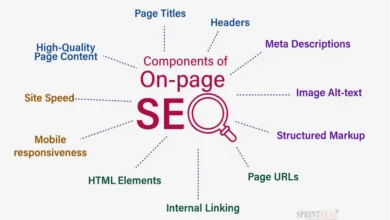
| Title Tag | “Wedding Photographer in Austin, TX | Candid & Editorial Style” | Tells Google exactly who, where, and what. | Using just “Home” or “Welcome” as the page title. |
| H1 Heading | “Capturing Your Austin Love Story: Editorial Wedding Photography” | Confirms to the user they clicked the right link. | Using an image logo instead of text for the H1. |
| Meta Description | “Booking for 2025. Award-winning Austin wedding photographer specializing in candid moments. View pricing and full galleries here.” | Improves click-through rate (CTR) from search results. | Leaving it blank so Google pulls random text from your menu. |
| Alt Text | “Bride holding wildflower bouquet at The Greenhouse venue in Driftwood” | Helps images rank in Google Images and Pinterest. | “IMG_5432.jpg” or keyword stuffing “wedding wedding wedding”. |
Step 1: Choose the page that should rank (service page vs location page vs blog post)
Don’t confuse Google. You need to match the page type to the user’s question. Use this rule of thumb:
- Query includes “Pricing,” “Service,” or “Hire”: Send them to a Service Page. This page is built to sell.
- Query includes “Near me,” “City,” or “Neighborhood”: Send them to a Location Page (e.g., “Wedding Planner in Scottsdale”).
- Query includes “Ideas,” “Inspiration,” or “Trends”: Send them to a Blog Post or Gallery.
Step 2: Match content to wedding search intent (inspiration vs comparison vs ready-to-book)
If I were a couple landing on your site, what do I need to see in the first 10 seconds? If I’m searching for “wedding venues,” I want to see the space immediately. If I’m searching for “pricing,” I don’t want to dig through five paragraphs of your philosophy on love to find a starting rate.
Look at the SERPs (Search Engine Results Pages). If the top ranking pages are “Top 10” lists, write a comparison guide. If they are service pages, polish your sales copy. Align your “above the fold” content—the part they see before scrolling—with their immediate need.
Step 3: Write titles, H1s, and meta descriptions that win clicks (with wedding-specific templates)
Your title tag is the single most important on-page SEO factor. Stop writing cute titles; write clear ones. Here are a few templates you can steal:
- Venue: [Venue Name] | [Style] Wedding Venue in [City], [State]
- Photographer: [City] Wedding Photographer | [Style/Vibe] & Elopements
- Planner: Full-Service Wedding Planner in [City] | [Business Name]
- Florist: Luxury Wedding Florist in [City] | [Business Name]
Bad Example: “Home – Bella Photography”
Better Example: “Fine Art Wedding Photographer in Charleston, SC | Bella Photography”
Step 4: Structure the page like a conversion-focused guide (headings, sections, FAQs, CTAs)
A wall of text scares people away. Break your page down into digestible sections using Headings (H2, H3). An ideal structure looks like this:
- Hero Section: Great photo + H1 + “Inquire” button.
- Intro: Who you serve and where.
- Social Proof: “Featured in Vogue” or client testimonials.
- The Experience: How you work.
- Pricing/Packages: Give at least a “starting at” price to filter leads.
- FAQ Section: Answer questions about travel fees, timelines, and booking.
- Final CTA: Contact form.
Step 5: Add internal links that guide couples (and Google) to the next best page
Think of internal linking like organizing a physical store. You want to make it easy for customers to find the next aisle. If you mention “classic bouquets” on your service page, link that text to your “Classic Floral Gallery.” If you mention “venues we love,” link to your blog posts about those specific venues. This keeps users on your site longer and helps Google crawl your content.
Step 6: Use schema where it actually helps (LocalBusiness, Service, FAQ, Review)
Schema is just code that helps Google understand your content. It’s not as scary as it sounds. Focus on implementing LocalBusiness schema (to cement your location) and FAQ schema (to take up more space in search results). Be careful with Review schema; only mark up reviews that are visible on the page, or you risk a penalty.
Local SEO tips for wedding businesses: win “near me” searches and city-specific bookings
For most of you, your battleground is local. You don’t need to rank globally; you need to rank when a bride in your zip code searches for “florist.” We know that searches for “bridal shops near me” spike by over 50% during engagement season. You need to capture that intent.
| Vendor Type | Local Keyword Pattern | Example Query | Target Page Type |
|---|---|---|---|
| Venue | [Style] venue near [City] | “Rustic wedding venue near Nashville” | Home or Location Page |
| Planner | [City] wedding planner | “Day-of coordinator Seattle” | Service Page |
| Photographer | [City] wedding photography | “Wedding photographer San Diego” | Home or Location Page |
Google Business Profile basics (what to fill out, what to post, and what to avoid)
Your Google Business Profile (GBP) is your new homepage. Fill out every single field. List your services explicitly. Upload your best photos regularly—Google loves active profiles. And please, respond to every review. If a couple raves about your work at “The Plaza,” mention “The Plaza” in your response. It signals local relevance. Avoid: Stuffing keywords into your business name (e.g., calling yourself “Best Atlanta DJ” when your legal name is “Smith Audio”). That gets you suspended.
Location pages that don’t feel spammy (a simple, ethical template)
If you serve multiple cities, you can create Location Pages, but do not just copy-paste the same text and swap the city name. That is spam. Instead, create unique pages for your top 3 markets. Include specific details about that city: venues you’ve worked at, travel fees for that zone, and testimonials from couples in that area. Make it a genuine resource for a couple getting married there.
Visual SEO tips for wedding businesses: optimize images, galleries, and video for discovery

In our industry, visuals are everything. But search engines can’t “see” a photo; they read the data attached to it. Optimizing your visual assets is the biggest missed opportunity I see. It’s also how you show up in Google Images and Pinterest—vital discovery channels for brides.
- Rename files before uploading:
DSC_1024.jpgtells Google nothing.sunset-wedding-ceremony-malibu.jpgtells a story. - Compress images: Huge files slow down your site and kill mobile rankings.
- Use Descriptive Alt Text: Describe the image for accessibility first, SEO second.
Alt text + filenames: what I write for real wedding photos (examples)
When writing alt text, close your eyes and describe the image to someone who can’t see it. Then, naturally weave in context.
- Bad: “wedding dress”
- Good: “Lace mermaid wedding gown with long train hanging in a window at The Driskill Hotel”
- Bad: “flowers”
- Good: “Cascading eucalyptus and white rose bridal bouquet on a rustic farm table”
- Bad: “reception”
- Good: “Candlelit outdoor wedding reception with string lights in Savannah, Georgia”
Pinterest and Instagram: how to support SEO without treating them like Google
Pinterest is a search engine, too. Optimize your Pins with the same keywords you use on your site. But remember the goal: drive traffic back to your website. Ensure every Pin links to a relevant blog post or gallery, not just your homepage. Use UTM parameters if you want to geek out on tracking, but mainly focus on consistent, keyword-rich board names.
Technical on-page essentials: mobile-first design, speed, and Core Web Vitals

I know, “technical SEO” sounds boring. But if your homepage takes 8 seconds to load on an iPhone because of a massive video background, that potential client is gone. Google’s Core Web Vitals measure user experience: loading performance (LCP), interactivity (INP), and visual stability (CLS). If you fail these, you will struggle to rank.
If you use a template from Squarespace, Showit, or WordPress, you are halfway there, but you can still break it. Keep your design mobile-first. Most brides are planning on their phones.
A simple performance checklist for wedding sites (especially image-heavy galleries)
- Resize images: No image needs to be wider than 2500px.
- Compress everything: Use tools like TinyJPG or dedicated plugins.
- Lazy Load: Ensure images below the fold don’t load until the user scrolls.
- Limit Plugins: If you don’t use it, delete it.
- Avoid Auto-play Video on Mobile: It eats data and slows down the page.
Content that ranks and builds trust: E-E-A-T for wedding vendor websites

E-E-A-T stands for Experience, Expertise, Authoritativeness, and Trust. Google wants to know you are a real business that delivers real results. For wedding pros, this means moving beyond just pretty pictures. Show your work. Write about the challenges you solved (e.g., “How we handled a rainy ceremony”). This shows Experience.
Ride the wave of trends intelligently. We know searches for “sustainable wedding dresses” are up 38% and “AI wedding planning” queries have grown 450%. Create content around these topics if they fit your brand. It positions you as a forward-thinking expert.
A case study template I’d publish (that also converts inquiries)
Stop just posting “Real Weddings” with 50 photos and no text. Write a Case Study that sells your expertise. Here is a structure you can reuse:
- The Couple & The Vision: What did they want?
- The Challenge: Was the timeline tight? Was the weather bad?
- The Solution: How did you fix it?
- The Gallery: Your best photos.
- The Vendor Team: Link to your friends (they might link back!).
- Testimonial: The couple’s review.
- CTA: “Want a stress-free day like this? Contact us.”
Common on-page SEO mistakes I see wedding businesses make (and how I’d fix them)
If I inherited a struggling wedding website today, these are the fires I would put out first. I see these mistakes constantly, and they are usually fixable in an afternoon.
5–8 mistakes + fixes (fast wins first)
- Mistake: Duplicate Title Tags. Every page says “Home.”
Fix: Rewrite unique titles for every page describing the specific service. - Mistake: Thin Service Pages. A page with one paragraph and a contact form.
Fix: Add FAQs, pricing context, and a process breakdown. - Mistake: Huge Images. Uploading 5MB raw files.
Fix: Bulk resize and compress your entire library. - Mistake: No Local Signals. Not mentioning your city in H1 or text.
Fix: Add your service area to your footer and main headings. - Mistake: Ignoring Broken Links. Linking to venues that closed.
Fix: Run a free broken link checker and remove dead ends.
FAQs + a 30-day action plan to implement these on-page SEO tips (with smart content scaling)

This can feel overwhelming, especially if you have a wedding this weekend. But you don’t have to do it all at once. If I had just 2 hours a week, here is how I would break it down over a month to start seeing real traction.
FAQ: How can wedding businesses capitalize on local searches?
Start with your Google Business Profile. Optimize it fully. Then, ensure your website explicitly states your city and surrounding areas in titles, headings, and footer text. Build specific location pages for your top secondary markets using the template above.
FAQ: What role do images and video play in SEO for wedding businesses?
They are your storefront. Optimized images (alt text + filenames) allow you to be found in Visual Search, which is how most couples start their inspiration journey. Video increases “dwell time” (how long people stay on your site), which signals quality to Google.
FAQ: How important is site performance?
Critical. If your site is slow, users leave. If users leave, Google drops your rankings. Focus on mobile speed first. You can be beautiful and fast, but it requires discipline with image sizing.
FAQ: How can a wedding site build trust and authority for SEO?
Through consistent, high-quality content. Publish case studies, answer specific client questions in blog posts, and display verified reviews prominently. This builds E-E-A-T.
30-day action plan (Week 1–4) + recap + next actions
Scaling your content doesn’t have to be a nightmare. You can use tools like a bulk article generator to create first drafts for your blog or location pages, then spend your energy editing them to match your voice. Use an AI SEO tool or SEO content generator to handle the heavy lifting of keyword research and outlining.
| Week | Task | Time Est. | Impact | Owner |
|---|---|---|---|---|
| Week 1 | Fix Homepage & Top Service Page (Titles, Meta, H1s) + Update GBP | 2 Hours | High | You |
| Week 2 | Audit & Compress Images + Fix Broken Links | 3 Hours | Medium | You/Dev |
| Week 3 | Create/Update one “Location Page” + Internal Linking | 3 Hours | High | You |
| Week 4 | Publish 1 Case Study + Add FAQs to Service Pages | 4 Hours | Medium | You |
Recap:
- Couples are searching with high intent; your site needs to answer them fast.
- Local and Visual SEO are your biggest levers for growth.
- Technical performance is the foundation that holds it all up.
Your Next 3 Actions:
- Go rewrite your Homepage Title Tag right now.
- Run your site through a speed test and compress those images.
- Draft one helpful FAQ section for your main service page.
You’ve got this. The season is waiting.