Amazon KDP keyword research: 7-slot backend wins for authors
Introduction: what I mean by Amazon KDP keyword research (and who this guide is for)

I still remember the sting of my first book launch. I had a great cover and a professionally edited manuscript, yet the sales dashboard flatlined. I assumed people would just "stumble" upon it. I was wrong. The reality of the Amazon marketplace is stark: 97% of book discovery happens through search, not browsing categories. If your book doesn’t appear when a reader types a problem or genre into that search bar, it effectively doesn’t exist.
That experience taught me that hope is not a marketing strategy. Amazon KDP keyword research isn’t about gaming the system; it’s about connecting your book with the reader who is already looking for it. This guide is for the intermediate author—someone who knows what a backend keyword slot is but isn’t sure how to fill it effectively. We are going to move beyond guessing and into a repeatable, newsroom-grade workflow that prioritizes compliance, relevance, and long-term sales. I’ll walk you through the exact steps I use to find intent-matched terms, specifically for the US market.
Why Amazon KDP keyword research matters in 2025 (visibility, conversion, and competition)

By 2025, the digital shelves are more crowded than ever. With over two million new books uploaded to KDP annually, the "publish and pray" method is obsolete. When I audit listings, I treat keywords as the bridge between a book and a credit card. Here is the realistic business case for why this research deserves your time:
- Keywords drive discoverability: Without them, Amazon’s A9 algorithm has no text data to index your book against user queries.
- Long-tail efficiency: Phrases with 3–5 words often convert 2.5× better than broad, single-word terms because the intent is clearer.
- Ranking boosts: Proper placement of relevant keywords can improve your Best Seller Rank (BSR) by 30–50% within weeks by signaling relevance to the algorithm.
However, let’s be clear about what keywords cannot do. They cannot fix a bad book cover, and they cannot salvage a poorly written blurb. Keywords get the horse to water; the cover and description make it drink. If your product-market fit is off, even the best Amazon book discoverability strategy will fail. But if your book is solid, keywords are the leverage that scales your success.
How Amazon Books search ranks listings: A9/A10 basics and the Rufus-era relevance shift

If you have spent any time in author groups, you have heard terms like A9 or A10 thrown around. Let’s strip away the jargon. Amazon’s search engine is a profit-seeking machine. Its goal is simple: show the product most likely to result in a sale.
I visualize the ranking process like this:
Relevance inputs → Impressions → Clicks → Sales → Higher Placement.
In the "Rufus era"—referring to Amazon’s newer, AI-driven generative search interfaces—relevance is stricter. Old tactics like stuffing unrelated keywords (e.g., putting "romance" in a thriller title) used to work simply by generating impressions. Now, the algorithm punishes this. If users see your book and don’t click, or click and don’t buy, Amazon downgrades you. This "relevance score" is invisible to us, but it dictates everything.
When I launch a book, the metrics I watch first aren’t just sales—they are impressions and Click-Through Rate (CTR). These tell me if my keyword relevance signals are working.
What ‘relevance’ means on Amazon (and why it’s stricter than Google)
On Google, a user might be researching a topic (informational intent). On Amazon, they are usually looking to buy (transactional intent). Relevance here means: "Does this book fulfill the promise of the search term?"
For example, if I target "psychological thriller" but my cover looks like a cozy mystery, the metadata might get me the impression, but the user experience will kill my conversion. Amazon tracks that bounce. In 2025, accuracy beats volume. I would rather rank #1 for a specific term like "vegan meal prep for athletes" than #500 for "cookbook."
The placement hierarchy I follow (title > subtitle > backend > description)

Not all metadata fields are created equal. Based on years of industry observation and testing, here is the hierarchy of algorithmic weight:
- Title: Carries the heaviest weight (estimated 3–5× more impact than other fields).
- Subtitle: High impact for supporting keywords.
- Backend Keywords: The engine room for discoverability (invisible to readers).
- Description & Categories: Lower direct ranking weight, but critical for conversion and relevance context.
Beginners often obsess over filling the KDP backend keywords while leaving their title vague. That is a mistake. Your title is your primary signal.
A step-by-step Amazon KDP keyword research workflow (the exact process I use)

When I sit down to research a new title, I don’t just stare at the screen waiting for inspiration. I follow a structured workflow to remove the guesswork. Whether you are launching a workbook or a novel, this process works because it relies on data, not intuition.
Step 1: lock the book’s promise and reader (so keywords don’t drift)
Before opening any tool, I define exactly who the book is for. Keywords fail when they try to catch everyone. I use this simple positioning statement template:
"For [specific reader] who wants [specific result] without [specific pain point]."
Example: "For busy working parents who want healthy weeknight dinners without spending hours in the kitchen."
This clarity instantly filters out irrelevant terms like "gourmet cooking" or "chef recipes."
Step 2: build a seed list from Amazon itself (autocomplete + category paths)
The best data source is Amazon’s own search bar. I open an Incognito window (so my personal browsing history doesn’t skew results) and select "Books" from the dropdown.
I start typing my core topic and watch the Amazon autocomplete predictions. These aren’t random; they are phrases real people are typing in high volume right now.
- Type: "Meal prep"
- Observe: "Meal prep cookbook for beginners," "Meal prep containers," "Meal prep on a budget."
I write down every relevant phrase. Sometimes I find surprising ones, like "Meal prep for two," which indicates a specific audience segment I hadn’t considered.
Step 3: mine competitor listings (without copying—extracting patterns)
Next, I analyze the top 10 books in my target niche. I am not here to clone a bestseller; I’m looking for the shared vocabulary buyers use. I scan their titles, subtitles, and—crucially—their reviews.
What I look for:
- Recurring phrases in subtitles (e.g., "Quick and Easy," "30-Day Plan").
- Pain points in reviews (e.g., "I loved that it didn’t use exotic ingredients").
What I ignore:
- Author names (you can’t target them in keywords).
- Trademarked terms (e.g., "Instant Pot" unless licensed).
- Generic marketing fluff like "Best Seller."
Step 4: validate demand vs competition (a simple scoring system)
Once I have a list of 30–50 raw keywords, I need to filter them. I use a simple 0–5 scoring method for keyword difficulty for Amazon books. I prefer phrases with moderate search volume but low competition. If a keyword has 50,000 competing products, I skip it. I’m looking for gaps where a new book can actually rank.
Step 5: cluster keywords into themes (so one book ranks for many terms)
Finally, I group my list. I literally highlight them in the same color if they mean the same thing. For example, "Meal prep ideas" and "Food prep recipes" are semantically similar. Clustering helps me avoid repeating the same word 20 times in my backend slots. One good cluster can feed into one backend slot or a subtitle.
How I choose winning long-tail keywords (with an evaluation table you can copy)
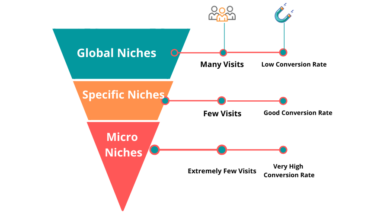
Beginners often chase the "head terms"—single words with massive volume like "Thriller" or "Cookbook." This is a trap. You will be buried on page 50. I used to chase volume, but now I prioritize long-tail keywords (phrases of 3–5 words). They have lower volume, but the people typing them are ready to buy.
Here is the evaluation table I use to decide which keywords make the cut:
| Keyword Phrase | Search Intent | Relevance (1-5) | Competition Signal | Placement Recommendation |
|---|---|---|---|---|
| Meal prep for beginners | Educational / Instructional | 5 (High) | High (Crowded) | Subtitle |
| Healthy meal prep for weight loss | Outcome-driven | 5 (High) | Medium | Title or Backend Slot 1 |
| Easy lunch ideas for work | Specific Occasion | 4 | Low | Backend Slot 2 |
| Freezer meals cookbook | Format specific | 3 | Medium | Backend Slot 3 |
| Instant Pot recipes | Device specific | 5 (If applicable) | High | AVOID (Trademark risk in backend) |
The 4 signals I prioritize (relevance, intent, specificity, competition)
When filtering my list, I look for these signals:
- Relevance: Does my book 100% deliver on this? If not, discard.
- Intent: Is the searcher looking to buy a book? (Avoid "free recipes").
- Specificity: "Sci-fi" is too broad. "Space opera with female protagonist" is actionable.
- Competition: Can I beat the books currently on page 1?
Example keyword clusters for one niche (so you can model it)
If I were publishing a guide on "Container Gardening," my clusters might look like this:
Cluster A (Audience):
Gardening for beginners, apartment gardening, balcony garden ideas.
Cluster B (Outcome):
Grow vegetables in pots, small space vegetable yield, organic patio herbs.
Cluster C (Problem/Pain):
Shade loving plants for pots, pest control for container plants.
Where to place keywords in KDP metadata (title, subtitle, backend keywords, description, categories)
Once you have your clusters, you need to map them to the right spots. This is where art meets science. You can use an AI article generator to help draft keyword-rich descriptions or brainstorm subtitle variations, but the final placement requires a human touch to ensure it reads naturally.
Title and subtitle: high-weight placement without awkward phrasing
Your title must be readable. Don’t stuff it. A subtitle like "Cookbook: Recipes, Food, Cooking, Kitchen, Dinner" looks spammy and destroys trust.
Good Structure: The Easy Meal Prep Cookbook: 50 Healthy Recipes for Busy Parents
Bad Structure: Meal Prep Cookbook Healthy Recipes Easy Food Prep Weight Loss Guide
Backend keywords: how I use all 7 boxes (50 characters each) efficiently
This is the most technical part of KDP backend keywords. You have 7 boxes. Each allows 50 characters (technically bytes). Here is my golden rule checklist:
- Use all 7 slots: Leaving one empty is throwing away visibility.
- No repetition: If "Cookbook" is in your title, do not put it in the backend. It’s wasted space.
- No commas: You don’t need them. Just use spaces. Commas eat up your character count.
- Order doesn’t matter: "red shoes" ranks for "shoes red."
My drafting process: I open a simple text editor (like Notes) and type out my phrases to check length before pasting them into KDP. 50 characters disappears fast.
Example of a filled slot (48/50 chars):
quick easy dinner ideas budget friendly family
Description + categories: supporting relevance (and conversion)
While descriptions carry less algorithmic weight, they are vital for conversion. I weave my secondary keywords naturally into the text. "This guide helps you master apartment gardening…" reads better than a list of tags. For categories, I ensure they align with my primary keyword clusters. Misaligned categories (e.g., putting a business book in "Self-Help" just for visibility) confuses the relevance engine.
My keyword tool stack (free and paid) + a comparison table for beginners

You can do great research with zero budget, but tools speed up the validation process. If you are producing content at scale or want deeper insights, tools become necessary. For broader content strategy, tools like a SEO content generator can assist, but for specific KDP data, you need specialized software.
Free workflow (0–$0): what I do before buying any tool
If I’m strapped for cash, here is my 45-minute manual workflow:
- Incognito Mode: Run autocomplete searches for my main terms.
- Manual Scraping: Open the top 5 books and copy/paste their subtitles and description keywords into a spreadsheet.
- BookBiz Academy (Free Tool): I use their free keyword tool to get a quick check on search volume estimates without signing up for a subscription.
Comparison table: which tool helps at each stage (discovery, validation, tracking)
Here is how I view the landscape of Amazon keyword tools for authors:
| Tool | Best For | Cost Level | Limitation |
|---|---|---|---|
| Publisher Rocket | Validation & Category Research | One-time fee | Data is estimated, not real-time accurate. |
| Helium 10 | Deep Dive Data & Tracking | Monthly Sub (High) | Overkill/Expensive for just one book. |
| BookBiz Academy | Budget Validation | Free / Low | Less depth than paid tools. |
| Manual Amazon Search | Discovery & Intent | Free | Time-consuming; no volume data. |
Seasonality, timing, and quarterly keyword updates (so your book doesn’t fade)
A book is not a "set it and forget it" asset. Consumer interests shift. I was once baffled why my "Organizing" book spiked in January and died in June. I realized I wasn’t accounting for the "New Year’s Resolution" wave vs. the "Spring Cleaning" lull.
In the Rufus era, algorithm sensitivity to trends is higher. I recommend a quarterly audit. You shouldn’t overhaul your entire metadata (that resets your relevance history), but you should rotate 1–2 backend slots to capture seasonal intent.
My 15-minute quarterly keyword audit checklist
- Check BSR Trend: Is rank slipping? If yes, relevance might be fading.
- Review Competitors: Have new books entered the top 10? What keywords are they using?
- Seasonal Scan: Is a holiday coming? (e.g., Mother’s Day, Back to School).
- Update 1 Slot: I usually designate "Backend Slot 7" as my rotating slot for seasonal terms.
Seasonal swaps without losing your core ranking
Caution is key here. I keep my core, evergreen keywords (the ones describing the book’s topic) locked in Slots 1–5. I only play with Slots 6 or 7. For example, in November, I might add "Christmas gift for dad" to Slot 7. In January, I swap it for "New Year habit tracker."
A quick lesson learned: I once changed my subtitle to include "Summer Read" and forgot to change it back in October. My click-through rate plummeted because the book looked outdated. Seasonal swaps require maintenance.
Common mistakes, compliance rules, and FAQs (so you don’t get suppressed) + my next steps checklist
Amazon’s compliance bots are aggressive. Since 2023, with the 3-uploads-per-day limit, they are focusing on quality and metadata accuracy. Getting your book suppressed because you tried to be clever with keywords is a nightmare I want you to avoid.
Mistakes I see beginners make (and the quick fix for each)
- Mistake: Using another author’s name (e.g., "Stephen King style").
Fix: Describe the style instead ("psychological horror," "suspense thriller"). - Mistake: Including "Kindle" or "KDP" in backend keywords.
Fix: Remove them. These are banned terms. - Mistake: Claiming "Best Seller" in the title or keywords.
Fix: This is a misleading claim unless verified by Amazon’s system. Stick to describing the content. - Mistake: Repeating the title in the backend.
Fix: Use that valuable space for synonyms and long-tail variations.
FAQs about Amazon KDP keyword research
Q: How many keywords can I use on KDP?
You get 7 backend keyword boxes. Each box has a limit of 50 characters (bytes). Use as much of that space as possible.
Q: Should I put my main keyword in the title?
Yes. The title has the highest algorithmic weight. Place your primary long-tail keyword there naturally.
Q: How often should I update my KDP keywords?
I check mine quarterly. Frequent changes (daily/weekly) prevent the algorithm from establishing a baseline for your book.
Recap + next actions (what I’d do in the next 7 days)
If you do only one thing after reading this, stop guessing. Here is your plan for the next week:
- Day 1: Pick one book. Run the autocomplete search and build a list of 30 phrases.
- Day 2: Score them using the table provided. Cluster them into themes.
- Day 3: Draft your 7 backend slots in a text editor to maximize the 50-character limit.
- Day 7: Update your KDP metadata and set a calendar reminder to check BSR in 30 days.
Keywords are not magic, but they are the necessary signal that connects your work to the reader waiting for it. Good luck.