Introduction: why I use topical maps before I publish (and what you’ll be able to do after this guide)

I used to keep my blog topic ideas in a messy Google Doc. It was a chaotic list of keywords I found in tools, random ideas from the shower, and questions sales reps slacked me. When it came time to write, I’d pick whatever felt easiest.
The result? I had fifty posts, but traffic was stagnant. My content was competing with itself, cannibalizing keywords, and failing to build any real authority. Publishing felt reactive, not strategic.
That changed when I stopped building lists and started building maps. A blog content map (or topical map) isn’t just a schedule; it’s an infrastructure plan for your site. It tells you exactly what to write, how to link it, and how to prove to search engines that you are the expert.
In this guide, I’m going to walk you through the exact system I use. You will leave with a clear understanding of how to structure your content, a prioritization framework to decide what to write next, and a spreadsheet template you can use immediately. Let’s stop the random acts of content and start building an asset.
What exactly is a topical map (and how it’s different from a keyword list)?

Think of your blog like a bookstore. A keyword list is a pile of books dumped in the middle of the floor. You might find a good one, but it’s a mess to navigate. A topical map is the shelving system: the sections, the aisles, and the logic that connects a broad category (like “Cooking”) to a specific niche (like “French Pastries”).
In technical terms, a topical map is a hierarchical diagram of content. It starts with a broad “Pillar” or “Hub” topic, breaks down into specific “Cluster” subtopics, and connects them all through strategic internal linking. It’s not just about keywords; it’s about covering an entire subject so thoroughly that search engines recognize your site as an authority.
Quick answer for beginners: topical map in one paragraph
A topical map is a strategic blueprint that organizes your blog content into clusters. It consists of a central Hub Page (the broad topic), Cluster Pages (specific subtopics), and Supporting Posts (granular questions). The goal is to cover every aspect of a subject and link them together so that authority flows from one page to another, helping the whole section rank higher than individual posts could on their own.
Topical clusters, pillars, and intent: the 3 building blocks
To build a map that works, you need three specific components. I often see people skip the third one (intent), which is usually why their maps fail.
- The Pillar (Hub) Page: This is your high-level resource. Think of it as the “Ultimate Guide.” For a US-based SMB, this might be “Small Business Email Marketing.” It touches on everything but doesn’t go deep into the weeds.
- The Cluster Content: These are the deep dives. If your pillar is Email Marketing, your clusters are “Email Tools,” “List Building Strategies,” and “Cold Email Templates.”
- Intent Layers: This is critical. You don’t just group by keyword; you group by what the user wants. Are they learning (Awareness), comparing software (Consideration), or ready to buy (Decision)?
When I map this out, I often pull intent data directly from support tickets. If customers keep asking “how does X compare to Y,” that’s a comparison intent cluster waiting to be built.
A simple table: keyword list vs topical map

Here is why my content stopped competing with itself once I made the switch:
| Feature | Standard Keyword List | Topical Map |
|---|---|---|
| Structure | Flat list (row by row) | Hierarchical (Parent > Child > Grandchild) |
| Goal | Rank for specific keywords | Own an entire topic/entity |
| Internal Linking | Random or afterthought | Planned before writing |
| Cannibalization | High risk (overlap is common) | Low risk (intent is separated) |
| Maintenance | Rarely updated | Living document |
Why blog content mapping matters now: SEO, AI search, and business outcomes

When I plan coverage first, publishing feels less random. But beyond my own peace of mind, there is a hard business case for this approach. The search landscape has shifted. Search engines—and increasingly, AI answer engines—don’t just look for keyword matches anymore. They look for Topical Authority.
Sites that demonstrate comprehensive coverage of a topic often outrank competitors who have more backlinks but thinner content. In one case study, a B2B SaaS company saw a 295% increase in organic traffic after reorganizing their blog into structured topical maps . The logic is simple: if you prove you know everything about a topic, Google trusts you on the specific keywords.
How topical authority works (in plain English)
Imagine two websites. Site A has one viral post about “CRM software.” Site B has that same post, plus 50 supporting articles about CRM implementation, CRM pricing, and CRM integrations, all interlinked. Search engines view Site B as the authority entity. Because the content is connected, the “authority juice” from the popular pages flows to the smaller ones, lifting the entire section.
Why topical maps help in the age of AI search and citations
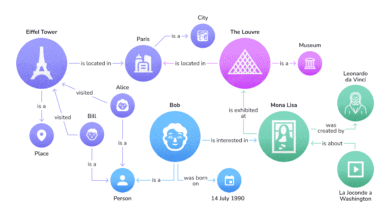
AI models (like ChatGPT or Google’s AI Overviews) function by understanding “Entities” and the relationships between them. They are looking for a structured source of truth.
If your content is organized logically—where a definition leads to a process, which leads to a tool recommendation—it is much easier for an AI to parse, understand, and cite your content as the answer. A scattered blog confuses these models; a mapped blog feeds them exactly what they need to generate an accurate answer.
Evidence and expectations: what results can look like (and the timeline)
I want to be realistic here. Mapping isn’t a magic button; it’s a compound interest engine. Based on typical rollouts I’ve managed:
- Months 1–2: You’ll see movement on long-tail keywords (positions 10–50). These are your specific cluster posts.
- Months 3–4: First-page rankings often appear for easier terms as the clusters start to connect.
- Months 6–12: This is where the magic happens. The pillar pages start rising because the supporting clusters are pushing authority up.
Patience is the hardest part of this strategy, but the durability of the rankings is worth it.
Blog content mapping: my step-by-step workflow to build a topical map you can actually publish

This is the part where we turn theory into a plan. I’m going to walk you through the workflow I use. To visualize this, imagine a hub in the center with spokes radiating out to clusters.
You will need: A keyword research tool, access to your customer support or sales team (or just their notes), and a spreadsheet.
Step 1: pick one hub topic tied to revenue (not just traffic)
Don’t pick a topic just because it has high search volume. I’ve made that mistake, and I ended up with traffic that never converted. Your hub should be a broad topic that is directly adjacent to what you sell.
My Hub Checklist:
- Is it broad enough to have at least 10–20 sub-topics?
- Is it not your homepage? (Hubs are informational resources, not sales pages).
- If someone reads this, are they logically a candidate for my product?
Step 2: gather topics from 6 sources (keyword tools + customer reality)
Most beginners stop at Ahrefs or SEMrush. That’s a mistake because your competitors are using the same tools. To find the gaps, you need human data.
- Keyword Tools: Get the raw volume data.
- Google PAA (People Also Ask): I copy/paste these questions verbatim—they often become my H2 headings.
- Internal Site Search: What are people typing into your search bar?
- Support Tickets: This is gold. Look for troubleshooting questions.
- Sales Calls: What objections do prospects raise?
- Competitor Categories: Look at their blog tags to see how they group things.
Step 3: cluster by intent first, then by keywords (to avoid cannibalization)
This is where I save the most time later. If you have the keywords “best email software” and “email software comparison,” a keyword tool might say they are different. But the intent is the same: the user wants to compare options. Those should be one post, not two.
My rule of thumb: If I’m unsure, I check Google. If the results for two keywords are nearly identical, I group them into one cluster. If the results are different (e.g., one shows guides, one shows tools), they are separate clusters.
Step 4: design the hierarchy (pillar → cluster → supporting posts)
Keep your depth simple. For most SMB blogs, 2–3 levels are enough. If you go deeper, maintenance becomes a nightmare.
- Level 1 (Pillar): The Ultimate Guide to Email Marketing.
- Level 2 (Cluster): Email Marketing Tools.
- Level 3 (Supporting): Review of Tool A vs Tool B.
Step 5: build the topical map in a spreadsheet (template + required columns)
I don’t use fancy visualization software for this; a Google Sheet works best because it’s actionable. Start with 10–30 rows—don’t try to map the whole universe at once.
Add these columns to your sheet:
| Column Name | Description & Example |
|---|---|
| Proposed URL | /blog/email-marketing/subject-line-guide |
| Page Type | Pillar, Cluster, or Support |
| Primary Query | “how to write subject lines” |
| User Intent | Informational (How-to) |
| Funnel Stage | Awareness |
| Link Parent | Links up to: Email Marketing Guide |
| Status | Planned, Briefed, Published |
Step 6: turn each node into a publishable outline and brief
Once the map is done, you need to execute. This is where quality often drops if you aren’t careful. For every row in your spreadsheet, you need a brief that defines the angle, the headings, and the internal links.
I use a SEO content generator like Kalema to speed up this briefing process. It helps me identify the missing entities and structure the outline, but I always add a human layer: verifying the intent and ensuring the tone matches our brand voice.
Optional accelerator: drafting faster without losing quality
If you are a team of one, writing 30 cluster posts is daunting. This is where automation can help, provided you treat it as an operations layer, not a replacement for strategy.
I sometimes use an AI article generator to produce the first drafts based on my map. However, I have a strict rule: I never publish raw output. I run through a personal editing checklist: Did I verify the stats? Is the internal linking accurate? Did I add a real-world example? The goal is to scale your output, not your noise.
Internal linking strategy that supports topical maps (and helps Google understand your site)

I’ve made the mistake of publishing great content and forgetting to link it. It’s like building a house and forgetting the hallways. Without links, Google can’t crawl from your pillar to your clusters, and your topical authority breaks down.
Here is the playbook I use to ensure every post is connected properly.
The 4-link rule I start with: up, down, sideways, and contextual
For every piece of content I publish, I check for these four connections:
- Link UP: The post must link back to its Parent/Pillar page. (e.g., The “Tools” post links back to the “Ultimate Guide”).
- Link DOWN: If it’s a pillar, it must link down to the specific clusters.
- Link SIDEWAYS: Link to “sibling” posts in the same cluster. (e.g., “Subject Lines” links to “Open Rates”).
- Contextual: Natural links in the body text where definitions are needed.
Anchor text and placement: how to make links feel natural (not spammy)
Don’t overthink this, but do follow these rules to avoid looking like a spam bot:
- DO use descriptive anchors. Instead of “click here,” use “read our guide on email deliverables.”
- DON’T force exact match keywords every time. It looks unnatural.
- DO place important links high up in the content if they help the user navigate.
- DON’T cram links. If a paragraph has 5 links, users will click none of them.
- DO keep anchors accessible for screen readers.
Internal linking template table (copy/paste)
Add these columns to your content plan to manage links before you even write:
| Page Topic | Link UP To (Parent) | Link SIDEWAYS To (Siblings) | Anchor Idea |
|---|---|---|---|
| Example: Subject Lines | Email Marketing Guide | Open Rates Guide, Spam Words List | “improve your open rates” |
Prioritizing topics, rollout timelines, and how often I update my topical map

A map with 50 topics can be paralyzing. You can’t write them all at once. When I’m staring at a full spreadsheet, I use a simple scoring model to decide the “Next 5” posts to write.
A simple prioritization score (business value × ease × coverage gap)
I score each topic on a scale of 1–3 for these three criteria. Multiply them to get a priority score.
- Business Value (1-3): How close is this to a sale? (3 = high intent).
- Ease to Rank (1-3): Is the competition weak? (3 = easy/low competition).
- Coverage Gap (1-3): Is this a missing piece that breaks my cluster? (3 = critical gap).
Example: A “Comparison of Our Tool vs Competitor” post might be high value (3) and high ease (3), giving it a score of 9. A broad “What is Marketing” post might be low value (1) and hard to rank (1), scoring a 1. Write the 9s first.
Phased rollout: what to publish in weeks 1–4, months 2–3, and months 4–6
You don’t have to launch the pillar first. In fact, I often do the opposite.
- Phase 1 (Weeks 1-4): Publish the specific, long-tail cluster posts (the “how-to” and “comparison” articles). These are easier to rank and build the foundation.
- Phase 2 (Months 2-3): Publish the Pillar page. Now you can immediately link down to all those cluster posts you just wrote.
- Phase 3 (Months 4-6): Expand sideways. Add more supporting posts to beef up the clusters.
Once you have the plan, using an Automated blog generator can help you maintain consistency during these phases, ensuring you hit your weekly publishing targets without burnout.
How often should I update the topical map? (what I do quarterly)
Your map is a living document. I treat mine like a quarterly business review. Every three months, I check:
- Are there new questions sales reps are hearing?
- Have we launched new features that need their own clusters?
- Which published posts are decaying and need a refresh?
Common blog content mapping mistakes (and how I fix them)

I’ve learned most of this the hard way. Here are the traps that usually catch people out.
Mistake-to-fix list (5–8 items)
- Mistake: Choosing a hub that is too broad (e.g., “Business”).
Why it hurts: You can never cover it all, so you never look authoritative.
Fix: Niche down. Try “SaaS Sales Processes” instead. - Mistake: Ignoring Search Intent.
Why it hurts: You write a “guide” when users wanted a “tool list,” so you don’t rank.
Fix: Google the keyword before you map it. See what’s ranking. - Mistake: Shipping clusters without links.
Why it hurts: I’ve done this. Orphan pages struggle to get indexed.
Fix: Don’t hit publish until you’ve added the “Link UP” to the parent. - Mistake: Cannibalizing your own keywords.
Why it hurts: Google doesn’t know which of your two similar pages to rank.
Fix: Merge similar topics into one strong page. - Mistake: Setting it and forgetting it.
Why it hurts: Your map becomes irrelevant as your business changes.
Fix: Schedule a recurring calendar invite for a “Map Audit.”
FAQs about topical maps and blog content mapping
What exactly is a topical map, and how does it differ from keyword lists?
A keyword list is just a collection of search terms. A topical map is a structured hierarchy that groups those terms into clusters based on relationships and intent. It’s the difference between a pile of bricks and a blueprint for a house.
Why do I need a topical map in the age of AI search?
AI search engines rely on understanding “entities” (concepts) and how they relate to one another. A structured topical map makes these relationships clear, increasing the odds that AI will cite your content as a trustworthy source.
How should I prioritize topics to create or update?
Start with the “low hanging fruit”: topics that are high business value (close to a sale) and low competition. I prioritize specific questions over broad guides in the beginning to get quick wins.
What internal linking strategy supports topical maps?
Follow a strict hierarchy: Sub-pages should link up to the Pillar page. Pillar pages should link down to Sub-pages. Sibling pages in the same cluster should link to each other where relevant.
How often should I update my topical map?
I recommend a quarterly review. Use this time to add new customer questions, remove irrelevant topics, and identify content that needs a refresh.
Summary: my blog content mapping checklist + next steps
We’ve covered a lot, but don’t let the details paralyze you. The goal is progress, not a perfect spreadsheet.
Here is your recap:
- Topical maps organize content into Pillars and Clusters to build authority.
- Intent matters more than keywords—group topics by what the user wants to achieve.
- Internal linking is the glue that makes the map work for search engines.
Your Next 3 Steps:
- Pick one Hub Topic relevant to your bottom line (e.g., a core service).
- Identify 10 Sub-topics using support tickets and PAA questions.
- Create the Spreadsheet and start publishing the first cluster.
Start small—one hub, ten supporting posts—then compound it. If you build the structure right, the traffic will follow.