Introduction: Eliminating friction so writers can ship faster (and better)

I used to make a mistake that I see almost every new content manager make. I would send a vague message to a writer via Slack: "Hey, can you write a post about content operations? Maybe 1,000 words?"
Three days later, I’d get a draft that was well-written but completely unusable. The tone was too academic, it targeted the wrong persona, and it missed the search intent entirely. That led to two rounds of heavy revisions, a frustrated writer, and a delayed publishing schedule. The friction wasn’t the writer’s fault; it was mine. I hadn’t defined what "good" looked like.
To scale a newsroom or even a small blog, you have to stop guessing. You need a repeatable content briefing process that aligns goals, audience, and SEO requirements before a single word is written. In this guide, I’m sharing the exact editorial workflow and copy-paste template I use to reduce writing revisions. This isn’t just about keywords; it’s about giving writers the context they need to ship high-performing content on the first try.
What a content brief template is (and why it eliminates friction)

Quick Answer: A content brief template is a structured document that acts as a roadmap for a piece of content. It details the target audience, primary keywords, core message, structural outline, and business goals, ensuring the writer knows exactly what to build.
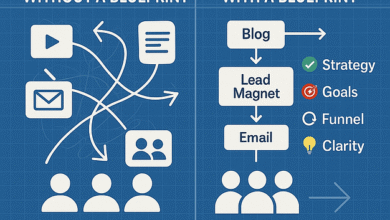
Think of a content brief as an architectural blueprint. You wouldn’t ask a contractor to "build a nice house" without giving them floor plans and material specs. Similarly, a content brief eliminates the guesswork. It is not a rough draft, nor is it a rigid script that stifles creativity. Instead, it is a set of constraints and guardrails that allows the writer to focus their energy on narrative and flow rather than worrying if they are targeting the right keyword.
The primary value here is operational speed. By front-loading the research and strategy work, you drastically reduce research time for the writer. This separation of duties—strategy vs. execution—is critical for scaling. In fact, industry data suggests that using AI tools and structured templates can double writer output by reducing research time .
Unlike a creative brief, which might cover a broad campaign, a content brief is tactical and specific to one URL. It provides the editorial clarity needed to turn a vague idea into a ranking asset.
What I include in every content brief template (the non-negotiables)

Over the years, I’ve learned that a brief is only as good as its weakest section. If you leave out the business goal, you get fluff. If you leave out the distribution plan, you get a lonely article. Here are the brief components that I consider non-negotiable for a professional, results-driven content operation.
I organize my content brief checklist into three main buckets: Strategy, SEO/Structure, and Logistics. Below is a breakdown of why each field matters and the friction it prevents.
The Essential Components Breakdown
| Brief Field | Why I include it (The Friction Reducer) | Common Mistake |
|---|---|---|
| Business Goal & KPIs | Tells the writer why we are publishing this. Is it for organic traffic, demo requests, or newsletter signups? | Focusing only on "traffic" without defining the next step for the user. |
| Audience Snapshot | Specifies exactly who is reading. "US Small Business Owner" reads differently than "Enterprise CTO." | Listing "everyone" or vague demographics. |
| Search Intent | Clarifies if the user wants to buy (transactional) or learn (informational). | Writing a sales pitch when the user just wants a definition. |
| H2/H3 Outline | Prevents structural rewrites. I define the skeleton; the writer adds the muscle. | Leaving structure completely up to the writer, leading to missed subtopics. |
| Internal Links | Ensures the new post connects to our existing topic clusters for SEO authority. | Asking the writer to "link to relevant posts" without providing URLs. |
| Submission Guidelines | Sets the editorial standards for formatting, sourcing, and delivery. | Assuming the writer knows your style guide by heart. |
By explicitly stating the business goal and content KPIs (Key Performance Indicators), you shift the conversation from subjective quality ("I don’t like this intro") to objective performance ("This intro doesn’t drive the user to the demo CTA"). It clarifies the definition of success.
My step-by-step workflow to write a content brief that writers actually use

You can’t just fill in a template blindly; you need a process. My content brief process usually takes about 15 minutes for a standard post, or up to 60 minutes for a high-stakes pillar page. Here is the workflow I use to ensure nothing slips through the cracks.
- Confirm the Ask & Audience: Before I open any tool, I clarify the purpose. If I can’t articulate the unique angle in one sentence, I’m not ready to brief it. I ask myself: "What is the one thing the reader must take away from this?"
- Scan the SERP (Search Engine Results Page): I look at the top 5 results for my target keyword. I’m looking for patterns—what are competitors covering? More importantly, what are they missing? This SERP analysis is where I find my differentiation.
- Draft the Outline (Skeleton): I map out the headers. I don’t write the content, but I do bullet point the key takeaways for each section. This effectively does the "thinking" for the writer, so they can focus on the "writing."
- Layer in SEO/AEO Requirements: Once the logical flow is set, I add the technical layer. This includes the primary keyword, secondary semantic terms, and any specific questions (People Also Ask) that need to be answered to capture voice search traffic.
- Add Sources & Internal Links: I hunt down 2–3 credible sources or internal data points so the writer doesn’t have to start from zero. I also paste in the exact links I want included.
- Set Logistics & Handoff: Finally, I define the deadline, word count range, and specific editorial handoff notes. I do a final "sanity check"—if I were receiving this brief, would I have questions?
For small teams, you might combine steps 2 and 3 using AI assistance (more on that later), but step 6 is the human safeguard. Never automate the final check.
The eliminating-friction content brief template (copy/paste)

Here is the exact structure I use. You can copy this into a Google Doc, Notion page, or your project management tool. I’ve included "Notes to Writer" within the fields to show how I communicate tone without being robotic.
Pro Tip: If you are in a rush and can only fill 5 fields, fill these: Topic/Angle, Target Audience, Primary Keyword, H2 Outline, and Call to Action (CTA).
CONTENT BRIEF TEMPLATE
1. LOGISTICS
Working Title: (Draft a catchy title + 1 alternative)
Target Word Count: (e.g., 1,500 words)
Deadline: (Date & Time)
Format: (e.g., Blog Post, Case Study, Guide)
2. STRATEGY & INTENT
Target Audience: (Be specific. e.g., "Marketing Managers at Series B SaaS companies who are tired of generic advice.")
User Pain Point: (What problem are they trying to solve right now?)
Primary Business Goal: (e.g., Drive clicks to the ‘Services’ page OR Generate newsletter signups.)
Key Takeaway/Angle: (What makes this article different from the top result? e.g., "Focus on the operational cost of bad briefs, not just SEO.")
3. SEO & STRUCTURE
Primary Keyword: [Insert Keyword]
Secondary Keywords: [List 3-5 related terms]
Search Intent: (Informational / Commercial / Transactional)
Competitor URLs: (Paste top 2-3 rivals to analyze)
Suggested H2/H3 Outline:
(Note to writer: You can tweak the wording for flow, but please keep the logical structure.)
– H2: Introduction (Hook the reader with [Specific Problem])
– H2: What is X?
– H2: Benefits of X
– H3: Benefit 1
– H3: Benefit 2
– H2: How to implement X (Step-by-Step)
– H2: Conclusion
4. BRAND VOICE & SOURCES
Tone/Voice: (e.g., "Authoritative but humble. Use ‘I’ statements. No jargon without definition.")
Internal Links to Include: (Paste exact URLs + anchor text)
External Sources/Data: (Paste links to studies/reports to cite)
Call to Action (CTA): (Exact text: e.g., "Download our checklist here.")
5. SUBMISSION CHECKLIST (Definition of Done)
[ ] Spell checked & Grammarly score >85
[ ] Meta title & description included
[ ] All claims backed by linked sources
[ ] Internal links added naturally
This copy/paste content brief works because it balances rigidity (the SEO data) with flexibility (the brand voice guidelines). It treats the writer as a partner, not a robot.
SEO briefs vs AEO briefs: what I add to the content brief template for rankings and AI visibility
The game is changing. We used to optimize just for search engines (SEO), but now we must optimize for Answer Engines (AEO) like ChatGPT, Perplexity, and Google’s AI Overviews. An SEO brief gets you found; an AEO brief gets you quoted.
To upgrade my template for AEO, I add specific instructions on intent mapping and structure. AI engines prioritize content that directly answers questions in a structured format. This often means including schema markup recommendations and formatting answers explicitly.
Here is how I adapt the brief for the AI era:
| Feature | Standard SEO Brief | Advanced AEO Brief |
|---|---|---|
| Structure | Keyword-focused H2s | Question-based H2s with direct, concise answers immediately following. |
| Schema | Basic Article Schema | Specific request for FAQ schema, HowTo schema, or QAPage schema. |
| Content Depth | Length & keyword density | Topical authority & "Information Gain" (new data/perspectives). |
In the "Notes to Writer" section of an AEO brief, I’ll write: "Please format the definition of [Topic] in 40-60 words immediately under the H2. This helps us capture the featured snippet and AI summary." This is Answer Engine Optimization in practice—making it easy for machines to parse and redistribute your expertise.
Tools that generate briefs faster (and how I use them without sacrificing quality)
Let’s be honest: doing a deep SERP analysis and finding topic gaps manually for every single article is exhausting. This is where content brief tools and AI come in. They are fantastic at the heavy lifting—scanning the web, identifying keyword clustering opportunities, and suggesting outlines.
However, I treat AI-generated briefs as a suggestion, not a mandate. Tools like MarketMuse or WriterZen are great for data, but they lack your business context. They don’t know your product’s unique value proposition or your customer’s specific complaints.
My workflow is hybrid: I use a tool to generate the "data skeleton"—the headings, the competitor analysis, and the semantic terms. Then, I manually overlay the strategy. I look at the AI suggestion and think, "That H2 is generic, let’s swap it for something opinionated."
For those looking to streamline this, AI article generator tools can help bridge the gap between a brief and a first draft. Platforms like Kalema act as content intelligence engines. They don’t just spit out text; they help structure arguments based on what is actually ranking, allowing you to use an AI content writer to accelerate production while keeping the strategic reins in your hands.
How I extend the same brief for multimedia and interactive content (video, podcast, quizzes)
Modern content isn’t just text. If you are planning a multimedia content brief, you don’t need a completely new document—you just need a new section. I often add an "Asset Expansion" field to my template.
If the article is destined to become a YouTube video, I add a "Visual Hook" field. If it’s going to be a podcast discussion, I add "Interview Questions." For interactive content planning, such as a quiz or calculator, I outline the logic. Research suggests that interactive content can boost dwell time by up to 45% , so planning this in the brief stage is crucial.
For example, if I’m briefing a post on "SEO Pricing," I will add a note: "Please draft 5 questions for a ‘How much should you pay?’ quiz to be embedded in the middle of the post." This forces the writer to think about quiz branching logic and engagement, rather than just delivering a wall of text.
Common mistakes that create friction (and my fixes) + FAQs + next steps
Even with a great template, things can go wrong. Here are the most common content brief mistakes I see and how to fix them:
- The "Figure it out" Mistake: Leaving the H2 outline blank. Fix: Always provide at least the top 3 headers.
- The "Keyword Stuffing" Instruction: Asking writers to use a keyword X times. Fix: Ask for the keyword in natural places (Title, H1, first 100 words).
- The Missing "Definition of Done": Not specifying what constitutes a finished draft. Fix: Use the submission checklist I provided above.
- Vague Audience Definitions: Targeting "Everyone." Fix: Define the audience by their job title and their current problem.
Frequently Asked Questions
What is a content brief template?
A standardized document that outlines the goals, audience, SEO requirements, and structure for a piece of content to ensure writers deliver quality drafts with minimal revisions.
How do I eliminate friction in content briefs?
By being prescriptive about the "non-negotiables" (intent, outline, sources) while leaving room for the writer’s voice. Friction comes from ambiguity.
What is the difference between SEO and AEO briefs?
SEO briefs focus on keywords and rankings. AEO briefs focus on answering questions directly and using schema markup to be understood by AI assistants.
Your Next Steps
If you want to stop the revision cycle, here is your plan for this week:
- Copy the template above into your preferred tool today.
- Brief one article using the full process—do the SERP scan, define the angle, and fill out every field.
- Track the friction. When the draft comes back, note how many edits were related to "misunderstanding the goal" vs. actual writing style. You should see a massive drop in the former.