How often should I do an SEO audit? (Maintenance vs. Overhaul for businesses)

If you’re wondering how often you should do an SEO audit, you’re not alone. In my career, I’ve seen two distinct approaches to this, and honestly, both have flaws. I’ve seen teams treat audits like annual tax filings—one massive, painful event where they spend weeks fixing a year’s worth of accumulated problems. On the flip side, I’ve seen anxious site owners running audit tools every Monday morning, chasing low-impact warnings while missing the bigger strategic picture.
The sweet spot lies somewhere in the middle. It requires a shift in mindset from “auditing” to “operations.”
To keep a site healthy without burning out, you need to separate maintenance (routine checks) from overhauls (deep strategic dives). An audit isn’t a single task; it’s a collection of checks that have different expiration dates. Technical breakages can happen overnight; content strategy decay happens over months.
In this guide, I’ll help you build a defensible schedule that fits your business size and resources. We will cover a layered audit rhythm, what to automate, and exactly what to do when things go wrong—so you can stop guessing and start operating.
Maintenance vs. overhaul: what an SEO audit actually includes (and why frequency isn’t one-size-fits-all)

If you take your car to the mechanic, you don’t ask for an engine rebuild every time you need an oil change. SEO is similar. A “full audit” is resource-intensive and often paralyzing if done too frequently. Instead, I break SEO health into two buckets: Maintenance and Overhaul.
Maintenance is about catching sudden failures—crawling errors, broken links, or schema breaking after a code push. Overhaul is about competitiveness—is my site architecture still logical? Is my content strategy working? Has the market shifted?
I’ve been guilty of confusing these two. Years ago, I would present a 100-page audit deck to a client every quarter. They never implemented it. It was too much noise. Once I switched to monthly maintenance checks and annual strategic overhauls, implementation rates skyrocketed.
Here is how I distinguish them:
| Feature | Maintenance (Routine Health) | Overhaul (Strategic Deep Dive) |
|---|---|---|
| Primary Goal | Prevent traffic loss & fix bugs | Find new growth opportunities & fix structure |
| Typical Frequency | Monthly (or Weekly) | Every 6–12 Months |
| Time Investment | 1–3 Hours | 20–30+ Hours |
| Key Checks | Crawl errors, 404s, Robots.txt, Core Web Vitals | Content gaps, Site Architecture, E-E-A-T, Competitors |
The 4 audit layers (technical, on-page, off-page, full-site review)

If you are new to this, don’t let the terminology intimidate you. To make scheduling easier, I group audit tasks into four layers. We will detail the schedule for these below, but here is the map:
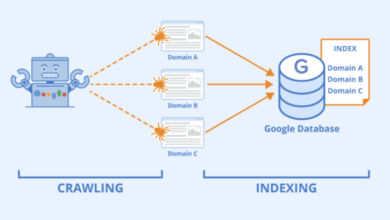
- Technical Layer: Can Google access and index my site? (Changes fast)
- On-Page Layer: Is my content relevant and optimized? (Changes moderately)
- Off-Page Layer: Is my authority and backlink profile safe? (Changes slowly)
- Full-Site Review: How do all these pieces fit together for ROI? (Strategic)
How often should I do an SEO audit? A business-first decision framework

There is no universal answer, but there is a right answer for your specific situation. Frequency depends on three factors: how big your site is, how often you update it, and how much money you lose if organic traffic drops.
If I’m advising a local dentist with a 20-page brochure site that hasn’t changed in two years, I’m not going to recommend a monthly deep-dive. However, for a SaaS company shipping code weekly, a monthly audit is the bare minimum.
Here is the decision logic I use:
- IF you publish content daily/weekly OR rely on SEO for >50% of revenue → Audit Monthly.
- IF you have >500 pages OR operate in a competitive niche (Finance, SaaS, Health) → Audit Quarterly.
- IF you are a local business OR have a static brochure site (<50 pages) → Audit Every 6 Months.
Research suggests that businesses who fix SEO issues promptly often see a 20–50% increase in organic traffic within 3–6 months . The cost of delay is real.
Quick benchmarks: small, medium, and large sites

- Small Sites (<50 pages): These are usually local services or portfolio sites. They are stable. I typically run a full check every 6–12 months. In between, I just glance at Google Search Console (GSC) alerts.
- Medium Sites (50–500 pages): This covers most SMBs and growing blogs. Complexity creeps in here. I recommend a Quarterly rhythm for on-page reviews and a monthly glance at technical health.
- Large/Enterprise Sites (500+ pages): If you have thousands of programmatic pages or an e-commerce catalog, automation is non-negotiable. You need Monthly technical audits (often segmented by site section) because the scale amplifies small errors.
When ‘competitive’ changes the math (and why rankings can be volatile)
If you are in a ruthless niche like personal finance or software, “standard” advice doesn’t apply. Competitors are actively trying to de-rank you, and Google updates algorithms frequently. In these cases, I tighten the loop. I don’t obsess over daily rankings—that’s a recipe for madness—but I do monitor volatility weekly. If I see the SERP (Search Engine Results Page) shifting wildly, I trigger an ad-hoc audit to see if intent requirements have changed.
The layered SEO audit cadence I use: maintenance rhythm + scheduled overhauls

This is the core of my strategy. Instead of trying to do everything at once, I layer the audits. This keeps the workload manageable and ensures I’m always looking at the right data at the right time.
The workflow usually looks like this: Collect Data → Diagnose → Prioritize → Fix → Validate → Monitor.
If you are using an Automated blog generator to scale your content, this rhythm becomes even more critical to ensure quality control doesn’t slip as volume increases.
| Audit Layer | Ideal Cadence | Typical Checks | Est. Time |
|---|---|---|---|
| Technical | Monthly | Crawl errors, Indexing, CWV, Redirects | 1–2 Hours |
| On-Page | Every 2–3 Mos | Titles, Intent match, Internal links, Decay | 3–5 Hours |
| Off-Page | Every 3–6 Mos | Lost backlinks, Toxic links, Anchor text | 1–2 Hours |
| Full Overhaul | Every 6–12 Mos | Strategy, Architecture, Competitors, Content Gaps | 10–20 Hours |
Monthly (or weekly) technical checks: catch breakages early
Technical issues are the silent killers of SEO. I once saw a client lose 40% of their traffic because a well-meaning developer accidentally set the whole site to `noindex` during a staging push. A monthly check would have caught that immediately.
My Monthly Checklist:
- Google Search Console Coverage: Look for spikes in 5xx (server errors) or 404s.
- Robots.txt & Sitemap: Ensure your sitemap is being read and nothing critical is blocked.
- Core Web Vitals (CWV): Check the “Experience” tab in GSC. Are URLs failing LCP or CLS?
- Broken Links: Run a crawler (like Screaming Frog or a cloud tool) to find internal 404s.
Every 2–3 months: on-page & content quality mini-audits (focus on high-impact pages)
I don’t audit every single blog post every quarter. That’s a waste of time. Instead, I focus on the “Money Pages”—the top 20% of pages driving traffic or conversions.
I start by asking: Is this page still the best answer on the internet for its query?
My Quarterly Page Brief Template:
- Target Query: Has the intent changed? (e.g., Are users now wanting video instead of text?)
- Freshness: Is the data/year outdated?
- Internal Links: Can I link to this page from new content I’ve published recently?
- CTR Check: If impressions are high but clicks are low, I rewrite the Title Tag and Meta Description.
Every 3–6 months: backlink & reputation review (risk management, not vanity metrics)
Unless you are actively building links every day, you don’t need to stare at your backlink profile weekly. For most businesses, this is a risk management exercise.
What I track:
- Spikes in lost links: Did a major publication remove a link? Why?
- Negative SEO attack: A sudden influx of thousands of spammy links from irrelevant TLDs.
- Anchor Text Diversity: Is it looking too over-optimized (spammy) or natural?
Every 6–12 months: the full overhaul audit (strategy, architecture, and ROI)
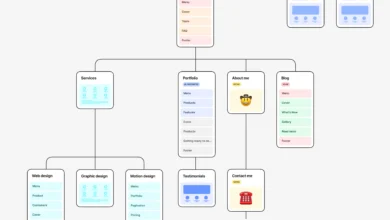
This is the “step back and think” moment. This audit is less about fixing broken things and more about strategy. I look at Site Architecture—is my navigation still logical? Am I cannibalizing my own keywords with too many similar pages?
I’d rather fix the top 20% of strategic issues that move revenue than chase 200 low-impact warnings. This is where you build the roadmap for the next year.
What triggers an immediate SEO audit (even if it’s ‘not time yet’)

Schedules are great until reality hits. There are specific events that override your calendar and demand an immediate response. If you wait for your “monthly check” after a bad site migration, you might already be dead in the water.
Trigger Events & First Response:
| Trigger Event | Likely Cause/Risk | First Check |
|---|---|---|
| Site Migration / Redesign | Broken redirects, missing content | Crawl errors & Redirect chains |
| Sudden Traffic Drop | Algorithm update or technical bug | Manual Actions in GSC & Analytics |
| CMS/Theme Update | Accidental code changes (noindex) | View Source: Robots tag |
Fast triage checklist (30–60 minutes)
If you see traffic plummet, don’t panic. Panic leads to bad changes. Follow this triage order—exactly as I do:
- Check GSC Manual Actions: Did Google penalize you? (Rare, but check first).
- Check GSC Indexing Report: Did valid pages suddenly drop out of the index?
- Test Robots.txt: Did a developer accidentally block the site?
- Check Analytics Setup: Is the traffic actually down, or did the tracking code just break? (Happens more often than you’d think).
- Check Recent Changes: Look at your changelog. What shipped yesterday?
Turning audits into results: prioritization, time/cost expectations, and simple ROI tracking

The biggest waste of money in our industry is the “Shelfware Audit”—a PDF that sits on a virtual shelf and gathers dust. An audit is only as valuable as the fixes it generates.
When you have a list of 50 issues, how do you choose? I use a simple prioritization matrix. Also, if content freshness is your bottleneck, using tools like an AI article generator can help you execute content updates faster once you identify the gaps.
Time Expectations: based on typical workflows, a small site audit might take 10–12 hours to complete and report. Large enterprise audits can easily exceed 30 hours . Be realistic with your boss or client about this.
My prioritization method (Impact × Effort × Risk)
I score every finding on a 1-3 scale.
Impact (3=High), Effort (1=Low/Easy), Risk (1=Low).
Example:
- Fixing a broken link on the Homepage: High Impact (3), Low Effort (1). Score: Do Immediately.
- Rewriting 500 meta descriptions: Low Impact (1), High Effort (3). Score: Do Later (or never).
I used to try to fix everything “for perfection.” Now, I prioritize based on revenue. If a page doesn’t bring traffic or leads, I usually deprioritize its technical warnings.
What success looks like 30/60/90 days after an audit
Don’t promise overnight miracles. SEO is a freighter, not a speedboat. However, you should see directional indicators:
- 30 Days: Technical errors in GSC should flatten or reach zero. Crawl stats should normalize.
- 60 Days: Core Web Vitals should pass. Impressions for updated pages should start ticking up.
- 90 Days: Rankings should stabilize or improve. Organic traffic and conversions should show growth trends.
How I automate SEO audits and keep a lightweight monitoring loop (without losing judgment)
The goal is to spend less time finding problems and more time fixing them. I automate the data collection, but I never automate the strategy. Automation finds patterns; I decide what matters.
What I Automate:
- Uptime Monitoring: Alerts if the site goes down (Pingdom/UptimeRobot).
- Rank Tracking: Daily checks on key positions.
- Crawl Health: Weekly automated crawls to catch new 404s.
What I Review Manually:
- Content Quality: Is the writing actually good? Does it sound human?
- User Experience: I actually click through the site on my phone to feel the friction.
- Strategic Alignment: Are we targeting the right topics?
If you want to streamline the content side of this loop, using an AI SEO tool like Kalema can act as your intelligence layer, ensuring that when you do update content, it’s optimized from day one.
A simple weekly/monthly monitoring routine for beginners
If you are a team of one, keep it simple:
- Monday Morning (15 mins): Log into GSC. Check the “Performance” tab for drops and the “Pages” tab for errors.
- Monthly (1 hour): Run a full site crawl with your tool of choice. Fix the top 5 technical errors.
- Quarterly (1 day): deep dive into content performance and refresh decaying pages.
Common mistakes, FAQs, and next steps (my recommended audit plan to start today)
If you do just one thing this week, set up a recurring calendar invite for your audit. Consistency beats intensity every time.
Common SEO audit mistakes (and how I fix them)
- Auditing only when traffic drops: This is reactive. Be proactive with monthly checks to prevent the drop.
- Obsessing over “Health Scores”: A tool saying you have a “92% Health Score” means nothing if your robots.txt is blocking the checkout page. Look at specific issues, not vanity scores.
- Ignoring Mobile: I’ve been guilty of this—checking everything on my desktop while 70% of users were on mobile. Always audit the mobile version of your site.
- No “Owner” for fixes: An audit without assigned tickets is just a wish list. Assign every fix to a person with a due date.
- Fixing low-value pages first: Don’t spend hours optimizing a tag page from 2018. Prioritize your money pages.
FAQs: audit cadence, triggers, automation, and time required
How often should I conduct an SEO audit?
For most businesses, perform a technical check monthly and a full strategic audit every 6–12 months. Increase frequency if your site changes often.
Can I automate SEO audits?
You can automate the detection of issues (crawls, uptime, rank tracking), but a human must prioritize and fix them. Automation supports judgment; it doesn’t replace it.
How long does an SEO audit take?
A maintenance check takes 1–2 hours. A full overhaul for a mid-sized site typically takes 15–25 hours of deep analysis and reporting.
Conclusion: 3-bullet recap + next actions
To wrap up, remember that SEO is a marathon, not a sprint. Your goal is to build a rhythm that keeps your site healthy without overwhelming your team.
- Adopt a Layered Approach: Technical monthly, On-page quarterly, Strategic annually.
- Prioritize Ruthlessly: Don’t fix everything. Fix what drives revenue and protects the site.
- Automate Monitoring: Use tools to watch your back so you can focus on growth.
Your Next Actions:
- Open your calendar right now and set a recurring “SEO Check-in” for the first Monday of every month.
- Run a quick crawl today to identify any immediate “red alert” technical errors.
- Identify your top 10 money pages and schedule a mini-audit for them this quarter.