Introduction: Focus vs. reach in keyword targeting (and why it matters for my business pages)

I have audited enough business websites to know that the most common SEO mistake isn’t technical—it’s a fundamental misunderstanding of focus versus reach. I talk to marketing managers who are paralyzed by conflicting advice: one expert says “stick to one keyword per page to be safe,” while another shouts about “ranking for 500 keywords with semantic clusters.”
So, which is it? When I sit down to plan a content calendar, I’m not just counting keywords; I’m trying to solve a specific problem. I need to know how many terms I can target without diluting the page’s intent or confusing Google. If you are a beginner or operating a small marketing team, you need a rule of thumb, not a theoretical debate.
In this guide, I’m going to walk you through the framework I use to decide keyword counts. We will cover how to pick a primary and secondary set based on page type, how to apply density guidelines without sounding robotic, and how to avoid the expensive mistake of keyword cannibalization. By the end, you’ll have a scalable process you can apply to your next brief.
Quick answer: How many keywords should I target for SEO on one page?

If you are looking for the direct, implementation-ready answer, here is the standard I apply to 90% of the pages I work on. It balances clear signals for search engines with enough depth to capture related traffic.
- 1 Primary Keyword: Every page must have exactly one main target keyword that defines its core intent.
- 2–5 Secondary Keywords: For standard pages, support the primary term with a small set of related questions or variations.
- Semantic/Long-tail Keywords: These are virtually unlimited but should be used naturally. For comprehensive content (1,500+ words), it is common to naturally cover 12–15+ variations without forcing them.
The goal is never to optimize for two different search intents on the same URL. If the user wants “pricing” and you give them a “how-to” guide, no amount of keyword targeting will save that ranking.
Rule of thumb ranges by content length
The volume of keywords you can target is directly tied to how much space you have to explain them.
- Short Content (300–500 words): Stick to 1 primary and 3–5 secondary keywords. If I can’t explain a subtopic in a single paragraph, it probably doesn’t belong on a short product or service page.
- Long-form Content (1,500–2,000 words): You have room for 1 primary and up to ~12–15 secondary keywords . However, these secondary keywords must earn their place as headers (H2s/H3s) or distinct sections.
The real decision isn’t the count—it’s search intent and page focus

When I audit a page, I’m not counting keywords first—I’m checking whether the page has one clear job. I used to make the mistake of cramming terms like “pricing,” “reviews,” and “how it works” into a single URL, hoping to catch everyone. The result? Rankings were messy, and the leads were worse because the page didn’t satisfy anyone specific.
Before I choose a single keyword, I run through three intent checks:
- What would satisfy the searcher? (A quick definition? A comparison table? A purchase page?)
- What do the current top results look like? (Are they blogs, product pages, or homepages?)
- What action do I want the user to take? (Learn, sign up, or call?)
This brings us to the core strategy: Focus vs. Reach. You don’t win by targeting more keywords on a single page; you win by matching a single dominant intent (Focus) and building topical coverage around it (Reach). Well-crafted pages naturally rank for hundreds of related queries not because the writer stuffed them in, but because the content is authoritative.
Primary vs. secondary vs. semantic keywords (plain-English definitions)
Let’s clear up the jargon. I think of these three categories like the structure of a book:
- Primary Keyword: The book title. The main topic the page is about (e.g., “commercial roofing”).
- Secondary Keywords: The chapter titles. These are the subtopics that support the main idea (e.g., “roof repair,” “maintenance checklist,” “flat roof types”).
- Semantic/Related Keywords: The sentences inside the chapters. These are the natural words, entities, and synonyms that appear when you write well about a topic. (Note: You might hear people call these “LSI keywords.” That is an old-school shorthand, but the practical takeaway is simply topical depth.)
Why “one page = one primary keyword” still works
Targeting one primary keyword per page remains the gold standard because it prevents confusion. If you target “SEO software” on your homepage, your features page, and your blog, you create keyword cannibalization. Google doesn’t know which page to rank, so it often ranks none of them—or worse, it flips back and forth between them, killing your stability.
A practical framework for choosing the right number of keywords (by page type + goal)

Here is where we move from theory to execution. You cannot apply the same keyword rules to a blog post that you apply to a contact page. The “right number” depends entirely on the page format and the user’s expectation.
Below is the framework I use to assign keyword counts based on page type. This helps me standardize briefs so every writer knows exactly what the boundaries are.
Table: Recommended keyword counts by content type (business-friendly)
| Page Type | Primary Keyword Count | Secondary Keyword Range | Typical Length | Primary KPI |
|---|---|---|---|---|
| Blog Post (How-to / Guide) | 1 | 5–15 (depends on depth) | 1,200–2,000+ words | Traffic / Authority |
| Service / Landing Page | 1 | 3–5 (highly specific) | 500–1,000 words | Leads / Conversions |
| Product / Category Page | 1 | 2–4 (features/specs) | 300–800 words | Sales / Add to Cart |
| Pillar Page (Ultimate Guide) | 1 | 15–20+ (broad scope) | 2,500+ words | Backlinks / Authority |
| Local Location Page | 1 | 3–5 (geo-modifiers) | 500–800 words | Local Calls / Map Pack |
When to choose fewer keywords: If the intent is transactional (e.g., “buy payroll software”), keep the focus narrow. Distractions kill conversions.
When to choose more keywords: If the intent is informational (e.g., “how to manage payroll for small business”), the user wants a complete resource. You can credibly cover more ground here.
How my business goal changes the keyword set (traffic vs leads vs authority)
Your business goal dictates your keyword aggression. When I need leads this quarter, I prioritize narrow, high-intent keywords (e.g., “emergency plumber near me”). I might only target 2–3 secondary terms because I want the user to call, not read.
Conversely, when I am building topical authority to prove expertise, I create long-form guides. In that scenario, I intentionally target 10+ secondary keywords to show Google, “I know everything about this topic.”
Step-by-step workflow: from one primary keyword to a clean, scalable keyword map

Creating a keyword map shouldn’t be a guessing game. This is the exact workflow I use to go from a blank screen to a fully optimized brief. When I’m managing this process across dozens of pages, I often use a content intelligence approach like Kalema to help standardize the research and structure. An AI SEO tool isn’t about letting a machine do the thinking; it’s about ensuring I haven’t missed critical subtopics or intent signals that would take me hours to find manually.
Here is the manual logic behind that workflow, which serves as the foundation for any good SEO content generator strategy:
- Choose the Primary Keyword: Based on high intent and business fit.
- Validate the SERP: Ensure Google rewards the type of content you plan to write.
- Build the Secondary Set: Identify 2–5 core terms that support the main topic.
- Cluster into Subtopics: Group keywords to form your H2 outline.
- Assign to Elements: Map keywords to your Title, Headings, and URL.
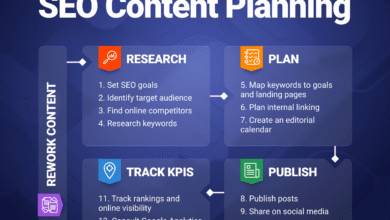
- Publish & Iterate: Use data to refine coverage later.
Step 1–2: Pick the primary keyword and verify intent in the SERP
Before writing a word, I type my proposed primary keyword into Google. I’m looking for three signals:
- Content Type: Are the top results blog posts, product pages, or tools?
- Format: Is it a listicle, a “complete guide,” or a comparison?
- Recurring Themes: What do the titles promise? (e.g., “Fast,” “Free,” “2024 Guide”)
If I want to rank a service page but Google only shows informational blog posts, I need to change my keyword or my strategy. You cannot fight the SERP intent.
Step 3–4: Build 2–5 ‘must-have’ secondary keywords, then add semantic depth
Once the primary is locked, I look for the supporting cast. I check “People Also Ask” boxes, related searches at the bottom of the SERP, and competitor headings. I usually categorize these into:
- Must-Haves (2–5): Direct sub-questions (e.g., pricing, benefits, process).
- Nice-to-Haves (Semantic): Contextual words that add depth but don’t necessarily need their own section.
My rule: If a secondary keyword can’t earn an H2 or a clear paragraph, I drop it. If I have to shoehorn it in, it doesn’t belong.
Step 5–6: Assign keywords to page elements (without stuffing) and iterate post-publish
I map my primary keyword to the Title Tag, H1, URL, and the first 100 words. Secondary keywords get assigned to H2s and H3s. This creates a skeleton where optimization happens naturally.
The real magic happens 30 days after publishing. I open Google Search Console, look at the queries the page is ranking for on Page 2, and identify terms I didn’t explicitly target. I then go back and add a section or a sentence to capture that demand. This is safer and more effective than guessing 50 keywords upfront.
Keyword density and mentions: what the numbers mean (and what I actually do)
This is where beginners often get anxious. “Is 1% density enough? Is 3% spam?”
Here is the reality: Keyword density is a guardrail, not a target. Industry benchmarks suggest that top-ranking 1,500-word articles typically mention the primary keyword 14–18 times . That works out to a density of roughly 1–1.2%.
However, I have seen pages rank #1 with 0.5% density because their engagement metrics are incredible. I use the table below as a sanity check. If I’m way below 0.5%, Google might not understand what the page is about. If I’m above 2.5%, I’m risking a penalty for keyword stuffing.
Table: Density-to-mentions cheat sheet for beginners
| Word Count | ~0.5% Density (Minimum) | ~1% Density (Sweet Spot) | ~2% Density (Upper Limit) |
|---|---|---|---|
| 500 words | 2–3 mentions | 5 mentions | 10 mentions |
| 1,000 words | 5 mentions | 10 mentions | 20 mentions |
| 1,500 words | 7–8 mentions | 15 mentions | 30 mentions |
| 2,000 words | 10 mentions | 20 mentions | 40 mentions |
Yes, it is normal to worry about this numbers game, but please use this table once during editing, then forget it. If it sounds weird when I read it out loud, I rewrite it—regardless of the math.
Worked example: building a keyword set and outline for a 1,750-word article

Let’s put this into practice. Imagine I am writing an article for a B2B SaaS company about “cloud data security.” I want to ensure I cover the topic comprehensively without losing focus. I might use an AI article generator to help speed up the drafting of these sections, but I always control the architectural decisions—specifically the keyword mapping.
I’m writing for an intermediate audience (IT managers), so I need to define terms but also get technical. Here is how I would structure the keyword map.
Example keyword map (primary → secondary → semantic)
- Primary Keyword: “Cloud data security best practices” (Intent: Informational/How-to)
- Secondary Keywords (Mapped to H2s):
- “Data encryption standards” (H2)
- “Identity and access management (IAM)” (H2)
- “Cloud compliance regulations” (H2)
- “Hybrid cloud security challenges” (H2)
- Semantic/Long-tail (Sprinkled in body text):
- “GDPR compliance”
- “Two-factor authentication”
- “Data breach prevention”
- “AWS vs Azure security”
Notice that I am not just listing keywords; I am building a Topic Cluster. By the time I finish writing about encryption and compliance, I will have naturally used dozens of semantic terms without ever “counting” them.
Common mistakes when choosing how many keywords to target (and how I fix them)
I have made plenty of mistakes in my career. Here are the most common traps I see businesses fall into, and the quick fixes I use to get back on track.
Mistake-to-fix checklist (6–8 items)
- Mistake: Targeting multiple intents (e.g., “buy shoes” and “how to clean shoes”) on one page.
Fix: Split them into two URLs: a product category page and a blog post. - Mistake: Keyword stuffing the introduction.
Fix: Use the primary keyword once in the first 100 words, then switch to natural variations. - Mistake: Ignoring low-volume keywords because tools show “0 search volume.”
Fix: If the intent is high (e.g., “service pricing in Austin”), target it. Tools often underestimate data. - Mistake: Cannibalizing your own rankings by writing the same article twice.
Fix: Audit your site (site:domain.com “topic”) before starting a new draft to see if you should update an old page instead. - Mistake: Using 15 secondary keywords in a 500-word post.
Fix: Cut the list. Stick to the “Rule of 3–5” for short content to maintain readability. - Mistake: Forgetting internal links.
Fix: Link to related pages using your secondary keywords as anchor text to build authority clusters.
FAQ: keyword counts, density, page length, and low-volume terms
How many primary keywords should I target per page?
Typically, just one. This ensures your page has a clear, singular purpose for both users and search engines. The only exception is extremely close variants (e.g., “attorney” and “lawyer”) which share identical intent and can be treated as the same topic.
How many secondary keywords are appropriate?
For most standard blog posts, 2–5 secondary keywords are sufficient. If you are writing a massive guide (2,000+ words), you can scale this up to 10–15, provided each keyword maps to a specific section or header. If you can’t write a paragraph about it, don’t target it.
What keyword density should I aim for?
Aim for a range of 0.5% to 2%. Anything lower might be too vague; anything higher risks looking like spam. Prioritize reading the content aloud—if it sounds natural, your density is likely fine.
Does page length affect keyword strategy?
Yes. A 400-word service blurb simply cannot carry 15 distinct subtopics without becoming a mess. Longer content allows for more headings (H2s), which creates more “shelves” to place your secondary keywords naturally.
Should I ignore low-volume keywords?
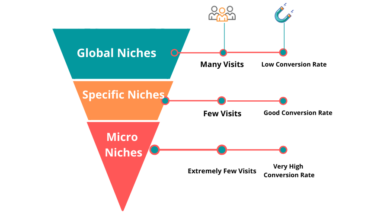
No. Low-volume keywords often have high commercial intent and lower competition. Ranking #1 for a specific, low-volume query usually brings in more qualified leads than ranking #20 for a broad, high-volume term.
Conclusion: my 3-part rule + next actions to implement this week

If you take nothing else from this article, remember my 3-part rule for keyword targeting:
- Focus: One primary keyword per page to anchor the intent.
- Reach: A realistic set of secondary keywords (2–5 for short, 12+ for long) mapped to your outline headers.
- Depth: Semantic coverage that happens naturally when you write comprehensively about the topic.
Your next actions: Pick one page on your site that isn’t performing. Confirm it has one clear primary keyword (and isn’t fighting another page). Map out 3–5 secondary keywords that answer user questions, update the H2s to reflect them, and hit publish. Then, give it 30 days and check your Search Console. That is how you build a strategy that works.