How to Build Pillar Pages: The Authority Hub Framework That Commands Search Dominance
When I audit new sites, I usually see the same pattern: fifty random blog posts, zero structure, and flat traffic lines. The team is working hard, publishing weekly, but the content competes with itself rather than building momentum. It feels like throwing spaghetti at a wall.
The solution isn’t to write more; it’s to structure better. You need a pillar page strategy.
For US-based marketers and founders running lean teams, building a “content hub” (or pillar page) is the highest-leverage move you can make in 2025. It transforms scattered articles into a topical authority engine.
In this guide, I’m skipping the fluff. I will walk you through the exact blueprint I use: how to plan your topic, map 8–12 clusters, structure the build, and handle the technical side—schema, internal linking, and mobile optimization.
Quick definition (TL;DR) before we start

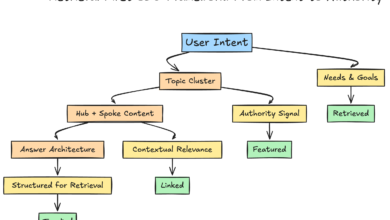
A pillar page is a high-level, comprehensive guide that covers a broad topic (the “hub”) and links out to detailed sub-pages (the “clusters”). It is designed to be the authoritative center of gravity for a specific subject on your website.
What Is a Pillar Page (and How It’s Different From a Regular Blog Post)?
Think of a pillar page like a major hub airport (say, O’Hare or Heathrow). It doesn’t fly everywhere directly, but it connects you to all the specific destinations. Your cluster pages are the connecting flights.
If you write about “Email Marketing,” a standard blog post might cover “10 Subject Line Tips.” That’s a single flight. A pillar page covers “The Complete Guide to Email Marketing for B2B,” briefly touching on strategy, software, lists, and automation, while linking out to deep-dive articles for each.
Pillar Page vs. Blog Post:
- Scope: Pillars cover the “what” and “why” of a broad topic; posts cover the specific “how” of a sub-topic.
- Structure: Pillars are modular (definitions, table of contents, distinct sections); posts are usually linear narratives.
- Links: Pillars are the central node sending equity out; posts are spokes sending equity back.
The pillar + cluster model in one minute

The mechanics are simple but powerful. The pillar targets the high-volume, competitive keyword (e.g., “SaaS Sales”). The clusters target specific, lower-volume long-tail queries (e.g., “SaaS sales compensation models”).
Because the pillar links to the clusters, Google crawlers find your deep content easily. Because the clusters link back to the pillar, they pass authority up to the main hub. This signal tells search engines, “We are experts on this entire topic, not just this one keyword.”
How long should a pillar page be in 2025–2026?
Based on current SERP data, the ideal length typically lands between 2,500 and 3,500 words. However, word count is a secondary metric to intent coverage. In competitive niches, I’ve seen 5,000-word pillars dominate, but only if they use modular design. If you publish a 4,000-word wall of text without navigation, mobile users will bounce. I’d rather ship a clean, navigable 2,000-word hub than a bloated textbook no one reads.
Why Pillar Pages Drive Search Dominance (Topical Authority, UX, and Conversions)

In the age of AI search, Google and other engines prioritize semantic understanding. They want to know if you are an entity that understands a topic deeply. A random blog post is an island; a pillar page is a continent.
The data backs this up. Properly executed topic clusters can drive 30–50% increases in organic traffic within 3–6 months. Sites utilizing this strategy often see ~40% more traffic than traditional blog setups because they capture a wider net of keywords. Furthermore, clusters linked to pillars increase featured snippet appearances by up to 60%.
But the real business case is conversion. Pillar pages supported by multiple clusters can see conversion rates around 14.8%, compared to the 6.6% average for general pages. When you educate a user from high-level concept to deep-dive detail, you build the trust required to close a deal.
What competitors often miss (your edge)
Most of your competitors stop at “writing long content.” If you want an edge, look at what they ignore: Speakable schema for voice search visibility, PWA (Progressive Web App) features for offline reading, and distinct mobile-first navigation. These aren’t just technical tricks; they are usability signals that modern algorithms reward.
Plan Your Authority Hub: Choose a Topic, Map Search Intent, and Define 8–12 Clusters

Don’t start writing until you have a map. I’ve wasted weeks writing content that had no search volume. The goal is to pick a topic that aligns with your product and has enough depth to support 8–12 sub-articles.
If you are using an SEO content generator workflow, you can speed up the research phase, but you must validate the intent manually. Here is how I map it out:
| Cluster Topic (Keyword) | Search Intent | Target Persona Stage | Anchor Idea |
|---|---|---|---|
| B2B Lead Generation (Pillar) | Informational | Awareness | N/A (This is the hub) |
| Lead scoring models | Commercial Investigation | Consideration | “how to score leads effectively” |
| Cold email templates | Informational / Practical | Action / Implementation | “templates for cold outreach” |
| LinkedIn lead gen tools | Commercial | Selection | “tools for LinkedIn prospecting” |
Step 1: Validate the pillar topic with a fast SERP review
I open the top 5 results for my main keyword. I’m looking for patterns. Are they “Ultimate Guides”? Are they software listicles? If the top results are simple definitions, a 5,000-word guide might be overkill. If they are massive hubs, you know you need to match that depth.
Step 2: Build the cluster map (8–12 pages) without overlap
I used to create clusters that were basically the same article with different titles. This is cannibalization. Ensure every cluster answers a different specific question.
- Check 1: Does Cluster A answer the exact same user problem as Cluster B? If yes, merge them.
- Check 2: Can I write at least 800 words on this sub-topic? If not, it should just be a section in the pillar, not a separate page.
How to Build Pillar Pages (Step-by-Step): Structure, Write, and Design for Skimmability

Now, we build. This is where most teams get overwhelmed. To avoid burnout, I treat the pillar build like a product launch: structure first, content second.
Using a modern AI article generator can help you draft these modules significantly faster, but you must act as the editor-in-chief to ensure the voice remains authentic.
Step 3: Draft the pillar’s promise + table of contents (the “navigation-first” approach)
If I can’t tell what the page covers in 10 seconds, I rewrite the Table of Contents (TOC). Your intro should be short (under 150 words) and end with a clear roadmap. The TOC must be sticky on mobile or easily accessible. It’s not just a list; it’s your user’s primary navigation tool.
Step 4: Write “definition modules” and “deep-dive modules”
Don’t write a wall of text. Build your page in modules. Here is the architecture I use to keep readers engaged:
| Module Type | Purpose | SEO & UX Notes |
|---|---|---|
| Definition Block | Answer “What is X?” immediately for Featured Snippets. | Keep it under 50 words. Bold the core term. Use clear H2s. |
| Deep-Dive Expanders | Cover complex sub-topics without cluttering the page. | Use accordions or “Read More” jumps. Great for mobile. |
| Cluster Teasers | Summarize a sub-topic and link to the full cluster page. | Write 2–3 paragraphs, then use a clear “Read the full guide” link. |
Step 5: Add conversion modules that fit the reader’s stage
I treat CTAs like helpful signposts, not pop-ups disguised as advice. If someone is reading the “Definition” section, they aren’t ready for a demo—give them a checklist download. If they are reading the “Software Comparison” section, give them a product trial link.
Connect the Clusters: Internal Linking Architecture, URL Strategy, and Link Hygiene

If you build the pages but don’t link them correctly, you’ve built a library with no doors. The internal linking structure is the nervous system of your SEO strategy.
The Golden Rules of Pillar Linking:
- Pillar to Cluster: The pillar page must link to every cluster page. Usually, this happens in the body text where that sub-topic is introduced.
- Cluster to Pillar: Every cluster page should link back to the pillar in the first 200 words. This signals to Google that the cluster is part of a larger whole.
- Cluster to Cluster: Only link siblings if it helps the user. Don’t force it.
A simple anchor text rule I follow
Avoid “Click here.” Also, avoid using the exact same keyword 50 times (that looks like spam). I aim for natural variation.
- Bad Anchor: “Check out our email marketing guide.” (Generic)
- Better Anchor: “…which is why a robust B2B email marketing strategy is essential for retention.” (Descriptive and contextual)
Optimize for AI Search, Voice, and Mobile UX: On-Page SEO + Schema That Improves Extractability

Optimization in 2025 isn’t just about keywords; it’s about extractability. AI engines need to pull answers from your content easily. I implement schema when it clearly helps the reader and the SERP feature, not just because it’s trendy.
| Schema Type | Best Use Case | Implementation Note |
|---|---|---|
| FAQPage | Q&A sections at the bottom of the pillar. | Helps you capture “People Also Ask” slots. |
| HowTo | Step-by-step processes or workflows. | Great for getting rich results with images on mobile. |
| Speakable | Key definitions or summaries. | signals to voice assistants (Alexa/Google) that this section is read-aloud ready. |
Mobile-first layout checklist (because most visits are on phones)
Mobile traffic contributes over 60% of visits to pillar pages. If your desktop version looks great but your mobile version is a nightmare, you will fail.
- I preview the page at 375px width before I publish.
- Ensure the Table of Contents is collapsible.
- Check that tap targets (links/buttons) are large enough for thumbs.
- Shorten paragraphs to 1-3 sentences max to avoid the “wall of text” effect on small screens.
Publish, Promote, and Measure: The Pillar Page Launch Checklist (What I Track in the First 90 Days)

Launching is just the starting line. In competitive US SERPs, I usually watch for indexing and impressions first, then clicks. Don’t panic if traffic is flat in week two.
The 90-Day Tracker:
- Days 1-30 (Indexing): Check Google Search Console (GSC). Are the pillar and all clusters indexed? Are there any mobile usability errors?
- Days 30-60 (Impressions): Are you showing up for relevant queries? Look at the “Queries” report in GSC.
- Days 60-90 (Clicks & Engagement): Are users clicking? What is the scroll depth? If bounce rates are high, check your intro and TOC.
A simple outreach angle that doesn’t feel spammy
If I wouldn’t reply to the email, I don’t send it. When promoting a pillar, try this: “I saw your guide on X. It’s great, but I noticed you didn’t cover [New Trend Y]. We just published a deep dive on that specifically—might be a useful addition for your readers.” Value first, link second.
Maintain and Scale Your Authority Hub: Updates, Audits, and Publishing Clusters Efficiently
The sites that win aren’t the ones that publish once—they’re the ones that maintain their hubs like products. Content decays. Links break. Information becomes outdated.
To scale this across multiple topics, you need a system. Using a Bulk article generator can help you populate cluster content efficiently, but the maintenance schedule is human work. I recommend a quarterly audit cadence.
My recurring audit checklist (15 minutes per pillar)
- Check for orphan pages: Did we publish a new blog post that should link to this pillar but doesn’t?
- Refresh data: Are the stats from 2021? Update them.
- Check broken links: Use a tool to find 404s.
- Review intent match: Has Google changed the SERP? If video results are now dominating, maybe we need to embed a video in the hero section.
Common Mistakes Beginners Make When Building Pillar Pages (and How I Fix Them)

I’ve made plenty of mistakes. Here are the most common ones so you can avoid them.
- The “Text Wall” Mistake: Publishing 4,000 words with no visuals or breaks.
Fix: Add a visual or bulleted list every 300 words. - The “Orphan Cluster” Mistake: Writing great sub-pages but forgetting to link them back to the hub.
Fix: Make the “Back to Guide” link part of your template. - The “Broad Anchor” Mistake: Linking with “click here” or generic terms.
Fix: Audit your internal links and rewrite them to be descriptive. - The “Set and Forget” Mistake: Never updating the page after launch.
Fix: Add a calendar reminder for a 90-day review.
Fast troubleshooting: what to do if your pillar page isn’t ranking
Usually, it’s one of three things: technical issues (noindex tag?), intent mismatch (you wrote a guide, they wanted a tool), or lack of authority (you need more backlinks or better internal linking). Start with GSC to diagnose the problem.
Pillar Page FAQs + Recap and Next Steps
Building a pillar page strategy is an investment, but it’s one that compounds. By moving from random blogging to structured hubs, you tell users and search engines that you are an authority.
FAQ: What is a pillar page, and how does it differ from regular blog posts?
A pillar page is a comprehensive hub covering a broad topic, linking out to specific sub-topics (clusters). Regular blog posts are narrower and support the pillar. The pillar is the library; the posts are the books.
FAQ: How long should a pillar page be in 2025–2026?
Aim for 2,500–3,500 words, but prioritize modular design and intent coverage over raw length. If you can answer the query better in 2,000 words, do that.
FAQ: How many cluster pages should support a pillar?
Start with 8–12. This is usually enough to establish topical authority without overwhelming your team. You can always expand later based on performance data.
FAQ: What SEO formats enhance pillar page effectiveness?
Use FAQ schema, HowTo schema, and speakable markup. Ensure you have a sticky Table of Contents and a mobile-responsive layout.
FAQ: How do I maintain a pillar page over time?
Schedule quarterly audits. Check for broken links, update outdated statistics, and ensure new related content links back to the hub.
Your Week-One Action Plan:
- Day 1: Choose one core topic and validate it in the SERPs.
- Day 2: Map out your 8–12 cluster topics and check for overlap.
- Day 3: Draft the pillar outline with a strong Table of Contents and module plan.