How to Get Consistent Blog Traffic: Draft-to-Dominance
Introduction: From Draft to Dominance (and why consistent traffic is a system, not a lucky spike)

I still remember the frustration of my early days in content marketing. I would spend hours crafting what I thought was the perfect blog post, hit publish, and wait. And wait. I treated publication like a lottery ticket, hoping Google would magically “find” me and send a flood of visitors. Sometimes I’d get a lucky spike from a social share, but it would flatline 48 hours later.
It wasn’t until I stopped chasing spikes and started building a system that the numbers actually stabilized. The truth is, consistent blog traffic doesn’t come from going viral; it comes from predictability.
If you are a marketing manager, a solo founder, or a business operator tired of “random acts of content,” this guide is for you. I’m going to walk you through a newsroom-grade strategy—a 90-day repeatable workflow—that prioritizes evergreen assets, accurate structuring, and smart distribution. This isn’t about hype; it’s about building a traffic engine that works even when you’re sleeping.
What “consistent blog traffic” actually means (and the 5 metrics I watch weekly)

Before we fix your traffic, let’s define what we are actually aiming for. Consistent traffic isn’t a vertical line that shoots up to the moon; it’s a steady, boring, upward staircase. It means your impressions (how often you show up in search) and clicks (how often you earn the visit) grow month-over-month because you are building a library of answers, not just news.
When I’m trying to stabilize traffic for a client or my own projects, I stop obsessing over vanity metrics like total pageviews and start tracking the health of the engine. Here is the scorecard I use:
| Metric | Where to find it | Why it matters | What to do if it drops |
|---|---|---|---|
| Impressions | Google Search Console (GSC) | Shows your topical authority is growing. | Check if you’ve stopped publishing or if new content isn’t indexing. |
| Clicks | GSC | Proves your titles and topics match user intent. | Audit your title tags and meta descriptions for CTR optimization. |
| Top 10 Rankings | Ahrefs / SEMrush / GSC | High rankings drive passive, steady traffic. | Update the content freshness or improve internal linking. |
| Engagement Time | GA4 | Indicates content quality and relevance. | Review the intro hook and formatting (is it scannable?). |
| Conversions | GA4 / CRM | Traffic is vanity without business results. | Check your Call-to-Action (CTA) placement and relevance. |
How to get consistent blog traffic: the 4-part system I use (Plan → Create → Optimize → Distribute)

Consistency is impossible if you are reinventing the wheel every time you open a Google Doc. You need a production line. The system I use—and the one that consistently outperforms sporadic posting—breaks down into four distinct phases.
Here is the workflow. You can screenshot this checklist and paste it into your project management tool:
- 1. Plan (The Blueprint)
- Map keyword research to business goals.
- Group topics into clusters (Pillar + Supporting posts).
- 2. Create (The Asset)
- Draft based on a structured brief, not a blank page.
- Write for depth and utility (evergreen > news).
- 3. Optimize (The Polish)
- Format for scannability and On-Page SEO.
- Structure answers for AI/Voice search (GEO).
- 4. Distribute (The Engine)
- Repurpose into social/email assets immediately.
- Build internal and external links to secure authority.
Step 0: Pick one business goal so your traffic has a purpose
Before you write a single word, decide what this traffic is for. If you run a local HVAC company in Dallas, your goal might be “booked service calls.” If you run a B2B SaaS platform, your goal is likely “demo requests.”
If you don’t define this, you’ll end up ranking for high-volume keywords that bring zero value. I’ve seen companies celebrate 10,000 visitors a month, only to realize those visitors were looking for free PDF templates and had zero intent to buy. Pick one goal. It clarifies everything that follows.
A simple 90-day target (what I consider ‘early traction’)
Let’s set expectations. Research consistently shows that long-form, evergreen content is foundational, but it takes time to mature. In the first 90 days, if you are starting from zero, success looks like rising impressions in Search Console, not necessarily a flood of leads. Your target: publish 1 Pillar Page and 6–8 cluster posts, and update them once based on initial data.
Plan: find topics that compound (keyword research + a topical map you can actually finish)

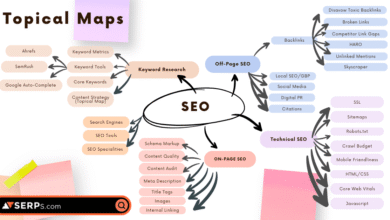
Random topics yield random results. To get consistent traffic, you need to prove to Google that you are an authority on a specific subject. We do this by building a “Topical Map.”
This is where many beginners get stuck in analysis paralysis. I simplify it by using a basic SEO content generator or research tool to find the core questions my audience asks. Then, I map them out.
Here is what a practical Cluster Map looks like for a theoretical project management software company:
| Content Type | Topic / Keyword | Search Intent | Primary CTA |
|---|---|---|---|
| Pillar Page | Complete Guide to Project Management for Small Teams | Informational | Download Checklist |
| Cluster Post 1 | Best project management tools for startups | Commercial | Start Free Trial |
| Cluster Post 2 | How to organize a sprint planning meeting | Informational | Newsletter Sign-up |
| Cluster Post 3 | Asana vs Trello vs [Your Tool] | Commercial Investigation | Watch Demo Video |
| Cluster Post 4 | Why do projects fail? (Common pitfalls) | Problem/Solution | Download Case Study |
By linking all these cluster posts back to the pillar (and to each other), you create a web of relevance that is much harder for competitors to break than a single isolated article.
The 5 intent types I plan for (and what each one is supposed to do)
Notice the “Intent” column above? I categorize every idea into one of five buckets:
- Informational: “What is…” or “How to…” (Builds trust).
- Commercial Investigation: “Best X for Y” or “Top 10 tools” (Captures comparison shoppers).
- Transactional: “Buy X” or “Hire [Service]” (The money pages).
- Navigational: Users looking for your specific brand or login page.
- Problem/Solution: Users searching for a pain point like “AC not blowing cold air” (High urgency).
Build a cluster the easy way: start with one pillar and 6–10 supporting posts
Don’t try to boil the ocean. If you’re a team of one, or just you and a freelancer, commit to one cluster at a time. Finish the “Email Marketing” cluster before you start the “Social Media Ads” cluster. Google rewards depth. A site with 100 deep articles on one topic often outranks a site with 500 shallow articles on fifty topics.
Create: write evergreen, long-form posts that keep earning traffic (without sounding like a textbook)

Once you have a plan, you have to execute. Research suggests that long-form content (often 1,500+ words) tends to get 3x more traffic and 4x more shares than shorter posts. But length alone isn’t enough; it has to be useful.
The bottleneck is usually drafting. Writing 2,000 words from scratch is exhausting. This is where I use tools strategically. An AI article generator can handle the heavy lifting of the first draft—getting the structure, definitions, and basic explanations down—so I can spend my energy adding the human elements: the examples, the tone, and the strategic internal links.
My content brief template (copy/paste)
Whether I’m writing it myself or assigning it to a writer (or AI), I never start without a brief. Here is the exact structure I use:
- Target Keyword: (e.g., “how to fix a leaky faucet”)
- Search Intent: (e.g., Informational / DIY)
- Target Audience: (e.g., Homeowners with no plumbing experience)
- Unique Angle: (e.g., Fix it in under 15 minutes with tools you already have)
- Key Headings (H2s): (List the main steps)
- Internal Links to Include: (Link to “Best Wrenches” review)
- Call to Action: (e.g., Call us if the leak persists)
- Human Insight: (One specific mistake to avoid)
Example: a 1-week production plan for beginners (that doesn’t burn me out)
If you have a full-time job or run a business, you probably don’t have 40 hours a week to write. Here is a realistic schedule:
- Monday (30 mins): Keyword research & Brief creation.
- Tuesday (60 mins): Drafting (using tools to accelerate).
- Wednesday (30 mins): Editing & Adding images/screenshots.
- Thursday (30 mins): Uploading & On-page Optimization.
- Friday (30 mins): Publish & Distribution (Social/Email).
Optimize: on-page SEO + internal links + Generative Engine Optimization (GEO) for AI/voice search

Writing the text is only half the battle. Now we optimize it for two audiences: the human reader skimming on a mobile phone, and the search engines (including AI bots like ChatGPT and Google Gemini).
With voice search usage growing around 22% year-over-year, and AI overviews becoming standard, we need to adapt our formatting. I call this Generative Engine Optimization (GEO).
On-page essentials I never skip (title tags, headers, CTR, and readability)
Before I hit publish, I check the basics. Your Title Tag is your billboard—if it’s boring, nobody clicks. Instead of “SEO Tips,” try “SEO Tips for Small Businesses (2025 Guide).” Use H2s and H3s to break up text. If I see a wall of text longer than three sentences, I hit the enter key. Readability is retention.
GEO/voice formatting: how I structure answers so AI can quote them
AI tools look for concise, confident answers. When I want to capture a Featured Snippet or be cited by an AI, I use this specific “Answer-First” format:
1. The Question as an H2 or H3.
Example: How often should I blog for SEO?
2. The Direct Answer (40–60 words).
Start immediately with the answer. “For most small businesses, blogging once a week is sufficient to build topical authority. Consistency is more important than frequency; publishing one high-quality post weekly outperforms daily thin content.”
3. The Expansion (Bullets).
Follow up with data or steps:
• Focus on cluster topics first.
• Update content quarterly.
• prioritize evergreen topics.
This structure is gold for voice search because it sounds natural when read aloud, and it’s easy for bots to parse.
Publish consistently: create an editorial cadence and a refresh routine that protects rankings
The hardest part of blogging isn’t starting; it’s keeping it up three months later when things get busy. This is where using an automated blog generator alongside your manual efforts can save you. It helps maintain a baseline cadence—keeping the lights on—while you focus your deep creative energy on your pillar pages.
However, publishing new content isn’t the only way to grow. In fact, refreshing old content is often the fastest way to get traffic back.
A simple cadence: new posts vs updates (the ratio I aim for)
Once you have an archive of 20+ posts, I recommend a 60/40 split. Spend 60% of your time creating new content to cover more ground, and 40% updating older posts. Why? Because it’s easier to move a post from page 2 to page 1 than to rank a brand new post from scratch.
Mini table: what to refresh first (and what not to touch yet)
If I only have an hour to do SEO maintenance, here is how I triage:
| Scenario | Priority | Action |
|---|---|---|
| High Impressions / Low Clicks | High | Rewrite Title & Meta Description. |
| Ranking #4–#10 | High | Add new data, improved images, or a FAQ section. |
| Ranking #1–#3 | Low | Don’t touch it! (Unless traffic is dropping). |
| Declining Traffic | Medium | Check for “content decay” (outdated years/facts). |
Promote: distribution, repurposing, and backlinks (so my best posts don’t die in silence)

The biggest mistake I see beginners make is the “publish and pray” method. They spend 10 hours writing and zero minutes promoting. After I publish, I treat distribution like part of the assignment. If I don’t distribute it, I haven’t finished the job.
You need backlinks (other sites linking to you) to build authority. Pages with backlinks have significantly more visibility—stats suggest top pages have ~3.8x more backlinks than lower-ranking ones. But you don’t need to be a spammer to get them.
Repurposing workflow: 1 blog post → 7 assets (in under an hour)
Don’t create new content for social media from scratch. Steal from your blog. Here is my workflow:
- LinkedIn: Turn the H2s into a carousel PDF or a text-only listicle.
- Twitter/Threads: Post the “Answer-First” summary as a thread.
- Newsletter: Send the intro and a link to the full post.
- Pinterest: Create a pin for the main infographic or header image.
- Quora/Reddit: Find people asking the question you just answered and answer them (helpfully!) with a link to your deep dive.
- YouTube Short: Read your best paragraph into your phone camera.
- Google Business Profile: Post the update as a “What’s New” post.
Backlinks for beginners: what I pursue (and what I ignore)
If a link opportunity looks like a scheme, I skip it. Focus on ethical, relationships-based links. Reach out to partners or software tools you mentioned in your post and let them know. Guest post on relevant industry blogs. Use services like HARO (Help A Reporter Out) or similar platforms to provide expert quotes. Quality beats quantity every time.
Retain: turn one-time visitors into repeat readers with email, community, and light-touch notifications

Traffic is great, but an audience is better. I’d rather have 1,000 subscribers than 10,000 one-time visitors. The ROI of email marketing is legendary (often cited around $36 for every $1 spent), but mostly, it’s about control. You own your list; you don’t own your Google rankings.
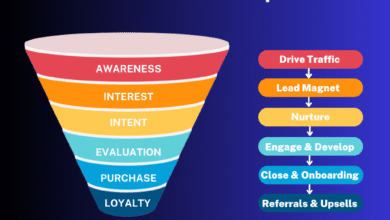
The simplest funnel: pillar post → lead magnet → welcome sequence → weekly newsletter
Here is the loop that builds consistency:
- The Hook: A reader lands on your “Project Management Guide” (Pillar).
- The Offer: You offer a free “Project Checklist PDF” (Lead Magnet) in exchange for their email.
- The Welcome: They get an automated email delivering the PDF, followed by 2–3 emails sharing your best evergreen articles.
- The Habit: You email them once a week with your latest post.
This turns a fleeting Google searcher into a loyal reader who sees your brand every week. That is how you build a moat around your business.
Common mistakes that kill consistent traffic (and how I fix them) + FAQs + next steps
Even with a plan, things go wrong. Here is what I look for when traffic plateaus.
Mistakes & fixes (quick troubleshooting list)
- Mistake: Publishing random topics.
Fix: Stop. Go back to your Cluster Map. Only publish if it fits a cluster. - Mistake: Thin content (500 words of fluff).
Fix: Combine 3 thin posts into one “Ultimate Guide” and redirect the old URLs. - Mistake: Zero internal links.
Fix: Every time you publish, edit 3 older posts to link to the new one. - Mistake: Ignoring search intent.
Fix: Google your keyword. If the results are all “How-to” guides, don’t write a product page.
FAQs (AI/voice, formats, frequency, social, repeat visitors)
What content format drives the most consistent blog traffic?
Long-form, evergreen “how-to” guides and comprehensive pillar pages drive the most consistent traffic. They remain relevant for years and attract more backlinks than news-style posts.
How do I optimize my blog for AI and voice search?
Use conversational language and structured data. Include an FAQ section with concise (40–60 word) answers to specific questions, as this format is easily picked up by voice assistants and AI summaries.
Is social media still effective for driving traffic?
Yes, but mostly for initial distribution. Social media creates the initial “spark” of traffic, while SEO provides the long-term fuel. Use social to validate topics before investing in deep SEO content.
How often should I publish posts to maintain traffic growth?
For most small businesses, one high-quality post per week is ideal. Consistency matters more than volume. Publishing weekly helps you build a habit and signals to Google that your site is active.
What’s the best way to turn one-time visitors into repeat readers?
Email capture is the most effective method. Offer a high-value lead magnet (like a checklist or template) related to the blog topic to incentivize sign-ups, then nurture them with a weekly newsletter.
My 5 next actions for the next 7 days (beginner checklist)
If I were starting today with zero traffic, this is exactly what I would do this week:
- Pick 1 Business Goal: Decide if you want leads, sales, or awareness.
- Draft 1 Pillar Topic: Identify the broad topic you want to own (e.g., “Commercial Roofing”).
- Find 6 Cluster Keywords: Map out the specific questions people ask about that topic.
- Write 1 “Answer-First” Outline: Create a brief for your first post using the template above.
- Set Up Search Console: Ensure you can actually measure the results when they come in.
Consistent traffic isn’t magic. It’s a process of planning, creating, optimizing, and distributing—over and over again. Start with the plan, stick to the schedule, and watch the staircase build itself.