Instagram keyword research for Instagram visibility: what I’ll cover (Beginner guide)

I posted consistently for 30 days straight—Reels, carousels, Stories—and still couldn’t get found for a basic service query in my city. It’s a frustrating reality many of us face: great content, zero discoverability. We often blame the algorithm or assume we just need to use more hashtags, but the game has fundamentally changed. Instagram is no longer just a feed; it is a search engine.
If you are tired of relying on viral spikes that vanish in 24 hours, this guide is for you. I’m going to walk you through a practical, business-focused approach to Instagram SEO that prioritizes long-term visibility over short-term hype.
In this guide, I’ll show you:
- How Instagram search actually works in 2026 (and why hashtags aren’t the main lever anymore).
- A step-by-step workflow to find the keywords your customers are typing right now.
- Exactly where to place those keywords in bios, captions, and alt text without looking spammy.
- A modern hashtag strategy and a simple way to measure if your efforts are working.
Social search on Instagram in 2026: what gets indexed (and why keywords beat hashtags)

For years, we treated hashtags as the only way to label our content. But as of 2026, Instagram’s search architecture is far more sophisticated. The platform now processes natural language across almost every surface of your profile and content. This means the algorithm “reads” your posts much like Google reads a website.
Where Instagram looks for keywords:
- Captions: Especially the first sentence.
- Name Fields: Your username and display name.
- Bio: The descriptive text in your profile.
- Alt Text: Custom descriptions for images.
- On-screen Text & Subtitles: Text overlays on Reels and auto-generated captions.
This shift is massive. I’ve observed that keyword-rich captions—those that naturally describe the content using search terms—can boost reach by approximately 30% and double likes compared to posts that rely solely on hashtags . Why? Because users are searching for solutions, not just tags. When someone types “Austin wedding photographer” or “postpartum fitness tips,” Instagram scans your actual content to see if it matches that intent.
Furthermore, since mid-2025, public professional accounts have had the option to be indexed by Google. This bridges the gap between social media and traditional SEO, allowing your Instagram posts to appear in standard search results outside the app.
What “social search” means for a business account (beyond going viral)
Social search is about intent. It’s the difference between stumbling upon a funny cat video (passive consumption) and actively looking for “best CPA for freelancers” (active intent). For a business, ranking for these high-intent queries is infinitely more valuable than going viral.
When you optimize for social search, you are building evergreen visibility. A Reel optimized for “home office ergonomics” can drive leads months after it was posted because people keep searching for that problem. Whether you run a local med spa or an ecommerce brand selling sustainable skincare, your goal is to be the answer when your ideal customer asks a question.
Google indexing (mid‑2025+): when Instagram SEO becomes “real SEO”
If I were starting a business profile today, I would write every caption with the assumption that someone might find it via a Google search. The integration of Instagram posts into Google’s index for professional accounts means your content has a lifespan far beyond the 24-hour feed cycle.
Note: Always verify the latest specific eligibility requirements in your Instagram settings under “Privacy and Search” before finalizing your strategy.
This capability allows your visual content to capture traffic for queries like “before and after balayage Dallas” directly on Google, leading users straight to your profile. It makes clarity and keyword usage non-negotiable.
Define your niche + search intent: the foundation for Instagram keyword research

Before we open any tools, we need to get clear on who we are. Instagram’s search algorithm rewards specificity. If your profile tries to be everything to everyone, you end up ranking for nothing. The most successful profiles I see have a clear “niche statement” that acts as a compass for their keywords.
Try this simple exercise:
Define your business using these four elements:
- Offer: What do you sell? (e.g., Personal training)
- Audience: Who is it for? (e.g., Postpartum moms)
- Location: Where are you? (e.g., Austin, TX – crucial for local biz)
- Outcome: What is the result? (e.g., Safe core recovery)
Now, write down 10 questions your customers actually ask you in DMs or discovery calls. Convert these into phrases. For example, “How do I fix my abs after baby?” becomes the keyword theme “Diastasis recti exercises.” This human-first approach ensures your keywords map to real problems.
A beginner-friendly intent map for Instagram searches
When I search “meal prep for beginners,” I don’t want a brand story video; I want a carousel with a shopping list or a Reel showing the steps. Matching your content format to user intent is critical.
- Intent: Learn (How-to) → Format: Educational Reel or Carousel → CTA: Save this post
- Intent: Buy/Book (Transactional) → Format: Product Tag or Service Highlight → CTA: Click link in bio
- Intent: Compare (Best vs) → Format: Comparison Chart/Carousel → CTA: Read full guide
- Intent: Trust (Reviews/Proof) → Format: Client Testimonial/Story → CTA: DM for info
Step-by-step Instagram keyword research workflow (beginner-friendly)

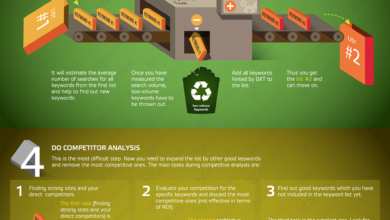
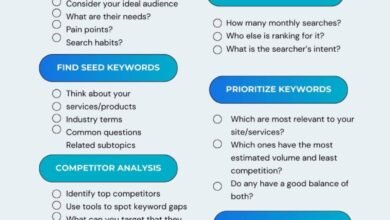
This is the part where we get our hands dirty. Real keyword research isn’t about guessing; it’s about data collection. I personally treat this like a detective game. My goal is to find the exact words my customers are using, not the industry jargon I think they should use.
My keyword research output typically includes:
- 3–5 Core themes
- 20–50 Specific keyword phrases
- 5–10 Content angles based on those keywords
- 3–5 Relevant hashtags per theme
Step 1: Start with seed keywords your customers actually say
I start by brainstorming a “seed list.” These are the broad terms that define your business. However, the trick is to use the language of the customer. For example, as a marketer, I might say “conversion rate optimization,” but my client says “get more sales.”
Example Seeds for an Austin Personal Trainer:
- Austin personal trainer
- Beginner strength training
- Postpartum fitness
- Weight loss coach Austin
- Gym anxiety tips
- Safe core exercises
Step 2: Use Instagram search bar autocomplete to find real queries
Here is exactly what I type into the search bar: I enter one of my seed keywords, like “Postpartum fitness,” and I do not hit enter immediately. I wait to see what Instagram suggests.
Capture Method:
I keep a simple spreadsheet open. I look at the suggestions—often things like “postpartum fitness c-section” or “postpartum fitness timeline.” These are gold. They tell you exactly what people are searching for. I was surprised to find that for many niches, users search for symptoms (“back pain relief”) far more often than the solution (“chiropractor”).
Check the tabs for Tags, Accounts, and Reels to see different variations. “Near me” variations are also critical if you are a local business.
Step 3: Competitor caption + bio audit (steal patterns, not posts)
Next, I find 5–10 competitors who are ranking well. I don’t copy their content, but I audit their structure. I look at their bios: What specific words are in bold? I look at their top-performing Reels: What text is on the screen in the first 3 seconds?
What to record:
- Recurring phrases in their name fields.
- Topics they cover repeatedly (content pillars).
- The exact language in their calls-to-action (CTA).
- Hashtag styles—are they using broad or super-niche tags?
Step 4: Expand into long-tail keywords and content angles
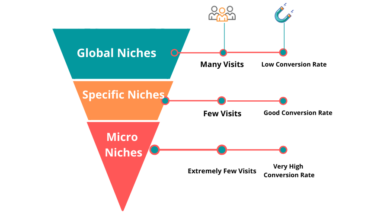
“Personal trainer” is too competitive. “Postpartum personal trainer for back pain” is a long-tail keyword you can actually dominate. I take my core keywords and add modifiers: who, what, where, beginner, budget, fast.
Content Angle Templates:
- Specific Service: “{Service} for {Audience} in {Location}”
(e.g., “Pelvic floor therapy for new moms in Austin”) - Problem Solving: “How to {Task} without {Pain}”
(e.g., “How to deadlift without hurting your lower back”)
Table: Instagram keyword sources and what each one is best for
| Source | Best For | Example Output | Pitfalls |
|---|---|---|---|
| Instagram Autocomplete | Finding high-volume, current searches | “meal prep for muscle gain” | Can suggest irrelevant trends |
| Competitor Bios | Positioning & authority keywords | “Holistic acne specialist” | Copying strategy that doesn’t fit your offer |
| Customer DMs/Comments | High-intent, problem-aware phrasing | “fix hormonal breakout” | Volume might be low (but value is high) |
| Google Search (People Also Ask) | Educational/How-to content ideas | “How long does acne take to heal?” | Phrasing might differ slightly from social |
Keyword placement playbook: profile, captions, Reels, and accessibility

Having a list of keywords is useless if you don’t know where to put them. I treat my profile like a landing page. Clarity beats cleverness every time. Here is the rule I live by: Human first, robot second. If a sentence sounds like a robot wrote it, delete it.
Profile optimization: display name + bio that matches what people search
Your Display Name (the bold name on your profile) is searchable. Your username is too. Use this space for your primary SEO terms.
Bio Checklist:
- Niche/Industry keyword
- Target Audience
- Location (if local)
- Outcome/Promise
Real Example (Before vs. After):
Before: “Sarah | Dreamer | Coffee Lover ☕ | DM to chat!”
After: “Sarah | Austin Wedding Photographer | Candid & Editorial Style | Booking 2026 📸”
The second one tells the algorithm—and the human—exactly what I do.
Caption optimization: how I use keywords in the first lines without sounding robotic
The first 1–2 lines of your caption are prime real estate. I try to include my main keyword here naturally. It frames the context for the algorithm immediately.
The Formula: Hook → Value → Proof → CTA
Example: “Struggling with knee pain while running? (Hook + Keyword). Here are 3 form corrections that helped my marathon clients (Value)…”
I avoid stuffing. “Here is running knee pain running tips for runners” looks spammy and damages trust.
Alt text + subtitles: accessibility upgrades that also help search
Alt text is designed for screen readers, allowing visually impaired users to understand your content. It also happens to be a strong signal for search engines. Keep it descriptive and under 125 characters.
Don’t: “shoe sneaker nike running buy now”
Do: “Woman tying laces on red Nike running shoes on a trail in Austin.”
Also, always enable subtitles on Reels. Instagram indexes this text, and it captures the massive audience that watches with sound off.
Table: Keyword placement checklist
| Surface | Goal | Safe Density / Length | Example |
|---|---|---|---|
| Display Name | Ranking for core service | 3–4 keywords / 60 chars | “Dallas SEO Expert | Marketing” |
| Bio | Conversion & Context | 2–3 keywords / 150 chars | “Helping SAAS founders scale…” |
| Caption | Context & Engagement | 5–7 keywords naturally | “If you need easy meal prep ideas…” |
| Alt Text | Accessibility & Indexing | <125 chars, descriptive | “Glass meal prep containers stacked…” |
Caution: Over-optimizing (exceeding ~40% keyword density) can trigger spam filters and reduce your reach. Always prioritize readability.
Hashtag strategy in 2026: 3–5 tags, broad vs niche vs branded (with examples)

It sounds counterintuitive, I know. We were trained to use 30 hashtags for years. But today, using 3–5 highly relevant hashtags is the gold standard. The algorithm is smart enough to categorize your content based on the caption and video itself; it doesn’t need a wall of 30 tags to understand the post. In fact, spamming irrelevant tags can confuse the system.
How I choose hashtags in under 5 minutes:
- 1–2 Niche specific tags (Targeted)
- 1 Broad category tag (Volume)
- 1 Branded or Community tag (Identity)
A simple hashtag mix that works for beginners
If I were posting that running video mentioned earlier, my mix would look like this:
- #RunningFormTips (Niche)
- #MarathonTraining (Broad)
- #AustinRunners (Local/Community)
- #CoachSarah (Branded)
This mix tells Instagram exactly who needs to see this, without looking desperate for attention.
Tools + templates to scale Instagram keyword research (without spamming)

You don’t need expensive enterprise software to do this, but you do need a system. I primarily use native Instagram search and a spreadsheet. However, when I need to scale my content planning or brainstorm variations I haven’t thought of, I use tools as a “second brain.” This is where platforms like Kalema.io can be incredibly helpful. Using an AI SEO tool or SEO content generator helps streamline the process of moving from a keyword idea to a full outline. Just remember, even the best AI content writer requires a human editor to ensure the brand voice remains authentic.
Table: Tool stack for beginners
| Tool | Best For | Pros | Cons |
|---|---|---|---|
| Instagram App | Primary research (Autocomplete) | Free, 100% accurate data | Manual, time-consuming |
| Google Sheets | Tracking & Calendar | Customizable, free | Requires manual entry |
| AI Assistants | Expanding keyword lists & Angles | Fast, breaks writer’s block | Human review required for context |
Measurement + iteration: track search visibility, reach, and build a keyword calendar

How do you know if this is working? Stop looking at likes. Look at “Impressions from Search“ in your insights (if available) or track Profile Visits and Follows from non-followers. These metrics indicate that new people are finding you.
I once had a post specifically about “technical SEO for small business” that flopped in likes but drove 5 direct inquiries. That is a win. If a post underperforms, I don’t delete it. I check the hook, clarify the on-screen text, or tweak the caption keywords for better alignment.
A simple 4-week keyword calendar template
Setting up a strategic calendar takes about 10–15 hours for a multi-month plan , but you can start small. Here is a lightweight structure:
| Week | Primary Keyword | Post Type | Hook / Angle |
|---|---|---|---|
| Week 1 | “Postpartum core exercises” | Reel (30s) | “Stop doing crunches if you have this symptom…” |
| Week 2 | “Diastasis recti test” | Carousel | “How to check your abs at home (Step-by-step)” |
| Week 3 | “Busy mom workouts” | Reel | “10-minute workout while the baby naps” |
| Week 4 | “Pelvic floor health” | Story Highlight | Q&A: Answering your top DMs |
Common mistakes, FAQs, and next steps checklist

To wrap this up, let’s cover the things that might trip you up. The biggest mistake I see is Keyword Stuffing. This is when you force keywords where they don’t belong, making your bio or caption unreadable. If you exceed that ~40% density threshold, you risk looking like spam.
Mistakes & fixes (quick troubleshooting list)
- Mistake: Using vague bios like “Helping you shine.”
Fix: Be specific: “Helping creative entrepreneurs scale with SEO.” - Mistake: Ignoring Alt Text.
Fix: Spend 10 seconds adding a descriptive sentence to every image post. - Mistake: Relying only on hashtags.
Fix: Shift your focus to keyword-rich captions and on-screen text. - Mistake: Copying competitor keywords blindly.
Fix: Use them as inspiration, but validate that they match your specific offer. - Mistake: Never looking at analytics.
Fix: Review your top posts monthly to see which topics brought in non-followers.
FAQs: keyword discovery, placement, hashtags, alt text, and Google visibility
How do I find the best keywords?
Start with your customer’s questions, then use Instagram’s search bar autocomplete to see how they phrase them. Use AI tools to expand these into long-tail variations, but always verify relevance manually.
Where should I put keywords?
Prioritize your Display Name and Bio for profile SEO. For content, place the main keyword in the first sentence of your caption, in the on-screen text of Reels, and in Alt Text.
How many hashtags should I really use?
Stick to 3–5 highly relevant tags. This helps the algorithm categorize you without diluting the message. Quality over quantity.
Does Alt Text actually matter?
Yes. It is essential for accessibility and provides a strong contextual signal to both Instagram and Google about what your image contains.
Can my Instagram posts show up on Google?
Yes, since mid-2025, public professional accounts can opt into indexing. This means your content is eligible to appear in standard search results, making SEO best practices even more critical.
Recap + next actions (what I’d do this week)
If I were starting from zero today, I wouldn’t panic about the algorithm. I would focus on clarity. Here is your game plan for the week:
- Day 1: Build your seed list and capture 20 autocomplete phrases.
- Day 2: Audit and rewrite your Name and Bio to be search-friendly.
- Day 3: Draft 3 posts where the primary keyword is in the hook and first caption line.
- Day 4: Select your 3–5 core hashtags for each content pillar.
- Day 5: Post your first optimized piece and ensure Alt Text is included.
Consistency combined with this structured approach is how you win. Good luck!