Target Your Town: A Deep Dive into Localized Keyword Research Strategies (Local SEO Keyword Research)
Introduction: A beginner-friendly guide to local SEO keyword research (and why I focus on “your town,” not just your industry)

We’ve all seen it happen. You launch a website for a client—let’s say a plumber in Phoenix—optimize it perfectly for “plumber Phoenix,” and then watch as they get outranked by a competitor with half the authority but better neighborhood targeting. Ranking locally often feels random until you realize that Google isn’t just looking at the city anymore; it’s looking at the street corner.
The days of ranking purely on broad city terms are fading. Today, successful local SEO keyword research is about mapping intent to specific geographies—neighborhoods, landmarks, and service radii. It’s not just about getting traffic; it’s about getting the call from the customer three miles away who needs help now.
Here’s the workflow I use when I’m starting from zero. It’s designed for U.S. markets, keeps the technical jargon to a minimum, and focuses on repeatable steps you can execute today. We will move from building a location framework to identifying intent, mapping pages, and aligning your off-site signals like Google Business Profile (GBP). Let’s turn that random visibility into a structured growth engine.
What local SEO keyword research means in 2026: hyperlocal intent, E‑E‑A‑T, and AI-driven SERPs

Local SEO keyword research isn’t just adding a city name to a service keyword anymore. It has evolved into a multi-dimensional strategy where you must prove you are part of the community, not just targeting it. The landscape has shifted significantly:
- Hyperlocal beats broad: Modern algorithms prioritize proximity and context. A page optimized for “emergency dentist in Hyde Park” will often convert better and rank easier than a generic “Chicago dentist” page.
- Your GBP is a mini-website: Google Business Profile is often the first and only thing a user sees. Your keyword strategy must extend to your GBP posts, services, and Q&A.
- E‑E‑A‑T is critical: Since the December 2025 core update, Google has placed heavier weight on Experience, Expertise, Authoritativeness, and Trustworthiness in local results. You need authentic local proof—real photos, real staff, real reviews—to back up your keywords.
- AI Overviews are here: As of 2025, AI Overviews appear in a significant portion of searches, and mobile usage continues to dominate local queries . This means we need to answer questions directly to appear in generative summaries.
A few years ago, a simple “Dallas dentist” page could be enough. Now, I see neighborhoods, landmarks, and specific “near me” intent winning the click. If you don’t adapt, you’re fighting a losing battle against aggregators and established giants.
Quick definitions (so beginners don’t get stuck)
Local Intent: When a search engine infers the user wants results nearby (e.g., searching “pizza” implies “pizza near me”).
Hyperlocal: Targeting specific neighborhoods, districts, or landmarks rather than just the city level.
Local Pack: The map-based block of three business listings that appears at the top of Google search results.
Service-Area Business (SAB): A business that visits customers (like plumbers) rather than having customers come to a storefront.
NAP: Name, Address, Phone number. Consistency here is the bedrock of local trust.
AEO (Answer Engine Optimization): Optimizing content to provide direct, conversational answers for AI and voice search.
What’s driving the shift: neighborhood relevance + authenticity + structured answers
The biggest shift I’ve noticed is that “close” isn’t good enough; users want “right here.” Neighborhood-level targeting significantly outperforms city-level approaches because it aligns with how people actually speak and search. If I live in Brooklyn, I rarely search for “coffee shop NYC”; I search for “coffee shop Williamsburg.”
Authenticity is the other half of the equation. Users and algorithms are skeptical of generic stock photos. Real photos of your team at a local landmark build trust that a keyword alone cannot. Furthermore, with the rise of voice search and generative AI, structured content—like FAQs and clear service menus—helps machines understand exactly what you offer. When I’m unsure, I open the local SERP and let Google show me the language customers use, often finding they ask questions I hadn’t even considered.
Step 1 — Build a location framework: city → neighborhoods → landmarks (the backbone of local SEO keyword research)

Before I ever touch a keyword tool, I build a “geo map” or location framework. This prevents the common mistake of generating a massive list of keywords that you can’t actually use. You need to know exactly where you have a right to rank.
Think of it as a pyramid. At the top is your primary City (e.g., Austin). Below that are the major Regions (North Austin, South Congress). Below that are specific Neighborhoods (Mueller, Hyde Park). Finally, at the base, are Landmarks and Zip Codes (near UT Austin, 78704).
This framework gives you a logical structure for your website. You aren’t just throwing “Austin” on every page; you are building a hierarchy that mirrors the real world.
Decide what you actually serve (so you don’t target the wrong places)
If you are a business owner or helping one, sit down and clarify the operational reality. If you only travel 15 miles, don’t waste budget building pages for the entire metro area. It frustrates users and sends negative signals to Google when you reject jobs.
- Business Type: Storefront (customers come to you) or Service Area (you go to them)?
- Revenue Radius: Which zip codes actually generate money?
- Expansion Goals: Where do you want to be in 6 months?
Table template: your local ‘geo inventory’ (copy/paste)

I use a simple spreadsheet to track this. Here is a template you can copy to start your inventory:
| Location Layer | Examples (Austin, TX) | How to Validate | Where it Lives (Assets) |
|---|---|---|---|
| Primary City | Austin | Business License, GBP Address | Home Page, Main Service Pages |
| Macro-Neighborhoods | South Congress, North Loop | Google Maps, Real Estate sites | Location Pages, Service Area Section |
| Micro-Neighborhoods | Cherrywood, Tarrytown | Nextdoor, Local Blogs | Blog Posts, GBP Updates, Project Galleries |
| Landmarks / ZIPs | Near The Domain, 78751 | Google Autocomplete | Directions text, Image Alt Text, FAQs |
Step 2 — Generate keyword ideas fast: services × locations × modifiers (without expensive tools)

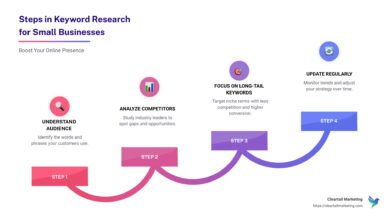
Once you have your location framework, it’s time to multiply it by your services. I don’t start with expensive tools; I start with logic and the search bar. This approach ensures we capture high-intent phrases that tools often miss due to low reported volume.
I use a simple formula: Service + Location + Modifier. To speed this up, especially when mapping out content briefs for these clusters, I often use an SEO content generator to help brainstorm the semantic variations, but the core list comes from manual research first.
My workflow looks like this:
- Open an incognito window and simulate the location (you can use GS Location Changer or just type the city).
- Type your core service (e.g., “roof repair”) and wait.
- I jot down the Autocomplete phrases exactly as Google shows them—typos and all—then clean them up later.
- Look at the “People Also Ask” section. These are your FAQ candidates.
- Check the “Searches related to…” at the bottom of the page.
My ‘services × locations × modifiers’ formula (with examples)
You can generate hundreds of targeted keywords by combining these three buckets. Here is how it looks in practice:
- Intent Modifiers: Best, Affordable, Emergency, 24/7, Same-day, Reviews, Cost, Price, Near me.
- Service Core: Dentist, HVAC repair, Personal Injury Lawyer.
- Location: [City], [Neighborhood], [Zip Code], Near [Landmark].
Real-world examples:
- “Emergency dentist near Hyde Park open now” (High intent, ready to book)
- “Cost of new AC unit in North Austin” (Research intent, needs a guide or price table)
- “Personal injury attorney downtown Dallas free consultation” (Transaction intent, competitive)
Where to pull real language: competitors, reviews, and GBP Q&A
Tools give you data; customers give you language. I spend time reading competitor reviews and Q&A sections. I’m not looking to copy; I’m mining for pain points.
If a review says, “My AC stopped working at night and they came out instantly,” I add “24/7 emergency AC repair [city]” to my list. If a GBP Q&A asks, “Do you offer financing for braces?”, I know I need a keyword cluster around “orthodontist with payment plans [city].” This mirrors the actual voice of the customer.
Step 3 — Qualify and prioritize keywords: intent, feasibility, and what the local SERP is rewarding

Now you likely have a massive list. The mistake beginners make is trying to target everything at once. We need to score these keywords to find the quick wins.
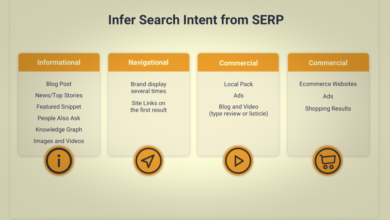
I prioritize based on three things: Intent (how close are they to buying?), Feasibility (can I actually rank?), and SERP features (what does Google want to show?). When I analyze the SERP, I look at the Local Pack. If the pack appears, it’s a local intent keyword. If it’s just blog posts, it’s informational.
My sanity check: If the top results are massive directories (Yelp, Angi), I don’t panic. I look for gaps. Often, these directories target the broad city. If I target the specific neighborhood, I can often flank them.
Intent buckets I use for local: ‘hire me now’ vs ‘help me decide’ vs ‘help me fix’
- Hire Me Now (Transactional): “Emergency plumber,” “Open now,” “Phone repair near me.” These are your top priority. They go on service pages and the homepage.
- Help Me Decide (Commercial Investigation): “Best roofer in [city],” “[Service] reviews,” “[Service] cost.” These need comparison pages or detailed service pages with pricing transparency.
- Help Me Fix (Informational): “Why is my sink leaking,” “How to fix a fence.” These are for blog posts that build trust and link to your service pages.
Table: a beginner scoring model to pick your first 10 target keywords
Use this scorecard to filter your list down to the best 10 opportunities.
| Keyword | Intent | SERP Type | Local Pack? | Priority Score (1-3) | Target Asset |
|---|---|---|---|---|---|
| Emergency plumber Mueller | Transactional | Service Pages | Yes | 3 (High) | Neighborhood Page |
| Water heater repair cost Austin | Commercial | Blogs/Guides | No | 2 (Med) | Pricing Guide / Blog |
| DIY drain cleaning | Informational | Videos/Blogs | No | 1 (Low) | Blog Post |
AEO check: which queries deserve a direct-answer block or FAQ schema
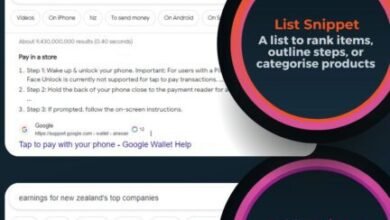
Answer Engine Optimization (AEO) isn’t about rebuilding your site; it’s about formatting. For queries that are questions (Who, What, Where, How much), I add a “Direct Answer” block near the top of the page. This is 2-3 sentences that directly answer the query.
For example, if the keyword is “How much does an oil change cost in Seattle?”, my text says: “An oil change in Seattle typically costs between $50 and $90 depending on oil type.” This pragmatic formatting increases the chance of being picked up by AI summaries without needing a total overhaul.
Step 4 — Turn keywords into pages and content: neighborhood landing pages, service pages, FAQs, and internal links

This is where the rubber meets the road. We need to map our prioritized keywords to actual pages. A common trap is creating “Doorway Pages”—thin, copy-pasted pages for every single city variant. Google hates these. Avoid doorway pages by ensuring every page offers unique value, specifically tailored to that location.
If you’re managing multiple locations or need to produce high-quality drafts efficiently, using an AI article generator can help you structure these pages with unique local angles, provided you inject the real-world expertise and proof we discussed.
Here is how I map it out. Imagine a cluster for “Water Heater Repair”:
Primary Page: Water Heater Repair Austin (Service Page)
Sub-Pages (Only if unique demand exists): Water Heater Repair Westlake (Neighborhood Page)
Supporting Content: “Tankless vs Traditional Water Heaters in Hard Water Areas” (Blog Post)
A simple keyword-to-page map (what gets a page vs what becomes a section)
I learned this the hard way: if you create too many pages, you dilute your authority (cannibalization). Use this decision tree:
- Create a New Page If: The keyword has unique search volume, different user intent, or requires a completely different offer/service.
- Make it a Section/Heading If: It’s just a synonym (e.g., “fix water heater” vs “repair water heater”) or a very small nearby town with no unique distinctiveness.
- Make it an FAQ If: It’s a specific question about the service (e.g., “Same day availability”).
Template: neighborhood landing page that’s not spammy
A good neighborhood page feels like a local resource, not a robot’s output.
Page Title: [Service] in [Neighborhood] | [Company Name]
Intro: We provide [Service] to residents in [Neighborhood], usually serving homes near [Landmark].
Local Proof: “We recently fixed a heater on [Street Name]. Here is a photo of the project.”
Service Specifics: “In [Neighborhood], many homes have older piping, so we specialize in retrofitting…”
Reviews: Embed reviews specifically from customers in this area.
Map: Embed a Google Map centered on the neighborhood.
FAQ: Specific to the area (e.g., parking, local codes).
On-page checklist: titles, headers, schema, and internal links (placed where they matter)
Once the content is written, run this quick audit:
- Title Tag: Includes Service + City/Neighborhood + Modifier (e.g., “Plumber in Hyde Park | 24/7 Emergency Repair”).
- H1: Clear and matches the primary keyword.
- Schema: Use
LocalBusinessschema. If it’s a service page, useServiceschema. UseFAQPageschema for your Q&A section. - Internal Links: Link from your blog posts to your service pages using localized anchor text. Link from your neighborhood pages back to the main city page to show hierarchy.
- Mobile Check: Ensure the “Call Now” button is sticky or easy to find on mobile screens.
Step 5 — Align Google Business Profile, NAP, citations, and local links with your keyword plan

Your on-site SEO is only half the battle. Your off-site signals must verify what your website claims. If your website says “Best Pizza in Austin” but your GBP says you are a “Catering Service” with no mention of pizza, you won’t rank.
We need to align your GBP categories, description, and posts with the keyword research you just did. This creates a cohesive signal to Google.
| Action | Cadence | Keyword Focus |
|---|---|---|
| GBP Posts | Weekly | Highlight one specific service + neighborhood (e.g., “Installing new ACs in Tarrytown today!”) |
| Photo Uploads | Bi-Weekly | Geo-tag visually (landmarks in background) or label “Project in [Neighborhood]” |
| Q&A Seeding | Monthly | Post and answer common questions found in Step 2 research. |
GBP: the ‘mini-website’ you can update weekly
Treat your Google Business Profile like a social feed. Regular updates signal that the business is alive and active. I recommend using real photos—staff, trucks, storefronts—rather than stock images. When writing your business description, include your core service keywords and top 2-3 neighborhoods naturally. Don’t stuff it; just be descriptive.
NAP consistency: the easiest trust win most beginners skip
I’ve seen rankings wobble because of a single wrong suite number. Consistency builds trust. Here is a quick audit you can do:
- Google Search: Search for your “Business Name + Phone Number.” Look for discrepancies.
- Format: Decide on a format (St vs Street, Ste vs Suite) and stick to it everywhere.
- Aggregators: Check major data aggregators (like Data Axle) to ensure they have the correct info, as they feed smaller directories.
Common mistakes I see in local SEO keyword research (and how I fix them) + FAQs + next actions
Even seasoned pros get tripped up. Here are the traps I see most often, and how to avoid them.
Mistakes & fixes (5–8 quick hits)
- Mistake: Targeting the whole metro area when you are a small fish.
Fix: Start with your immediate zip code and expand outward only when you dominate home base. - Mistake: Creating “Doorway Pages” (duplicate content just changing the city name).
Fix: Only build pages for locations where you have unique projects, reviews, or office presence. - Mistake: Ignoring GBP Categories.
Fix: Ensure your primary category matches your main keyword, and use secondary categories for other services. - Mistake: Forgetting “Near Me” optimization.
Fix: You can’t optimize for “near me” directly, but you can optimize for “Service + Neighborhood” which triggers “near me” rankings. - Mistake: Not tracking conversions.
Fix: Rankings are vanity; calls are sanity. Set up call tracking.
FAQs (based on what people actually ask)
How detailed should hyperlocal research be?
Go as granular as the search behavior dictates. If people search by neighborhood (e.g., “SoHo”), target that. If they search by city only, stick to the city level. See Step 1 for the framework.
Does AEO replace traditional Local SEO?
No, it complements it. You still need traditional on-page elements and backlinks. AEO simply ensures your content is formatted to be picked up by AI summaries and voice assistants.
Do Google Business Profile updates actually help rankings?
Yes, they signal activity and relevance. While the direct ranking boost is debated, active profiles typically have higher engagement, which is a strong ranking signal.
Can I do this with free tools?
Absolutely. Google Autocomplete, GBP, and Google Keyword Planner are sufficient for 90% of local businesses. You don’t need enterprise software to start.
How critical is NAP consistency really?
Extremely. Inconsistent data confuses search engines about your actual location, diluting your trust signals. It’s a foundational requirement.
Wrap-up: my 30-minute action plan (recap + next actions)
We’ve covered a lot, but don’t let analysis paralysis set in. Local SEO is won by those who execute consistently. Here is your recap:
- Map your turf: Define your city, neighborhoods, and landmarks.
- Capture the intent: Find the “Hire me now” keywords vs. research questions.
- Align your signals: Ensure your website pages and GBP speak the same language.
If you only do one thing today: Open a Google Sheet, copy the Geo Inventory table from Step 1, and fill it out for your business. Then, pick your top 10 keywords and score them. That clarity alone puts you ahead of 80% of the competition.