SaaS SEO keyword research for Product-Led Growth: Keyword Research for the Modern SaaS Funnel

I used to chase high-volume keywords and celebrate every time our traffic graph spiked up and to the right. Then, at the end of the month, I’d look at our trial signups and realize they had barely moved. It’s a sinking feeling that many SaaS marketers know well: you’re winning the traffic game, but losing the revenue game.
The problem usually isn’t the quality of your writing; it’s the disconnect between what people are searching for and what you’re serving them. Traditional blog posts are great for education, but they are often terrible at getting a user to do something.
This guide is for the growth marketer or founder who is tired of empty metrics. I’m going to walk you through the Product-Led Growth (PLG) keyword research method I use—a system that maps high-intent queries directly to product features, templates, and integration pages. By the end, you’ll have a repeatable workflow to build a keyword list that actually drives activation.
- The Goal: Stop prioritizing keywords by volume; start prioritizing by “time-to-value.”
- The Method: Map intent to assets (tools, templates) rather than just articles.
- The Result: A predictable stream of users who don’t just read, but sign up and use your product.
Search intent and who this guide is for
If you are looking for a theoretical lecture on what SEO is, this isn’t it. This is an intermediate-to-advanced guide for practitioners who want a procedural workflow to fix their funnel.
We are going to move beyond basic “informational” queries. You will learn how to identify keywords where the user wants to complete a specific task—like “calculate ROI” or “export project to PDF”—and how to serve that intent immediately. This involves understanding the funnel stages: TOFU (Top of Funnel/Awareness), MOFU (Middle/Consideration), BOFU (Bottom/Decision), and the critical, often-ignored stage: Activation.
What is Product-Led Growth SEO (and why blog-only SEO often underperforms for SaaS)

Product-Led Growth (PLG) SEO is a strategy where your product itself—or parts of it—becomes the content that ranks. Instead of writing a 2,000-word essay on “Why budgeting is important,” you build a “Free Marketing Budget Template” page that ranks for that query and lets the user solve their problem instantly.
Why make this shift? In my experience, and based on industry data, blog-to-customer conversion rates can be incredibly low—sometimes hovering around 0.05% to 0.3%. When you force a user who wants a quick answer to wade through a long introduction, they bounce. When you give them a tool, they engage.
Here is how the mindset shifts when you move from traditional SaaS SEO to a PLG approach:
| Feature | Traditional SaaS SEO | PLG SEO |
|---|---|---|
| Primary Asset | Long-form blog posts, whitepapers | Templates, calculators, tools, integration pages |
| Keyword Focus | High-volume informational (“What is X?”) | High-intent utility (“X template,” “X vs Y,” “Connect X to Y”) |
| User Goal | Learn about a topic | Complete a task or solve a specific problem |
| Primary KPI | Organic Traffic, Pageviews | Product Signups, Activations (PQLs) |
| Typical Pitfall | Traffic that doesn’t convert | Technical complexity in building assets |
Traditional SEO vs PLG SEO: what changes in keywords, pages, and success metrics
In a traditional model, we optimize for readership. In a PLG model, we optimize for usage. For example, a traditional keyword might be “project management best practices.” A PLG keyword is “Gantt chart generator free.” The first user wants to read; the second user wants to work. If you can capture the second user with a product-led asset, your path to a trial account is frictionless.
Map keyword intent to the modern SaaS funnel (TOFU → MOFU → BOFU → activation)

Before I ever open a keyword tool, I map out the intent. If you skip this, you’ll end up with a messy spreadsheet of terms that look good but don’t fit your business model. I use a modified funnel that explicitly includes “Activation”—the moment a user gets value from the product.
| Funnel Stage | User Intent | Example Query | Best Page Type | Primary CTA |
|---|---|---|---|---|
| TOFU (Learn) | Problem aware, seeking definition or method | “How to calculate burn rate” | Guide + Calculator | Use Free Calculator |
| MOFU (Evaluate) | Solution aware, comparing options | “Best accounting software for startups” | “Best of” List / Comparison | See Why We Win |
| BOFU (Decide) | Provider aware, looking for validation | “[Competitor] alternatives” | Comparison Landing Page | Start Free Trial |
| Activation (Do) | Ready to execute a specific task | “Burn rate excel template” | Template Library Page | Download / Copy Template |
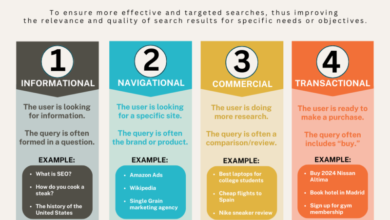
The 4 intent buckets I use for PLG SEO keyword research
I simplify intent into four buckets to keep my team sane:
- Learn: They have a knowledge gap.
- Evaluate: They have a tool gap and are shopping.
- Decide: They are validating a choice.
- Do (Activation): They have a task to finish right now.
My sanity check is always: “Is this person trying to learn theory, or are they trying to get a job done?” If it’s the latter, that’s a PLG goldmine.
Where product-led assets fit (tools, templates, calculators, interactive demos)
This is where the magic happens. Product-led assets—like a “free SEO audit tool” or a “social media caption generator”—bridge the gap between searching and using. These assets typically convert at a much higher rate than standard content because they demonstrate value before asking for a credit card. If you’re a beginner, start small: a simple library of Google Sheet templates relevant to your niche is often the easiest MVP to ship.
A step-by-step workflow for SaaS SEO keyword research (PLG-first, beginner-friendly)

Here is the exact workflow I use. It’s designed to be linear, so you can follow it from start to finish without getting overwhelmed by data.
Step 1: Start from the product (features, integrations, and the job-to-be-done)
Don’t start with a keyword tool; start with your own product interface. I literally log into the app and click through the navigation menu. Every feature, every report, and every integration is a potential seed keyword.
If you have a “SOC 2 Compliance” report feature, write down “SOC 2 checklist” and “SOC 2 compliance automation.” If you integrate with HubSpot, write down “HubSpot integration.” These are your highest-intent seeds because you already have the solution built.
Step 2: Expand the list using real customer language (not just SEO tools)
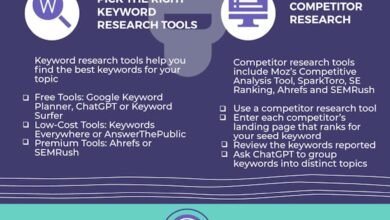
SEO tools are great, but they often lag behind how people actually talk. I try to spend 30 minutes a month doing this simple routine:
- Sales Calls: Listen to recordings. What words do prospects use to describe their pain? (e.g., “I need to unify my data,” not “integrate”.)
- Support Tickets: Look for “how do I…” questions.
- Google Search Console: Filter for question queries (who, what, how) that you are ranking for but not targeting.
- Google Autocomplete: Type your seed keywords and see what Google suggests. This is often where you find long-tail gems.
Step 3: Classify intent and funnel stage (TOFU/MOFU/BOFU/Activation)
Go through your raw list and tag each keyword with an intent. This helps you decide what to build later. A rule of thumb I use: If the keyword contains “template,” “tool,” “generator,” or “example,” it’s almost always Activation intent. If it contains “best,” “top,” or “vs,” it’s MOFU/BOFU.
Counterexample: Sometimes “how to [task]” looks TOFU, but if the task is complex, the user might actually be looking for a tool to do it for them. That’s a hidden Activation opportunity.
Step 4: Prioritize with a simple scoring model (impact vs effort)
You can’t build everything. I use a simple 0-3 scoring system to prioritize. This isn’t perfect, but it prevents me from chasing shiny, high-volume terms that won’t convert.
| Keyword | Intent Fit (0-3) | Product Proximity (0-3) | Build Effort (0-3, reversed) | Total Score |
|---|---|---|---|---|
| “Free invoice template” | 3 | 3 | 3 (Easy to build) | 9 |
| “What is accounting” | 1 | 1 | 3 (Easy to write) | 5 |
| “QuickBooks alternative” | 3 | 3 | 2 (Medium effort) | 8 |
Step 5: Turn keywords into a brief that forces activation
A PLG brief is different from a blog brief. It must define the “product moment.” When I write a brief, I include a specific field for “Embedded Asset.” I ask: What part of the product are we showing here?
If you are scaling this process, using an AI article generator can help you draft the educational content surrounding that asset efficiently. The goal isn’t to replace strategy, but to speed up the execution of the supporting text so you can focus on the product value.
Step 6: On-page SEO essentials (titles, headings, schema, internal links) — applied to PLG pages
Before I publish any PLG page, I run a quick mental checklist. Since these pages are often utility-focused, on-page elements need to be precise.
- Title Tag: Does it promise the utility? (e.g., “Free Gantt Chart Template (Excel & Sheets)” vs “About Gantt Charts”)
- H1: Match the user’s “Job to be Done.”
- Schema: Use FAQ schema for questions and Product/SoftwareApp schema if you are offering a tool.
- Internal Links: Ensure your blog posts link to these product pages. Do not let your high-converting assets become orphans.
Turn keywords into product-led assets: templates, tools, integration pages, and programmatic SEO

One of the biggest advantages of PLG SEO is scalability. Once you identify a pattern—like “[Industry] marketing dashboard”—you can often replicate that structure across dozens or hundreds of keywords. This is Programmatic SEO.
However, doing this manually is slow, and doing it poorly looks like spam. When I need to build out content clusters around these assets—like generating descriptions for 50 different integration pages—I often use a Bulk article generator. This allows me to maintain a consistent structure and quality level across hundreds of pages without burning out my writing team.
Asset patterns that convert (and the keyword footprints they match)
If you only build one asset type this quarter, choose the one that aligns closest to your product’s core value. Here are the patterns I see working most often:
- Templates: Queries containing “template,” “checklist,” “script,” “example.” (e.g., “sales script for cold calling”)
- Calculators: Queries regarding math or estimation. (e.g., “mortgage calculator,” “email ROI calculator”)
- Integrations: Connecting tools. (e.g., “Slack Salesforce integration,” “connect Jira to Trello”)
- Alternatives: Competitor comparisons. (e.g., “alternatives to Asana,” “Asana vs Monday”)
Programmatic SEO quality checklist (so pages don’t look mass-produced)
Programmatic doesn’t mean low quality. If your pages all look identical, Google will likely de-index them. Here is my red-flag checklist:
- Unique Intro: Is the introduction specific to the keyword, or generic fluff?
- Screenshots: Does the page show the actual template/tool, or a stock photo?
- Data/Inputs: If it’s a data page, is the data real and useful?
- Internal Links: Does it link to related, relevant clusters?
Examples and benchmarks: what product-led SEO results can look like (and what to learn from them)
Let’s look at what is possible when you execute this well. While every company is different, the directional data is compelling.
Cascade is a prime example. By building out a strategy focused on strategy templates and KPIs, they reportedly achieved a 670% increase in monthly organic traffic and secured over 700 keywords in the top 3 positions. They didn’t just write about strategy; they gave people the templates to execute it.
Dovetail saw similar success with their taxonomy and tagging templates, driving an 878% organic traffic increase over 18 months .
Even smaller players see wins. I’ve seen a video SaaS grow from ~200 to 2,400 visits per day in just 3 months by embedding their video tools directly onto “how-to” landing pages.
The transferable lesson: build assets that let the searcher ‘do the thing’ immediately
The lesson isn’t to copy their exact pages. It’s to copy the mechanism: Identify what the user is trying to do, and give them a way to do it immediately. A free checklist generator that emails the output is often infinitely more valuable than a 3,000-word guide on how to make a checklist.
Keyword research for voice search and AI Overviews (without chasing shiny objects)

The search landscape is changing. Voice search queries for B2B software have risen significantly—up roughly 42% over two years and AI Overviews (like Google’s AI snapshots) are taking up more screen real estate. It’s easy to get anxious about this, but I wouldn’t overthink it. The fundamentals that win in traditional SEO also help here.
Using an AI SEO tool or SEO content generator isn’t a magic button that forces Google to rank you. Rather, these tools support a workflow that produces the clear, structured data that AI and voice assistants crave.
Voice-search keyword patterns to add to your sheet
Voice searches are conversational. They don’t sound like “CRM software price”; they sound like “How much does HubSpot cost for a small team?”
- Questions: “What is the best way to…”
- Comparisons: “Is X better than Y for…”
- Capability: “Can I connect [Tool A] to [Tool B]?”
AI Overview visibility: what to optimize first (still mostly classic SEO signals)
If I had one hour to optimize for AI Overviews, I wouldn’t try to “hack” the prompt. I would fix my structure. AI models look for authoritative answers that are easy to extract. This means using clear H2s/H3s, concise definitions (2-3 sentences max) right after the heading, and HTML tables for data. Focus on classic authority signals—backlinks and topical depth—because AI sources tend to be the pages that already rank well.
How I measure PLG SEO success: from rankings to trials, activation, and pipeline

Traffic is a vanity metric if it doesn’t convert. I don’t wait 6 months to see if we are successful; I look for leading indicators in weeks 2-4. You need to move your reporting away from “clicks” and toward “revenue influence.”
| Metric | What it indicates | How to Measure | Type |
|---|---|---|---|
| Rankings / CTR | Are we visible? | Google Search Console | Leading |
| Organic Trial Signups | Is the intent matching the offer? | GA4 / Mixpanel | Lagging |
| Activation Rate | Are signups actually using the tool? | Product Analytics (e.g., Amplitude) | Lagging |
| Pipeline Influenced | Is SEO helping sales close deals? | CRM (Salesforce/HubSpot) | Lagging |
The minimum event tracking I set up for product-led SEO pages
You don’t need to track every mouse movement. Just track the value moments:
- CTA Click: The click on “Get Template” or “Start Free Trial.”
- Signup Complete: Account created.
- Activation Milestone: The “Aha!” moment (e.g., First Project Created).
Common mistakes in SaaS SEO keyword research (and what I do instead)
I’ve made plenty of mistakes in my career. Here are the ones I see most often, so you can avoid them.
- Chasing volume over intent: Focusing on 10k/month keywords that never convert. Fix: Prioritize keywords with “template” or “tool” even if they only have 50 searches/month.
- Ignoring product proximity: Targeting topics your product can’t solve. Fix: Only target keywords where your product is the natural next step.
- Treating TOFU as the only strategy: Writing only “What is” guides. Fix: dedicate 50% of your roadmap to BOFU/Activation pages.
- Publishing thin programmatic pages: creating 100 pages with only a title change. Fix: Ensure every programmatic page has unique data or a unique utility.
- Skipping internal links: Leaving great pages isolated. Fix: Link from high-traffic blog posts to your new tools.
- Misclassifying intent: sending a “template” search to a blog post. Fix: If they ask for a template, give them a landing page with a download button.
- Cannibalization: Creating a blog post and a landing page for the exact same term. Fix: Choose one champion asset per intent bucket.
- Measuring only traffic: Celebrating views while sales starve. Fix: report on trials and activations first.
A quick self-audit: 10 yes/no questions before I commit to a keyword
- Is the searcher trying to complete a task?
- Can our product help them complete that task?
- Do we have an asset (template/tool) for this?
- Is the volume > 0 (or is the value per lead high)?
- Is the competition beatable (or can we be different)?
- Do I know what the CTA will be?
- Do I have internal links ready to point to it?
- Can I define the activation moment for this page?
- Is this better than what is currently ranking?
- Will this page still be valuable in 12 months?
FAQs: Product-Led Growth SEO and keyword research for SaaS
What is Product-Led Growth SEO for SaaS?
It is an SEO strategy where the content assets are product features, tools, or templates designed to solve a user’s problem immediately, rather than just educational blog posts. It focuses on user activation over simple readership.
How do I choose keywords for product-led SEO?
Look for high-intent modifiers like “template,” “calculator,” “tool,” “integration,” or “example.” Prioritize queries where the user implies they want to execute a task, not just learn about a concept.
How does product-led SEO support the funnel stages?
It aligns assets to intent: Educational guides for TOFU, comparison pages for MOFU, and interactive tools/templates for BOFU and Activation. This creates a seamless path from “searching” to “using.”
How do I measure success for PLG SEO?
Focus on business outcomes: organic trial signups, product activation rates (PQLs), and influenced pipeline. Traffic is just a leading indicator; revenue is the goal.
How to address SEO visibility in AI-driven search interfaces?
Optimize for structure and clarity. Use concise definitions, clear headings, and structured data (schema). The easier it is for a machine to extract your answer, the more likely you are to appear.
Conclusion: my 3-point recap + next actions for your first PLG keyword research sprint
We’ve covered a lot, but SEO is ultimately about execution, not theory. If you take nothing else away, remember this:
- PLG SEO is about utility: Stop writing essays for people who want spreadsheets.
- Intent mapping is your compass: Know if your user wants to Learn, Evaluate, Decide, or Do.
- Activation is the metric: If they don’t sign up or use the tool, the ranking doesn’t matter.
Your 30-Day Action Plan:
- Week 1: Build a seed list based strictly on your product features and integrations.
- Week 2: Score your top 30 keywords and identify 3 “Activation” opportunities (templates/tools).
- Week 3: Draft briefs that include embedded product moments and explicit CTAs.
- Week 4: Ship one MVP asset (even just a Notion doc or PDF) and set up event tracking.
It won’t be perfect the first time. But a messy template that solves a user’s problem will always outperform a polished blog post that wastes their time. Good luck with your sprint.