SEO Content Examples: 50 Real-World Models of High-Quality SEO Content (and Why They Work)
Introduction: Why I’m studying SEO content examples (and what you’ll learn)

I distinctly remember the moment I stopped guessing and started analyzing. Early in my career, I published dozens of articles that I thought were brilliant—well-researched, grammatically perfect, and technically sound. Yet, they sat at zero traffic. It wasn’t until I looked at the pages that were actually ranking that I realized my mistake: I was writing essays, but users wanted answers.
If you are frustrated because you publish consistently but nothing ranks, you aren’t alone. The gap usually isn’t about writing talent; it’s about structural alignment with what search engines—and now AI engines—expect to see. You don’t need magic tricks; you need patterns.
In this guide, I’m pulling back the curtain on what high-quality SEO content looks like today. We will walk through a practical framework for quality, a massive list of 50 real-world content patterns you can model, and the exact workflow I use to build them. This isn’t just theory; it is a breakdown of the mechanics that drive traffic in 2026.
What “high-quality” means in 2026: the standards behind great SEO content examples

“Create high-quality content” is the most overused, vague advice in our industry. When I train new editors, I ban that phrase unless they can define it. In 2026, quality isn’t just about good grammar or length; it is about decision support. Does this page help the user accomplish their task faster than the competitor?
If I can’t explain the value of a page in one sentence, the page likely won’t rank. For example, a search for “best CRM for small business” requires a comparative analysis with pricing, not a 2,000-word history of customer relationship management. High-quality content matches the user’s intent precisely, demonstrates E-E-A-T (Experience, Expertise, Authoritativeness, and Trustworthiness), and provides comprehensive entity coverage.
Here is the checklist I use to audit quality before I ever hit publish:
- Intent Match: Does the format (list, guide, tool) match the SERP?
- Information Gain: Do we offer something unique (data, perspective, experience)?
- Scannability: Can a user find the answer in 5 seconds?
- Sourcing: Are claims backed by citations or direct experience?
Below is how I verify these signals quickly:
| Quality Signal | How It Shows Up on the Page | How I Verify It Quickly |
|---|---|---|
| E-E-A-T | Author bios, “tested by” badges, original photos. | Check the byline: Is this a real person with relevant credentials? |
| Entity Coverage | Using related terms naturally (e.g., mentioning “deductibles” in an insurance post). | I scan headings: Do they cover the sub-topics a knowledgeable person would expect? |
| Accuracy | Citations, links to primary sources, recent data points. | I click two outbound links. If they are broken or irrelevant, quality is low. |
| Structure | Logical H2/H3 hierarchy, bullet points, tables. | I scroll without reading. If I can’t understand the gist, it fails. |
The new discovery layer: GEO/AEO and AI-first optimization (without abandoning traditional SEO)

We are currently navigating a massive shift. It used to be enough to optimize for ten blue links. Now, we have Generative Engine Optimization (GEO) and Answer Engine Optimization (AEO). This simply means optimizing content so it is easy for AI models (like Google’s AI Overviews or ChatGPT) to read, understand, and summarize.
I don’t let this panic me. I still optimize for Google rankings, but I now write so an AI can quote me accurately. Why? Because AI Overviews now appear in over 50% of U.S. search results . If your content is unstructured blobs of text, AI ignores it.
The “dual audience” approach is my standard: write for humans first, but structure for machines. This means using concise answer blocks, clear lists, and schema markup.
Here is how the game has changed:
| Feature | Traditional SEO | GEO / AEO (AI-First) |
|---|---|---|
| Primary Goal | Rank #1 in organic listings. | Be cited in the AI answer/snapshot. |
| Content Structure | Long-form, keyword-rich headings. | Q&A format, structured data, direct answers. |
| Success Metric | Organic Traffic / CTR. | Share of Voice / Citation frequency. |
Editor’s Note: Here is a quick “before and after” of how I edit for AI visibility:
- Before: “When considering the various factors that influence how long it takes to rank, one might find that it varies based on domain age…” (Too fluffy).
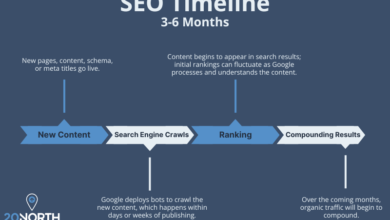
- After: “How long does it take to rank? typically takes 3 to 6 months for a new page to rank on Google, depending on competition and domain authority.” (Direct, quotable, entity-rich).
My repeatable workflow to create pages like the best SEO content examples

Great content isn’t an accident; it’s a process. I used to rely on inspiration, which meant I was inconsistent. Now, I use a strict workflow. This ensures every piece meets the quality bar, whether I write it myself or oversee a team.
Here is my step-by-step process. Yes, step 2 takes time—do it anyway.
- Intent Analysis: I Google the keyword. Are the results product pages, blogs, or calculators? I must match this type.
- SERP Analysis: I open the top 3 results. What headings do they share? What is missing? (This is my “gap” opportunity).
- Detailed Outline: I map out H2s and H3s. I note where a table or image must go.
- Drafting: I often use an SEO content generator to speed up the first draft, getting ideas on paper quickly. However, I never publish raw AI output.
- Human Optimization: I inject personal experience, verify facts, and adjust the tone.
- On-Page Technicals: I write the meta title, description, and URL slug.
- Internal Linking & Schema: I add links to related hubs and insert FAQ schema code.
- QA & Publish: I run through my checklist.
- Measurement: I check rankings after 3 weeks.
| Workflow Step | What I Do | Output Artifact |
|---|---|---|
| Briefing | Define audience, goal, and keywords. | Strategic Content Brief |
| Drafting | Write or generate core text. | First Draft (Google Doc) |
| Editing | Check flow, tone, and E-E-A-T. | Final Polish |
| QA | Verify links, schema, and images. | QA Checklist (Green lit) |
50 SEO content examples (real-world patterns) you can copy: what works, why it works, and how to implement it

Instead of listing 50 random URLs, I have categorized 50 distinct content patterns that I see winning in the SERPs right now. These are the archetypes you can copy. If you are building a site, you will likely need a mix of these.
I have grouped them into actionable categories. When I am stuck on “what to write,” I scan this list for inspiration. Tools like an AI article generator can help you structure these patterns efficiently, provided you apply the human oversight we discussed.
Category 1: Definitions & Explainer Hubs (The “What Is” Intent)
These rank for top-of-funnel queries. They need clear definitions and structured lists.
- The Glossary Term Page: Short definition + context (e.g., “What is ROI?”).
- The “Complete Guide” Hub: Pillar page linking to sub-topics.
- The History/Evolution Post: “History of SEO” (Good for backlinks).
- The Concept vs. Concept: “SEO vs. SEM” (Clarifies confusion).
- The Checklist Guide: “New Website Checklist.”
- The Beginner’s 101: Zero-jargon entry point.
Category 2: Comparisons & Decision Support (Commercial Intent)
These are money pages. Readers want tables and unbiased pros/cons.
- Best [X] for [Y] Listicle: “Best CRM for Startups.”
- The Head-to-Head Review: “Product A vs. Product B.”
- The Alternatives Page: “Top 5 Alternatives to [Competitor].”
- The Pricing Breakdown: “How much does [Service] cost?”
- The Buyer’s Guide: “How to choose a laptop in 2026.”
- The Review Round-up: Aggregating 3rd party reviews.
- The Feature Deep Dive: Focusing on one specific capability.
Category 3: How-To & Process (Informational/Action)
If you only copy one pattern, copy the “Step-by-Step” guide. It is evergreen.
- Standard Step-by-Step: “How to change a tire.”
- The Advanced Tutorial: For experts only.
- The Case Study Walkthrough: “How we achieved X.”
- The Mistake Fixer: “How to fix error 404.”
- The Video-First Tutorial: Video embed + transcript.
- The Hack/Shortcut Guide: “Quick way to do X.”
- The Recipe/Formula: Literal recipes or business formulas.
Category 4: Local & Service Pages (Local SEO)
Critical for SMBs. Trust signals are paramount here.
- City-Specific Landing Page: “Plumber in Austin, TX.”
- Service Area Hub: Map of all cities served.
- The Portfolio/Gallery Page: “Recent Roof Repairs in [City].”
- The ‘Near Me’ Optimizer: Content targeting proximity terms.
- Local Events/News: Community involvement posts.
- The Team Bio Page: Who is doing the work? (E-E-A-T).
- Customer Testimonial Page: reviews with local schema.
Category 5: Data & Thought Leadership (Backlink Magnets)
- Original Research/Survey: “State of the Industry 2026.”
- The Statistics Roundup: “50 Stats about AI.”
- The Expert Interview: Q&A with an industry leader.
- The Contrarian Op-Ed: “Why X is dead.”
- The Trend Prediction: “Future of [Industry].”
- The Curated Resource List: “Best tools for Designers.”
Category 6: Product-Led Education (SaaS/B2B)
- The Use-Case Page: “Using [Tool] for [Task].”
- The Integration Page: “How [Tool] connects with Zapier.”
- The Migration Guide: “Moving from [Competitor] to [Us].”
- The Template Library: Free downloadable assets.
- The ROI Calculator Landing Page: Interactive tool wrapper.
- The Customer Success Story: Detailed narrative.
- The Feature Update Log: Showing velocity of development.
Category 7: Troubleshooting & Support (Long-Tail)
- The Error Code Library: “Fix Error 503.”
- The Compatibility Guide: “Does X work with Y?”
- The Maintenance Schedule: “When to service your AC.”
- The FAQ Database: Searchable question bank.
- The Installation Manual: Digital version of docs.
Category 8: AI-First Formats (The New Wave)
- The Q&A Page: Just questions and direct answers.
- The Data Table Page: Only hard data, minimal text.
- The Definition Cluster: Micro-definitions linked together.
- The Entity Map: Explaining relationships between topics.
- The Summarized Abstract: Bulleted executive summary at top.
Mini-Template for a Comparison Post:
If you write a comparison (Patterns 7-9), use this flow:
Title: A vs B: Which is better for [User]?
Intro: The verdict in 30 seconds.
Comparison Table: Feature by feature.
Deep Dive A: Pros/Cons.
Deep Dive B: Pros/Cons.
Conclusion: Final recommendation based on specific scenarios.
On-page SEO elements that show up in nearly every winning example (titles, headings, FAQs, schema, internal links)

You can write the best text in the world, but if the container is broken, Google won’t serve it. I view on-page elements as the “packaging” that helps search engines understand what is inside.
1. Title Tags & Meta Descriptions
I spend 10 minutes just on the title. It must include the keyword near the front and a “hook” (e.g., “2026 Update” or “Free Template”).
2. H1 and Heading Hierarchy
Your H1 is your headline. H2s are the main chapters. H3s are sub-points. I keep H2s phrased as questions when the intent is informational—this helps win Featured Snippets.
3. Internal Linking
I don’t just link at the end. I link contextually. If I mention a concept I’ve explained elsewhere, I link it immediately. This builds a “web” of relevancy.
4. Schema Markup
This is non-negotiable for AI visibility. I use FAQ Schema on almost every educational page. Note: Google only shows FAQ snippets for authoritative government/health sites sometimes, but AI engines still consume this structured data .
| Element | Best Practice | Common Mistake |
|---|---|---|
| Title Tag | Front-load keyword, keep under 60 chars. | Cute/vague titles like “Thoughts on Growth.” |
| H2s | Descriptive and keyword-relevant. | Single words like “Introduction” or “Conclusion.” |
| Internal Links | Descriptive anchor text (e.g., “link building guide”). | “Click here” or “Read more.” |
| Schema | Validate code using Rich Results Test. | Adding schema for content not visible on the page. |
Multimodal G‑SEO for beginners: making images and visuals help you rank (and get cited)

Multimodal SEO sounds fancy, but it just means optimizing non-text elements. AI models like Gemini and GPT-4 can “see” images. If you provide a chart, they can interpret the data and use it to answer a user’s question.
Recent research into “Caption Injection” suggests that descriptive captions significantly help AI understand context. Here is what I do:
- Alt Text: Describes the image for accessibility (e.g., “Bar chart showing SEO traffic growth in 2025”).
- Captions: Adds context/takeaway (e.g., “Figure 1: Organic traffic increased by 22% after implementing schema markup.”).
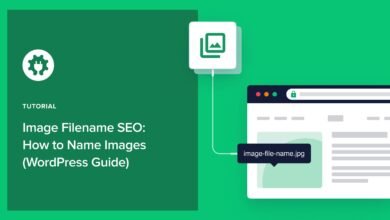
- File Names: dashes-between-words.jpg (not IMG_001.jpg).
Visual QA Checklist:
1. Is the image relevant?
2. Is the file size compressed (under 100KB)?
3. Does the caption explain why this image matters?
Common mistakes I see beginners make (and how to fix them) when copying SEO content examples
I’ve made all these mistakes. In fact, I used to prioritize word count over value, thinking “longer is better.” It’s not. Here are the traps to avoid.
- Copying structure without intent match:
The Mistake: Writing a 3,000-word guide when the user just wants a calculator.
The Fix: Check the SERP. If the top results are tools, build a tool (or a very short page). - Ignoring the “Hook” in the intro:
The Mistake: Starting with “In today’s digital world…”
The Fix: State the problem and the solution in the first 2 sentences. - Scaling without governance:
The Mistake: Automating content production without checks. When setting up an Automated blog generator, you need a human-in-the-loop.
The Fix: Implement a mandatory editorial review step for every single draft. - Thin E-E-A-T:
The Mistake: No author bio, no sources, generic advice.
The Fix: Add an author block and cite at least 3 external authorities. - Vague Headings:
The Mistake: Using H2s like “Tips” or “Overview.”
The Fix: Rewrite them to be specific: “5 Tips for faster indexing.”
FAQs + recap: quick answers, next actions, and how I’d start this week
Let’s wrap up with some quick answers to questions I hear often.
What do AI-first SEO examples look like?
They look like structured data. Lots of lists, clear headings, direct answers in the first sentence of paragraphs, and distinct “key takeaway” boxes.
Is GEO replacing SEO?
No. It’s an evolution. Traditional SEO gets you on the page; GEO gets you into the AI summary at the top of the page.
Why does human editing matter if AI writes well?
AI hallucinates facts and lacks nuance. Human editing adds the “soul,” the experience, and the brand voice that builds trust.
Recap:
- Quality = Utility: Can the user act on your information?
- Structure Wins: Use H2s, tables, and schema to help machines understand you.
- Pattern Matching: Don’t reinvent the wheel; use the 50 examples list to find the right format for your keyword.
Next Actions (Start this week):
- Pick one content pattern from the list above (e.g., “The Mistake Fixer”).
- Run a SERP analysis for a keyword you want to target.
- Draft a concise outline with clear H2s.
- Write the draft, ensuring you include a clear answer block for AI.
- Publish and track it.
The best way to learn is to ship. Good luck.