Introduction: Closing the gap between SEO content and sales execution

I recently listened to a call recording where a brilliant SDR was struggling. The prospect asked a sharp question about enterprise security features. The rep paused, typed frantically in the background, and eventually said, “I’ll have to get back to you on that.”
The tragedy wasn’t that we didn’t have the answer. Marketing had published a detailed security white paper three months prior. It ranked #1 on Google for that exact topic. But the sales team didn’t know it existed, didn’t know how to find it, and certainly didn’t know how to use it to close the confidence gap in real-time.
This is the typical disconnect. Marketing builds traffic; Sales builds relationships. But when you bridge that gap with SEO for sales teams, you don’t just get more pageviews—you get a repeatable operating model that drives pipeline.
In this guide, I’m sharing the exact playbook I use to turn search insights into better outreach, sharper talk tracks, and faster deal cycles. No fluff about the “digital landscape”—just a practical workflow you can implement this week.
Who this guide is for (and what I assume you already know)
This playbook is written for the operators sitting between revenue and content: Demand Gen Managers, Sales Enablement Leads, and RevOps professionals. I’m assuming you know the basics of sales (you know what an SQL is) and the basics of SEO (keywords drive traffic).
To keep us aligned, here are the plain-English definitions of the jargon I’ll use:
- SQL (Sales Qualified Lead): A prospect who is ready for a direct sales conversation.
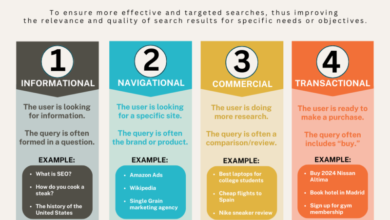
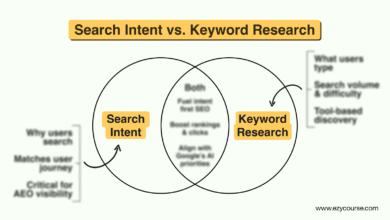
- Search Intent: The why behind a search query (e.g., are they looking to buy, learn, or compare?).
- SERP (Search Engine Results Page): The page Google shows after you search.
- Pillar Page: A comprehensive guide that covers a broad topic and links out to specific sub-topics.
Quick answer: How SEO content supports sales (in one paragraph)
Here is the mechanism: Your prospects act like detectives before they ever talk to you. They use Google to research pricing, competitors, and problems. SEO reveals exactly what language they use and what questions they have. By capturing this data, marketing can build content that answers those specific questions. Sales can then use that same intelligence to personalize outreach and send the exact right asset at the exact right moment, shortening the cycle from “just looking” to “ready to sign.”
Why SEO for sales teams is now a revenue lever (not just traffic)

For a long time, SEO was treated as a vanity metric game. But in the current B2B environment, it is arguably the most efficient sales enabler we have. The data supports this shift in thinking.
Most B2B buyers complete 60–70% of their research before contacting sales . This means the majority of the selling happens while your team is asleep. If your content isn’t answering their specific objections during that window, you aren’t even making the shortlist.
Furthermore, the efficiency of inbound organic leads is undeniable. Industry data suggests that SEO leads close at a rate of around 14.6%, while traditional outbound leads close at about 1.7% . That is nearly an 8x difference in efficiency. Why? Because the buyer has intent. They came looking for a solution.
Organic search drives approximately 50–60% of B2B website traffic and contributes over 40% of revenue . Of course, this varies by industry. If you are selling a hyper-niche enterprise solution with a Total Addressable Market of 50 companies, pure outbound might win. But for most of us, ignoring the revenue leverage of SEO is leaving money on the table.
What sales can learn from SEO that they can’t learn from a lead list
Lead lists give you demographics: Title, Company Size, Location. SEO gives you psychographics: Pain, Urgency, and Vocabulary.
If I see a spike in traffic for “[Competitor] vs [My Company] pricing,” I know exactly where the market’s head is at. I know they are price-sensitive, and I know who they are comparing us against. If I see searches for “API documentation for [Integration],” I know technical stakeholders are getting involved. This allows sales reps to stop guessing and start mirroring the prospect’s reality.
Table: SEO-sourced leads vs traditional outbound (what typically changes)
| Channel | Typical Intent Level | Typical Close Rate | Sales Motion Impact | Notes/Risks |
|---|---|---|---|---|
| SEO / Inbound | High (They searched for you) | ~14.6% | Consultative: “How can I help you implement?” | Requires speed to lead; interest decays fast. |
| Traditional Outbound | Low (You interrupted them) | ~1.7% | Persuasive: “Here is why you should care.” | High volume required; risk of burnout. |
Note: These benchmarks are directional. In complex enterprise sales with 12-month cycles, attribution blurs, but the efficiency gap usually remains.
Zero-click SEO in plain English (and why sales should care)
Here is a scary stat: roughly 58.5% of searches result in zero clicks . This means the user searches, sees the answer right on Google (in a featured snippet or AI summary), and leaves without ever visiting your site.
Why should a sales leader care about traffic that never arrives? Because that snippet is often the first impression a prospect has of your brand. If Google answers “How much does [Product] cost?” with a snippet from your competitor saying “[Product] is expensive and complex,” you have lost the deal before the phone rings. Controlling the narrative in the SERPs (Search Engine Results Pages) is reputation management.
Workflow: how I turn SEO insights into better SDR outreach and AE conversations

Theory is great, but operations pay the bills. Here is the exact 30-minute weekly ritual I run to connect SEO data to sales action. If I only had 60 minutes a week for this entire initiative, I would spend 45 of them right here.
Step 1: Pull the right SEO inputs (queries, pages, and intent)
You don’t need expensive tools to start. I usually ask marketing for a simple export from Google Search Console or a tool like Ahrefs/Semrush once a week. If you don’t have access, ask for a “top queries and top pages” report.
What I look for:
- High-Intent Queries: Anything containing “pricing,” “cost,” “alternatives,” or “best tool for X.”
- Rising Topics: Are we suddenly ranking for a specific integration? (e.g., “Salesforce integration”).
- Question Queries: “How to calculate ROI for X.”
Step 2: Map keywords to pipeline stages and stakeholders
Raw keywords are useless to a sales rep. You need to translate them. I use a simple “Keyword-to-Stage Map” in a shared Google Sheet.
- Awareness (SDR/Marketing): “What is sales enablement?” → Target: Junior Managers.
- Consideration (AE/Champion): “Sales enablement tools comparison.” → Target: Director/VP.
- Decision (Finance/IT): “Is [Tool] SOC2 compliant?” → Target: CIO/CISO.
Knowing that B2B buying decisions typically involve 6–10 stakeholders , this mapping helps reps understand who cares about what.
Step 3: Turn buyer language into talk tracks and objection answers
This is where the magic happens. I take the specific phrasing people use in search and feed it into sales scripts.
Example:
If I see high volume for “automating SDR workflows in HubSpot,” I don’t pitch “efficiency.” I tell the rep to say: “I noticed a lot of teams like yours are trying to automate SDR workflows specifically inside HubSpot right now…”
It sounds subtle, but using the prospect’s exact vocabulary signals that you are an insider. It builds instant trust.
Step 4: Build an SEO-informed outreach sequence (example)
Don’t just cold email. Warm email using intent data. Here is a sequence structure that works:
- Touch 1 (Email): Reference the problem everyone is searching for. Link to a “How-to” guide (TOFU).
- Touch 2 (LinkedIn): Share a snippet or stat from a high-performing blog post.
- Touch 3 (Call): “I sent over that guide on [Topic] because we see so many folks struggling with [Specific Pain from Keywords].”
Mini template: SDR email built from a high-intent query
Context: People are searching for “[Competitor] alternatives.”
Subject: The [Competitor] renewal conversation
Hi [Name],
I talk to a lot of VPs who are reviewing their stack right now, and the topic of “[Competitor] alternatives” keeps coming up—usually because of [Specific Pain Point found in search data, e.g., rigid contracts].
We recently published a comparison guide that breaks down the math on switching versus staying. Even if you aren’t moving today, it might help with your next budget review.
Here is the link: [Link to Comparison Page]
Best,
[Rep Name]
Step 5: Close the loop—what sales should send back to marketing
This cannot be a one-way street. Sales talks to reality all day. I ask reps to tag CRM notes with “Content Gap” whenever they get stumped by a question.
My favorite quick win: A rep kept getting asked about “implementation timelines.” We didn’t have a page for it. Marketing built a specific “Implementation & Onboarding” FAQ page in two days. The next week, that rep used the link to save a deal that was stalling. That is the feedback loop in action.
What to publish: SEO content that supports your sales team across the funnel

You can’t just publish generic blog posts and expect sales to use them. You need a mix of asset types. When we scale this, I often use an AI article generator to accelerate the drafting process, but I always apply rigorous editorial checks—SME reviews, real examples, and verified sources—because speed without accuracy destroys trust.
Pillar-and-cluster structure (explained simply)
Think of a Pillar Page as your “Ultimate Guide.” It’s the binder you’d hand a new employee. It covers the broad topic (e.g., “Enterprise Cyber Security”). Then, you have Cluster Pages that answer specific questions (e.g., “Ransomware protection for remote teams”) and link back to the pillar.
For sales, this is useful because if a prospect asks a broad question, you send the Pillar. If they ask a specific technical question, you send the Cluster page. It keeps the navigation clean.
BOFU pages sales actually needs (and what to include on them)
Bottom-of-funnel (BOFU) pages are your closers. These are the pages marketing is often scared to publish, but sales desperately needs:
- Pricing Pages: Even if you can’t show exact numbers, show “starting at” ranges or the factors that drive cost.
- Comparison Pages: “Us vs. Them.” Be honest. If they are better for small businesses, say that. It builds credibility.
- Alternatives Pages: “Best alternatives to [Competitor].”
Checklist for these pages: Clear CTA, “Last Updated” date (crucial for trust), and a direct FAQ section addressing common objections.
Top-of-funnel and mid-funnel content that sets up better sales conversations
These are your educational assets. Guides, “What is X” articles, and glossaries. Sales reps should use these as “leave-behinds” or follow-ups. “Hey, we discussed X on the call; here is a deeper dive if you want to share it with your team.”
Formats that win in SERPs and in sales follow-ups
Interactive content is a superpower here. Tools like calculators (e.g., “ROI Calculator”) or quizzes keep prospects on the page longer. Data suggests Content Experience Platforms increase engagement by up to 4× and session duration by 2.5× .
If I had to pick just one format for a small team? Build a really good Comparison Page with an embedded FAQ. It ranks, it converts, and sales will use it every single day.
Table: Content type → search intent → where it fits in a sales sequence
| Content Type | Typical Query Pattern | Funnel Stage | Sales Use Case |
|---|---|---|---|
| Pricing Page | “[Product] cost” / “pricing model” | Decision | Send when budget questions arise to anchor expectations. |
| Comparison Guide | “[Product] vs [Competitor]” | Consideration | Send before a demo to frame the competitive narrative. |
| Case Study | “[Industry] examples” | Decision | Send to economic buyers to prove ROI/safety. |
| Calculator/Tool | “ROI of [Solution]” | Awareness | Use as a hook in cold outreach to offer immediate value. |
On-page and technical basics that make sales-enabling pages rank (and convert)

You don’t need to be a developer, but you do need to understand the anatomy of a page that ranks. Here is what I check before I ship any sales-enablement page.
Snippet-first writing: earning featured snippets without sacrificing depth
To win that “position zero” (the box at the top of Google), you need to write for the snippet. Start your section with a direct question and immediately follow it with a 40–60 word direct answer. No fluff.
Example:
“How much does [Service] cost?”
“[Service] typically ranges from $500 to $1,500 per month depending on user count and storage needs. Enterprise plans with custom integrations start at $3,000 per month.”
After that bold summary, you can go into 2,000 words of detail. But giving the answer upfront helps you rank for the snippet—and it respects the reader’s time.
Internal linking that helps both Google and reps
Internal links are the roads between your pages. From a sales perspective, think: “If a rep is on this page during a live call, where might they need to go next?”
If you are on a “Features” page, you should absolutely link to the “Pricing” and “Case Studies” pages. Use descriptive anchor text (e.g., “See our enterprise pricing” rather than “Click here”). It helps Google understand context and helps reps navigate fast.
Trust and credibility signals that lift rankings and reduce sales friction
Google calls this E-E-A-T (Experience, Expertise, Authoritativeness, and Trustworthiness). Buyers just call it “safety.”
Every page sales uses should have:
- Real Authors: Byline with a photo and title.
- Social Proof: Logos of current clients or a mini-testimonial.
- Accuracy: A “Last Reviewed” date, especially on technical or pricing content.
Measuring SEO’s impact on sales: the metrics dashboard I’d build

Traffic is vanity. Revenue is sanity. When I use an SEO content generator or scale up production, I still validate performance with a simple dashboard—otherwise, speed just creates more noise.
Leading indicators vs lagging indicators (what I watch weekly vs monthly)
Leading Indicators (Weekly):
- Rankings for high-intent keywords (e.g., “pricing”).
- Click-through rate (CTR) on BOFU pages.
- Scroll depth (are they reading the whole case study?).
Lagging Indicators (Monthly/Quarterly):
- Number of SQLs sourced from organic search.
- Pipeline influenced (did they read a blog post before signing?).
- Deal velocity (did reading content speed up the close?).
Table: SEO-to-sales metrics (definition, owner, and what ‘good’ looks like)
| Metric | What it tells me | Owner | Action if it’s down |
|---|---|---|---|
| SQL Rate | Quality of traffic converting to leads. | Marketing | Check intent alignment; is the CTA clear? |
| Pipeline Influenced | Revenue touched by content. | RevOps | Audit internal linking; make content easier to find. |
| Sales Usage | How often reps send links. | Enablement | Remind sales where assets live; re-train. |
| Reply Rate | Effectiveness of SEO-based messaging. | Sales/SDR | Adjust email templates; refresh intent data. |
Attribution reality check: time lag, multi-touch, and cross-device behavior
Be honest with your leadership: Attribution is never 100% perfect. A buyer might read an article on their phone on a Tuesday, forward it to their boss on Slack on Wednesday, and the boss might book a demo on her desktop on Friday. Google Analytics might credit “Direct” traffic for that demo.
Don’t get hung up on perfect last-click attribution. Look for Assisted Conversions and qualitative data. I often add a “How did you hear about us?” field on the demo form. You’d be amazed how often people type, “I Googled X and found your article.”
Common mistakes when implementing SEO for sales teams (and how to fix them)

I’ve made plenty of mistakes trying to get these two teams to talk. Here is a checklist of the most common pitfalls so you can avoid them.
Checklist: 5–8 mistakes + the one-step fix for each
- Mistake: Publishing content sales never sees.
Fix: Create a “New Content Alert” Slack channel where you post the link + a one-sentence “When to use this” tip. - Mistake: Ignoring BOFU intent.
Fix: Prioritize “pricing,” “alternatives,” and “comparison” pages over generic thought leadership. - Mistake: No feedback loop.
Fix: specific monthly 15-minute sync with SDR leads to ask, “What questions stumped you this month?” - Mistake: Measuring only traffic.
Fix: Switch your primary KPI to “Organic SQLs” or “Pipeline Influenced.” - Mistake: Overlooking zero-click.
Fix: Audit your top 10 pages and rewrite the intros to be snippet-friendly (Question + Direct Answer). - Mistake: Weak trust signals.
Fix: Add author bios and a “Why trust us” block to every article.
Summary, FAQs, and next steps for SEO for sales teams
SEO isn’t just a marketing channel; it’s a sales weapon. If you treat it that way, the results compound.
Recap of what matters most:
- Intent over Volume: 100 visitors searching for “pricing” are worth more than 10,000 searching for “what is business.”
- Alignment is Key: Sales needs to know what content exists and how to use it in conversation.
- Measurement is Revenue: Track pipeline and SQLs, not just pageviews.
Your Next Steps for this week:
- Set up a 30-minute sync with your Sales or SDR manager.
- Pull a list of your top 20 queries from Search Console and map them to the funnel.
- Audit your “Pricing” or “Contact” page—does it answer the questions people are actually asking?
- Draft one email template using a specific high-intent keyword pattern.
FAQ: Why should sales teams care about SEO?
Because buyers are 60–70% of the way through their decision process before they contact you. SEO gives you a window into that research phase. It tells you exactly what pains they have and what language they use, allowing sales to enter the conversation with relevant, personalized solutions rather than generic pitches.
FAQ: How can SDRs practically use SEO data?
If I were an SDR, I would look at the “Top Pages” report weekly. If I see a company visiting our “API Integration” page, I’m sending a technical outreach email to their developer lead, not a generic marketing email to their CEO. Use the data to tailor the message.
FAQ: What types of content best support both SEO and sales?
Comparison pages, Pricing/ROI pages, and detailed “How-to” guides (Pillars) are the trifecta. They rank well because they answer specific queries, and they help sales because they address the friction points that kill deals.
FAQ: What’s zero-click SEO, and why does it matter?
Zero-click SEO means optimizing for the answers Google shows directly on the results page (Featured Snippets). It matters because even if a prospect doesn’t click, they see your brand answering the question. It builds authority and trust before they ever speak to a rep.
FAQ: How can we measure SEO’s impact on sales?
Start with what you can track: Form fills (SQLs) from organic traffic. Then, look at “Assisted Conversions” in GA4 to see if organic search played a role in the journey. Finally, ask sales: “Are these leads better quality than the cold list?” Qualitative feedback is often your best early indicator.