Best tools to track Google AI Overviews: Winning Google’s AI Box (Top Trackers + Workflow)
Introduction: Why AI Overviews changed what “ranking” means (and what I’ll show you)

I’ve sat in weekly reviews where the SEO team celebrated holding a #1 organic ranking, yet the marketing director was asking why traffic and demo requests were flatlining. The answer was sitting right at the top of the SERP: a Google AI Overview (AIO) was answering the user’s question immediately, citing a competitor instead of us.
This is the new reality of search. Traditional rank tracking is no longer the single source of truth because “Position 1” is often pushed below the fold by generative panels. If you aren’t tracking your visibility inside that AI box, you are flying blind regarding your actual share of voice.
In this guide, I’m going to walk you through exactly how to solve this measurement gap. We’ll cover what metrics actually matter (hint: it’s not just rankings), a practical 7-step workflow to operationalize this data, and a candid comparison of the best tools to track Google AI Overviews based on your budget and team maturity.
Quick answer: what a Google AI Overview tracker does (in plain English)
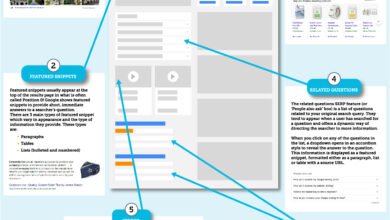
A Google AI Overview tracker is specialized software that monitors search results to detect when an AI-generated summary appears for your target keywords. Unlike standard rank trackers, it specifically reports whether your brand or URL is cited as a source within that summary, giving you data on “citation rate,” sentiment, and visibility share compared to competitors.
Google AI Overviews 101: what they are, how they work, and why businesses should monitor them

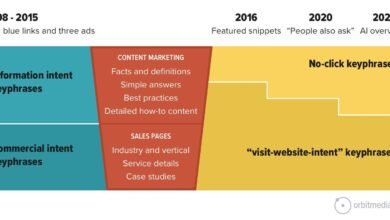
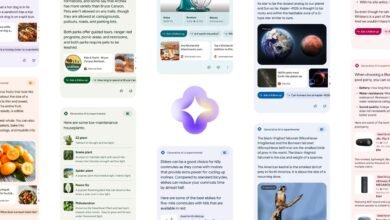
When I audit SERPs today, I’m looking for a fundamental shift in user behavior. Google’s AI Overviews—now largely powered by the Gemini 3 model—don’t just list links; they synthesize answers. For a user, this means they often get their solution without ever clicking a blue link.
Consider a query like “best CRM for small manufacturing business.” Previously, the user would open five tabs to compare options. Now, the AI Overview provides a comparison table, pros and cons, and a “consensus” view. If your software isn’t cited in that initial summary, you likely won’t even make the consideration set.
This shifts the goalpost from “ranking” to “being sourced.” With Gemini 3 enabling conversational follow-ups directly on mobile, users can dig deeper (“what about pricing?”) without leaving the AI interface. Monitoring this is critical because these overviews can cannibalize organic clicks for informational queries while acting as a powerful endorsement for commercial ones.
The landscape is shifting fast. We are seeing these panels appear for more complex queries every month.
What “winning the AI box” actually means (visibility vs. clicks vs. trust)

Winning isn’t just about showing up; it’s about context. I categorize “winning” in three ways:
- Citation Presence: Your URL is linked as a source. This is the baseline win.
- Brand Dominance: Your brand name is mentioned in the text (e.g., “Tools like Salesforce and HubSpot…”). This drives brand recall even without a click.
- Sentiment Alignment: The AI describes your product accurately. I’ve seen cases where a local service brand was mentioned but described as “expensive” or “niche,” which hurt conversions despite the visibility.
Regulatory and brand-risk context you shouldn’t ignore (EU probe)
There is also a governance angle here. With the European Commission initiating antitrust investigations into how Google uses publisher content for AI services, brands need to be vigilant. I treat this as another reason to keep a clean paper trail of visibility and citations. If your content is being used to train models or answer queries without traffic attribution, you need historical data to understand the impact on your business. Tracking is your insurance policy and your evidence log.
What I track in AI Overviews (the metrics that matter before you pick a tool)
Before you spend budget on a tool, you need to know what you are measuring. If I’m reporting to leadership, I keep the dashboard to five metrics max to avoid “analysis paralysis.”
First, data hygiene is non-negotiable. You cannot track this effectively at a single-keyword level; you need to track by topic cluster. Secondly, understand that volatility is high—an AI Overview might appear for me but not for my colleague in the next state. Tools that offer higher update frequencies (hourly vs. daily) help smooth out this noise.
Here are the core metrics I recommend focusing on:
Starter table: AI Overview tracking metrics (what/why/how)

| Metric | What it tells me | Why it matters for business | How a tracker captures it | Common pitfall |
|---|---|---|---|---|
| Trigger Rate | % of keywords where an AI Overview appears. | Reveals where organic traffic is at risk of cannibalization. | Scans SERP for the AI panel presence. | Assuming a low rate is bad; it might just mean low volatility. |
| Citation Rate | % of times your URL is cited in the AI answer. | This is your new “Share of Voice.” | Parses the carousel/footnotes for your domain. | Confusing “ranking organically” with “being cited.” |
| Brand Mention | Is your brand name in the text summary? | Top-of-funnel awareness and authority. | Text analysis of the generated answer. | Ignoring negative or inaccurate mentions. |
| Competitor Share | Who else is cited alongside you? | Identifies who is stealing your digital market share. | Aggregates citations for rival domains. | Only tracking direct competitors, not publishers. |
My rule of thumb: If your Citation Rate is rising but traffic is flat, check the sentiment—users might be getting the answer they need without clicking.
A simple workflow to track (and improve) AI Overview visibility in 7 steps

Buying a tool won’t fix your SEO. You need a process. Here is the workflow I use on Monday mornings to turn data into action.
Step 1–2: Set your goal and build a query set you can actually manage
Don’t try to boil the ocean. If you’re a solo marketer or small team, don’t track 1,000 keywords on day one. Start with 25–50 high-priority “money keywords” where you suspect AI is influencing decisions. Define your goal: Is it brand protection (monitoring branded queries) or discovery (non-branded informational queries)?
Step 3–4: Capture baseline AI Overview citations and tag patterns
Before you optimize, you need a baseline. Use your chosen tool to record the current state. I personally screenshot the SERP when I see a new citation source or a particularly good AI answer. Note the patterns: Are the cited sources huge publishers, niche blogs, or Reddit threads? Tag your keywords by intent (e.g., “Research,” “Buy,” “Support”) because AI triggers differently for each.
Step 5–6: Turn tracking into content actions (refresh, consolidate, add evidence)
This is where the work happens. If you aren’t cited, look at who is. Usually, the AI favors content with clear structure, direct answers, and strong entity coverage. You need to refresh your pages to match these signals.
I often use an AI article generator to help draft structured content updates or create new definition-heavy sections that AI models love to cite. The goal isn’t to let AI write everything, but to use it to build the comprehensive framework that Gemini is looking for. Once drafted, human review is essential to ensure unique value and accuracy.
If you need to scale this across hundreds of pages, an Automated blog generator can help you consistently publish properly formatted, entity-rich content that signals authority to search engines, increasing your odds of citation.
Step 7: Reporting cadence (weekly vs hourly) and what to tell stakeholders
For most stakeholders, a weekly summary is sufficient. “We appeared in 40% of AI Overviews for our top terms, up from 30% last week.” However, during a product launch or a PR crisis, you may need hourly tracking. When reporting, I always explicitly state: “These figures are snapshots; volatility is normal.”
The best tools to track Google AI Overviews (categories, use cases, and a comparison table)

The market for AIO tracking has exploded. We now have everything from specialized startups to massive enterprise suites. Below, I’ve categorized them to help you avoid buying more horsepower than you need.
Category 1: Real-time AI Overview alerts (when speed matters)
These tools are built for speed. If a competitor launches a guide and suddenly starts getting cited for your core terms, you need to know immediately, not next week. Ziptie.ai is a prime example here, focusing on rapid detection. I find these most useful for news publishers or brands in highly volatile industries where being cited first matters.
Category 2: Predictive analytics (forecasting volatility and visibility trends)
Predictive tools like TrendSignal AI and MetricStory AI don’t just tell you what happened; they try to tell you what might happen. I treat predictions like weather reports—useful for planning, but not a guarantee. These are best for teams planning editorial calendars who want to know which topics are likely to see increased AI volatility.
Category 3: Enterprise dashboards and integrations (APIs, data warehouses, BI)
If you are in a large org, you probably need data in BigQuery or Tableau, not another login. Enterprise platforms like BrightEdge and Nozzle shine here. Nozzle’s integration with BigQuery is particularly powerful for analyzing vast datasets . BrightEdge is reported to capture visibility changes hourly, integrating them with conversion data . My advice: don’t overbuy. If you don’t have a data analyst to manage the API feed, these might be overkill.
Category 4: Brand visibility scoring and sentiment (from tracking to action roadmaps)
This is for the brand managers. Tools like Wellows (visibility scoring) and Topify (sentiment analysis) go beyond “are we there?” to “how do we look?”. If the AI Overview says your software is “complicated to set up,” that’s a sentiment problem, not a ranking problem. Topify provides roadmaps to fix these perception issues.
Category 5: Legacy SEO suites adding AI Overview visibility (hybrid approach)
If your team already lives in Ahrefs or Semrush, starting with their new AI Overview features is often the path of least resistance. While they might lack the predictive depth of AI-native tools, they are convenient and improving rapidly. They act as a great “hybrid” choice for generalist SEOs.
Comparison table: AI Overview tracking tools (features, frequency, pricing, integrations)
| Tool | Category | Best For | Update Freq | Starting Price (Est.) | Key Feature |
|---|---|---|---|---|---|
| Ziptie.ai | Real-time | Agencies & News | Real-time | Contact Vendor | Instant alerts on visibility changes |
| TrendSignal AI | Predictive | Content Strategy | Daily | ~$99/mo | Volatility forecasting |
| Nozzle | Enterprise | Data Teams | Daily/Hourly | Based on usage | BigQuery / API Integration |
| BrightEdge | Enterprise | Large Corps | Hourly | Custom | Session/Conversion integration |
| Topify | Brand/Sentiment | Brand Managers | Weekly/Daily | ~$79/mo | Sentiment analysis & roadmaps |
| Semrush/Ahrefs | Hybrid | General SEOs | Varies | Standard sub | Integrated into existing workflow |
| Dashword AI | Content Intel | Content Teams | Daily | ~$69/mo | Free plan for 10 keywords |
Methodology Note: Prices and features change rapidly in this space. Always verify current plans. Update frequency often correlates with price—real-time data costs more.
How I choose the best tools to track Google AI Overviews (a decision framework for beginners)
Choosing software is stressful. To avoid buyer’s remorse, I look at team maturity first. If you are still struggling to publish two blog posts a week, an enterprise predictive tool is a waste of money. You need execution support first.
In fact, many teams benefit more from a robust AI SEO tool that helps them create the content that gets cited, rather than just measuring how much they are missing out. But assuming you are ready to track, use this checklist.
Beginner decision checklist (budget, speed, depth, integrations)
- Update Frequency: Do I need to know today (News/PR) or next week (Evergreen content)?
- Granularity: Does it track just the “Trigger” or the actual “Citation URL”? (Red flag if it only tracks triggers).
- Sentiment: Do I need to know how I am described, or just that I am described?
- Export/API: Will I need to put this data into Looker Studio later?
- Onboarding: Is the metric definition clear? (Ask them how they define a “citation”).
Suggested starter stacks (solo marketer, small team, enterprise)
The Solo Marketer: I’d stick with a hybrid tool like Ahrefs/Semrush if you already have it, supplemented by manual checks or a low-cost specific tracker like Dashword AI for your top 20 keywords.
The Growth Team (Small Biz): Use Ziptie.ai or Topify. You need actionable alerts to pivot your content strategy quickly. Pair this with a content production tool to execute fixes fast.
The Enterprise Org: Nozzle or BrightEdge is likely mandatory here for the data integration capabilities. Your stakeholders will want custom dashboards, not tool screenshots.
Common mistakes I see when teams track AI Overviews (and how to fix them)
- Mistake: Tracking too many keywords.
Why: You get overwhelmed by data and do nothing.
Fix: Start with your top 50 revenue-driving keywords.
Next Week: Audit your list and cut the fluff. - Mistake: Ignoring Search Intent.
Why: You expect citations on queries where AI doesn’t even trigger.
Fix: Segment keywords by “Informational” vs “Transactional.”
Next Week: Filter your report to show only Informational queries to see where AI impact is highest. - Mistake: Confusing “Triggered” with “Cited.”
Why: You think you are winning because an AI box appears.
Fix: Focus purely on Citation Rate.
Next Week: Check your citation rate specifically, not just trigger rate. - Mistake: Not saving snapshots.
Why: Leadership asks “what did it look like?” and you can’t show them.
Fix: Use a tool that stores HTML/screenshot history.
Next Week: Configure your tool to retain history for at least 30 days. - Mistake: Reacting to daily noise.
Why: AIOs are volatile; they flicker in and out.
Fix: Look at 7-day or 30-day trends, not daily blips.
Next Week: Set your reporting comparison window to “Previous 30 Days.”
FAQs + recap: what to do next to win more AI Overview citations
FAQ: What is a “Google AI Overview tracker”?
It is a tool that monitors SERPs specifically to see if an AI-generated summary appears, and crucially, if your website is cited as a source or if your brand is mentioned within that summary.
FAQ: Why should businesses monitor AI Overviews?
Because AI Overviews sit at the top of the results and can siphon off organic traffic. If you aren’t cited there, you are invisible to a huge segment of users, even if you rank #1 organically below the fold.
FAQ: What types of tracking tools are available?
There are five main types: Real-time alerts (speed), Predictive (forecasting), Enterprise (data integration), Brand/Sentiment (reputation), and Legacy Hybrids (all-in-one SEO suites).
FAQ: What’s the difference between legacy SEO tools and AI-native platforms?
Legacy tools (like Semrush) add AI tracking as a feature within a broader suite. AI-native platforms (like Ziptie or Topify) are built specifically for generative search, often offering deeper metrics like sentiment analysis and predictive modeling that legacy tools lack.
FAQ: How do pricing and accessibility vary across tools?
Entry-level tools or addons can start around $49–$69/month (like SEOptimer or Dashword). Enterprise solutions with API access (like BrightEdge or RankRanger) can easily run into hundreds or thousands per month depending on keyword volume.
3-bullet recap + next actions checklist (3–5 steps)
If you only take three things away from this guide, make it these:
- Rankings represent the past; Citations represent the future. Shift your mindset to “Share of Voice” in the AI box.
- Context allows for action. Don’t just track if you are there; track how you are described (sentiment).
- Tools are useless without a workflow. Data implies action—have a plan to refresh content based on what you find.
Your Action Plan for this week:
- Pick your top 50 “money keywords.”
- Choose a tool category from the table above (start with a Hybrid if you are unsure).
- Run a baseline report to see your current Citation Rate.
- Identify 3 pages that are ranking well but not cited, and refresh them with clear, structured answers.
- Set a calendar reminder to re-check that baseline in 30 days.