Introduction: Ranking the Moment (Without Chasing Hype)fneed

I’ve watched smart teams publish their “main recap” article two hours after a trend has already peaked—then wonder why their Google Search Console graphs stayed flat. It’s a painful reality in digital publishing: you can have the best content in the world, but if you miss the window of user intent, the traffic goes to the competitor who was simply faster (or better organized).
Viral events—whether it’s a product launch, an industry award show, or a sudden market shift—create a unique, high-velocity pressure. Most site operators either publish too late, forget to update their pages once the news breaks, or create a mess of duplicate content that cannibalizes their own rankings. But there is a way to tame the chaos.
This article isn’t about chasing every Twitter trend. It is a practical, phase-based blueprint for SEO strategy for viral events. I’m going to walk you through the exact newsroom-style workflow I use to plan, publish, and update content across the event lifecycle.
This approach is designed for Content Managers and SEO Operators at lean teams who need a repeatable system. You’ll leave here with a content architecture you can reuse, a clear phase playbook, and the confidence to rank when the moment matters most.
What a timeline-based SEO strategy for viral events is (and when it’s worth doing)

At its core, a timeline-based SEO strategy is about matching your content to the specific questions users ask at different stages of an event’s lifecycle. It moves beyond the standard “publish once” mentality and treats a URL as a living document that evolves from a pre-event primer to a live update hub, and finally, to an evergreen recap.
Quick answer: Instead of writing three separate articles that compete with each other, you build a strategy around time-sensitive SEO. You capture early search volume with preparation content, spike your visibility with real-time freshness signals during the event, and preserve that authority long-term by consolidating everything into a robust historical record.
Why does this work? Because Google rewards freshness signals and intent matching. Before an event, people ask “when is it?” During the event, they ask “what is happening now?” After the event, they ask “who won?” If your page static, you lose two-thirds of that traffic.
However, I don’t recommend this for every piece of news. Here is how I decide if a viral event is worth the editorial resources:
Signs this strategy fits your business:
- Relevance: The event directly impacts your audience or product category.
- Resource Availability: You have a team member available to update content live (or near-live) during the window.
- Unique Angle: You can offer a perspective (data, local angle, specific expertise) that major news publishers won’t cover.
Signs you should skip it:
- No Authority: You are a brand new site trying to cover a general topic (e.g., “The Super Bowl”) against major networks.
- Compliance Risks: Your legal team requires 48 hours to approve any text changes (this kills real-time SEO).
- Zero Evergreen Value: The topic will have absolutely no search volume 48 hours after it ends.
The newsroom workflow I use: plan, publish, and update fast (without breaking quality)

In a newsroom, chaos is managed through structure. As an operator, you need a workflow that allows for speed without sacrificing accuracy. If I only had two hours before a spike, I wouldn’t waste time on fancy graphics—I would focus entirely on getting the architecture right.
Here is the repeatable workflow I use to keep things sane:
- Choose the event + define your angle: Don’t try to be everything.
- Map queries by timeline: Know what people search before, during, and after.
- Build a content architecture: Establish your hub and spokes early.
- Pre-write and publish in waves: Draft the background info before the news breaks.
- Update and consolidate: Use one strong URL rather than fragmenting authority across twelve thin posts.
To execute this at scale, especially if you manage multiple sites, you might look into an SEO content generator. Platforms that help you draft primers fast and keep a hub updated are essential when your team is small, but the output always needs a human editor at the helm.
Below is a mapping table I use to clarify intent shifts. I keep this pinned during planning sessions:
| Event Moment | Search Intent | Best Content Format | Update Frequency |
|---|---|---|---|
| Pre-Event | Informational / Planning “Schedule,” “How to watch,” “Predictions” |
Evergreen Primer / Guide | Weekly -> Daily |
| During-Event | Transactional / Freshness “Live results,” “Happening now,” “Keynote video” |
Live Blog / Real-time Hub | Every 15-60 mins |
| Post-Event | Analysis / Summary “Highlights,” “Winners list,” “Recap” |
Consolidated Recap Article | Once (within 24 hours) |
A note on accuracy: Speed kills trust if you get it wrong. Always include a “Last updated: [Date/Time] ET” stamp at the top of your content. If you make a factual error, issue a correction immediately. My rule is simple: Correction: An earlier version of this post stated X. It has been corrected to Y. This transparency actually builds trust with both readers and search engines.
Step 1: Pick the event and define a winnable angle
If you try to outrank CNN or The Verge on “Apple Event Live,” you will likely fail. They have the raw domain authority to dominate head terms. However, you can win by going niche.
For example, if there is a major industry conference, don’t just cover the keynote. Cover “What the Keynote Means for [Specific City] Small Businesses” or “The Accessibility Features Announced at the Event.” This is your topical angle. Before committing, I validate this by checking if there are forum discussions (Reddit/Quora) asking specific questions that mainstream media is ignoring.
Step 2: Map search intent by timeline (before / during / after)
You don’t need a thousand keywords. You need 10 to 20 highly relevant ones per phase. I use Google Trends to see breakout terms from the previous year’s event to predict what will pop this year.
What I look for in the SERP:
- Pre-event: “People Also Ask” boxes (great for FAQ sections).
- During-event: Video carousels or Top Stories (signals that Google wants rich media and speed).
- Post-event: Review aggregations or long-form analysis.
Step 3: Build a hub page that can absorb updates (and link out to spokes)
One strong page usually beats five weak ones. The biggest mistake I see is changing the URL mid-event. Do not do this. It resets your social shares and confuses indexation.
Hub Page Mini-Template:
URL: /events/annual-conference-2024-guide (Keep it clean)
Title Structure: [Event Name] 2024: [Current Status Hook]
H1: Everything You Need to Know About [Event]
Status Block: Last Updated: Oct 12, 2:30 PM ET | Status: Live Coverage
This page acts as the anchor. If you write smaller articles (spokes) about specific sub-topics, they should all link back to this hub.
The phase playbook: SEO strategy for viral events before, during, and after

Here is the exact order I’d execute in if the event were starting tomorrow. This phased approach allows you to build authority before the spike, capture traffic during the chaos, and keep the equity afterward.
Pre-event (7 days to 1 hour before): build the foundation and get indexed early
The goal here is early indexation. If you publish your page an hour before the event, Google might not even crawl it in time. You want your URL to be discovered, indexed, and sitting in the cache waiting for the surge.
What to publish: Explainer guides, schedules, and “what to expect” articles. This is event primer content.
This is also the phase where efficiency matters. Using an AI article generator can help you draft these foundational primers quickly. You can generate the skeleton of the “history of the event” or “speaker bios” rapidly, then have a human editor inject the unique insights. Always manually review factual claims—AI can hallucinate dates, which is fatal for event SEO.
My Pre-Event Checklist:
- Publish the Hub page at least 7 days out.
- Submit the URL to Google Search Console for priority crawling.
- Include an FAQ section marked up with Schema (more on that later).
- Link to the Hub from your homepage or navigation.
Benchmark Note: Fast indexation of pre-optimized content can happen in ~3.2 days vs. the 11.7 day average for unoptimized content, so getting a head start is critical.
During-event (live window): capture momentum with live updates and rapid publishing
This is the fun part. The goal is freshness signals. Google’s algorithm explicitly looks for content that has been updated recently when a query attracts “Query Deserves Freshness” (QDF) signals.
What to publish: Live blog updates, real-time reactions, and embedded social media posts. If you are using WordPress, an Automated blog generator setup can assist in creating draft posts for sub-updates, but for the main hub, manual curation is safer. Be careful not to flood your site with thin, 100-word posts that compete with each other.
Strategy Pivot: If you are late to the party or have a small team, don’t pretend to be a live news ticker. Instead, publish one authoritative “Day 1 Recap” immediately as the day ends. It’s better to be the best summary than a slow, bad live blog.
Post-event (next day to 90 days): turn the spike into evergreen traffic
Most marketers high-five and walk away once the event ends. This is a waste. That page has accumulated backlinks, social shares, and user data. Don’t let it die.
What to publish: Transform the live blog into a polished narrative. Remove the “10:05 AM: Coffee break started” updates. Replace them with “Key Takeaway #1.” Embed the official recording or transcripts.
Repurposing Power: Turn your recap into an infographic or a short video. Content repurposing into varied formats can generate 33% more backlinks quarterly.
Finally, update the internal links. Link from this event page to your product pages or other evergreen supporting content. You have captured the audience’s attention; now direct it to where it makes money.
On-page and technical setup that helps you win SERP features (even as a beginner)

You don’t need to be a developer to get the technical basics right, but you do need to be precise. I treat schema like the label on a file folder—it helps Google file your content in the right drawer faster.
If you only do three things, do these:
- Use Event Schema on your hub page.
- Put the timestamp at the top of the text (visible to humans).
- Ensure your title tag evolves with the event status.
Schema markup: Event/BroadcastEvent basics and why it can boost CTR
Schema markup (structured data) tells Google explicit details about your page. For events, Event schema is standard. If the event is online-only or televised, BroadcastEvent is even more specific.
Using this markup makes you eligible for rich results—those shiny event packs with dates and locations right in the search results. While it doesn’t guarantee a ranking boost, it often improves Click-Through Rate (CTR) because your result looks more authoritative.
Common Mistake: Don’t forget to set the time zone correctly in the schema. I’ve seen international events fail to appear in local search packs because the schema was set to the wrong UTC offset.
On-page elements that change by phase (titles, intros, timestamps, FAQs)
Your on-page elements must shift as user intent shifts. Here is a quick cheat sheet for how I evolve a single page’s title tag:
- Pre-Event: [Event Name] 2024 Schedule, Speakers, and How to Watch
- During-Event: LIVE: [Event Name] 2024 Updates, Winners, and Key Announcements
- Post-Event: [Event Name] 2024 Recap: Full List of Winners and Highlights
Always keep a “Last Updated” note near the top. Search engines read this date to verify freshness, and users look for it to ensure they aren’t reading old news.
How I measure results: what to track (and how fast SEO traction can appear)

When I’m reporting this internally, I don’t sell it as instant revenue—I sell it as compounding visibility. However, stakeholders always want to know: “When will we rank?”
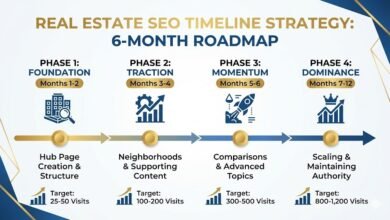
Real-world expectations: For a viral event, you can see indexation in hours. But for meaningful authority building on a new topic, realistic timelines suggest early improvements in 3–4 months, meaningful traffic in 6–8 months, and strong ROI in 12+ months.
Here is how I track success by phase:
| Metric | Tool | Frequency | What “Good” Looks Like |
|---|---|---|---|
| Indexation | Search Console | Daily (Pre-event) | URL is “Indexed, not submitted in sitemap” (or submitted) |
| Crawl Freq. | Server Logs / GSC | Hourly (During) | Googlebot visiting multiple times per day |
| CTR | Search Console | Weekly (Post) | High CTR due to rich snippet/schema winning clicks |
Benchmarks and expectations (indexation days vs. months of compounding)
Don’t be discouraged if your first event doesn’t break the internet. The goal is to build a layer of topical authority. Each event you cover adds to your site’s history, making it easier to rank for the next one. The true ROI often comes from the compounding traffic of the evergreen recap, not just the live spike.
Mistakes I see most often + FAQs + my next-step checklist

I want you to succeed, so let’s look at the pitfalls that usually trip people up. These are the unforced errors that destroy value.
Common mistakes and fixes (the fast troubleshooting list)
- Mistake: Changing the URL slug (e.g., from
/event-previewto/event-live).
Fix: Pick one generic URL (/event-2024) and stick with it forever. - Mistake: Accidental Noindex.
Fix: Check your robots meta tag. I’ve seen devs leave “noindex” on because they cloned a staging page. - Mistake: Publishing rumors as facts.
Fix: Use the “Two Source Rule.” If you can’t verify it, label it clearly as “Unconfirmed Report.” - Mistake: Cannibalization.
Fix: Don’t write a new article for every minor update. Add it to the main hub. - Mistake: Ignoring Mobile.
Fix: 80% of viral event traffic is mobile. If your table breaks on a phone, you lose the user.
FAQs: timeline-based SEO for viral events
What is timeline-based SEO for viral events?
It is a strategy that aligns content updates with the three phases of an event (pre, during, post) to match shifting user search intent and maximize visibility.
Why use schema markup for event SEO?
Schema markup helps search engines understand the specific dates, location, and nature of your content, increasing the likelihood of appearing in rich results and boosting CTR.
How can live content improve SEO during an event?
Live updates generate frequent changes to the page, signaling “freshness” to Google. This can trigger higher rankings in “Top Stories” or news carousels.
Should event pages remain live after the event ends?
Yes! Delete nothing. Update the page to be a recap. This preserves the backlinks and authority for next year’s event.
How fast can SEO results from an event strategy appear?
Indexation can happen in hours or days, but building substantial authority generally takes months of consistent publishing.
Wrap-up: 3 takeaways + what I’d do next (copy/paste checklist)
If you remember nothing else, remember this:
- Timing is everything: Match the intent (Planning -> Watching -> Reviewing).
- One URL rules them all: Build equity in a central hub.
- Schema is your friend: Help Google help you.
Your Next-Step Checklist:
- [ ] Identify one event 30+ days out that fits your niche.
- [ ] Draft a Hub Page template (URL, H1, Status block).
- [ ] Map 10 keywords for Pre, During, and Post phases.
- [ ] Implement Event Schema and test it with Google’s Rich Results Test.
- [ ] Set a calendar reminder to “Update and Consolidate” 24 hours after the event closes.
After the next event, I revisit what ranked and what didn’t, and I tighten the template. Good luck—go rank the moment.