Best CMS for SEO: Choosing Your Platform in 2025 (Beginner-Friendly Review)
Introduction: Choosing the right CMS for SEO (and why it’s not just “pick WordPress”)

When I help a small business pick a CMS, I start with a scenario that usually makes them pause: Imagine you’re a local plumber. A simple WordPress site is perfect. Now imagine you’re an ecommerce brand with 5,000 SKUs. Suddenly, managing product filters on that same WordPress site creates thousands of duplicate URLs that tank your rankings, while Shopify handles it natively.
The problem most growth-minded operators face isn’t a lack of options—it’s the noise. One expert shouts that “WordPress is the only serious choice,” while another claims “Headless is the future.” The reality? The best CMS for SEO is the one that fits your business model and technical resources right now.
In this guide, I’m cutting through the hype. We aren’t just looking at feature lists; we are looking at what actually moves the needle in 2025. I’ll walk you through a practical scoring framework, a candid review of the top platforms (WordPress, Shopify, Wix, Webflow, and more), and the exact workflow I use to set them up. My goal is to help you pick a platform that works for you, not one you have to fight against.
What makes a CMS “SEO-friendly” in 2025 (the non-negotiables)

If you remember one thing from this article, remember this: A CMS doesn’t do SEO for you; it facilitates it. An “SEO-friendly CMS” is simply software that allows you to execute technical best practices without requiring a degree in computer science.
In 2025, the definition of SEO-friendly has evolved. It’s no longer just about editing a title tag. It’s about how the platform handles performance (Core Web Vitals), mobile-first rendering, and structured data. There is a distinct line between what the CMS controls (architecture, code bloat, server speed) and what you control (content quality, keywords, internal linking).
Here are the minimum requirements any CMS must meet to be considered viable:
- Customizable Page Metadata: You must be able to edit Title Tags and Meta Descriptions individually.
- Clean URL Structure: No forced parameters or random strings of numbers (e.g.,
/page-id?=123). - Mobile Responsiveness: It must render perfectly on mobile devices out of the box.
- Canonical Tags: Essential for preventing duplicate content issues.
- XML Sitemaps & Robots.txt: Auto-generated and editable.
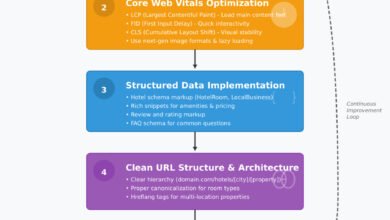
- Structured Data Support: Ability to add Schema markup (JSON-LD) easily.
The 2025 shift: SEO is increasingly about structure + speed + clarity

Years ago, you could get away with a slow site if your keywords were right. That’s gone. Today, SEO is increasingly about structure, speed, and clarity. Why? Because search engines are evolving into answer engines. By mid-2025, AI-powered summaries appear in over 50% of search results .
This means your CMS needs to support “answer-ready formatting.” It’s not enough to just write a blog post; your CMS must allow you to structure content with clear H2/H3 hierarchies and clean code that bots can parse instantly. If your theme loads 4MB of JavaScript before the text appears, Google’s AI won’t bother summarizing you. Speed isn’t a luxury anymore; it’s an entry ticket.
What is answer-ready formatting?
It looks like this: A clear H2 question (e.g., “What is a canonical tag?”) followed immediately by a concise, 40–60 word definition block in a paragraph tag. Your CMS editor needs to make this formatting easy, not a struggle.
Minimum SEO controls I expect from any CMS
Here’s what I check before I even look at pricing. If a platform hides these controls or charges extra for them, I walk away:
- Independent H1 tags: Can I make the H1 different from the Title Tag?
- Alt text editing: Can I easily add descriptions to images for accessibility and SEO?
- 301 Redirect Manager: Can I redirect an old URL to a new one easily? (Crucial for site health).
- Noindex control: Can I tell Google not to index low-value pages like “Thank You” pages or tag archives?
- Schema injection: Is there a field to paste header/footer code for things like Organization or Article schema?
Best CMS for SEO: my evaluation checklist (use this before you pick a platform)

Choosing a CMS is often an emotional decision—people pick what they know. But I prefer a scoring framework. Below is the checklist I use to evaluate platforms. When you are assessing a tool, don’t just look at the marketing page; ask these specific questions.
| Criterion | Why it matters | Red Flags (Dealbreakers) |
|---|---|---|
| SEO Control | You need to dictate how bots crawl your site. | No access to robots.txt; auto-generated URLs you can’t change. |
| Performance | Speed impacts rankings and conversion. | Fails Core Web Vitals on a blank demo theme. |
| Scalability | Moving 500 pages later is a nightmare. | No bulk edit features; relies heavily on manual entry. |
| Content Workflow | If publishing is hard, you won’t do it. | Rigid templates that require a developer to change a heading. |
| Maintenance | Broken sites don’t rank. | Requires weekly plugin updates to stay secure (high burden). |
How to score this: I rate each category 1–5. For a local plumber, “Maintenance” is weighted heavily (they have no dev team). For a media company, “Content Workflow” and “SEO Control” are the priority. If I were scoring a hypothetical small business, WordPress might get a 5/5 on Control but a 2/5 on Maintenance, whereas Shopify gets a 5/5 on Maintenance but a 3/5 on Control.
Checklist category 1: SEO control (metadata, canonicals, redirects, schema)
Can I edit X without code? That’s the golden question. I’ve seen this go wrong when a client used a niche website builder that auto-generated page titles based on the navigation menu label. They couldn’t target long-tail keywords without making their navigation menu look ridiculous.
You need granular control. You must be able to set a canonical tag to tell Google, “This is the master version of this page,” especially if you have products in multiple categories. If the CMS creates duplicate pages automatically and doesn’t let you fix them, it’s a liability.
Checklist category 2: Performance and Core Web Vitals
Performance is partly architecture (how the CMS renders code) and partly your choices (images, scripts). However, some platforms give you a head start, while others handicap you. You need to care about LCP (Largest Contentful Paint), INP (Interaction to Next Paint), and CLS (Cumulative Layout Shift).
My rule of thumb: Run the CMS’s showcase or demo themes through PageSpeed Insights before you commit. If the demo site scores a 40/100 on mobile, your real site—loaded with tracking pixels and images—will likely score even lower.
Checklist category 3: Content operations (templates, internal links, governance)
SEO-friendly also means “publisher-friendly.” When I’m publishing weekly, I want strict guardrails. Does the CMS allow me to save a “Blog Post” template that always includes a Table of Contents and an Author Bio? Or do I have to rebuild the layout every time? Consistency is key to scale, and messy internal linking structures (orphaned pages) are a silent killer of site authority.
Best CMS for SEO in 2025: side-by-side review of the most SEO-friendly platforms

Let’s look at the data. Approximately 71% of all websites use a CMS. As of mid-2025, WordPress powers around 43–44% of the web and holds about 61% of the CMS market share. However, SaaS platforms like Shopify (~6.8%), Wix (~5.4%), and Squarespace (~3.4%) are carving out significant territory for good reason.
Here is my honest, side-by-side assessment of the top contenders. I’ve stripped away the marketing fluff to focus on what actually impacts your rankings.
| CMS | Best For | SEO Strengths | The Tradeoff |
|---|---|---|---|
| WordPress | Content sites, Service businesses, News | Unmatched control via plugins (Yoast, RankMath) | High maintenance; performance requires optimization |
| Shopify | Ecommerce (DTC & Retail) | Fast, great structure, strong technical defaults | Rigid URL structure; apps can cause bloat |
| Wix | Small Biz, Portfolios, DIY | Built-in SEO checklist, easy setup, no maintenance | Hard to migrate away later; historically slower (improving) |
| Webflow | Designers, SaaS, Agencies | Clean code, semantic HTML control, fast | Steep learning curve; CMS limitations for large blogs |
WordPress: maximum flexibility (and why it still leads)

Is WordPress losing dominance? Slightly, but it remains the heavyweight champion for a reason. Its open-source nature means if you need to do something for SEO, there is a plugin for it. Plugins like Yoast SEO or Rank Math allow you to manage redirects, schema, and sitemaps with zero coding.
The Reality Check: If I were starting a content-heavy site, I’d choose WordPress. But, flexibility is a double-edged sword. You can easily break your site by installing too many plugins. A service business adding location pages will love WordPress for its ability to template thousands of pages, but you must be prepared to manage updates and security.
Shopify: SEO-friendly ecommerce with strong defaults
For ecommerce, Shopify is the gold standard. It handles technical SEO basics—like sitemaps, canonicals for products, and SSL—automatically. Its Structured Data implementation for products (prices, availability) is usually excellent out of the box, which is critical for getting those rich snippets in Google Shopping.
The Watch-out: Shopify has a rigid URL structure (e.g., you can’t remove /collections/ or /products/ from URLs). Also, be careful with collections: if you aren’t careful, a single product can exist at multiple URLs, leading to index bloat. Always ensure your theme points canonical tags to the root product URL.
Wix and Squarespace: no-code CMS that can rank (when used correctly)
Are no-code CMS platforms viable for SEO? Absolutely. The days of Wix being “bad for SEO” are largely over. Wix now offers direct access to robots.txt, bulk 301 redirects, and structured data markup. For a solo founder or local business, simplicity is a feature. You spend less time updating software and more time getting backlinks.
Squarespace is similar—beautiful templates and decent baseline SEO. However, if you need advanced technical customization or plan to scale to thousands of articles, you will hit a ceiling. These are closed ecosystems; you play by their rules.
Webflow: design-led, clean code, strong SEO fundamentals
Webflow is growing (approx. 1.2% market share) because it appeals to perfectionists. It generates incredibly clean code, which search engines love. Unlike WordPress, you don’t need a plugin to manage on-page SEO; the controls are built right into the visual interface.
It’s perfect for B2B SaaS or marketing sites where design and speed are paramount. The downside? The CMS content editor is separate from the design interface, which can be confusing for teams, and it has a steep learning curve compared to Squarespace.
Drupal/Joomla and enterprise CMS: when complexity is worth it (and when it isn’t)
If you don’t already have dev resources, this usually isn’t your best first move. Drupal and Joomla have declined to around 1–2% market share for a reason: they are complex. However, for universities, government sites, or enterprises with complex data governance needs, they offer security and taxonomy handling that WordPress struggles with. For the average business, they are overkill.
Implementation workflow: how I set up any CMS to be SEO-ready in week one

Regardless of the platform you choose, the setup process dictates your success. Here is the exact order I use so I don’t miss the basics. You can streamline the content creation part of this workflow using a tool like AI article generator to ensure your initial pages are optimized from day one.
- Map the Architecture: Define your URL structure on paper first.
- Configure Technicals: Set SSL, WWW vs Non-WWW resolution, and permalinks.
- Create Templates: Build SEO-friendly layouts for blogs and service pages.
- Set Global Metadata: Define default title/meta patterns.
- Generate Core Pages: Publish About, Contact, and Service pillars.
- Verify & Connect: Submit sitemaps to Google Search Console (GSC).
For those looking to scale this process, an Automated blog generator can help populate your structure with relevant content once the technical foundation is laid.
Step 1–2: Lock your site structure (URLs, navigation, categories) before publishing
Future-you will thank you for doing this first. Changing URLs after launch is painful. Decide now: will your blog posts live at /blog/post-name or just /post-name?
- Local Service:
domain.com/services/plumbing-repair - Ecommerce:
domain.com/category/mens-shoes - Content Site:
domain.com/topic/SEO-tips
Keep it shallow and logical.
Step 3–4: Configure technical SEO basics (indexing, sitemaps, schema)
Don’t assume the defaults are correct. Check your settings:
- Sitemap: Locate your
sitemap.xml. Is it updating automatically? - Robots.txt: Ensure you aren’t blocking your whole site.
- Canonical Tags: verify they are self-referencing by default on new pages.
Quick Test: Do a site:yourdomain.com search on Google a week after launch. If you see “Hello World” or demo pages, you forgot to delete or noindex them.
Step 5–6: Publish content that’s easy to extract into snippets and AI summaries
I write the answer first, then expand. When creating a service page or blog post, use an “Answer-First” snippet block. Under your H2 question (e.g., “How much does a CMS cost?”), write a direct, 40-word answer. This formatting makes it incredibly easy for Google to pull your content into featured snippets and AI overviews.
Beyond the basics: headless CMS, multi-CMS setups, and AI search changes
By 2023, 85% of businesses were using more than one CMS, and 57% had implemented headless solutions . Why? Because one tool rarely does everything perfectly. You might use SEO content generator tools to feed a WordPress blog, while Shopify handles your checkout.
This is where “Headless” comes in. A headless CMS stores content but doesn’t dictate how it looks. It pushes content via API to your website, mobile app, or smartwatch simultaneously. It separates the “body” (frontend presentation) from the “head” (content repository).
When headless helps SEO (and when it’s overkill)
What about headless CMS for SEO? Headless allows for blazing-fast performance because you can use modern frontend frameworks (like React/Next.js). It’s great for omnichannel SEO where content needs to appear everywhere. But here is the reality check: If you are a small marketing team with no developers, headless is likely overkill. You lose the “visual editor” convenience and become dependent on engineers for simple SEO changes.
How AI-powered search changes what your CMS must support
How are AI-powered search changes affecting CMS choices? Generative Engine Optimization (GEO) requires structured data and clear entities. Your CMS must allow you to easily update content to keep it fresh—a key signal for AI models. If your CMS makes it hard to go back and update old articles with new facts, your visibility in AI summaries will degrade.
Common CMS SEO mistakes (and how I fix them)

This is the postmortem section—the issues I see most often when auditing sites that aren’t ranking.
Mistake 1–3: bloat, speed regressions, and ungoverned plugins/apps
The most common mistake is “App Creep.” You install a plugin for a contact form, another for a pop-up, and another for heatmaps. Suddenly, your LCP (Largest Contentful Paint) jumps to 4 seconds.
The Fix: Audit your plugins monthly. If you can’t explain why a plugin exists, remove it. Use a performance budget: “We will not add any app that increases load time by more than 200ms.”
Mistake 4–6: duplicate pages, messy taxonomy, and index bloat
You don’t need to be technical—just consistent. Tagging a blog post with “SEO,” “SEO tips,” and “SEO help” creates three separate archive pages that all list the same content. This dilutes your crawl budget and authority.
The Fix: Restrict who can create new tags. Noindex low-value archive pages (like Date archives or Author archives if you’re a single author).
Mistake 7–8: migrations without redirects and tracking without verification
I’ve seen businesses lose 40% of their traffic overnight because they launched a new site and forgot to map the old URLs to the new ones.
The Fix: Create a “Launch Day Checklist.” Ensure 301 redirects are in place before you flip the switch. Verify your Google Analytics 4 (GA4) connection immediately—don’t wait a month to realize you have no data.
Conclusion: my recommendations + next steps to pick the best CMS for SEO
There is no perfect platform, only the right set of tradeoffs. If I were choosing today, I’d start with this decision shortcut:
- Choose WordPress if you want maximum flexibility and content control.
- Choose Shopify if you are building a serious ecommerce store.
- Choose Wix/Squarespace if you are a solo operator who needs simplicity.
- Choose Headless only if you have a dev team and multi-channel needs.
Your Next Steps:
- Run the evaluation checklist above on your top two choices.
- Test a demo theme in PageSpeed Insights.
- Map your site structure before you build.
- Set up Google Search Console immediately upon launch.
Pick your platform, follow the workflow, and start building. The best SEO strategy is consistent execution.