Scaling 100k+ Sites: Enterprise SEO Audit Masterclass
Introduction: auditing 100,000+ page sites without losing your mind

I still remember the first time I tried to audit a massive ecommerce site using my trusty laptop and a standard desktop crawler. About six hours in, with the fan screaming like a jet engine and my RAM maxed out, the application crashed. I lost the crawl data, but I gained a valuable lesson: what works for a 500-page brochure site will absolutely crush you when you’re dealing with 100,000, 500,000, or a million pages.
If you’re reading this, you’re likely staring down a similar mountain. Maybe you’ve just inherited a massive legacy news portal, or your leadership team is demanding an “SEO audit” for a sprawling marketplace without realizing that request involves analyzing millions of data points. At this scale, you can’t just click “crawl” and wait. You need a structured, repeatable workflow that separates signal from noise.
This isn’t a sales pitch for a specific tool. Instead, I’m going to walk you through the exact framework I use to audit enterprise-grade websites. Think of it like climbing a mountain: we’ll start at base camp (scoping and planning), manage the ascent (segmented crawling and analysis), and finally reach the summit (building a prioritized roadmap that actually gets implemented). Let’s get to work.
Who this enterprise SEO audit masterclass is for
I wrote this guide for in-house SEO managers, senior agency consultants, and product leaders who are responsible for large, complex web properties. If you know the basics of technical SEO—status codes, canonicals, Core Web Vitals—but you’re wondering how to apply them when you have more URLs than Excel rows, you’re in the right place. This is for the practitioner who needs to move from “we have a lot of errors” to “here is a prioritized plan to drive revenue.”
What this guide will (and won’t) cover
- It will cover: A step-by-step workflow for scoping, segmenting, and analyzing 100k+ page sites, choosing the right tool stack, and prioritizing findings for stakeholders.
- It won’t cover: Basic definitions of what a title tag is, or a feature-dump of every SEO tool on the market. We are focusing on process and strategy.
What an enterprise SEO audit looks like at 100,000+ pages

TL;DR: An enterprise SEO audit is a strategic, multi-week deep dive into a large-scale website (typically 100k+ URLs) that combines crawl data, log-file analysis, and business metrics to produce a prioritized roadmap. Unlike small audits, it focuses on patterns and templates rather than individual pages.
Quick definition: what is an enterprise SEO audit?
If someone asks you in a meeting, here is the answer: An enterprise SEO audit is not just a list of broken links. It is a comprehensive health check of a massive site’s technical infrastructure, content quality, and search performance. It requires analyzing how search engines crawl, render, and index your content at scale, often involving cross-functional data from server logs and analytics.
How very large sites change the rules
On a 500-page B2B site, you can manually inspect every page that matters. On a 500,000-page ecommerce catalog, you’ll drown without a system. The rules change because crawl budget becomes a real constraint—Googlebot might not even see your new products if it’s stuck in infinite faceted navigation loops.
At this scale, you stop fixing individual pages and start fixing templates. A single error in a product page template could be generating 50,000 duplicate title tags. Conversely, one fix can resolve thousands of issues instantly. Your mindset must shift from “fix this page” to “fix this pattern.”
What outcomes you should expect from a serious audit
In my experience, if I can’t hand the audit findings to a developer and a content lead and have them immediately know what to do, the audit isn’t finished. You should expect:
- A prioritized issue list: Ranked by business impact (revenue/traffic), not just severity.
- Segment-based insights: Knowing that your blog is healthy but your product pages are bleeding traffic.
- Implementation roadmap: A realistic timeline (often 30-90 days) acknowledging development cycles.
Plan the climb: scope, goals, and data foundations

I start every enterprise audit by putting my hands in my pockets and asking questions. Seriously. The biggest mistake is firing up a crawler before you know what you’re looking for. I once watched a team burn two weeks crawling a legacy subdomain that the business planned to shut down the following month. Scoping prevents that kind of waste.
Clarify business goals and SEO KPIs before you crawl
Together with your stakeholders, define success. Are we trying to recover from a traffic drop? Are we preparing for a site migration? Or are we looking for incremental growth in a specific category? If revenue is the goal, an audit that focuses heavily on blog tag pages might be technically accurate but strategically useless. Pick 3-5 KPIs—like organic revenue, non-brand traffic growth, or indexation rate of inventory—and let those guide your focus.
Map your site structure and critical templates
Before you crawl, sketch out the site’s architecture. You don’t need fancy software; a whiteboard or spreadsheet works fine. Identify your major templates:
- Homepage
- Category / Listing pages (PLPs)
- Product / Detail pages (PDPs)
- Informational / Blog content
- Utility pages (Login, Cart, About)
Knowing this structure allows you to configure your crawl to respect these boundaries and helps you spot when a specific template is the source of a systemic error.
Decide what “good enough” looks like for this audit
You rarely need to crawl 100% of a 1,000,000-page site to understand its health. I often set a “statistical significance” threshold—perhaps crawling 20% of product pages is enough to spot template issues. Define these boundaries early. “We will fully crawl the top 3 categories and sample the rest” is a perfectly valid scope that saves time and money.
Choosing your tool stack for large-scale SEO audits

This is where many SEOs get stuck. They try to stretch a $200 tool to do a $20,000 job. I love desktop crawlers like Screaming Frog—they are the Swiss Army knives of our industry—but they rely on your local machine’s memory. For enterprise sites, you often need cloud-based power.
| Tool Category | Examples | Best Use Case | Limitations |
|---|---|---|---|
| Desktop Crawlers | Screaming Frog, Sitebulb | Sampling, spot-checking, verifying fixes, small segments (under 100k URLs). | Dependent on RAM/CPU; slows down significantly at scale; hard to share data. |
| Enterprise Platforms | Botify, seoClarity, OnCrawl (Lumar), Deepcrawl | Full site crawls (millions of URLs), log file analysis, JS rendering at scale. | High cost ($10k-$30k+/year); steeper learning curve. |
| All-in-One Suites | Semrush, Ahrefs | General health monitoring, competitor benchmarking, historical data. | Crawl customization often less granular than dedicated audit platforms. |
When desktop crawlers are enough—and when they’re not
If you have a powerful machine, you can push desktop crawlers pretty far. I’ve successfully crawled 200k URLs with careful configuration (turning off rendering, excluding images/CSS). But if you need to execute JavaScript to see content, or if you need to analyze server logs alongside crawl data, you are bringing a knife to a gunfight. Use desktop tools for pilot crawls and verifying specific fixes, but don’t rely on them for the full picture on a massive site.
Enterprise-grade crawlers and analytics: key differences
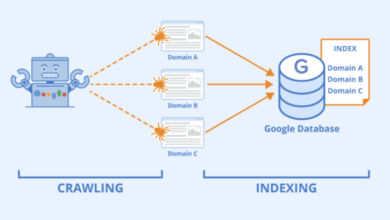
Enterprise platforms like Botify, OnCrawl, or seoClarity are built for speed and integration. They can crawl hundreds of URLs per second (compared to maybe 5-10 on a desktop) and, crucially, they integrate log file analysis. This lets you compare what you think is on your site (crawl data) with what Googlebot actually requests (log data). This gap is often where the biggest enterprise wins are hidden.
Where content intelligence fits in your audit stack
Once you have your technical data, you’re left with a question: “Okay, the pages work, but are they any good?” This is where I layer in a Content optimization platform like Kalema. Most people think of an AI SEO tool or an SEO content generator as something that just spits out copy. But in an enterprise stack, Kalema acts as a content intelligence layer. It analyzes your crawled segments to identify which clusters are thin, off-intent, or under-optimized compared to competitors. This helps prioritize content improvements at scale, rather than just technical fixes.
Step-by-step workflow to audit a 100,000+ page site

Here is how I execute the audit in practice. It’s not a straight line; it’s an orchestrated process.
Start with a pilot crawl to understand your terrain
This is your reconnaissance mission before the full ascent. I typically run a crawl of 5,000 to 10,000 URLs. My goal here isn’t to find every error; it is to validate my crawler settings. Does the crawler get stuck in a calendar loop? Is the JavaScript rendering correctly? Are we accidentally DDoSing the staging server? Fix these issues now so you don’t waste 48 hours on a botched full crawl later.
Design segmented crawls by section, template, or subdomain
Instead of hitting “Crawl All,” I break the site down. This makes the data manageable and keeps the audit focused. A typical segmentation plan might look like this:
- Segment A (High Priority): Product Pages – Full crawl of top 20 revenue categories.
- Segment B (Medium Priority): Blog/Articles – Full crawl to check for decay/thin content.
- Segment C (Low Priority): Archives/Help – Sample 10% to check for technical health.
Segmented crawling allows you to spot issues specific to a section. For example, you might find that your blog is perfectly healthy, but your product pages suffer from massive duplicate content issues due to URL parameters.
Use log-file analysis to align with real crawl behavior
This was a huge “aha” moment for me early in my enterprise career. I was obsessing over optimizing the blog, but when we finally got access to the server logs, we saw that Googlebot was spending 80% of its crawl budget on useless internal search result pages that we thought were blocked. We were optimizing pages Google rarely visited while it wasted resources on trash. If you can, get access to your server logs (ask your DevOps team nicely for a filtered export). It reveals the reality of how search engines experience your site.
Layer in Core Web Vitals and performance metrics at scale
Don’t just check speed on the homepage. In your enterprise tool, group Core Web Vitals (CWV) data by template. You might see that your “Article” template has a great LCP (Largest Contentful Paint), but your “Product” template fails CLS (Cumulative Layout Shift) because of a dynamic ad unit. Fixing that one ad unit solves the problem for 50,000 product pages instantly.
Audit templates for on-page SEO and internal linking
When analyzing the crawl data, look for patterns. Are all H1s missing on the category template? Is the breadcrumb schema broken on every product page? Also, check internal linking distribution. Large sites often suffer from “orphaned” sectors—great content buried so deep in the architecture that neither users nor bots can find it. Use your crawl visualization to see depth layers.
Identify systemic content issues, not just broken pages
This is where that content intelligence layer comes in. Technical health is a prerequisite, but content relevance ranks you. Look for patterns of “thin content” (e.g., product pages with only 50 words of description). Use tools to identify duplicate intent—where five different pages compete for the same keyword. In enterprise SEO, we don’t rewrite pages one by one; we create rules to consolidate, prune, or enhance groups of pages.
Summarize findings per segment so you don’t drown in data
At this point, you have millions of data points. Do not dump them into a spreadsheet and send it to your boss. Create summary views for yourself first:
| Segment | Top Issue | Severity | Est. Affected URLs |
|---|---|---|---|
| Product Pages | Canonical loop on filtered pages | Critical | ~45,000 |
| Blog | Missing H1 tags | Medium | ~2,500 |
| Category Pages | Slow LCP (4.5s) | High | ~12,000 |
From findings to roadmap: prioritization, reporting, and ROI

Congratulations, you’ve reached the summit. You have the data. Now comes the hardest part: getting people to care. I once delivered a beautiful, technically perfect 200-slide audit deck. I think exactly one person opened it. To avoid that fate, you must translate technical findings into business language.
Rank issues by impact, effort, and risk
I use a simple matrix to score every finding. I ask three questions:
- Impact: If we fix this, will it likely improve revenue or significant traffic? (1-5 score)
- Effort: How many dev hours or content hours will this take? (1-5 score)
- Risk: If we ignore this, could we get penalized or de-indexed? (High/Med/Low)
A high-impact, low-effort fix (like updating a robots.txt file blocking a key directory) goes to the top of the list. A low-impact, high-effort fix (like rewriting meta descriptions for archived news from 2015) goes to the backlog graveyard.
Build reports different stakeholders will actually read
You need different outputs for different audiences:
- For the Executive/CMO: A 1-2 page Executive Summary. Focus on health scores, major risks, and projected growth. Use charts. No code snippets.
- For the Developers: JIRA tickets or a technical appendix. Precise reproduction steps, example URLs, and expected behavior. They just want to know what to code.
- For Content/Marketing: A content playbook. “Here are the 5 topics we need to build clusters around,” or “Here is the template for optimizing product descriptions.”
Connect your audit to measurable business outcomes
Don’t promise rankings; they are volatile. Do promise improved site health, better crawl efficiency, and indexation coverage. Set a review window—usually 3 to 6 months—to measure the impact. “We expect fixing the canonical tags to increase indexation of our inventory by 20%, which historically correlates to a 10% lift in organic traffic.” That is a statement executives can sign a check for.
Common pitfalls in large-site SEO audits (and how I avoid them)

I’ve made most of these mistakes, so hopefully, you won’t have to.
Pitfalls that waste time and hide real issues
- Trying to crawl everything at once: You’ll run out of memory, storage, or patience. Fix: Segment relentlessly.
- Obsessing over 404s: On a 500k page site, a few hundred 404s are noise. Don’t waste days fixing them while ignoring a sitewide rendering issue. Fix: Prioritize patterns over individual errors.
- Ignoring JavaScript: If you only crawl the HTML source, you might be auditing a site that doesn’t exist for the user. Fix: Ensure your crawler renders JS if your site relies on it.
Pitfalls that break trust with stakeholders
- The “Data Dump”: Sending a raw CSV of 50,000 errors to a developer is a declaration of war. Fix: Group issues and provide solution examples.
- Over-promising speed: Enterprise fixes take time to deploy. If you promise results in two weeks, you will fail. Fix: Be realistic about dev sprints and re-indexing time (often 45+ days).
Enterprise SEO audit FAQs and your next steps

If you’re still feeling the weight of the task, here are some quick answers to common questions.
How can you audit a website with over 100,000 pages efficiently?
Don’t try to eat the elephant in one bite. Use a cloud-based crawler to handle the scale, but rely on sampling and segmentation to find the patterns. You don’t need to check every single page to know the template is broken.
Are enterprise audit tools worth the investment?
If your site drives significant revenue, yes. Tools like Botify or Deepcrawl typically cost $10k-$30k+ annually. However, if that tool helps you recover 5% of lost organic revenue on a $10M business, the ROI is immediate. For smaller businesses, a carefully managed desktop crawler might still suffice.
Can smaller tools like Screaming Frog handle 100k+ page audits?
They can, but with caveats. You need a dedicated machine with lots of RAM (32GB+), and you should use database storage mode. Even then, I recommend breaking the site into chunks (e.g., crawl the blog one day, the shop the next) rather than one massive crawl.
What emerging features are shaping enterprise SEO audits?
I’m seeing a massive shift toward automation and intelligence. Teams are setting up automated crawl monitoring that alerts them before a bad release goes live. Also, the integration of content intelligence—using AI to evaluate relevance at scale—is becoming standard.
Recap and your first 5 moves
If I were starting fresh on your site tomorrow, these are the steps I’d take first:
- Map the territory: Define your site sections and critical templates.
- Run a pilot: Crawl 5k URLs to validate your setup.
- Get the logs: Ask DevOps for a sample of server logs to see where Googlebot is actually going.
- Segment & Crawl: Run your targeted crawls on high-priority sections.
- Score & Pitch: Identify the top 3 high-impact patterns and build your business case.
Scaling the mountain of enterprise SEO is daunting, but with a good map and the right gear, the view from the top is worth it. Good luck.