Introduction: Why SEO audit accuracy breaks (and how I prevent common SEO audit mistakes)

I still remember the most embarrassing meeting of my early career. I walked into a boardroom, slapped a 50-page technical audit on the table, and proudly announced that the client’s site health score was now a pristine 94/100. The Marketing Director looked at the report, then at me, and asked, “Then why is our traffic down 15% this quarter?”
That was my wake-up call. I had fallen into the trap that catches almost everyone starting out: I trusted the tools more than the user experience. I was fixing “errors” that didn’t matter while missing the invisible issues—like intent mismatch and topic cannibalization—that were actually killing performance.
Accuracy isn’t about checking every box; it’s about fixing what blocks revenue.
In this guide, I’m skipping the generic advice you’ve read a dozen times. Instead, I’ll share the exact workflow I use today to diagnose US-based business sites. We’ll cover 10 critical SEO audit mistakes, how to manually verify them so you don’t look foolish, and—crucially—how to audit for modern AI-driven search (G-SEO). Whether you’re a solo founder or an in-house marketer, this is how you turn a list of problems into a prioritized roadmap.
My beginner-friendly SEO audit workflow (so I don’t miss what matters)

The biggest mistake I see isn’t technical; it’s procedural. Most people open a crawler, hit “start,” and then drown in a sea of red warnings. That’s not an audit; that’s panic.
When I audit a site, I treat it like a medical triage. You don’t schedule surgery because a patient sneezed. You look at vitals, symptoms, and lifestyle before you prescribe anything. Here is the workflow I use to ensure I’m solving the right problems.
While AI SEO tool options can accelerate the data collection phase, the interpretation—the part that saves you money—must come from human judgment. Here is my four-step process:
Step 1: Set scope and success criteria (before I open any tool)
Before I even look at a URL, I ask: “What are we actually trying to sell?” If I’m auditing a local service site (like an HVAC company in Austin), I don’t care if the blog posts from 2017 have missing meta descriptions. My scope focuses on service pages and location pages.
I define success based on business goals:
- E-commerce: Sales, Add-to-Carts, Category page visibility.
- SaaS: Demo requests, Pricing page traffic.
- Local: Phone calls, Map pack rankings.
Step 2: Collect inputs (GSC, analytics, crawl, and a content inventory)

I need a full picture of the ecosystem. I create a master spreadsheet that combines data from four sources. If you skip one, you have a blind spot.
- Google Search Console (GSC): Shows what Google actually sees and ranks.
- Crawler (Screaming Frog/Sitebulb/Ahrefs): Shows technical health and structure.
- GA4/Analytics: Shows user engagement and conversion.
- Content Inventory: A manual list of key pages and their intended target keywords.
Note to self: Don’t just crawl the homepage. I always check the sitemap.xml to find orphan pages the crawler might miss if they aren’t linked in the menu.
Step 3: Run the four lenses: technical, on-page, content/intent, authority/internal links

I organize my observations into four specific buckets. This keeps me from getting distracted by shiny objects.
- Technical SEO: Can bots crawl and index the pages? (Robots.txt, status codes, speed).
- On-Page SEO: Are the keywords in the right places? (Titles, headers, schema).
- Search Intent: Does the page solve the user’s problem? (This is usually where audits fail).
- Internal Linking: Is authority flowing to the money pages?
Step 4: Validate findings manually (spot-check like an editor)
This is the most critical step. Tools generate hypotheses; humans verify facts. If a tool says I have 500 “duplicate content” errors, I don’t panic. I open five URLs.
My Rule of 5: I never declare a sitewide issue until I have manually spot-checked at least 5 different URLs. Often, what looks like an error (e.g., duplicate title tags) is actually just pagination that the tool didn’t understand. Google warns that audit scores can be misleading—I take that warning seriously.
10 SEO audit mistakes that ruin accuracy (and the fixes I use)

Over the last decade, I’ve seen the same errors crop up repeatedly. These aren’t just technical glitches; they are “accuracy traps” that lead to wasted budget and flat rankings. Here are the 10 most common SEO audit mistakes and exactly how I fix them.
Mistake #1: Auditing without a clear goal (traffic ≠ revenue)
What it is: optimizing for vanity metrics rather than business outcomes. I once saw a B2B company spend three months optimizing high-traffic blog posts that had zero conversion intent, while their “Book a Demo” page was de-indexed.
Why it matters: You can double your traffic and see zero revenue growth if that traffic is unqualified.
How I detect it: I map the top 10 traffic-driving pages against the top 10 conversion-driving pages. If there is no overlap and no internal linking between them, we have a goal mismatch.
The Fix: Shift priority to “Money Pages” first. Optimize the bottom of the funnel before widening the top.
Mistake #2: Trusting tool scores as the truth (not a starting point)
What it is: Treating a “72/100” health score as a report card. Tools flag low word count, missing meta descriptions, or multiple H1s as “errors.”
Why it matters: A contact page should have a low word count. A missing meta description isn’t a ranking factor (Google rewrites them anyway). Fixating on these false positives burns time.
How I detect it: I ignore the score and look at the “High Priority” list. If the tool screams about “Low text-to-HTML ratio,” I generally ignore it if the user experience is good.
The Fix: Use the tool to find the issue, then use your brain to judge the impact. I’ve shipped “fixes” that made reports look perfect but didn’t move rankings an inch. Now, I only fix what impacts the user or the bot’s ability to crawl.
Mistake #3: Crawling the site incorrectly (wrong user-agent, blocked assets, partial renders)
What it is: Running a crawl that doesn’t mimic how Google actually sees the site. If your site relies on JavaScript but you run a standard HTML crawl, you are auditing a blank page.
Why it matters: You might think you have thin content, but Google renders the JavaScript perfectly. Or vice versa—you think you’re fine, but Google sees nothing.
How I detect it: I compare the crawler’s “word count” column against a manual check of the live page. If the crawler sees 0 words but I see 1,000, I need to enable JavaScript rendering in the crawler settings.
The Fix: Always configure your crawler to respect your robots.txt and use the “Googlebot Smartphone” user agent. Sanity check: verify the crawler can fetch your CSS and JS files.
Mistake #4: Treating “duplicate content” as one problem (instead of multiple causes)
What it is: Seeing 1,000 duplicate content errors and assuming you need to rewrite 1,000 pages.
Why it matters: Duplicates are usually technical, not editorial. It’s often URL parameters (e.g., ?sort=price) or trailing slashes (/service vs /service/) creating ghosts.
How I detect it: I look at the URLs. If they look like /product-shoe?color=red and /product-shoe?color=blue, that’s a parameter issue, not a content writing issue.
The Fix: Implement canonical tags. Tell Google, “This is the main version; ignore the rest.” Don’t rewrite content; consolidate URLs.
Mistake #5: Ignoring search intent mismatch because on-page SEO “looks right”

What it is: Having the keyword in the title, URL, and H1, but still not ranking because the page type is wrong.
Why it matters: If you are trying to rank a Product Page for a keyword where users want a “Best X” comparison guide, you will fail. No amount of backlinks will fix this.
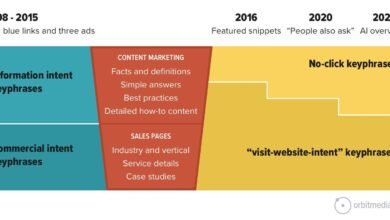
How I detect it: I Google the keyword and look at the top 5 results. Are they blogs? Tools? Product pages? If the SERP is 80% informational blogs and I have a sales page, I have an intent mismatch.
The Fix: Let the SERP vote. If I’m wrong, I either rewrite the page to match the intent (e.g., add a comparison section) or create a new page that aligns with what users actually want.
Mistake #6: Missing topic cannibalization (the invisible rankings leak)
What it is: When two or more pages on your site compete for the same keyword. Google gets confused about which one to rank, often ranking neither.
Why it matters: It dilutes your authority. Instead of one strong page, you have two weak ones.
How I detect it: I check GSC for the target keyword. If I see multiple URLs getting impressions for the same query, or if the ranking URL swaps back and forth every week, I suspect cannibalization.
The Fix: Decision tree time:
1. Merge: Combine the content into one super-guide and 301 redirect the loser.
2. Differentiate: Change the focus of one page to target a different long-tail keyword.
3. Delete: If the content is old and low-value, 401 Gone or redirect it.
Mistake #7: Auditing internal links by counting links, not by intent and context
What it is: Thinking “I have 10 internal links to this page, so I’m good.”
Why it matters: Context is king. A link from the footer is worth far less than a link from the first paragraph of a high-authority relevant blog post.
How I detect it: I look for “Orphan Pages” (zero links) first. Then, I check anchor text. If all links say “click here,” I’m missing an opportunity.
The Fix: Build “Hub and Spoke” clusters. Ensure your high-traffic informational posts link to your high-value conversion pages using descriptive anchor text (e.g., “audit your technical SEO” instead of “read more”).
Mistake #8: Over-focusing on metadata tweaks while ignoring content usefulness
What it is: Spending hours rewriting meta descriptions to hit the perfect character count while the page content itself is thin and unhelpful.
Why it matters: Meta descriptions are marketing copy, not ranking factors. If the page doesn’t satisfy the user, the click-through rate (CTR) won’t save you.
How I detect it: I look for pages with high impressions but low dwell time or high bounce rates. That signals the content failed to deliver.
The Fix: If I’m short on time, I ignore meta description warnings. I prioritize improving the H1 and the first 200 words of the content to hook the reader immediately.
Mistake #9: Treating Core Web Vitals as a single “speed score”
What it is: Obsessing over a 100/100 PageSpeed Insights score.
Why it matters: Lab data (the simulation) often differs from Field data (what real users experience). You can have a 50/100 score but pass Core Web Vitals (CWV) because real users are on fast Wi-Fi.
How I detect it: I look at the “Core Web Vitals” report in GSC. If the URLs are “Good,” I don’t stress about the granular score.
The Fix: Focus on LCP (loading speed of the main image) and CLS (visual stability). I avoid shipping risky performance changes right before a big campaign—stability is better than perfection.
Mistake #10: Skipping structured data and SERP feature eligibility checks
What it is: Failing to mark up content with Schema (Product, Article, FAQ) that helps Google understand the page.
Why it matters: Schema is how you qualify for Rich Results (stars, prices, images in search). It also helps AI agents extract your data cleanly.
How I detect it: I run key pages through Google’s Rich Results Test tool. If I see zero detected items, I’m leaving real estate on the table.
The Fix: Add valid JSON-LD schema. My rule: If the page can’t answer the question clearly in text, I don’t mark it up. Don’t spam FAQ schema if there are no FAQs.
Quick-reference table: Mistake → how it shows up → how I confirm it → recommended fix
| Mistake | Common Symptom | Fast Confirmation Step | Best Next Fix |
|---|---|---|---|
| Goal Mismatch | Traffic up, leads flat | Check GSC: are top pages informational? | Optimize conversion paths on top blogs |
| Trusting Scores | Panic over “Low Word Count” | Manually view page: is it useful? | Ignore if UX is good; verify crawlability |
| Bad Crawl Config | Crawler sees 0 words / errors | GSC URL Inspection: “View Tested Page” | Update crawler to render JavaScript |
| Duplicate Content | Thousands of “Duplicate” errors | Check URLs for parameters (?id=123) |
Implement self-referencing canonicals |
| Intent Mismatch | Good on-page SEO, no rankings | Check top 5 SERP results | Rewrite content to match SERP format |
| Cannibalization | Ranking URL flips constantly | GSC: Check query for multiple URLs | Merge pages or redirect the weaker one |
| Internal Linking | Orphan pages in crawl | Check “In-links” count in crawler | Add links from relevant category hubs |
| Meta Obsession | Perfect metas, high bounce | Check Time on Page | Improve content intro & headings first |
| CWV Confusion | Low lab score, passing field data | Check GSC Core Web Vitals report | Prioritize Field data; fix LCP image |
| Missing Schema | Standard blue link in SERP | Run Rich Results Test | Add JSON-LD for Article/Product |
Modern SEO audit mistakes in the age of AI-driven search: extractability, entities, and G‑SEO

If you are still auditing like it’s 2019, you are missing the biggest shift in search history. The new battleground isn’t just about keywords; it’s about extractability. Can an AI read your content, understand it, and confidently quote it? If not, you won’t show up in AI Overviews.
While an AI article generator can help structure content for these new formats, the audit logic must verify that your existing pages are ready for this shift.
Audit check: Content extractability (can an AI or a human quickly pull the answer?)
I test this simply: Can I copy/paste a 2-sentence answer from my content that answers the user’s core question? If the answer is buried in a wall of text, AI systems will likely skip it. 33% of AI Overviews show inconsistent info , which means clarity is your competitive advantage.
The Fix: Structure your content with clear H2s followed immediately by direct answers. Use bullet points and tables. Make it easy for a bot to scrape the facts.
Audit check: Entity clarity (who/what the page is really about)
Search engines are moving from “strings” (keywords) to “things” (entities). If your site talks about “Java” (the coffee) and “Java” (the code) without clear distinction, you confuse the entity graph.
The Fix: Be specific. Check your “About” page and schema. Ensure your brand and topic focus are explicitly defined in the first 100 words of your key pages. If I read your intro and don’t know who you are, neither does Google.
What is G‑SEO (Generative Search Optimization) and how I account for it in audits
G-SEO isn’t magic; it’s the practice of optimizing content for Generative AI retrieval. This implies modeling intent across different user roles (Buyer vs. Implementer) and providing synthesized value.
The Audit Step: I look for conversational queries in the content. Does the page answer “How do I fix X?” or “What is the difference between X and Y?” in a natural language format? If not, I add a Q&A section to capture these conversational long-tail queries.
How I prioritize audit findings (so I fix the right things first)

You have your list of errors. Now, what? If you hand a developer 100 tasks, they will do zero. You need a triage system.
I prioritize using a simple model: Impact × Confidence ÷ Effort. But to keep it beginner-friendly, I group fixes into three buckets.
The Golden Rule: Intent mismatch on a high-impression page always beats fixing 200 thin meta descriptions.
Prioritization table: what I fix now vs later
| Priority | Issue Type | Why it wins |
|---|---|---|
| FIX NOW (Urgent) | Crawl blocks (Robots.txt), Noindex tags, Broken Canonical loops | If Google can’t see it, you don’t exist. These are “kill switches.” |
| FIX NEXT (High Impact) | Intent Mismatch, Cannibalization, Title Tags on Money Pages | These directly affect ranking and revenue on pages that are already indexed. |
| MONITOR (Backlog) | Minor CWV issues, Missing Alt Text (non-critical), Meta Descriptions | These are “nice to have.” Fix them when dev time is cheap. |
How often I audit and refresh SEO content (a simple maintenance cadence)
Content decays. It’s a fact of life. A page that ranked #1 in 2022 might be #6 today because competitors updated their guides and you didn’t. I schedule refreshes like any other ops task—if it’s not on a calendar, it won’t happen.
Using an Automated blog generator can help maintain consistency in publishing, but auditing the performance of that content requires a human schedule.
Quarterly mini-audit checklist (beginner version)
I don’t do a deep dive every month. Here is my 90-minute quarterly routine:
- Performance Check: Look at the top 10 traffic pages in GSC. Did clicks drop?
- Freshness: Are there years (e.g., “2023”) in titles that need updating?
- Link Scan: Run a quick crawl to find broken external links (link rot).
- Cannibalization Spot-Check: Check my top 3 target keywords for URL swapping.
- Competitor Peek: Did a competitor release a new tool or calculator that I need to match?
FAQs + wrap-up: avoid these SEO audit mistakes and take the next 5 actions
FAQ: What is topic cannibalization and why does it matter for SEO audits?
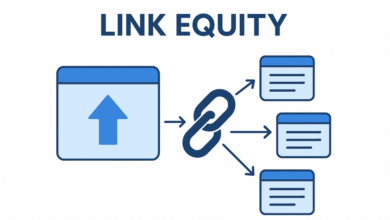
Topic cannibalization happens when multiple pages on your site fight for the same keyword, confusing search engines. It matters because it splits your link equity and often results in neither page ranking well. Detection is often missed in standard audits but is a major cause of stagnation.
FAQ: Can audit tools be fully trusted to assess SEO health?
No. Tools are excellent for gathering data but poor at interpreting context. They often flag false positives (like low word count on contact pages) and miss nuance (like poor search intent). Always treat tool scores as hypotheses, not facts.
FAQ: Why is content extractability important for AI-driven search?
AI-driven engines (like SearchGPT or Google’s AI Overviews) prioritize content they can easily understand and summarize. If your content is dense, unstructured, or ambiguous, AI cannot “extract” the answer, and you lose visibility in generative results.
FAQ: What is G‑SEO and how does it differ from traditional SEO?
G-SEO (Generative Search Optimization) focuses on optimizing for AI retrieval and synthesis, rather than just blue links. It involves modeling user intent across different buying stages and structuring data so LLMs can easily process it, while traditional SEO focuses more on keywords and backlinks.
FAQ: How often should SEO content be audited and refreshed?
At a minimum, perform a mini-audit quarterly to catch decay and technical errors. Do a deep-dive technical and content audit annually. For high-velocity sites, monthly monitoring of Core Web Vitals and index coverage is recommended.
Recap:
- Don’t let tool scores dictate your strategy; validate with manual checks.
- Focus on invisible killers like intent mismatch and cannibalization first.
- Prepare for the future by structuring content for AI extractability.
Your 5 Next Actions:
- Define your business goals and key “Money Pages.”
- Run a crawl with JavaScript rendering enabled.
- Open GSC and check your top 5 keywords for cannibalization.
- Manually check the SERP intent for your top landing page.
- Create a “Fix Now” list and ignore the low-priority noise.
If you only fix one thing this week, fix the thing tied to revenue. Happy auditing.