How to Write an SEO Report: AI-Aware Best Practices
Introduction: what I mean by a “successful” SEO report (and who this is for)

I still remember the first time I sent a monthly SEO report that I thought was perfect. It was twenty slides deep, packed with screenshots of green arrows from a rank tracker, showing we had moved from position 12 to position 4 for a high-volume keyword. I felt like a genius.
My client, a busy Director of Marketing, replied with one line: “Okay, but did this drive any qualified leads this month?”
I froze. I had the data—analytics, search console, crawl logs—but I hadn’t answered the only question that actually mattered. That moment taught me that a successful SEO report isn’t a data dump; it’s a decision document. If the person reading it doesn’t know what to fund, fix, or cut by the last page, the report has failed.
This guide is for the intermediate marketer or SEO operator who is tired of sending reports that get ignored. We are going to move beyond vanity metrics and build a newsroom-grade reporting framework that works for US-business standards in 2026. This means accounting for the messy reality of attribution, the rise of AI Overviews eating our click-through rates, and the pressure to prove ROI.
Here is my blueprint for writing SEO reports that stakeholders actually read—from the anatomy of the document to the exact workflow I use to write them.
The anatomy of a successful SEO report (the sections I include every time)

One of the biggest mistakes I see beginners make is reinventing the wheel every month. Stakeholders crave consistency. They want to know exactly where to look to see if we are winning or losing. Over the years, I’ve refined a standard “anatomy” that I use for almost every client, whether it’s a B2B SaaS company or a local service business.
I treat the report as a hierarchy of importance. Executives might only read the first page; the marketing manager will read the first three; the technical team needs the appendix. Here is the breakdown I stick to:
| Report Section | What to include | Why it matters | Common mistake |
|---|---|---|---|
| 1. Executive Summary | 3-5 bullets on outcomes (revenue/leads), major wins, and critical blocks. | It’s the only part the VP/C-suite reads. | Listing tasks completed (e.g., “We fixed 404s”) instead of business impact. |
| 2. KPI Scorecard | Year-over-Year (YoY) comparison of traffic, conversions, and AI visibility. | Provides immediate context on growth trends. | Using Month-over-Month (MoM) for seasonal businesses without context. |
| 3. Insights & Narrative | The “Why” behind the data. Explain movement using annotations (updates, seasonality). | Data without a story is just noise. | Describing the chart (“Traffic went up”) without explaining why. |
| 4. Strategic Actions | Prioritized list of next steps: Content to build, tech to fix. | Transforms the report into a project plan. | Vague promises like “Continue optimization” (this means nothing). |
Executive summary (the 60-second version)
This is the most critical real estate in your document. I write this last, even though it appears first. The goal is to answer the “So what?” question immediately. I specifically tie SEO performance to pipeline or revenue whenever possible.
A good summary looks like this: “Organic search drove 45 qualified demo requests this month (+12% YoY), directly influenced by improved rankings on our ‘enterprise pricing’ pages. However, overall traffic is flat due to seasonality. Next month, we are prioritizing technical fixes to improve INP scores to protect these conversions.” Crisp, honest, and business-focused.
Performance highlights (what moved, what didn’t, and why)
In this section, I use “because” statements religiously. It’s not enough to say “Rankings improved.” You must say, “Rankings improved because we updated the Q3 content clusters and refreshed the internal linking structure.”
I also include what didn’t move. If we launched a new campaign and it hasn’t indexed yet, I say that. Transparency builds more trust than a report full of selective green arrows.
Insights and recommendations (the most important part)
Here is my golden rule: No report leaves my desk without prioritized next steps. An insight is an observation (“Competitors are outranking us on feature terms”). A recommendation is the fix (“Create a comparison hub”). A task is the execution (“Assign brief to writer by Friday”).
Your stakeholders are busy. If you don’t tell them exactly what needs to happen to move the needle, they won’t guess.
How to write an SEO report: my step-by-step workflow (from raw data to decisions)

Creating a report shouldn’t be a panic-induced scramble on the 1st of the month. Over time, I’ve developed a workflow that turns raw data into a coherent narrative. This process ensures I’m not just copy-pasting charts but actually analyzing the health of the campaign.
If you are using tools like Kalema’s AI SEO tool or other analytics suites, the data collection might be fast, but the human synthesis is where you earn your paycheck. Here is my checklist:
| Step | Owner | Inputs | Outputs | Time Estimate |
|---|---|---|---|---|
| 1. Define Goals | Strategist | Business revenue targets | KPI Selection | 15 mins |
| 2. Pull Data | Analyst/SEO | GA4, GSC, Rank Tracker | Raw Data Sheets | 30 mins |
| 3. Annotate | Analyst | Change log, Algorithm updates | Contextual Notes | 15 mins |
| 4. Analyze & Write | Strategist | Data + Notes | Draft Narrative | 60 mins |
| 5. QA & Polish | Manager | Draft Report | Final PDF/Deck | 15 mins |
Step 1: define the business goal and reporting audience (so I don’t chase vanity metrics)
Before I open Google Analytics, I ask myself: “Who is reading this?” If it’s the CEO, they care about CAC (Customer Acquisition Cost) and total pipeline. If it’s the Content Lead, they care about which blog posts are getting traffic. I map the business goal to the metric. For example, if the goal is “Increase enterprise leads,” reporting on “Top of Funnel blog traffic” is secondary. I focus on “Demo Request Page Traffic” instead.
Step 2: pick KPIs and a timeframe (what I measure, and what I ignore)
I used to report purely on rankings. Now, I explain to clients that rankings are leading indicators, while revenue is a lagging indicator. I pick a timeframe that makes sense—usually YoY (Year over Year) to account for seasonality. If I only look at MoM (Month over Month) in December for a B2B company, it looks like a disaster because everyone is on holiday. Context is everything.
Step 3: pull data from GA4, GSC, rankings, and crawl tools (with clean definitions)
This is where beginners get tripped up: GA4 “Sessions” and Google Search Console (GSC) “Clicks” will never match perfectly. That is normal. I keep a “Report Glossary” slide at the end of my decks to explain this.
I pull data from:
- GA4: For conversions and engagement.
- GSC: For true organic visibility and query data.
- Rank Tracker: For share of voice.
- Site Crawler: For technical health (broken links, Core Web Vitals).
Step 4: analyze changes and write the story (how to write an SEO report without fluff)
This is the hardest part—turning the numbers into English. You can use a SEO content generator to help draft summaries, but the strategic insight must be yours. I use a simple formula: Observation + Cause + Effect + Action.
Example narrative: “Organic traffic to our product pages dipped 8% this month (Observation). This corresponds with the March Core Update, which increased volatility in our sector (Cause). However, conversion rates actually increased by 2%, suggesting we lost low-quality traffic but retained high-intent buyers (Effect). We will monitor this for two more weeks before making structural content changes (Action).”
Step 5: QA and delivery (I check these 10 things before sending)
I once sent a report where the date range was set to “Last 7 Days” instead of “Last 30 Days.” The client panic-called me thinking traffic had crashed by 75%. It was embarrassing. Now, I check these before sending:
- Date ranges are correct on every chart.
- Filters (e.g., “Organic Search only”) are applied.
- Conversion goals haven’t broken in GA4.
- Annotations explain big spikes or drops.
- Spelling and grammar (obviously).
- Links in the “Recommendations” section actually work.
- Terminology is consistent (don’t swap “visits” and “sessions”).
- I have an answer prepared for the biggest “red number” on the report.
Metrics that matter in business SEO reporting (and how I interpret them)

In 2025, organic search conversion rates averaged around 3.6%, which is nearly double that of social media. With 92% of data-driven marketers confirming positive ROI from SEO , the data supports us—if we measure the right things. I interpret metrics by grouping them into three buckets: Visibility, Engagement, and Money.
| Metric Cluster | Source | Good Signal | Common Misread |
|---|---|---|---|
| Visibility | GSC, Rank Tracker | Growing impressions on non-branded terms. | Thinking high impressions = high traffic (not if CTR is low). |
| Engagement | GA4 (Engagement Rate) | Users spending time on key product pages. | Obsessing over bounce rate (which is deprecated/misunderstood in GA4). |
| Conversion | GA4, CRM | Increase in qualified leads/sales. | Crediting SEO for all direct traffic or ignoring assisted conversions. |
Visibility metrics: impressions, average position, share of voice
I like to explain visibility to stakeholders using a billboard analogy. Impressions are how many people drove past the billboard; clicks are how many people actually walked into the store. In an AI-first world, impressions might go up while clicks stay flat (thanks to zero-click searches). That’s why I segment visibility by “Brand” vs. “Non-Brand.” If non-brand impressions are growing, our reach is expanding, even if they aren’t clicking yet.
Traffic quality: landing pages, query intent, and engagement signals
Traffic is vanity if it doesn’t stick. I look closely at Engagement Rate in GA4. If I see a blog post with 10,000 visits but a 10 second average engagement time, we have an intent mismatch. The user wanted a quick answer, and we gave them a 3,000-word essay. I report on this as an “Optimization Opportunity” to better match the content format to the user’s intent.
Conversions and attribution: tying SEO to pipeline (without overpromising)
This is where I tread carefully. Attribution models are imperfect. I usually report on:
- Primary Conversions: Demo requests, purchases, sign-ups.
- Assisted Conversions: Users who found us via SEO but converted later via Email or Paid Retargeting.
I always add a verbal caveat: “These numbers are directional.” It keeps me honest and manages expectations when the CFO asks why the CRM numbers don’t match GA4 exactly.
AI-first search adds new sections to your SEO report (AI Overviews, AEO/GEO, and new channels)

The game has changed. With AI Overviews appearing in roughly 15% to nearly half of Google search results , we are seeing a shift. Data shows that when an AI Overview is present, desktop CTR can drop from 13% to under 5%. If you aren’t reporting on this, you are going to have a hard time explaining why traffic is down even though rankings are stable.
I’ve started adding an “AI Visibility” module to my reports. It’s not huge—just enough to show we are watching the horizon.
What is AEO and how does it differ from SEO?
I explain AEO (Answer Engine Optimization) to my team simply: SEO is about ranking a list of links; AEO is about being the single answer the AI reads out. In my reports, I translate this into “Answer Visibility.” Are we winning the featured snippet? Is our content structured clearly enough (with schema and bullet points) that ChatGPT or Gemini can easily parse it? This is about being machine-readable.
How AI Overviews change what metrics I highlight in an SEO report
Because clicks are softening on informational queries, I am shifting focus to “Zero-Click Value.”
- Before: I reported solely on clicks to the blog.
- Now: I report on impressions and “Brand Lift.” Are people searching for our brand name after seeing us in an AI answer?
- New Metric: Inclusion in AI Overviews. Tools are just starting to track this reliably, but even manual spot-checks for top 10 keywords are valuable.
New channels I include: forums, video, voice, and AI engines
Did you know Reddit’s organic traffic has surged over 600% since mid-2023 ? If you aren’t tracking your brand’s presence on Reddit or Quora, you’re missing a huge chunk of the modern search funnel. I’ve added a small section called “Community & Forum Visibility.” It tracks specific threads where our brand is mentioned. It’s manual work, but high value.
Technical & UX reporting: Core Web Vitals (INP), indexing, and on-page basics I always include

Technical SEO can be scary for non-technical stakeholders, so I keep this section “Red/Yellow/Green.” I focus heavily on Core Web Vitals, specifically Interaction to Next Paint (INP). Since INP replaced FID, compliance rates dropped, meaning many sites are failing this metric without realizing it.
| Issue | How I Detect It | Impact | Owner |
|---|---|---|---|
| INP (Interactiveness) | GSC / PageSpeed Insights | Users rage-click; lowers conversion. | Dev Team |
| Index Bloat | GSC Coverage Report | Wastes crawl budget on low-value pages. | SEO |
| Schema Errors | Rich Results Test | Loss of rich snippets (stars, pricing). | Dev/SEO |
Why I include Core Web Vitals like INP in SEO reports
I tell clients: “INP is basically a measure of how annoying our site is.” If a user clicks “Add to Cart” and the site freezes for half a second, they leave. That’s lost revenue. By reporting on INP, I’m not just being a tech nerd; I’m protecting the bottom line.
How I report on on-page SEO, internal links, and schema without turning it into a checklist dump
I avoid listing every single missing alt tag. Instead, I report on Implementation Velocity. “We identified 50 pages needing internal links. We fixed 20 this month. Here is the traffic uplift on those 20 pages compared to the untreated ones.” This proves the value of the work rather than just listing problems.
SEO report examples and templates (copy, adapt, and send)

If you are staring at a blank page, here is a structure you can steal. You can use tools like Kalema’s AI article generator to help draft the narrative sections, but always mark AI-assisted content as “Human-Verified” to maintain credibility.
Example: the executive summary I’d send to a marketing lead
“Status: On Track. Organic revenue is up 15% YoY ($45k vs $39k), driven primarily by the new ‘Comparison’ page cluster ranking in the top 3. While overall traffic is slightly down due to AI Overview volatility on definition-based queries, our conversion rate has improved. Key Risk: INP scores on mobile checkout have degraded. Next Action: Dev sprint scheduled for next week to address mobile latency.”
Template: monthly SEO report outline (slide deck or doc)
I keep my monthly decks to about 8-10 slides max:
- Title Slide: Date range + Key Stakeholders.
- Executive Summary: The “One Pager” (Wins, Risks, Revenue).
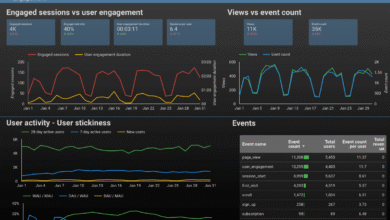
- KPI Dashboard: Traffic, Conversions, Rankings (YoY).
- Performance Narrative: The “What happened and Why” story.
- Content Performance: Top winning/losing pages.
- Technical Health: CWV snapshot + Indexing status.
- Competitor Watch: Who is moving up?
- Roadmap/Next Steps: What we are doing next month.
Can AI-generated content still be used in reports?
Yes, but with guardrails. I use AI to summarize data trends or draft initial bullet points, but I never let it write the final strategic recommendation. Credibility comes from your interpretation. If you use AI, verify the data, check the tone, and add a timestamp. Your stakeholders pay for your brain, not your prompt engineering.
Common SEO reporting mistakes I see (and how I fix them fast) + FAQs + next steps

After years of sending reports, I’ve made every mistake in the book. Here is how I avoid the most common ones now, so you don’t have to learn the hard way.
Mistake #1–#8 quick fixes (a punch list I keep handy)
- Mistake: Reporting rankings without traffic context. Fix: Always pair rank with clicks/impressions.
- Mistake: No annotations. Fix: Add a note for every site change or Google update.
- Mistake: Mixing GA4 Sessions with GSC Clicks. Fix: distinct sections with clear labels.
- Mistake: Ignoring Brand vs. Non-Brand. Fix: Segment them! Brand traffic growth is marketing; Non-brand is SEO.
- Mistake: Burying the lead. Fix: Put the bad news or the best news on slide 1.
- Mistake: Too many charts. Fix: One chart per insight. If it doesn’t aid the decision, cut it.
If you need help turning these reporting insights into content execution, tools like Kalema’s Automated blog generator can help scale the production of the “Next Steps” you identify in your reports.
FAQ: what should an SEO report include for a beginner-friendly stakeholder update?
- Executive Summary: What happened in plain English.
- Business KPIs: Leads/Revenue (not just traffic).
- Wins/Losses: Honest assessment of movement.
- Action Plan: What you need from them (approvals, budget).
Conclusion: my 3-bullet recap and the next 3–5 actions I’d take
Writing a great SEO report isn’t about being the smartest person in the room; it’s about being the most useful. Here is the recap:
- Shift from “Rankings” to “Revenue” and “AI Visibility.”
- Use the “Observation + Cause + Effect + Action” framework for your narrative.
- Never send a report without a prioritized action list.
Your Next Actions:
- Set up your annotation system in GA4 or a spreadsheet today.
- Build your “Executive Summary” template (steal the one above).
- Audit your Core Web Vitals (specifically INP) so you have a technical baseline for next month.
- Send your next report with a clear “Ask” for resources—you might be surprised when you get them.