Voice Search Health: A voice search SEO audit for Alexa and Voice Assistant visibility
Introduction + quick answer: what a voice search SEO audit is (and what it isn’t)

It’s a scenario I see constantly: a local business owner spends thousands on a beautiful website, but when I ask their office Alexa, “Who is the best service provider near me?” the device stays silent—or worse, recommends a competitor with an uglier site but better data structure.
This is where a voice search SEO audit comes in. It isn’t about chasing a mythical “voice keyword” or completely rebuilding your site. Instead, it is a structured review of three specific areas: technical readiness (speed and schema), content formatting (winning featured snippets), and local signals (so assistants trust your location data).
In this guide, I’ll walk you through the exact checklist I use to audit US-based businesses. My goal is to help you move from being invisible to being the confident, single spoken answer on devices like Alexa, Siri, and Google Assistant.
Voice search SEO basics for beginners: how voice assistants pick answers (and why it matters for US businesses)

If you are comfortable with standard SEO, voice search will feel familiar but stricter. When a user types a search, they get ten blue links. When they ask a voice assistant, they usually get one answer. That means being on page one isn’t enough; you need to be the definitive source (often Position Zero).
My rule of thumb is simple: if a page can’t answer the user’s question in under 30 seconds of reading aloud, it won’t win the voice result. The competition is fierce because the adoption is massive. Industry data suggests there are over 8 billion voice assistants globally, and in the US, approximately 27% of users rely on mobile voice search regularly .
Here is how I breakdown the difference for clients:
| Feature | Typed Search (Desktop/Mobile) | Voice Search (Smart Speaker/Assistant) |
|---|---|---|
| Query Style | Short, fragmented keywords (e.g., “NYC weather”) | Conversational, full sentences (e.g., “What is the weather like in NYC right now?”) |
| Intent | Research, comparison, browsing | Immediate answers, directions, “near me” actions |
| Content Format | Long-form guides, visual layouts | Concise definitions, bullet points, direct answers |
| Success Metric | Clicks, time on page | Answer selection, calls, physical visits |
What is voice search SEO? (definition in one paragraph)
Voice search SEO is the process of optimizing your website’s technical foundation and content structure so that virtual assistants can successfully crawl, interpret, and verbally recite your information. It prioritizes natural language, fast mobile loading, and structured data to ensure your site provides the single best answer for a user’s spoken query.
Why voice search behaves differently than normal search
When I type, I might search for “coffee shop open.” When I speak, I ask, “Where is the nearest coffee shop that’s open right now?” The voice query is longer, more specific, and urgent. This “long-tail” nature means we have to stop targeting generic keywords and start answering specific questions. The intent usually clusters into three buckets: informational (“How do I fix a leak?”), navigational (“Open Google Maps”), or transactional (“Call the nearest plumber”).
Where assistants get answers: featured snippets, PAA, and trusted local data
Think of voice assistants as librarians who only read from the best summary on the shelf. They don’t typically read deep paragraphs; they quote the Featured Snippet or the “People Also Ask” (PAA) box. In fact, research indicates that over 70% of voice answers are derived directly from featured snippets . If your content isn’t structured to win that snippet, it likely won’t be read aloud.
My voice search SEO audit framework (the checklist I use + tools to run it)

I don’t like guessing, so I use a three-part workflow for every audit: Technical Hygiene, Content Snippets, and Local Validity. Before I change a single comma, I establish a baseline so I can prove value later.
If you are doing this internally, you don’t need expensive enterprise software. I mostly use Google Search Console (GSC), PageSpeed Insights, and a good AI SEO tool to help cluster conversational questions and draft concise answer blocks (more on that in the content section). However, manual review is critical—tools can flag errors, but they can’t tell you if an answer sounds robotic.
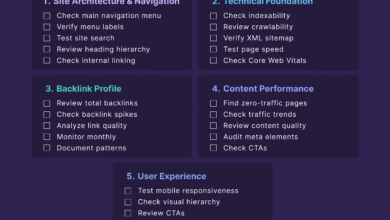
Here is the master checklist I work from:
| Audit Area | What I Check | Primary Tool | Pass/Fail |
|---|---|---|---|
| Technical | Mobile Load Speed (< 4.6s) | PageSpeed Insights | [ ] |
| Technical | Schema Markup (FAQ, Local) | Schema Validator | [ ] |
| Content | Featured Snippet Eligibility | Google Search (Manual) | [ ] |
| Content | Conversational Q&A Format | Visual Check | [ ] |
| Local | NAP Consistency | Google Business Profile | [ ] |
Define the goal of the audit (visibility, calls, directions, bookings)
For most of the businesses I work with, “success” in voice search doesn’t look like a traffic spike. It looks like the phone ringing more often. If you run a local clinic, your goal is for Siri to successfully provide your driving directions. If you run a recipe blog, your goal is for Alexa to read your ingredients list. Define this outcome first, because voice metrics are notoriously hard to isolate in analytics.
Set baselines before I change anything
This is the tricky part. Google Analytics doesn’t have a “Voice Traffic” filter. So, I infer voice intent. I look at GSC for queries that start with “who,” “what,” “where,” or contain “near me.” I record the current impressions for these question-based keywords. I also screenshot current Featured Snippets for my priority topics. This gives me a “before” picture to compare against.
Step 1 — Technical readiness in a voice search SEO audit (mobile, speed, security, crawlability)

If your site is slow or hard to read on a phone, voice assistants will ignore it. It’s that simple. I’ve seen clients write perfect content that never gets picked up simply because their Time to First Byte (TTFB) was too slow. This is where we clear the technical roadblocks.
I prioritize fixes in this order: Security (HTTPS) > Mobile Usability > Page Speed > Structured Data.
Mobile-first UX checks (because voice is often mobile)
Voice searches happen predominantly on smartphones. I start by pulling up the site on my own phone—not the desktop emulator. Can I find the phone number in under 5 seconds? Is the font legible without pinching? If I have to fight the interface to find an answer, a bot won’t bother trying to parse it.
Speed + Core Web Vitals: what I measure and what I fix
Speed is non-negotiable. Data suggests that pages appearing in voice results load significantly faster than average—often around 4.6 seconds . I use PageSpeed Insights to check Core Web Vitals, specifically looking at Largest Contentful Paint (LCP).
- Target: LCP under 2.5 seconds.
- Common Fixes: I usually find uncompressed images or heavy hero videos are the culprits. Lazy-loading images below the fold is often the quickest win here.
Indexing and crawlability essentials (so assistants can access the answer)
You can’t be the answer if Google can’t read the page. I’ve seen this happen with “Help” sections that were accidentally noindexed by a developer. I check the robots.txt file and ensure that my FAQ pages and location pages are clean, indexable, and not buried behind complex JavaScript that the crawler might struggle to render quickly.
Structured data/schema audit (eligibility, clarity, and trust)
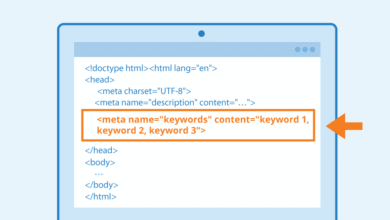
Schema markup is like putting a label on a jar—it tells the search engine exactly what is inside. For voice, this is critical. I use the Schema Markup Validator to check for:
- LocalBusiness Schema: Essential for verifying your address and hours.
- FAQPage Schema: Helps surface Q&A pairs directly in SERPs (Note: Google updates guidelines on this frequently, so I always verify the latest visibility policies ).
- Speakable Schema: While still limited in support, it’s worth watching for news publishers.
Step 2 — Content & on-page checks for voice answers (conversational queries, FAQs, and featured snippets)

Once the tech is solid, I move to the content. This is where the magic happens. We need to transition from “writing for readers” to “writing for answers.” Voice assistants prefer short, punchy, and direct paragraphs.
This process can be time-consuming. Sometimes I use an AI article generator to help draft variant Q&A formats or brainstorm related questions, but I always edit the output human-to-human. Voice assistants need natural, conversational rhythm, and AI sometimes sounds too stiff without a manual polish.
Find the right voice queries: question modifiers and long-tail mapping
I stop looking for “plumber marketing” and start looking for “how much does a plumber cost in Chicago?” I dig into the “People Also Ask” boxes in Google to find the exact questions users are typing. Common modifiers I look for include:
- Informational: What, How, Why (e.g., “Why is my sink leaking?”)
- Local/Navigational: Where, Near me, Open now (e.g., “Where is the nearest 24-hour plumber?”)
- Commercial: Best, Top, Cost, Price (e.g., “Best rated plumber near me”)
Format for ‘read-aloud’ clarity: headings, bullets, definitions, and short answers
When I edit a page for voice, I use the “Read Aloud” test. I read the answer out loud. If I stumble or run out of breath, it’s too complex. I structure content to be scannable:
- The Heading: Use the question as an H2 or H3 (e.g., “How do you unclog a drain?”).
- The Answer Block: Provide a direct, 40-60 word answer immediately after the heading. No fluff.
- The Elaboration: Use bullet points to provide steps or details.
Win featured snippets and PAA: what I change on the page
To win Position Zero (and thus the voice answer), I look for opportunities to simplify. If a competitor has a wall of text, I create a table. If they have a long paragraph, I make a numbered list. Tables are surprisingly effective for voice queries comparing prices or specs because Google can parse the data easily.
On-page SEO essentials that support voice (title tags, internal links, freshness)
I also check that title tags clearly reflect the user intent. If I’m auditing a restaurant’s menu page, the title shouldn’t just be “Menu.” It should be “Dinner Menu & Prices – [Restaurant Name].” Freshness is also a huge trust signal. If your “Holiday Hours” page hasn’t been updated since 2019, a voice assistant is less likely to trust it over a directory that was updated yesterday.
Step 3 — Local signals in a voice search SEO audit (GBP, NAP consistency, reviews, and “near me”)
For local businesses, this is the most important section. Since nearly 60% of voice searches have local intent , your Google Business Profile (GBP) is often the source of truth for Alexa and Siri.
I treat the GBP audit as a separate mini-project. I’ve seen businesses lose customers simply because their profile said “Closed” when they were actually open. Accuracy builds trust.
Google Business Profile: the fastest wins for voice visibility
I go through the profile field by field:
- Name, Address, Phone (NAP): Is this identical to what is on the website footer?
- Categories: Is the primary category accurate?
- Hours: Are special holiday hours updated? (Assistant often announces “They might be closed” if this isn’t clear).
- Q&A: I often seed this section with common questions like “Do you have parking?” and answer them officially.
Location pages and local content that match spoken queries
If a client has multiple locations, I ensure each has a unique landing page. I include specific details that people ask about locally: landmarks (“Located next to the City Library”), parking availability, and neighborhood names. These local signals help confirm to the algorithm that you are indeed the best result for a “near me” query.
Common voice search SEO audit mistakes (and how I fix them)
Even experienced SEOs get tripped up by voice nuances. Here are the mistakes I see most often, and how to triage them.
Mistake-to-fix list (5–8 items)
- Mistake: Buried Answers. Putting the answer to a question at the bottom of a 2,000-word post.
The Fix: Move the direct answer to the very top (the “inverted pyramid” style). Fix this immediately. - Mistake: Robotic Content. Stuffing keywords so the sentence sounds unnatural when spoken.
The Fix: Read it out loud. If it sounds weird, rewrite it using natural language. - Mistake: Ignoring “Near Me”. optimizing for “City Plumber” but forgetting “Plumber near me” intent.
The Fix: Ensure your GBP and footer address are perfectly consistent. - Mistake: Slow Mobile Speed. Ignoring mobile warnings because the desktop site looks fine.
The Fix: Compress images and defer non-essential JavaScript. Aim for that 4.6s load time benchmark. - Mistake: Forgotten Hours. Leaving holiday hours blank.
The Fix: set a calendar reminder to update GBP hours before every major holiday.
FAQs + wrap-up: next steps after my voice search SEO audit
Voice search SEO can feel abstract, but it boils down to being the most helpful, fastest, and most accurate answer in the room. By focusing on technical health, snippet-friendly content, and local accuracy, you aren’t just winning voice searches—you’re building a better website for everyone.
FAQ: What is voice search SEO and why does it matter?
Voice search SEO is optimizing your content so voice assistants can read it aloud. It matters because it captures high-intent traffic—people asking “where is…” or “how do I…” are usually ready to act, call, or buy.
FAQ: How should content be structured for voice search optimization?
Use a Q&A format. Place the question in a heading, followed immediately by a concise (40-60 word) answer. Use bullet points and tables to break down complex information, making it easy for assistants to extract data.
FAQ: How important is local SEO for voice search?
Extremely important. With a massive volume of voice queries being “near me” searches, having an optimized Google Business Profile and consistent Name-Address-Phone (NAP) data is arguably the single biggest factor for local visibility.
FAQ: Why do featured snippets and position zero matter?
Because voice assistants often only read one result. That result is typically the Featured Snippet. If you aren’t in Position Zero, you are likely invisible to a voice-only user.
FAQ: What technical factors affect voice search ranking?
Page speed is the big one—aim for fast mobile loading. Secure sites (HTTPS) and clean structured data (Schema) are also critical prerequisites for being trusted by voice algorithms.
To recap, here is your 3-step action plan:
- Audit your speed: Run PageSpeed Insights and fix the low-hanging fruit (usually images).
- Claim your snippet: Rewrite your top 5 FAQ answers to be concise (under 60 words) and direct.
- Lock down local: Update your Google Business Profile hours, categories, and Q&A section today.
You don’t need to overhaul your entire site overnight. Start with these three steps, and you will see a tangible difference in how well your site communicates—with humans and robots alike.